
Qt creator Update text file with input data
-
Hello all so I have a text file that I can upload to a listWidget along that Im able to add an item and delete an item. My problem is to have the selected row be updated with extra string data, say I click on mayo and i want to add 10 (mayo 10) and update it to my text file.
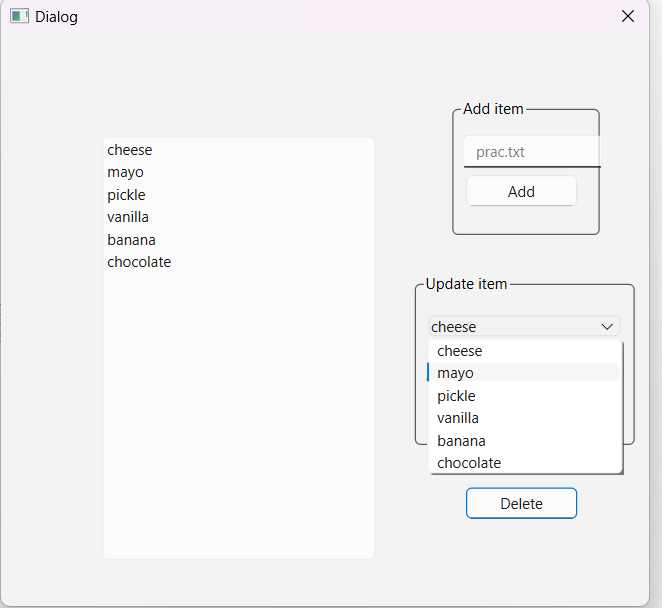
void all::on_pushButton_clicked() { //update listwidget QFile file3("C:\\Users\\morta\\QT Projects\\add_delete\\prac.txt"); file3.open(QIODevice::WriteOnly | QIODevice::Append | QIODevice::Text); QTextStream in3(&file3); QString s; //Detele item foreach (QListWidgetItem *NAME, ui->listWidget->selectedItems()) { ui->listWidget->takeItem(ui->listWidget->row(NAME)); //grabbed the line of text i need QString line2 = ui->extraline->text(); //the number of items text qDebug()<<line2; } //Update the text file auto numRows = ui->listWidget->count(); for(int row = 0; row < numRows; ++row) { auto item = ui->listWidget->item(row); s = item->text(); file3.resize(0); // Deletes all data from the textfile in3<<s; //adds row to text file in3<<"\n"; //adds a line break } file3.close(); } -
Hello all so I have a text file that I can upload to a listWidget along that Im able to add an item and delete an item. My problem is to have the selected row be updated with extra string data, say I click on mayo and i want to add 10 (mayo 10) and update it to my text file.
void all::on_pushButton_clicked() { //update listwidget QFile file3("C:\\Users\\morta\\QT Projects\\add_delete\\prac.txt"); file3.open(QIODevice::WriteOnly | QIODevice::Append | QIODevice::Text); QTextStream in3(&file3); QString s; //Detele item foreach (QListWidgetItem *NAME, ui->listWidget->selectedItems()) { ui->listWidget->takeItem(ui->listWidget->row(NAME)); //grabbed the line of text i need QString line2 = ui->extraline->text(); //the number of items text qDebug()<<line2; } //Update the text file auto numRows = ui->listWidget->count(); for(int row = 0; row < numRows; ++row) { auto item = ui->listWidget->item(row); s = item->text(); file3.resize(0); // Deletes all data from the textfile in3<<s; //adds row to text file in3<<"\n"; //adds a line break } file3.close(); }@Ruben12313
QListWidget::editItem(QListWidgetItem *item) is a call to edit (the text of) an item. To edit an item "in place" you need to set its flags to includeItemIsEditable.There's an example in Python at https://stackoverflow.com/questions/47962839/how-to-make-qlistwidget-items-editable, doubtless there are others in C++, like old forum post here https://forum.qt.io/topic/8928/solved-making-qlistwidget-item-as-editable-from-qlistwidget-context-menu.Whether you add, delete or modify, to update the text file you need to rewrite the whole thing, whenever you wish to do so. You need to get rid of whatever you are trying to do in your code with
resize(). You need to close your file after reading it in, and open (with truncate/overwrite) any time you want to write all the current data out (and of course close it when done writing it). That is how text files are updated. -
@JonB
I tried: ui->listWidget->setFlags(Qt::ItemFlag::ItemIsEnabled); but Class QListWidgets has no setFlags in it.@Ruben12313
Why did you tryItemIsEnabledwhen you needItemIsEditable?
Per the documentation, which you need to consult, and the example you set flags on individual items via void QListWidgetItem::setFlags(Qt::ItemFlags flags). -
@Ruben12313
Why did you tryItemIsEnabledwhen you needItemIsEditable?
Per the documentation, which you need to consult, and the example you set flags on individual items via void QListWidgetItem::setFlags(Qt::ItemFlags flags). -
@JonB yes sorry i was in a rush to head to my class but i tried both edit and enable but eitherway listWidgets does not have a setFlags
@Ruben12313 I have answered and given you the link. You set flags on the items in the list widget, not the list widget itself.
-
@JonB , thanks for helping i had modified the code and i can edit but its not what im trying for, i forgot to show on my end that i have a line editbox where i need to type a number and after pressing the button it will add on to the selected item
-
solved it myself:
foreach (QListWidgetItem *NAME, ui->listWidget->selectedItems())
{
delete ui->listWidget->takeItem(ui->listWidget->row(NAME));
QStringList stringList;
stringList << NAME->text()+"\t"+line2;
ui->listWidget->addItems(stringList);
}//Update the text file
auto numRows = ui->listWidget->count();
for(int row = 0; row < numRows; ++row)
{
auto item = ui->listWidget->item(row);
s = item->text();
file3.resize(0); // Delets all data from the textfile
in3<<s; //adds row to text file
in3<<"\n"; //adds a line break
}
file3.close(); -
R Ruben12313 has marked this topic as solved on
-
solved it myself:
foreach (QListWidgetItem *NAME, ui->listWidget->selectedItems())
{
delete ui->listWidget->takeItem(ui->listWidget->row(NAME));
QStringList stringList;
stringList << NAME->text()+"\t"+line2;
ui->listWidget->addItems(stringList);
}//Update the text file
auto numRows = ui->listWidget->count();
for(int row = 0; row < numRows; ++row)
{
auto item = ui->listWidget->item(row);
s = item->text();
file3.resize(0); // Delets all data from the textfile
in3<<s; //adds row to text file
in3<<"\n"; //adds a line break
}
file3.close();@Ruben12313
I'd love to know how your code correctly writes all the lines/rows to a file, considering the placement of yourfile3.resize(0); // Delets all data from the textfile. -
sure so in my header i created a pointer (int *amount).
on my code i used:
void MainWindow::on_pushButton_2_clicked() { //update listwidget QFile file3("prac3.txt"); file3.open(QIODevice::ReadWrite | QIODevice::Append | QIODevice::Text); QTextStream in3(&file3); QString line1 = ui->comboBox->currentText(); QString amount = ui->lineEdit->text(); //number of item text //detele old item data QString search(line1); QList<QListWidgetItem *> list = ui->listWidget->findItems(line1, Qt::MatchContains); for ( QListWidgetItem *item : list ) delete item; //add updated item with amount QStringList stringList; stringList << line1+"\t"+amount; ui->listWidget->addItems(stringList); //Update the text file auto numRows = ui->listWidget->count(); for(int row = 0; row < numRows; ++row) { auto item = ui->listWidget->item(row); QString s; s = item->text(); file3.resize(0); // Delets all data from the textfile in3<<s; //adds row to text file in3<<"\n"; //adds a line break } file3.close(); } -
not sure if you need the other button to add an item but here:
void MainWindow::on_add_clicked() { QString fname1st = ("prac3.txt"); QFile file1st(fname1st); if(file1st.open(QIODevice::WriteOnly | QIODevice::Append | QIODevice::Text)) { QTextStream stream(&file1st); QString file1st = ui->lineEdit_2->text(); stream << file1st <<"\n"; } } -
sure so in my header i created a pointer (int *amount).
on my code i used:
void MainWindow::on_pushButton_2_clicked() { //update listwidget QFile file3("prac3.txt"); file3.open(QIODevice::ReadWrite | QIODevice::Append | QIODevice::Text); QTextStream in3(&file3); QString line1 = ui->comboBox->currentText(); QString amount = ui->lineEdit->text(); //number of item text //detele old item data QString search(line1); QList<QListWidgetItem *> list = ui->listWidget->findItems(line1, Qt::MatchContains); for ( QListWidgetItem *item : list ) delete item; //add updated item with amount QStringList stringList; stringList << line1+"\t"+amount; ui->listWidget->addItems(stringList); //Update the text file auto numRows = ui->listWidget->count(); for(int row = 0; row < numRows; ++row) { auto item = ui->listWidget->item(row); QString s; s = item->text(); file3.resize(0); // Delets all data from the textfile in3<<s; //adds row to text file in3<<"\n"; //adds a line break } file3.close(); }@Ruben12313
Is that supposed to be an answer to me? Have you verified it works when there are multiple items and you save to file? Whatever you see or find thatQFile::resize(0)does why in the world do you call it for each line/row written?? And I find it very confusing that you openQIODevice::ReadWrite | QIODevice::Append: why open for append if you don't intend to append but rather overwrite the whole file? Never seen code written like this. -
Yes i can assure you this mini project works 100%, i save every row in to QString s, then delete the entire text file and add s back row by row. Append is a bit confusing for me but reading old post (forgot to save) I read its best to add it.
(https://ddgobkiprc33d.cloudfront.net/6e977f62-7100-4a2e-93c0-bbea3b949e80.png)
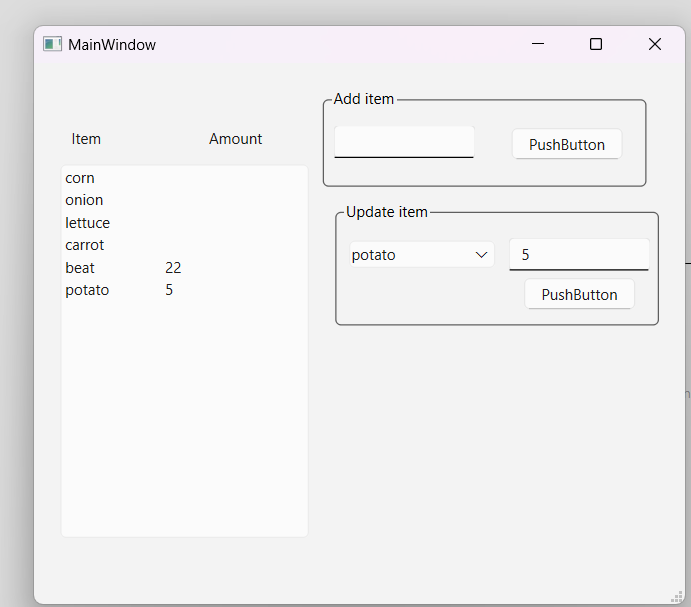
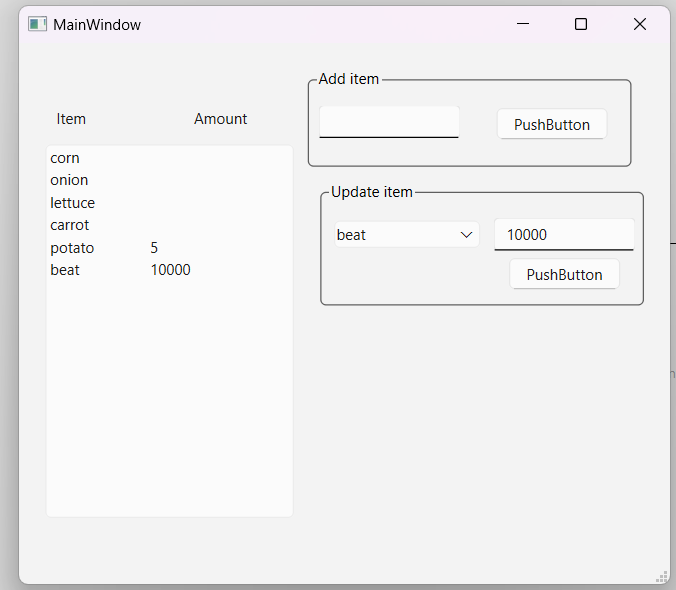
-
Yes i can assure you this mini project works 100%, i save every row in to QString s, then delete the entire text file and add s back row by row. Append is a bit confusing for me but reading old post (forgot to save) I read its best to add it.
(https://ddgobkiprc33d.cloudfront.net/6e977f62-7100-4a2e-93c0-bbea3b949e80.png)
@Ruben12313
You (attempt to) "truncate" the file you are writing to as you write each line to it!You have a stream named
in3which is only used for output.If there are no lines now in the widget you fail to truncate/clear out any lines which were in the file (e.g. after deleting).
Etc.
It makes no sense. I leave it to you.
