
Is posible to get somehow line height in QTextEdit
-
Use QFontMetrics::boundingRect(const QRect &rect, int flags, const QString &text, int tabStops, int *tabArray) to determine the rendered size of the line of text.
Asking a question about code? http://eel.is/iso-c++/testcase/
-
Use QFontMetrics::boundingRect(const QRect &rect, int flags, const QString &text, int tabStops, int *tabArray) to determine the rendered size of the line of text.
@jeremy_k
In that function the docs stateThe drawing, and hence the bounding rectangle, is constrained to the rectangle rect.
In the OP's case what should they pass into
QFontMetrics::boundingRect(const QRect &rect, ...)forrect? How will that correspond to each item in a rich-text list in theQTextEdit, to include the leading "bullet point marker" plus any indentation which might be in effect at that point in the rich text document? -
@jeremy_k
In that function the docs stateThe drawing, and hence the bounding rectangle, is constrained to the rectangle rect.
In the OP's case what should they pass into
QFontMetrics::boundingRect(const QRect &rect, ...)forrect? How will that correspond to each item in a rich-text list in theQTextEdit, to include the leading "bullet point marker" plus any indentation which might be in effect at that point in the rich text document?@JonB said in Is posible to get somehow line height in QTextEdit:
@jeremy_k
In that function the docs stateThe drawing, and hence the bounding rectangle, is constrained to the rectangle rect.
In the OP's case what should they pass into
QFontMetrics::boundingRect(const QRect &rect, ...)forrect?The full paragraph of the quoted documentation is:
Returns the bounding rectangle of the characters in the string specified by text, which is the set of pixels the text would cover if drawn at (0, 0). The drawing, and hence the bounding rectangle, is constrained to the rectangle rect.The important detail is "if drawn at (0,0)", or rephrased, the upper left corner of the rasterized text. It's also worth heeding the warning slightly further down:
Note that the bounding rectangle may extend to the left of (0, 0), e.g. for italicized fonts, and that the text output may cover all pixels in the bounding rectangle.How will that correspond to each item in a rich-text list in the
QTextEdit, to include the leading "bullet point marker" plus any indentation which might be in effect at that point in the rich text document?That's up to the caller. Bullet points and indentation are characters. Figure out what those are, and include them in the input string, or measure them independently by determining the bounding rectangle of empty list items.
Asking a question about code? http://eel.is/iso-c++/testcase/
-
@JonB said in Is posible to get somehow line height in QTextEdit:
@jeremy_k
In that function the docs stateThe drawing, and hence the bounding rectangle, is constrained to the rectangle rect.
In the OP's case what should they pass into
QFontMetrics::boundingRect(const QRect &rect, ...)forrect?The full paragraph of the quoted documentation is:
Returns the bounding rectangle of the characters in the string specified by text, which is the set of pixels the text would cover if drawn at (0, 0). The drawing, and hence the bounding rectangle, is constrained to the rectangle rect.The important detail is "if drawn at (0,0)", or rephrased, the upper left corner of the rasterized text. It's also worth heeding the warning slightly further down:
Note that the bounding rectangle may extend to the left of (0, 0), e.g. for italicized fonts, and that the text output may cover all pixels in the bounding rectangle.How will that correspond to each item in a rich-text list in the
QTextEdit, to include the leading "bullet point marker" plus any indentation which might be in effect at that point in the rich text document?That's up to the caller. Bullet points and indentation are characters. Figure out what those are, and include them in the input string, or measure them independently by determining the bounding rectangle of empty list items.
@jeremy_k
I am only trying to help the OP, this is not my area so I don't know what is available.Is it/is it not the case that the text shown by a
QTextEditgoes into/comes from theQTextDocument *document()and/or aQTextDocumentLayout? Are the items shown as bullet-list-items present as "paragraphs" in the document? Then can the user query from that via the document/layout to find the laid-out size of a particular paragraph, which would take everything into account? Or am I off-center here? -
I used QFontMetrics::boundingRect() as you sugest.
But i encountred a problem that the point where text wraps(in boundingRect) dont match the visible text wrap when resizing.
I removed all css styles of text and all tags in text area without any sucess.There is code taht create widgets:
//shared
QTextEdit * text;
QFont font; //I use the same font everywhere to be 100% sure that there is not an error

//QTextEdit setup
font = QFont("Helvetica", 15);
text = new QTextEdit();
text->setPlainText("- helo this is and long text helo");
text->setFont(font);
And there is code that calculate width of line on resize:
QRect rct = text->geometry();
rct.setWidth(rct.width() - 8 ); // Compensation for border
QRect rect = text->fontMetrics().boundingRect(rct, Qt::AlignLeft | Qt::TextWordWrap , "- helo this is and long text helo");

//print out
std::cout <<"out_rect:"<< rect.height() << "-"<< rect.width() << "," << "in_rect:"<< text->geometry().width() << "-" << text->geometry().height() << std::endl;
I got a theory why this code doesn't work.
After some pixel counting I find that QTextEdit has probably some margin around it (in my case 4px)( the 8px in code) (red area on the image).
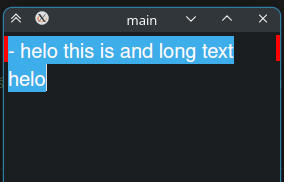
The 8px compensation works, and wraps show right.I asume that the 4px border can be diferent on other machines/stylings.
So My qestion is if there is way to get size of text without the border?
Or if there is way to remove the border? -
I used QFontMetrics::boundingRect() as you sugest.
But i encountred a problem that the point where text wraps(in boundingRect) dont match the visible text wrap when resizing.
I removed all css styles of text and all tags in text area without any sucess.There is code taht create widgets:
//shared
QTextEdit * text;
QFont font; //I use the same font everywhere to be 100% sure that there is not an error

//QTextEdit setup
font = QFont("Helvetica", 15);
text = new QTextEdit();
text->setPlainText("- helo this is and long text helo");
text->setFont(font);
And there is code that calculate width of line on resize:
QRect rct = text->geometry();
rct.setWidth(rct.width() - 8 ); // Compensation for border
QRect rect = text->fontMetrics().boundingRect(rct, Qt::AlignLeft | Qt::TextWordWrap , "- helo this is and long text helo");

//print out
std::cout <<"out_rect:"<< rect.height() << "-"<< rect.width() << "," << "in_rect:"<< text->geometry().width() << "-" << text->geometry().height() << std::endl;
I got a theory why this code doesn't work.
After some pixel counting I find that QTextEdit has probably some margin around it (in my case 4px)( the 8px in code) (red area on the image).
The 8px compensation works, and wraps show right.I asume that the 4px border can be diferent on other machines/stylings.
So My qestion is if there is way to get size of text without the border?
Or if there is way to remove the border?For anybody who tryes something similar.
text->setFrameStyle(QFrame::NoFrame);This removes the border and boundingRect returns acurate values.
If someboady has other solution without removing all styles from text area i would be glad to hear that.
Thanks for responses. -
T tolomaj has marked this topic as solved on
-
For anybody who tryes something similar.
text->setFrameStyle(QFrame::NoFrame);This removes the border and boundingRect returns acurate values.
If someboady has other solution without removing all styles from text area i would be glad to hear that.
Thanks for responses.@tolomaj said in Is posible to get somehow line height in QTextEdit:
If someboady has other solution without removing all styles from text area i would be glad to hear that.
Maybe this:
QTextEdit edit;
edit.append("1---------");
edit.append("2--------------------------------------------------");
edit.append("3-----------------------------------------------------------------------");
edit.append("1--------------");

edit.setFixedWidth(200);
edit.show();

QTextBlock block=edit.document()->begin();
while(block.isValid())
	{
	auto rect=block.layout()->boundingRect();
	qDebug()<<rect<<block.text().left(3);
	block=block.next();
	}
QRectF(0,0 192x16) "1--"
QRectF(0,0 192x32) "2--"
QRectF(0,0 192x48) "3--"
QRectF(0,0 192x16) "1--"I asume that the 4px border can be diferent on other machines/stylings.
You can retrieve document margin value with:
edit.document()->documentMargin() -
For anybody who tryes something similar.
text->setFrameStyle(QFrame::NoFrame);This removes the border and boundingRect returns acurate values.
If someboady has other solution without removing all styles from text area i would be glad to hear that.
Thanks for responses.@tolomaj
I don't know whether it works, but @mpergand code above uses the approach I suggested might be needed, i.e. it queries the underlying structuredQTextDocumentabout the actual layout of its block elements. @jeremy_k may know more than I, but I don't see that just callingQFontMetrics::boundingRect()will begin to take into account the actual layout in theQTextEdityou are wanting. -
I used QFontMetrics::boundingRect() as you sugest.
But i encountred a problem that the point where text wraps(in boundingRect) dont match the visible text wrap when resizing.
I removed all css styles of text and all tags in text area without any sucess.There is code taht create widgets:
//shared
QTextEdit * text;
QFont font; //I use the same font everywhere to be 100% sure that there is not an error

//QTextEdit setup
font = QFont("Helvetica", 15);
text = new QTextEdit();
text->setPlainText("- helo this is and long text helo");
text->setFont(font);
And there is code that calculate width of line on resize:
QRect rct = text->geometry();
rct.setWidth(rct.width() - 8 ); // Compensation for border
QRect rect = text->fontMetrics().boundingRect(rct, Qt::AlignLeft | Qt::TextWordWrap , "- helo this is and long text helo");

//print out
std::cout <<"out_rect:"<< rect.height() << "-"<< rect.width() << "," << "in_rect:"<< text->geometry().width() << "-" << text->geometry().height() << std::endl;
I got a theory why this code doesn't work.
After some pixel counting I find that QTextEdit has probably some margin around it (in my case 4px)( the 8px in code) (red area on the image).
The 8px compensation works, and wraps show right.I asume that the 4px border can be diferent on other machines/stylings.
So My qestion is if there is way to get size of text without the border?
Or if there is way to remove the border?@tolomaj said in Is posible to get somehow line height in QTextEdit:
I used QFontMetrics::boundingRect() as you sugest.
But i encountred a problem that the point where text wraps(in boundingRect) dont match the visible text wrap when resizing.
[...]QRect rct = text->geometry();[...]
I asume that the 4px border can be diferent on other machines/stylings.
So My qestion is if there is way to get size of text without the border?
Or if there is way to remove the border?The viewport should provide correct geometry for the area the text is rendered into.
Eg:text->viewport()->rect(); -
@jeremy_k
I am only trying to help the OP, this is not my area so I don't know what is available.Is it/is it not the case that the text shown by a
QTextEditgoes into/comes from theQTextDocument *document()and/or aQTextDocumentLayout? Are the items shown as bullet-list-items present as "paragraphs" in the document? Then can the user query from that via the document/layout to find the laid-out size of a particular paragraph, which would take everything into account? Or am I off-center here?@JonB said in Is posible to get somehow line height in QTextEdit:
@jeremy_k
I am only trying to help the OP, this is not my area so I don't know what is available.Is it/is it not the case that the text shown by a
QTextEditgoes into/comes from theQTextDocument *document()Yes, there is a QTextDocument, available via QTextEdit::document().
QTextDocument in turn make a QAbstractTextLayout available via QTextDocument::layout(). As a QTextDocument can be shared between multiple QTextEdit instances, I wasn't sure that the layout would be useful for this purpose. A quick test suggests that it can be.QAbstractTextLayout::blockBoundingRect() takes a QTextBlock and returns a QRectF. If the text in question can be isolated as an individual QTextBlock, this appears to be a viable option. The floating point use warrants the usual consideration.

