
Change focusOutEvent
-
Instead of overriding focusOutEvent I would suggest connecting to editingFinished instead.
Apart from that it is quite unclear where
new_textcomes from. Does it have the right value at the beginning of the function? setText will also work when the line edit does not have the focus. BTW, you should also consider the case that the user didn't enter anything at all. Right now, it will show "0", but I would rather expect "00" (or still empty) instead.One thing you haven't considered, is that the line edit (custom or not) is only used while editing. After it looses focus the line edit is hidden and a different widget is used to display the text. You need to change the text of the cell and not of the editor. The editor (i.e. the line edit) is created on demand and perfectly fitted to the cell when the user starts the input and destroyed afterwards.
@SimonSchroeder
Yes, you're right, I should change the text in the cell, not in the editor. I figured it out: I change the value in my delegate's setModelData.Do you know how to change the behavior of the Tab button? I've read a lot about it, and I understand that it is used to switch between widgets. But I can't figure out where exactly I should intercept this event to change its behavior. This is very important, and there is no other use of this button in my program.
-
@Vlad02
I am not sure if I understand what you write. When the line edit loses focus, it doesn’t get key events anymore. So why should anything change? How are you processing the changes otherwise?@Axel-Spoerl
Actually, I wanted certain actions to be taken before the focus was lost. But the person below me had already voiced the right idea, and I came to it later.Do you know where I can intercept the Tab button press? The KeyPressEvent does not capture in LineEdit. Moreover, I managed to change its actions for QTableWidget, but I don't know how to change the behavior of this button in QLineEdit. Below is the code snippet that I want to get from pressing Tab.
if(event->key() == Qt::Key_Tab || event->key() == Qt::Key_Space || event->key() == Qt::Key_Right){
        if(text().size() == 0){
            setText(old_text);
        }
        goRight = true;
        goLeft = goUp = goDown = false;
        emit editingFinished();
    }
Looking ahead, if you have a question why I need the same implementation for 3 buttons - this is a model of working with a memory block, where for convenience I have to implement several options for navigating between cells so that the user can quickly and conveniently enter data during editing.
-
@Axel-Spoerl
Actually, I wanted certain actions to be taken before the focus was lost. But the person below me had already voiced the right idea, and I came to it later.Do you know where I can intercept the Tab button press? The KeyPressEvent does not capture in LineEdit. Moreover, I managed to change its actions for QTableWidget, but I don't know how to change the behavior of this button in QLineEdit. Below is the code snippet that I want to get from pressing Tab.
if(event->key() == Qt::Key_Tab || event->key() == Qt::Key_Space || event->key() == Qt::Key_Right){
        if(text().size() == 0){
            setText(old_text);
        }
        goRight = true;
        goLeft = goUp = goDown = false;
        emit editingFinished();
    }
Looking ahead, if you have a question why I need the same implementation for 3 buttons - this is a model of working with a memory block, where for convenience I have to implement several options for navigating between cells so that the user can quickly and conveniently enter data during editing.
@Vlad02
Why do you not simply connect toQLineEdit::textChanged? -
@Vlad02
Why do you not simply connect toQLineEdit::textChanged?@Axel-Spoerl
I don't know if I understood you correctly. As you can see, I have flags. I need them so that when I press these buttons, the text is saved and the cell is moved to another cell, depending on the flags. In this case, pressing the space bar, tab, and right arrow should move the cursor to the next cell. In addition, there are cases when you don't want to move, but stay on the same cell. For this purpose, useQt::Key_Return. Will I be able to save all this if I useQLineEdit::textChanged()? -
@Axel-Spoerl
I don't know if I understood you correctly. As you can see, I have flags. I need them so that when I press these buttons, the text is saved and the cell is moved to another cell, depending on the flags. In this case, pressing the space bar, tab, and right arrow should move the cursor to the next cell. In addition, there are cases when you don't want to move, but stay on the same cell. For this purpose, useQt::Key_Return. Will I be able to save all this if I useQLineEdit::textChanged()?@Vlad02 said in Change focusOutEvent:
As you can see, I have flags.
What do you mean by "flags"?
@Vlad02 said in Change focusOutEvent:
I need them so that when I press these buttons
Which buttons?
@Vlad02 said in Change focusOutEvent:
the cell is moved to another cell
The cell is moved? Or the curser? Or the text?
@Vlad02 said in Change focusOutEvent:
In this case, pressing the space bar, tab, and right arrow
In which case? Which is the condition?
@Vlad02 said in Change focusOutEvent:
In addition, there are cases when you don't want to move, but stay on the same cell.
Which cases?
@Vlad02 said in Change focusOutEvent:
Will I be able to save all this if I use
QLineEdit::textChanged()?I don't know. Please describe your use case more precisely and in a way that an outsider can understand.
-
@Vlad02 said in Change focusOutEvent:
As you can see, I have flags.
What do you mean by "flags"?
@Vlad02 said in Change focusOutEvent:
I need them so that when I press these buttons
Which buttons?
@Vlad02 said in Change focusOutEvent:
the cell is moved to another cell
The cell is moved? Or the curser? Or the text?
@Vlad02 said in Change focusOutEvent:
In this case, pressing the space bar, tab, and right arrow
In which case? Which is the condition?
@Vlad02 said in Change focusOutEvent:
In addition, there are cases when you don't want to move, but stay on the same cell.
Which cases?
@Vlad02 said in Change focusOutEvent:
Will I be able to save all this if I use
QLineEdit::textChanged()?I don't know. Please describe your use case more precisely and in a way that an outsider can understand.
@Axel-Spoerl
Okay, I'll try it first. My program looks like this:
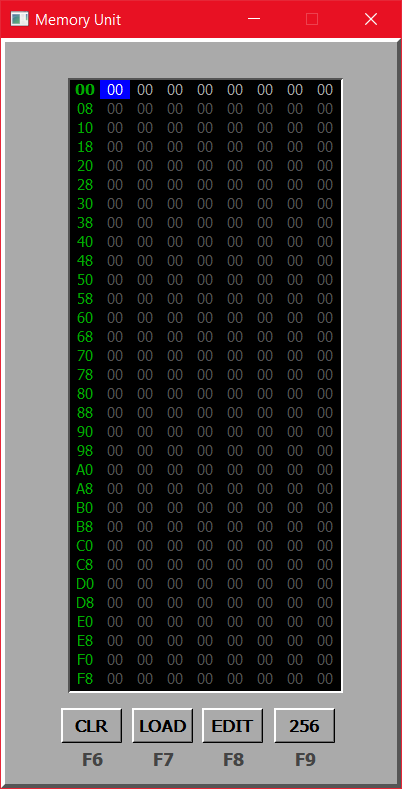
As you can see, there are several ways to interact with memory. It is worth paying attention to the edit mode (the Edit button), as well as the 256 button, which, when pressed, changes the amount of available memory to 256 bytes.When the 256 button is not pressed, only 8 bytes of memory are available to the user. This means that he cannot move around and fill in cells that are not available.
To work with the table, I inherit from QTableWidget. I also create my own delegate, inheriting from QStyledItemDelegate, in which I use my own class, inherited from QLineEdit, as a cell editor.
When you switch to the edit mode, you can move between cells using the arrows. As soon as he clicks a hexadecimal character, the editor of the selected cell opens and this character is written there.
void MyTable::keyPressEvent(QKeyEvent *event)
{
    if(!editMode || event->isAutoRepeat())
        return;
    else {
        if((event->key() >= Qt::Key_0 && event->key() <= Qt::Key_9) ||
                (event->key() >= Qt::Key_A && event->key() <= Qt::Key_F)){
            delegate->setOld_str(currentItem()->text());
            int row = currentRow();
            int column = currentColumn();
            array[8 * row + column] = currentItem()->text().toInt(&ok, 16);
            delegate->setEditingFlag(true);
            QTableWidget::keyPressEvent(event);
        } else if(event->key() == Qt::Key_Right){
            moveToNextCell();
        } else if(event->key() == Qt::Key_Left){
            moveToPrevCell();
        } else if(event->key() == Qt::Key_Up){
            moveToUpCell();
        } else if(event->key() == Qt::Key_Down){
            moveToDownCell();
        }
    }
}
Then the user works with LineEdit. He can enter another hexadecimal character and reach the maximum length. He can move to another cell using the arrows. To do this, I use the flags
goLeft,goRight,goUp,goDown. Depending on the arrow you click, one of the corresponding flags is set to true, the others to false. In addition, the user can move to the next cell by pressing the space bar. This is to allow the user to fill in the table as if they were working with a regular text editor.CustomLineEdit::CustomLineEdit(QString str, QWidget *parent) : QLineEdit(parent) { old_text = str; clear(); setFocusPolicy(Qt::NoFocus); connect(this, SIGNAL(editingFinished()), this, SLOT(changeText())); } void CustomLineEdit::keyPressEvent(QKeyEvent *event) { if(event->isAutoRepeat()) return; if(event->key() == Qt::Key_Tab || event->key() == Qt::Key_Space || event->key() == Qt::Key_Right){ if(text().size() == 0){ setText(old_text); } goRight = true; goLeft = goUp = goDown = false; emit editingFinished(); } else if(event->key() == Qt::Key_Left){ if(text().size() == 0){ setText(old_text); } goLeft = true; goRight = goUp = goDown = false; emit editingFinished(); } else if(event->key() == Qt::Key_Up){ if(text().size() == 0){ setText(old_text); } goUp = true; goLeft = goRight = goDown = false; emit editingFinished(); } else if(event->key() == Qt::Key_Down){ if(text().size() == 0){ setText(old_text); } goDown = true; goLeft = goRight = goUp = false; emit editingFinished(); } else if(event->key() == Qt::Key_Return){ if(text().size() == 0){ setText(old_text); } goLeft = goRight = goUp = goDown = false; emit editingFinished(); } else if(event->key() == Qt::Key_Escape){ setText(old_text); goLeft = goRight = goUp = goDown = false; emit editingFinished(); } else if((event->key() >= Qt::Key_0 && event->key() <= Qt::Key_9) || (event->key() >= Qt::Key_A && event->key() <= Qt::Key_F)){ if(new_text.size() == 2){ return; } else { new_text.append(event->text()); QLineEdit::keyPressEvent(event); } } else if(event->key() == Qt::Key_Backspace){ if(new_text.size() == 0) return; new_text.chop(1); QLineEdit::keyPressEvent(event); } } void CustomLineEdit::changeText() { if(new_text.size() < 2){ QString str = QString("0"); str.append(new_text); new_text = str; setText(new_text); } }The code also slightly changes the standard implementation of the Escape, Backspace, and Return buttons.
I managed to realize everything that was necessary. The only problem was the Tab button. I need to either block its use or change the standard implementation.
If you look at my code, you can see some unnecessary things, I don't mind. I don't have a lot of experience with qt, so I'm doing everything by feel. So I apologize for any mistakes and complicated implementations. But I just need to find out how to make Tab work in a different way.
Hopefully, I was able to clarify my program a bit for you.
-
@Axel-Spoerl
Actually, I wanted certain actions to be taken before the focus was lost. But the person below me had already voiced the right idea, and I came to it later.Do you know where I can intercept the Tab button press? The KeyPressEvent does not capture in LineEdit. Moreover, I managed to change its actions for QTableWidget, but I don't know how to change the behavior of this button in QLineEdit. Below is the code snippet that I want to get from pressing Tab.
if(event->key() == Qt::Key_Tab || event->key() == Qt::Key_Space || event->key() == Qt::Key_Right){
        if(text().size() == 0){
            setText(old_text);
        }
        goRight = true;
        goLeft = goUp = goDown = false;
        emit editingFinished();
    }
Looking ahead, if you have a question why I need the same implementation for 3 buttons - this is a model of working with a memory block, where for convenience I have to implement several options for navigating between cells so that the user can quickly and conveniently enter data during editing.
@Vlad02 said in Change focusOutEvent:
Do you know where I can intercept the Tab button press? The KeyPressEvent does not capture in LineEdit.
I don't know about your large code. But just to answer this:
#include <QApplication>
#include <QDebug>
#include <QKeyEvent>
#include <QLineEdit>

class MyLineEdit: public QLineEdit
{
    void keyPressEvent(QKeyEvent* event) override
    {
         if (event->key() == Qt::Key_Tab)
         {
            qDebug() << "tabPressed";
            return;
         }

         QLineEdit::keyPressEvent(event);
    }
};

int main(int argc, char *argv[])
{
    QApplication a(argc, argv);
    MyLineEdit w;
    w.setFocusPolicy(Qt::NoFocus);    // with or without this line
    w.show();
    return a.exec();
}
Tested with Qt
5.155.12 under Ubuntu 22.04, all I have. Doubt it's any different at Qt6. -
@Vlad02 said in Change focusOutEvent:
Do you know where I can intercept the Tab button press? The KeyPressEvent does not capture in LineEdit.
I don't know about your large code. But just to answer this:
#include <QApplication>
#include <QDebug>
#include <QKeyEvent>
#include <QLineEdit>

class MyLineEdit: public QLineEdit
{
    void keyPressEvent(QKeyEvent* event) override
    {
         if (event->key() == Qt::Key_Tab)
         {
            qDebug() << "tabPressed";
            return;
         }

         QLineEdit::keyPressEvent(event);
    }
};

int main(int argc, char *argv[])
{
    QApplication a(argc, argv);
    MyLineEdit w;
    w.setFocusPolicy(Qt::NoFocus);    // with or without this line
    w.show();
    return a.exec();
}
Tested with Qt
5.155.12 under Ubuntu 22.04, all I have. Doubt it's any different at Qt6.@JonB
I'm working with Qt 5.6 on Windows 10, and it's the problem that when I press Tab when I'm working with LineEdit, KeyPressEvent doesn't work, I've already tried it. It seems that it is intercepted somewhere higher, not in LineEdit itself.P.S. Okay, I'll try to work with LineEdit as a separate widget first, maybe something will come to mind
-
@JonB
I'm working with Qt 5.6 on Windows 10, and it's the problem that when I press Tab when I'm working with LineEdit, KeyPressEvent doesn't work, I've already tried it. It seems that it is intercepted somewhere higher, not in LineEdit itself.P.S. Okay, I'll try to work with LineEdit as a separate widget first, maybe something will come to mind
@Vlad02
If you really are using Qt 5.6, why?? That is really old (March 2016!). (I corrected my earlier post, of course I did not mean Qt 5.15 as that is commercial only.) At least consider moving to Qt 5.12.Start by testing your behaviour on my code. It should work. Assuming it does, you must find out what is different about your situation. Maybe it's to do with being inside a
QTableWidgetand that grabbing the Tab without letting it through to theQLineEdit, I don't know. If so, produce a truly minimal but complete example (i.e. the absolute fewest number of lines of code to reproduce!). I have not thought it through, but we may be able/have to intercept the Tab in theQTableWidget'seventFilter()instead of the subclassedQLineEdit'skeyPressEvent. BTW,QTableWidgetinherits QAbstractItemView::setTabKeyNavigation(bool enable), I don't know if you might need to set this tofalsemaybe for your situation. -
@Vlad02
If you really are using Qt 5.6, why?? That is really old (March 2016!). (I corrected my earlier post, of course I did not mean Qt 5.15 as that is commercial only.) At least consider moving to Qt 5.12.Start by testing your behaviour on my code. It should work. Assuming it does, you must find out what is different about your situation. Maybe it's to do with being inside a
QTableWidgetand that grabbing the Tab without letting it through to theQLineEdit, I don't know. If so, produce a truly minimal but complete example (i.e. the absolute fewest number of lines of code to reproduce!). I have not thought it through, but we may be able/have to intercept the Tab in theQTableWidget'seventFilter()instead of the subclassedQLineEdit'skeyPressEvent. BTW,QTableWidgetinherits QAbstractItemView::setTabKeyNavigation(bool enable), I don't know if you might need to set this tofalsemaybe for your situation.@JonB
Yes, I know that this is a rather old version of Qt. I had some problems in the new version with the display of my table (for some reason I couldn't get the dimensions I needed, and the table was with a ScrollBar).As for your example, yes, it does work. I tried to do it a little differently, here is the code:
#include "mainwindow.h"
#include "ui_mainwindow.h"

MainWindow::MainWindow(QWidget *parent) :
    QMainWindow(parent),
    ui(new Ui::MainWindow)
{
    ui->setupUi(this);
    QTableWidget *table = new QTableWidget(ui->centralWidget);
    MyLineEdit *lineEdit = new MyLineEdit(table);

}

MainWindow::~MainWindow()
{
    delete ui;
}

#include "mylineedit.h"
#include <QDebug>

MyLineEdit::MyLineEdit(QWidget *parent) : QLineEdit(parent)
{

}


void MyLineEdit::keyPressEvent(QKeyEvent *event)
{
    if(event->key() == Qt::Key_Tab)
        qDebug() << "Key Tab pressed";
}
MyLineEdit is located in a separate file, so there are several inlinks. In this form, Tab no longer works if the LineEdit is inside a QTableWidget. It seems that the table intercepts this event before.
-
@JonB
Yes, I know that this is a rather old version of Qt. I had some problems in the new version with the display of my table (for some reason I couldn't get the dimensions I needed, and the table was with a ScrollBar).As for your example, yes, it does work. I tried to do it a little differently, here is the code:
#include "mainwindow.h"
#include "ui_mainwindow.h"

MainWindow::MainWindow(QWidget *parent) :
    QMainWindow(parent),
    ui(new Ui::MainWindow)
{
    ui->setupUi(this);
    QTableWidget *table = new QTableWidget(ui->centralWidget);
    MyLineEdit *lineEdit = new MyLineEdit(table);

}

MainWindow::~MainWindow()
{
    delete ui;
}

#include "mylineedit.h"
#include <QDebug>

MyLineEdit::MyLineEdit(QWidget *parent) : QLineEdit(parent)
{

}


void MyLineEdit::keyPressEvent(QKeyEvent *event)
{
    if(event->key() == Qt::Key_Tab)
        qDebug() << "Key Tab pressed";
}
MyLineEdit is located in a separate file, so there are several inlinks. In this form, Tab no longer works if the LineEdit is inside a QTableWidget. It seems that the table intercepts this event before.
-
@Vlad02
For a quick try, I just appended aboutsetTabKeyNavigation()to my previous post, you could try that in 5 seconds. Otherwise I'm thinking theeventFilter()for theQTableWidget.@JonB
Yes, if I use the eventFilter, it will intercept the Tab button press. We need to somehow force this event to be skipped so that it is passed to LineEditbool MyTableWidget::eventFilter(QObject *obj, QEvent *event) { if(obj == this && event->type() == QEvent::KeyPress){ QKeyEvent *keyEvent = static_cast<QKeyEvent*>(event); if(keyEvent->key() == Qt::Key_Tab){ qDebug() << "Tab"; return true; } } return QTableWidget::eventFilter(obj, event); } -
@JonB
Yes, if I use the eventFilter, it will intercept the Tab button press. We need to somehow force this event to be skipped so that it is passed to LineEditbool MyTableWidget::eventFilter(QObject *obj, QEvent *event) { if(obj == this && event->type() == QEvent::KeyPress){ QKeyEvent *keyEvent = static_cast<QKeyEvent*>(event); if(keyEvent->key() == Qt::Key_Tab){ qDebug() << "Tab"; return true; } } return QTableWidget::eventFilter(obj, event); }@Vlad02
In that case, identify the relevant line edit in the event filter and call
QApplication::sendEvent(lineEdit, event);
You need to make sure of course, that the line edit handles and accepts the event. -
@Vlad02
In that case, identify the relevant line edit in the event filter and call
QApplication::sendEvent(lineEdit, event);
You need to make sure of course, that the line edit handles and accepts the event.@Axel-Spoerl
Yes, I managed to pass the event from the TableWidget to the LineEdit. Thank you very much, I will continue to try to define my own implementation!@JonB and @SimonSchroeder thank you too
-
@Vlad02
In that case, identify the relevant line edit in the event filter and call
QApplication::sendEvent(lineEdit, event);
You need to make sure of course, that the line edit handles and accepts the event.@Axel-Spoerl
Still, the problem remains. If I create a LineEdit for a delegate that is bound to my table, where exactly should I catch the Tab press? Because when a cell is edited, the TableWidget does not catch this Tab.I think I understand. Most likely, the LineEdit is not applied to the table, but to the QTableWidgetItem, that's the problem
-
@Axel-Spoerl
Still, the problem remains. If I create a LineEdit for a delegate that is bound to my table, where exactly should I catch the Tab press? Because when a cell is edited, the TableWidget does not catch this Tab.I think I understand. Most likely, the LineEdit is not applied to the table, but to the QTableWidgetItem, that's the problem
@Vlad02
I don't think it will be aQTableWidgetItembecause that is not aQWidgetor even aQObject. If you need to find the parent, I think you are doing editing (and only editing), take a look at parameter to
QWidget *QStyledItemDelegate::createEditor(QWidget *parent, const QStyleOptionViewItem &option, const QModelIndex &index) const. I thought it would be theQTableWidget, but you say not. You'll have to do some digging. -
@Vlad02
I don't think it will be aQTableWidgetItembecause that is not aQWidgetor even aQObject. If you need to find the parent, I think you are doing editing (and only editing), take a look at parameter to
QWidget *QStyledItemDelegate::createEditor(QWidget *parent, const QStyleOptionViewItem &option, const QModelIndex &index) const. I thought it would be theQTableWidget, but you say not. You'll have to do some digging.@JonB
I tried to print the following inside the createEditor:qDebug() << parent->parent(); qDebug() << editor->parent();As a result, I got this:
MyTable(0x7aace8)
QWidget(0x7a3188, name = "qt_scrollarea_viewport")
I don't really understand whatqt_scrollarea_viewportis.If I use
CustomLineEdit *editor = new CustomLineEdit(old_str, parent);I get the following cell editing (as I need):
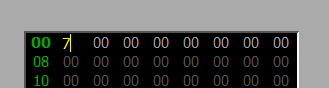
If I try it this way
CustomLineEdit *editor = new CustomLineEdit(old_str, parent->parentWidget());then the result is as follows:
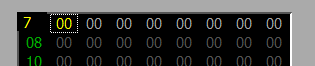
-
@JonB
I tried to print the following inside the createEditor:qDebug() << parent->parent(); qDebug() << editor->parent();As a result, I got this:
MyTable(0x7aace8)
QWidget(0x7a3188, name = "qt_scrollarea_viewport")
I don't really understand whatqt_scrollarea_viewportis.If I use
CustomLineEdit *editor = new CustomLineEdit(old_str, parent);I get the following cell editing (as I need):
If I try it this way
CustomLineEdit *editor = new CustomLineEdit(old_str, parent->parentWidget());then the result is as follows:
@Vlad02
The table widget will have aQScrollArea. That will have a viewport, QWidget *QAbstractScrollArea::viewport() const. It looks like that is the parent of the edit widget. Maybe that is what grabs the Tabs. I don't know where that leaves you with regard toeventFilter().You never gave a complete, minimal example. I take it you are saying you have a
QLineEdit-derived widget for editing only in aQTableWidget, and there you cannot deal with Tab, and that's the whole thing. -
@Vlad02
The table widget will have aQScrollArea. That will have a viewport, QWidget *QAbstractScrollArea::viewport() const. It looks like that is the parent of the edit widget. Maybe that is what grabs the Tabs. I don't know where that leaves you with regard toeventFilter().You never gave a complete, minimal example. I take it you are saying you have a
QLineEdit-derived widget for editing only in aQTableWidget, and there you cannot deal with Tab, and that's the whole thing.@JonB said in Change focusOutEvent:
I take it you are saying you have a QLineEdit-derived widget for editing only in a QTableWidget, and there you cannot deal with Tab, and that's the whole thing.
That's right. I can provide the code of the derived class if necessary.
I tried to look at the parent hierarchy of my
LineEditand got the following:QWidget(0x2ef34a8, name="qt_scrollarea_viewport")
MyTable(0x2efa8f8)
QWidget(0x14094b0, name="centralWidget")
MainWindow(0x61fde0, name="MainWindow") -
@JonB said in Change focusOutEvent:
I take it you are saying you have a QLineEdit-derived widget for editing only in a QTableWidget, and there you cannot deal with Tab, and that's the whole thing.
That's right. I can provide the code of the derived class if necessary.
I tried to look at the parent hierarchy of my
LineEditand got the following:QWidget(0x2ef34a8, name="qt_scrollarea_viewport")
MyTable(0x2efa8f8)
QWidget(0x14094b0, name="centralWidget")
MainWindow(0x61fde0, name="MainWindow")@Vlad02
I have spent two hours so far this morning! I'm not going to lie, it's complex, and I don't have a solution and don't know whether I will get one/how long it will take!Basically the
QTableView/QTableWidgetis grabbing the Tab and dealing with it, without it getting to yourQLineEdit.Some further information/clues from https://forum.qt.io/topic/97293/qtableview-navigation-with-tab.
Also see bool QStyledItemDelegate::eventFilter(QObject *editor, QEvent *event), which tells you Tab is among the "special" keys handled by theQStyledItemDelegate, but not what you/I can do about it if we don't like it and want it to go to the line edit instead....

