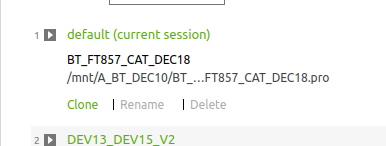
where is the "clone"?
-
In "welcome" dialog there is an option to "clone" the currently selected project.
Where is such "clone" build?
In what Linux folder ?It is my sad experience "QT" (ide) can get corrupted and will NOT execute , hence I am hoping the cloned project can be executed from ANY "QT" , but I have to know where is the cloned project.
-
In "welcome" dialog there is an option to "clone" the currently selected project.
Where is such "clone" build?
In what Linux folder ?It is my sad experience "QT" (ide) can get corrupted and will NOT execute , hence I am hoping the cloned project can be executed from ANY "QT" , but I have to know where is the cloned project.
@AnneRanch
Are you referring to "Clone from remote repository..." or something like that?
Dont know the what's really written there, but I think this is what it means.
So you are not copying (cloning) your local project from A to B, but write a remote project to disk... likegit clonewould do, for example.hence I am hoping the cloned project can be executed from ANY "QT" , but I have to know where is the cloned project.
From "any Qt"?! Qt-what?! Qt version? QtCreator? device?!
-
 C Christian Ehrlicher moved this topic from General and Desktop on
-
@AnneRanch
Are you referring to "Clone from remote repository..." or something like that?
Dont know the what's really written there, but I think this is what it means.
So you are not copying (cloning) your local project from A to B, but write a remote project to disk... likegit clonewould do, for example.hence I am hoping the cloned project can be executed from ANY "QT" , but I have to know where is the cloned project.
From "any Qt"?! Qt-what?! Qt version? QtCreator? device?!
-
@AnneRanch This is for cloning a session, not a project.
That is, when you click this, a dialog will open that allows you to give a new name to the session. See also https://doc.qt.io/qtcreator/creator-project-managing-sessions.html .
This won't change anything for the projects that are part of the session.
-
@AnneRanch This is for cloning a session, not a project.
That is, when you click this, a dialog will open that allows you to give a new name to the session. See also https://doc.qt.io/qtcreator/creator-project-managing-sessions.html .
This won't change anything for the projects that are part of the session.
@kkoehne So when I loose Qt, for whatever reason,
after restoring QT initially I get empty sessions, hence, the original sessions are no longer accessible.I was hoping QT session are accessible as plain files.