Skip to content
  • Categories
  • Recent
  • Tags
  • Popular
  • Users
  • Groups
  • Search
  • Get Qt Extensions
  • Unsolved
Collapse
Brand Logo
  1. Home
  2. Qt Development
  3. General and Desktop
  4. QLabel displays bold text as non-bold from a certain size on
Qt 6.11 is out! See what's new in the release blog

QLabel displays bold text as non-bold from a certain size on

Scheduled Pinned Locked Moved Solved General and Desktop
9 Posts 3 Posters 3.1k Views 2 Watching
  • Oldest to Newest
  • Newest to Oldest
  • Most Votes
Reply
  • Reply as topic
Log in to reply
This topic has been deleted. Only users with topic management privileges can see it.
  • l3u_L Offline
    l3u_L Offline
    l3u_
    wrote on last edited by l3u_
    #1

    Hi all :-)

    When using a QLabel to display large bold text, the text isn't bold anymore from a certain font size on.

    Minimal example:

    main.cpp:

    #include "MainWindow.h"
    
    #include <QApplication>
    
    int main(int argc, char *argv[])
    {
        QApplication app(argc, argv);
        MainWindow mainWindow;
        mainWindow.show();
        return app.exec();
    }
    

    MainWindow.h:

    #ifndef MAINWINDOW_H
    #define MAINWINDOW_H
    
    #include <QMainWindow>
    
    class MainWindow : public QMainWindow
    {
        Q_OBJECT
    
    public:
        explicit MainWindow();
    
    };
    
    #endif // MAINWINDOW_H
    

    MainWindow.cpp:

    #include "MainWindow.h"
    
    #include <QVBoxLayout>
    #include <QLabel>
    
    MainWindow::MainWindow()
    {
        auto *centralWidget = new QWidget;
        auto *layout = new QVBoxLayout(centralWidget);
        setCentralWidget(centralWidget);
    
        auto labelFont = font();
        labelFont.setBold(true);
    
        auto *label1 = new QLabel(tr("Bold text"));
        labelFont.setPointSize(47);
        label1->setFont(labelFont);
        layout->addWidget(label1);
    
        auto *label2 = new QLabel(tr("Bold text"));
        labelFont.setPointSize(48);
        label2->setFont(labelFont);
        layout->addWidget(label2);
    }
    

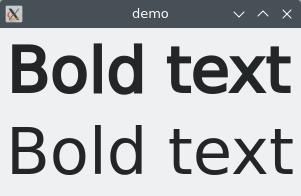
    This is the output:

    bold_demo.png

    As you can see, label1 has a point size of 47, and the text is, as it should be, bold. label2 is one point bigger, and the text isn't displayed bold anymore.

    So … is this a bug or a feature?! ;-)

    Thanks for all help!

    Cheers, Tobias

    JonBJ 1 Reply Last reply
    0
    • M mpergand

      @l3u_
      I changed the default font to DejaVu Sans,
      no issue whatsoever.

      l3u_L Offline
      l3u_L Offline
      l3u_
      wrote on last edited by
      #9

      @mpergand I just tried it with another machine where "Noto Sans" was selected from the beginning. Same issue, from a certain size on, the bold text was displayed non-bold. But after having changed the font to something else and back to "Noto Sans", the issue was gone.

      Maybe some strange configuration problem caused by an years old KDE profile and some updates?!

      Strange, but could be fixed by simply playing around with the font settings.

      Thanks for testing this however :-)

      1 Reply Last reply
      0
      • l3u_L l3u_

        Hi all :-)

        When using a QLabel to display large bold text, the text isn't bold anymore from a certain font size on.

        Minimal example:

        main.cpp:

        #include "MainWindow.h"
        
        #include <QApplication>
        
        int main(int argc, char *argv[])
        {
            QApplication app(argc, argv);
            MainWindow mainWindow;
            mainWindow.show();
            return app.exec();
        }
        

        MainWindow.h:

        #ifndef MAINWINDOW_H
        #define MAINWINDOW_H
        
        #include <QMainWindow>
        
        class MainWindow : public QMainWindow
        {
            Q_OBJECT
        
        public:
            explicit MainWindow();
        
        };
        
        #endif // MAINWINDOW_H
        

        MainWindow.cpp:

        #include "MainWindow.h"
        
        #include <QVBoxLayout>
        #include <QLabel>
        
        MainWindow::MainWindow()
        {
            auto *centralWidget = new QWidget;
            auto *layout = new QVBoxLayout(centralWidget);
            setCentralWidget(centralWidget);
        
            auto labelFont = font();
            labelFont.setBold(true);
        
            auto *label1 = new QLabel(tr("Bold text"));
            labelFont.setPointSize(47);
            label1->setFont(labelFont);
            layout->addWidget(label1);
        
            auto *label2 = new QLabel(tr("Bold text"));
            labelFont.setPointSize(48);
            label2->setFont(labelFont);
            layout->addWidget(label2);
        }
        

        This is the output:

        bold_demo.png

        As you can see, label1 has a point size of 47, and the text is, as it should be, bold. label2 is one point bigger, and the text isn't displayed bold anymore.

        So … is this a bug or a feature?! ;-)

        Thanks for all help!

        Cheers, Tobias

        JonBJ Offline
        JonBJ Offline
        JonB
        wrote on last edited by JonB
        #2

        @l3u_ You should probably say what version of Qt, what platform and what window manager?

        l3u_L 1 Reply Last reply
        0
        • JonBJ JonB

          @l3u_ You should probably say what version of Qt, what platform and what window manager?

          l3u_L Offline
          l3u_L Offline
          l3u_
          wrote on last edited by l3u_
          #3

          @JonB Oh, sorry ;-) It's Qt 5.15.11 on KDE/X. But I also get the very same result compiling the code against Qt 6.5.3.

          JonBJ 1 Reply Last reply
          0
          • l3u_L l3u_

            @JonB Oh, sorry ;-) It's Qt 5.15.11 on KDE/X. But I also get the very same result compiling the code against Qt 6.5.3.

            JonBJ Offline
            JonBJ Offline
            JonB
            wrote on last edited by
            #4

            @l3u_
            Also does your windowing system have some "font viewer" where you could see how this behaves outside of Qt? I doubt whatever the issue that Qt code handles a point size >= 48 specially.

            l3u_L 1 Reply Last reply
            0
            • JonBJ JonB

              @l3u_
              Also does your windowing system have some "font viewer" where you could see how this behaves outside of Qt? I doubt whatever the issue that Qt code handles a point size >= 48 specially.

              l3u_L Offline
              l3u_L Offline
              l3u_
              wrote on last edited by l3u_
              #5

              @JonB labelFont.family() says it's "DejaVu Sans", also according to my KDE settings.

              Here's what LibreOffice displays (as expected) when using this font and setting the same font sizes:
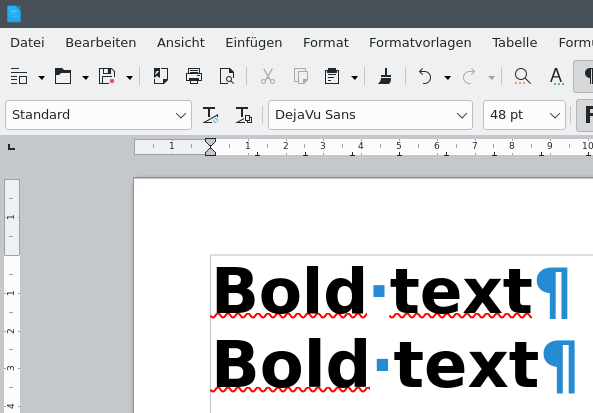
              libreoffice.png
              although the rendering looks a bit different …

              M 1 Reply Last reply
              0
              • l3u_L l3u_

                @JonB labelFont.family() says it's "DejaVu Sans", also according to my KDE settings.

                Here's what LibreOffice displays (as expected) when using this font and setting the same font sizes:
                libreoffice.png
                although the rendering looks a bit different …

                M Offline
                M Offline
                mpergand
                wrote on last edited by
                #6

                @l3u_
                I can't reproduce this in kubuntu 22.04 Qt 5.14.2

                l3u_L 1 Reply Last reply
                0
                • M mpergand

                  @l3u_
                  I can't reproduce this in kubuntu 22.04 Qt 5.14.2

                  l3u_L Offline
                  l3u_L Offline
                  l3u_
                  wrote on last edited by l3u_
                  #7

                  This is odd … seems to depend on the used font.

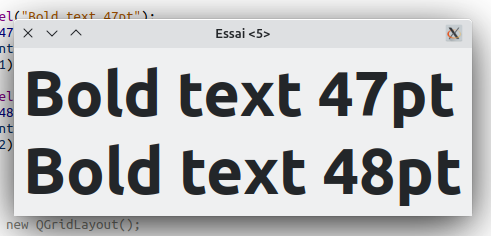
                  Happens with DejaVu, doesn't happen if I set it to e.g. "Arimo" or "Noto Sans".

                  Question is: Why?!

                  M 1 Reply Last reply
                  0
                  • l3u_L l3u_

                    This is odd … seems to depend on the used font.

                    Happens with DejaVu, doesn't happen if I set it to e.g. "Arimo" or "Noto Sans".

                    Question is: Why?!

                    M Offline
                    M Offline
                    mpergand
                    wrote on last edited by
                    #8

                    @l3u_
                    I changed the default font to DejaVu Sans,
                    no issue whatsoever.

                    l3u_L 1 Reply Last reply
                    0
                    • M mpergand

                      @l3u_
                      I changed the default font to DejaVu Sans,
                      no issue whatsoever.

                      l3u_L Offline
                      l3u_L Offline
                      l3u_
                      wrote on last edited by
                      #9

                      @mpergand I just tried it with another machine where "Noto Sans" was selected from the beginning. Same issue, from a certain size on, the bold text was displayed non-bold. But after having changed the font to something else and back to "Noto Sans", the issue was gone.

                      Maybe some strange configuration problem caused by an years old KDE profile and some updates?!

                      Strange, but could be fixed by simply playing around with the font settings.

                      Thanks for testing this however :-)

                      1 Reply Last reply
                      0
                      • l3u_L l3u_ has marked this topic as solved on

                      • Login

                      • Login or register to search.
                      • First post
                        Last post
                      0
                      • Categories
                      • Recent
                      • Tags
                      • Popular
                      • Users
                      • Groups
                      • Search
                      • Get Qt Extensions
                      • Unsolved