
Qt 6.11 is out! See what's new in the release
blog
Please advise - how to add MDI to "Main window" / console ?
-
Bump /addendum
Am I on the right track?
I have added QMdiArea and replacedsetCentralWidget(m_mdiarea);
I cannot "see" the title window of the added Mdi Area ....
   m_ui->setupUi(this);
    m_console->setEnabled(false);

    // create mdi area
    setCentralWidget(m_mdiarea);
    m_mdiarea->setEnabled(true);
    m_mdiarea->setWindowTitle(" MDI area ");
    m_mdiarea->show();
    m_mdiarea->setVisible(true);
    // test resize ??
    m_mdiarea->activateWindow();
I am using QT example "simple terminal" .
I am struggling with its code , mainly because it was not created using QTDesigner , hence QTDesigner cannot be effectively used to make changes.As is - the "main access " to the code (keyboard - serial port I/O) is via "console".
(see the black area in attached screen shot )
That works fine, however, I like to "split" the console physical size and have "console " I/O area - as of now -
and new , separate MDI area.How do I add MDI area to share same space as current console?
.
//! [0] MainWindow_Bluetooth::MainWindow_Bluetooth(QWidget *parent) : QMainWindow(parent), m_ui(new Ui::MainWindow_Bluetooth), m_status(new QLabel), m_console(new Console), m_settings(new SettingsDialog), //! [1] //! add rfcomm ?? m_serial(new QSerialPort(this)) //! [1] { //! [0] m_ui->setupUi(this); m_console->setEnabled(false); setCentralWidget(m_console); // actions m_ui->actionConnect->setEnabled(true); m_ui->actionDisconnect->setEnabled(false); m_ui->actionQuit->setEnabled(true); m_ui->actionConfigure->setEnabled(true); m_ui->statusBar->addWidget(m_status); initActionsConnections(); connect(m_serial, &QSerialPort::errorOccurred, this, &MainWindow_Bluetooth::handleError); //! [2] connect(m_serial, &QSerialPort::readyRead, this, &MainWindow_Bluetooth::readData); //! [2] connect(m_console, &Console::getData, this, &MainWindow_Bluetooth::writeData); //! [3] } //! [3]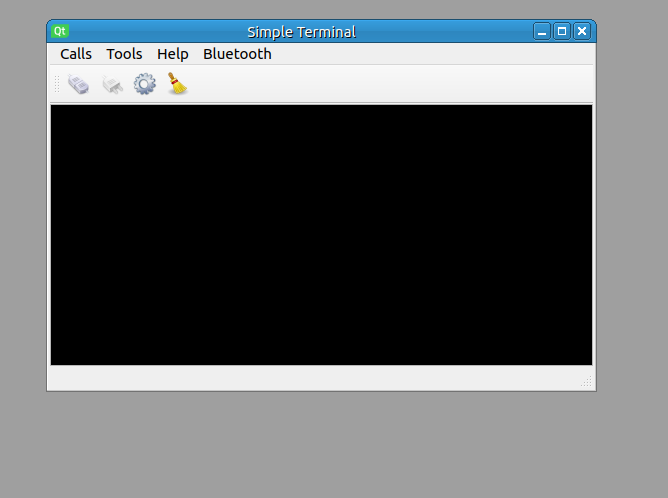
-
 C Christian Ehrlicher moved this topic from C++ Gurus on