
Skip to content
  • Categories
  • Recent
  • Tags
  • Popular
  • Users
  • Groups
  • Search
  • Get Qt Extensions
  • Unsolved
Collapse
Brand Logo
  1. Home
  2. Qt Development
  3. QML and Qt Quick
  4. design button unvailable
Qt 6.11 is out! See what's new in the release blog

design button unvailable

Scheduled Pinned Locked Moved Unsolved QML and Qt Quick
2 Posts 2 Posters 272 Views 2 Watching
  • Oldest to Newest
  • Newest to Oldest
  • Most Votes
Reply
  • Reply as topic
Log in to reply
This topic has been deleted. Only users with topic management privileges can see it.
  • A Offline
    A Offline
    agmar
    wrote on last edited by agmar
    #1

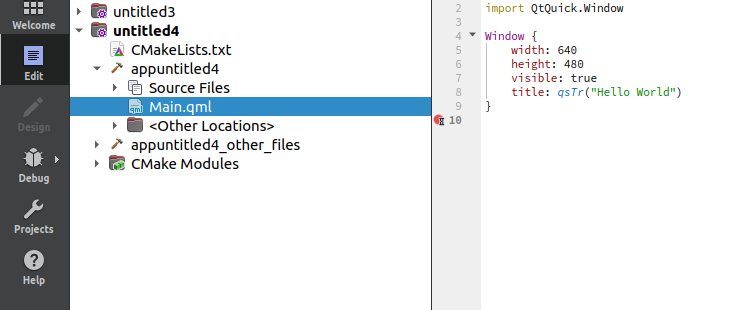
    Hi, i wanted to ask if anyone knows any possible reason why i cant use the design workspace in the picture i showed below?

    I tried creating a new project multiple times but it doesnt change and its still greyed out...
    71614cd9-8469-44dd-8b40-e92488dabda8-image.png
    e0b5f284-bb91-4104-8289-16076cd3d048-image.png

    1 Reply Last reply
    0
    • JKSHJ Offline
      JKSHJ Offline
      JKSH
      Moderators
      wrote on last edited by
      #2

      The Design button is for *.ui.qml files, not for *.qml files (see the opening section of https://doc.qt.io/qtdesignstudio/studio-designer-developer-workflow.html )

      Recently though, the Design functionality has been split out into a standalone tool called Qt Design Studio: https://www.qt.io/blog/qt-design-studio-4.0-released
      Qt Doc Search for browsers: forum.qt.io/topic/35616/web-browser-extension-for-improved-doc-searches

      1 Reply Last reply
      1

      • Login

      • Login or register to search.
      • First post
        Last post
      0
      • Categories
      • Recent
      • Tags
      • Popular
      • Users
      • Groups
      • Search
      • Get Qt Extensions
      • Unsolved