Skip to content
  • Categories
  • Recent
  • Tags
  • Popular
  • Users
  • Groups
  • Search
  • Get Qt Extensions
  • Unsolved
Collapse
Brand Logo
  1. Home
  2. Qt Development
  3. Qt Creator and other tools
  4. QtCreator Application Output text coloring

QtCreator Application Output text coloring

Scheduled Pinned Locked Moved Solved Qt Creator and other tools
13 Posts 5 Posters 3.4k Views 2 Watching
  • Oldest to Newest
  • Newest to Oldest
  • Most Votes
Reply
  • Reply as topic
Log in to reply
This topic has been deleted. Only users with topic management privileges can see it.
  • C ChortleMortal

    Is there any way to configure QtCreator Application Output text so that qDebug, Qinfo, and qWarning text have different colors? I have tried creating my own message handler, but on windows it seems I still have to call OutputDebugString and this does not seem to take html coloring. Or is there some other way to do this?

    aha_1980A Offline
    aha_1980A Offline
    aha_1980
    Lifetime Qt Champion
    wrote on last edited by
    #2

    Hi @ChortleMortal,

    Qt Creators Application output understands ANSI escape codes.

    I've successfully tested that with qDebug under Linux, but I guess it will work on Windows too:

    #include <QDebug>
    
    int main(int argc, char *argv[])
    {
        qDebug("\033[31m Hello World\033[0m");
    
        return 0;
    }
    

    Result:
    e4ccc260-52a5-44f2-857a-b8afc502fdac-image.png

    Regards

    Qt has to stay free or it will die.

    mrjjM 1 Reply Last reply
    2
    • aha_1980A aha_1980

      Hi @ChortleMortal,

      Qt Creators Application output understands ANSI escape codes.

      I've successfully tested that with qDebug under Linux, but I guess it will work on Windows too:

      #include <QDebug>
      
      int main(int argc, char *argv[])
      {
          qDebug("\033[31m Hello World\033[0m");
      
          return 0;
      }
      

      Result:
      e4ccc260-52a5-44f2-857a-b8afc502fdac-image.png

      Regards

      mrjjM Offline
      mrjjM Offline
      mrjj
      Lifetime Qt Champion
      wrote on last edited by
      #3

      @aha_1980
      It works on win 10 :)

      aha_1980A 1 Reply Last reply
      2
      • mrjjM mrjj

        @aha_1980
        It works on win 10 :)

        aha_1980A Offline
        aha_1980A Offline
        aha_1980
        Lifetime Qt Champion
        wrote on last edited by
        #4

        @mrjj Thanks for checking :)

        Qt has to stay free or it will die.

        mrjjM 1 Reply Last reply
        0
        • aha_1980A aha_1980

          @mrjj Thanks for checking :)

          mrjjM Offline
          mrjjM Offline
          mrjj
          Lifetime Qt Champion
          wrote on last edited by
          #5

          @aha_1980
          Hi
          Well I didn't know we could use colors so I was a bit excited.

          I sometimes use the "ASSERT" trick

          void myCustomMessageHandler(QtMsgType type, const QMessageLogContext &context, const QString &msg)
          {
              QMessageLogger(context.file, context.line, nullptr).debug("ASSERT: \"%s\" in file %s, line %d",
                                                                        msg.toLocal8Bit().data(), context.file, context.line);
          }
          ..
          qDebug("CLICK ME :)");
          

          to allow to click to jump to the location.
          so i had to see if the colors would mix but the hot linking stop working which i guess
          is due to how it's recognized.

          alt text

          aha_1980A 1 Reply Last reply
          0
          • mrjjM mrjj

            @aha_1980
            Hi
            Well I didn't know we could use colors so I was a bit excited.

            I sometimes use the "ASSERT" trick

            void myCustomMessageHandler(QtMsgType type, const QMessageLogContext &context, const QString &msg)
            {
                QMessageLogger(context.file, context.line, nullptr).debug("ASSERT: \"%s\" in file %s, line %d",
                                                                          msg.toLocal8Bit().data(), context.file, context.line);
            }
            ..
            qDebug("CLICK ME :)");
            

            to allow to click to jump to the location.
            so i had to see if the colors would mix but the hot linking stop working which i guess
            is due to how it's recognized.

            alt text

            aha_1980A Offline
            aha_1980A Offline
            aha_1980
            Lifetime Qt Champion
            wrote on last edited by
            #6

            @mrjj AFAIK stderr is printed in red, so could you try stdout?

            Qt has to stay free or it will die.

            mrjjM 1 Reply Last reply
            0
            • aha_1980A aha_1980

              @mrjj AFAIK stderr is printed in red, so could you try stdout?

              mrjjM Offline
              mrjjM Offline
              mrjj
              Lifetime Qt Champion
              wrote on last edited by
              #7

              @aha_1980
              Hi

              How do you mean?
              here
              QMessageLogger(context.file, context.line, nullptr).xxxx ?

              If i use the codes then the whole line is red but its not longer "hot/clickable"

              alt text

              aha_1980A 1 Reply Last reply
              0
              • mrjjM mrjj

                @aha_1980
                Hi

                How do you mean?
                here
                QMessageLogger(context.file, context.line, nullptr).xxxx ?

                If i use the codes then the whole line is red but its not longer "hot/clickable"

                alt text

                aha_1980A Offline
                aha_1980A Offline
                aha_1980
                Lifetime Qt Champion
                wrote on last edited by aha_1980
                #8

                @mrjj Indeed, it seems that broke again (I fixed this code in Creator once to get exactly that working).

                However, putting the link first still works :)

                qDebug("\033[31m Hello World\033[0m file://%s:%d", __FILE__, __LINE__);  // << fails
                qDebug("file://%s:%d \033[31m Hello World\033[0m", __FILE__, __LINE__); // << works
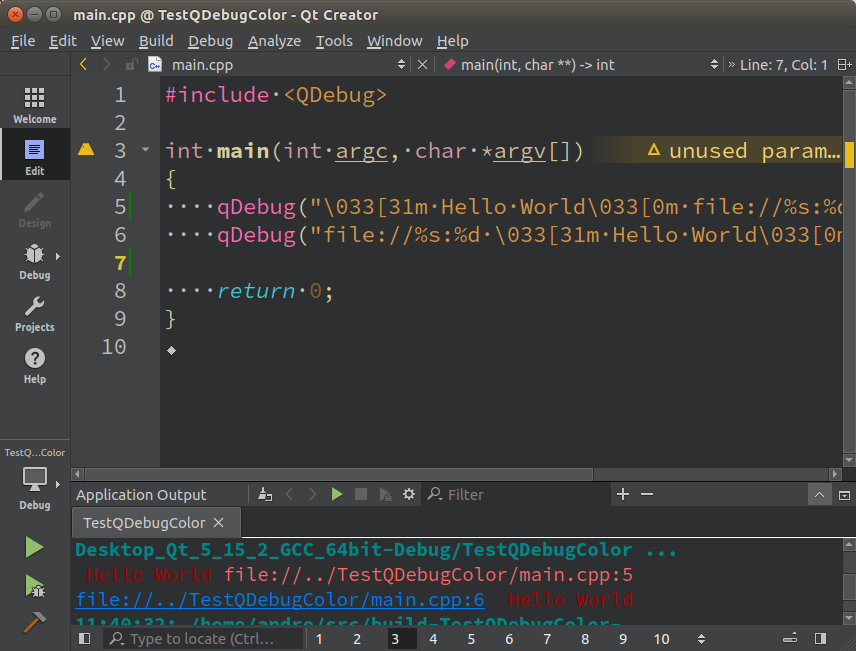
                

                c8fc7bef-1347-46d1-a230-68be78727206-image.png

                Qt has to stay free or it will die.

                mrjjM 1 Reply Last reply
                2
                • aha_1980A aha_1980

                  @mrjj Indeed, it seems that broke again (I fixed this code in Creator once to get exactly that working).

                  However, putting the link first still works :)

                  qDebug("\033[31m Hello World\033[0m file://%s:%d", __FILE__, __LINE__);  // << fails
                  qDebug("file://%s:%d \033[31m Hello World\033[0m", __FILE__, __LINE__); // << works
                  

                  c8fc7bef-1347-46d1-a230-68be78727206-image.png

                  mrjjM Offline
                  mrjjM Offline
                  mrjj
                  Lifetime Qt Champion
                  wrote on last edited by
                  #9

                  @aha_1980
                  Oh cool.
                  I did try the "file:" but must have gotten syntax wrong as didn't become hot but your sample does.
                  so we can have colored hot linked debugs. perfect :)

                  1 Reply Last reply
                  0
                  • C Offline
                    C Offline
                    ChortleMortal
                    wrote on last edited by
                    #10

                    Thanks to everyone for their suggestions. This is what I ultimately did. First in main.cpp I installed a message handler:

                    qInstallMessageHandler(&qtAppLog::crashMessageOutput);`
                    

                    Then in the message handler:

                    void qtAppLog::crashMessageOutput(QtMsgType type, const QMessageLogContext &context, const QString &msg2)
                    

                    Amongst other things I did:

                    if (_logToStderr)
                        {
                            std::string s1;
                            std::string s2;
                            std::string str;
                            switch (type)
                            {
                            case QtDebugMsg:
                                str = msg2.toStdString();
                                break;
                            case QtInfoMsg:
                                s1 = "\033[32m";
                                s2 = "\033[0m";
                                str = s1 + msg2.toStdString() + s2;
                                break;
                            case QtWarningMsg:
                                s1 = "\033[35;1m";
                                s2 = "\033[0m";
                                str = s1 + msg2.toStdString() + s2;
                                break;
                            case QtCriticalMsg:
                                str = msg2.toStdString();
                                break;
                            case QtFatalMsg:
                                str = msg2.toStdString();
                                break;
                            }
                            str += '\n';
                    #ifdef WIN32
                            OutputDebugStringA(str.c_str());
                    #else
                            fprintf(stderr,"%s\n",str.c_str());
                    #endif
                        }
                    
                    1 Reply Last reply
                    1
                    • C Offline
                      C Offline
                      ChortleMortal
                      wrote on last edited by ChortleMortal
                      #11

                      The solution I posted worked quite well, but then I changed the QtCreator Theme. So now it needs different code for Classic and Design Dark, and the colors are different for Linux and Windows too.

                      My question is, at runtime in a debug build, is it possible to determine the QtCreator theme? Failing that, is it possible to somehow read the background color of the Application Output?

                      If there is no answer to these questions, I guess I'll find a text color that works for any background color in the Application Output.

                      JonBJ 1 Reply Last reply
                      0
                      • C ChortleMortal

                        The solution I posted worked quite well, but then I changed the QtCreator Theme. So now it needs different code for Classic and Design Dark, and the colors are different for Linux and Windows too.

                        My question is, at runtime in a debug build, is it possible to determine the QtCreator theme? Failing that, is it possible to somehow read the background color of the Application Output?

                        If there is no answer to these questions, I guess I'll find a text color that works for any background color in the Application Output.

                        JonBJ Online
                        JonBJ Online
                        JonB
                        wrote on last edited by
                        #12

                        @ChortleMortal
                        I don't think your application has any knowledge that it is being run under Creator, nor should it.

                        Marcus Sonestedt - CellinkM 1 Reply Last reply
                        1
                        • JonBJ JonB

                          @ChortleMortal
                          I don't think your application has any knowledge that it is being run under Creator, nor should it.

                          Marcus Sonestedt - CellinkM Offline
                          Marcus Sonestedt - CellinkM Offline
                          Marcus Sonestedt - Cellink
                          wrote on last edited by
                          #13

                          Check if parent process's filename = qtcreator and adapt? :)

                          Developer comforts matter. I think it makes sense.

                          1 Reply Last reply
                          0

                          • Login

                          • Login or register to search.
                          • First post
                            Last post
                          0
                          • Categories
                          • Recent
                          • Tags
                          • Popular
                          • Users
                          • Groups
                          • Search
                          • Get Qt Extensions
                          • Unsolved