
Log Window Not Showing!
-
Hi I am trying to create an application which displays recent 10 Logs from a file, and have checkboxes to filter the logs based on types,
here is my code:logdisplay.cpp
#include "logdisplay.h"
#include <QFile>
#include <QHBoxLayout>
#include <QLabel>
#include <QTextStream>
#include <QTimer>
#include <QVBoxLayout>

LogDisplay::LogDisplay(QWidget *parent)
    : QWidget(parent)
{
    QVBoxLayout *mainLayout = new QVBoxLayout(this);

    QHBoxLayout *checkBoxLayout = new QHBoxLayout;
    infoCheckBox = new QCheckBox("INFO");
    infoCheckBox->setChecked(true);
    checkBoxLayout->addWidget(infoCheckBox);
    warnCheckBox = new QCheckBox("WARN");
    warnCheckBox->setChecked(true);
    checkBoxLayout->addWidget(warnCheckBox);
    debugCheckBox = new QCheckBox("DEBUG");
    debugCheckBox->setChecked(true);
    checkBoxLayout->addWidget(debugCheckBox);
    mainLayout->addLayout(checkBoxLayout);

    readLogs();

    QTimer *timer = new QTimer(this);
    connect(timer, &QTimer::timeout, this, &LogDisplay::refresh);
    timer->start(5000);
}


void LogDisplay::readLogs()
{
    QFile file("home/arpitk/QT Projects/logtail1/sample.log");
    if (!file.open(QIODevice::ReadOnly | QIODevice::Text))
        return;

    QTextStream in(&file);
    QStringList logLines;
    while (!in.atEnd()) {
        logLines.append(in.readLine());
    }

    int logLinesCount = logLines.count();
    int startIndex = logLinesCount > 10 ? logLinesCount - 10 : 0;

    for (int i = startIndex; i < logLinesCount; i++) {
        QString message = logLines.at(i);
        QString level = message.left(5);
        if ((level == "INFO " && infoCheckBox->isChecked()) ||
            (level == "WARN " && warnCheckBox->isChecked()) ||
            (level == "DEBUG" && debugCheckBox->isChecked())) {
            mainLayout->addWidget(new QLabel(message));
        }
    }

    file.close();
}

    void LogDisplay::refresh()
            {
                QLayoutItem *child;
                while ((child = mainLayout->takeAt(1)) != 0) {
                    delete child->widget();
                    delete child;
                }
                readLogs();
            }
    LogDisplay::~LogDisplay()
    {
    }
main.cpp
#include "logdisplay.h"
#include <QApplication>

int main(int argc, char *argv[])
{
    QApplication a(argc, argv);
    LogDisplay w;
    w.show();
    return a.exec();
}
The code is executing and checkboxes are displaying but Log Window is not showing?
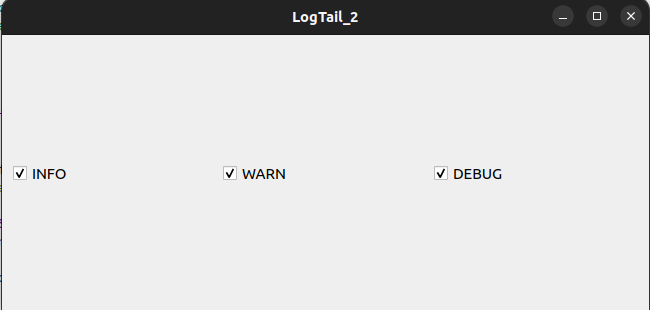
The log window is not showing, Please help! -
Hi I am trying to create an application which displays recent 10 Logs from a file, and have checkboxes to filter the logs based on types,
here is my code:logdisplay.cpp
#include "logdisplay.h"
#include <QFile>
#include <QHBoxLayout>
#include <QLabel>
#include <QTextStream>
#include <QTimer>
#include <QVBoxLayout>

LogDisplay::LogDisplay(QWidget *parent)
    : QWidget(parent)
{
    QVBoxLayout *mainLayout = new QVBoxLayout(this);

    QHBoxLayout *checkBoxLayout = new QHBoxLayout;
    infoCheckBox = new QCheckBox("INFO");
    infoCheckBox->setChecked(true);
    checkBoxLayout->addWidget(infoCheckBox);
    warnCheckBox = new QCheckBox("WARN");
    warnCheckBox->setChecked(true);
    checkBoxLayout->addWidget(warnCheckBox);
    debugCheckBox = new QCheckBox("DEBUG");
    debugCheckBox->setChecked(true);
    checkBoxLayout->addWidget(debugCheckBox);
    mainLayout->addLayout(checkBoxLayout);

    readLogs();

    QTimer *timer = new QTimer(this);
    connect(timer, &QTimer::timeout, this, &LogDisplay::refresh);
    timer->start(5000);
}


void LogDisplay::readLogs()
{
    QFile file("home/arpitk/QT Projects/logtail1/sample.log");
    if (!file.open(QIODevice::ReadOnly | QIODevice::Text))
        return;

    QTextStream in(&file);
    QStringList logLines;
    while (!in.atEnd()) {
        logLines.append(in.readLine());
    }

    int logLinesCount = logLines.count();
    int startIndex = logLinesCount > 10 ? logLinesCount - 10 : 0;

    for (int i = startIndex; i < logLinesCount; i++) {
        QString message = logLines.at(i);
        QString level = message.left(5);
        if ((level == "INFO " && infoCheckBox->isChecked()) ||
            (level == "WARN " && warnCheckBox->isChecked()) ||
            (level == "DEBUG" && debugCheckBox->isChecked())) {
            mainLayout->addWidget(new QLabel(message));
        }
    }

    file.close();
}

    void LogDisplay::refresh()
            {
                QLayoutItem *child;
                while ((child = mainLayout->takeAt(1)) != 0) {
                    delete child->widget();
                    delete child;
                }
                readLogs();
            }
    LogDisplay::~LogDisplay()
    {
    }
main.cpp
#include "logdisplay.h"
#include <QApplication>

int main(int argc, char *argv[])
{
    QApplication a(argc, argv);
    LogDisplay w;
    w.show();
    return a.exec();
}
The code is executing and checkboxes are displaying but Log Window is not showing?
The log window is not showing, Please help!This post is deleted! -
Hi I am trying to create an application which displays recent 10 Logs from a file, and have checkboxes to filter the logs based on types,
here is my code:logdisplay.cpp
#include "logdisplay.h"
#include <QFile>
#include <QHBoxLayout>
#include <QLabel>
#include <QTextStream>
#include <QTimer>
#include <QVBoxLayout>

LogDisplay::LogDisplay(QWidget *parent)
    : QWidget(parent)
{
    QVBoxLayout *mainLayout = new QVBoxLayout(this);

    QHBoxLayout *checkBoxLayout = new QHBoxLayout;
    infoCheckBox = new QCheckBox("INFO");
    infoCheckBox->setChecked(true);
    checkBoxLayout->addWidget(infoCheckBox);
    warnCheckBox = new QCheckBox("WARN");
    warnCheckBox->setChecked(true);
    checkBoxLayout->addWidget(warnCheckBox);
    debugCheckBox = new QCheckBox("DEBUG");
    debugCheckBox->setChecked(true);
    checkBoxLayout->addWidget(debugCheckBox);
    mainLayout->addLayout(checkBoxLayout);

    readLogs();

    QTimer *timer = new QTimer(this);
    connect(timer, &QTimer::timeout, this, &LogDisplay::refresh);
    timer->start(5000);
}


void LogDisplay::readLogs()
{
    QFile file("home/arpitk/QT Projects/logtail1/sample.log");
    if (!file.open(QIODevice::ReadOnly | QIODevice::Text))
        return;

    QTextStream in(&file);
    QStringList logLines;
    while (!in.atEnd()) {
        logLines.append(in.readLine());
    }

    int logLinesCount = logLines.count();
    int startIndex = logLinesCount > 10 ? logLinesCount - 10 : 0;

    for (int i = startIndex; i < logLinesCount; i++) {
        QString message = logLines.at(i);
        QString level = message.left(5);
        if ((level == "INFO " && infoCheckBox->isChecked()) ||
            (level == "WARN " && warnCheckBox->isChecked()) ||
            (level == "DEBUG" && debugCheckBox->isChecked())) {
            mainLayout->addWidget(new QLabel(message));
        }
    }

    file.close();
}

    void LogDisplay::refresh()
            {
                QLayoutItem *child;
                while ((child = mainLayout->takeAt(1)) != 0) {
                    delete child->widget();
                    delete child;
                }
                readLogs();
            }
    LogDisplay::~LogDisplay()
    {
    }
main.cpp
#include "logdisplay.h"
#include <QApplication>

int main(int argc, char *argv[])
{
    QApplication a(argc, argv);
    LogDisplay w;
    w.show();
    return a.exec();
}
The code is executing and checkboxes are displaying but Log Window is not showing?
The log window is not showing, Please help! -
Hi I am trying to create an application which displays recent 10 Logs from a file, and have checkboxes to filter the logs based on types,
here is my code:logdisplay.cpp
#include "logdisplay.h"
#include <QFile>
#include <QHBoxLayout>
#include <QLabel>
#include <QTextStream>
#include <QTimer>
#include <QVBoxLayout>

LogDisplay::LogDisplay(QWidget *parent)
    : QWidget(parent)
{
    QVBoxLayout *mainLayout = new QVBoxLayout(this);

    QHBoxLayout *checkBoxLayout = new QHBoxLayout;
    infoCheckBox = new QCheckBox("INFO");
    infoCheckBox->setChecked(true);
    checkBoxLayout->addWidget(infoCheckBox);
    warnCheckBox = new QCheckBox("WARN");
    warnCheckBox->setChecked(true);
    checkBoxLayout->addWidget(warnCheckBox);
    debugCheckBox = new QCheckBox("DEBUG");
    debugCheckBox->setChecked(true);
    checkBoxLayout->addWidget(debugCheckBox);
    mainLayout->addLayout(checkBoxLayout);

    readLogs();

    QTimer *timer = new QTimer(this);
    connect(timer, &QTimer::timeout, this, &LogDisplay::refresh);
    timer->start(5000);
}


void LogDisplay::readLogs()
{
    QFile file("home/arpitk/QT Projects/logtail1/sample.log");
    if (!file.open(QIODevice::ReadOnly | QIODevice::Text))
        return;

    QTextStream in(&file);
    QStringList logLines;
    while (!in.atEnd()) {
        logLines.append(in.readLine());
    }

    int logLinesCount = logLines.count();
    int startIndex = logLinesCount > 10 ? logLinesCount - 10 : 0;

    for (int i = startIndex; i < logLinesCount; i++) {
        QString message = logLines.at(i);
        QString level = message.left(5);
        if ((level == "INFO " && infoCheckBox->isChecked()) ||
            (level == "WARN " && warnCheckBox->isChecked()) ||
            (level == "DEBUG" && debugCheckBox->isChecked())) {
            mainLayout->addWidget(new QLabel(message));
        }
    }

    file.close();
}

    void LogDisplay::refresh()
            {
                QLayoutItem *child;
                while ((child = mainLayout->takeAt(1)) != 0) {
                    delete child->widget();
                    delete child;
                }
                readLogs();
            }
    LogDisplay::~LogDisplay()
    {
    }
main.cpp
#include "logdisplay.h"
#include <QApplication>

int main(int argc, char *argv[])
{
    QApplication a(argc, argv);
    LogDisplay w;
    w.show();
    return a.exec();
}
The code is executing and checkboxes are displaying but Log Window is not showing?
The log window is not showing, Please help!@Aviral-0
I would start by changing the way you do stuff. All this creating individualQLabels for each message and deleting widgets/layout items is not a good way, for many reasons. For displaying log lines just append to aQ[Plain]TextEdit, or possibly use aQListVieworQListWidget. You might also benefit from separating responsibilities, soreadLogs()might just read the lines with no UI stuff and something else be responsible for displaying them. -
@Aviral-0
I would start by changing the way you do stuff. All this creating individualQLabels for each message and deleting widgets/layout items is not a good way, for many reasons. For displaying log lines just append to aQ[Plain]TextEdit, or possibly use aQListVieworQListWidget. You might also benefit from separating responsibilities, soreadLogs()might just read the lines with no UI stuff and something else be responsible for displaying them.@JonB @jsulm I am new to all this, appreciate your patience!
This is my updated code, I have tried to keep all of your suggestions in mind. and this is I come up with.
The application is building but still no logs are shown :'(
And yes the file contains log information for which I am putting absolute path.#include "logdisplay.h" #include <QFileSystemWatcher> #include <QFile> #include <QTextStream> #include <QVBoxLayout> #include <QHBoxLayout> #include <QCheckBox> #include <QPlainTextEdit> #include <QTextCursor> #include <QToolBar> LogDisplay::LogDisplay(QWidget *parent) : QMainWindow(parent) { // Create the log display widget logDisplay = new QPlainTextEdit(this); logDisplay->setReadOnly(true); // Create the error checkbox errorCheckbox = new QCheckBox("Error", this); errorCheckbox->setChecked(true); // Create the warning checkbox warningCheckbox = new QCheckBox("Warning", this); warningCheckbox->setChecked(true); // Create the info checkbox infoCheckbox = new QCheckBox("Info", this); infoCheckbox->setChecked(true); // Create a horizontal layout for the checkboxes QHBoxLayout *checkboxLayout = new QHBoxLayout; checkboxLayout->addWidget(errorCheckbox); checkboxLayout->addWidget(warningCheckbox); checkboxLayout->addWidget(infoCheckbox); // Create a vertical layout for the log display and checkboxes QVBoxLayout *mainLayout = new QVBoxLayout; mainLayout->addWidget(logDisplay); mainLayout->addLayout(checkboxLayout); // Create a central widget and set its layout QWidget *centralWidget = new QWidget(this); centralWidget->setLayout(mainLayout); setCentralWidget(centralWidget); // Create a toolbar for the checkboxes QToolBar *filterToolBar = addToolBar("Filter"); filterToolBar->addWidget(errorCheckbox); filterToolBar->addWidget(warningCheckbox); filterToolBar->addWidget(infoCheckbox); // Connect the checkbox state changed signals to the updateLogDisplay slot connect(errorCheckbox, &QCheckBox::stateChanged, this, &LogDisplay::updateLogDisplay); connect(warningCheckbox, &QCheckBox::stateChanged, this, &LogDisplay::updateLogDisplay); connect(infoCheckbox, &QCheckBox::stateChanged, this, &LogDisplay::updateLogDisplay); // Create a QFileSystemWatcher to monitor the log file QFileSystemWatcher *watcher = new QFileSystemWatcher(this); connect(watcher, &QFileSystemWatcher::fileChanged, this, &LogDisplay::updateLogList); watcher->addPath("log.txt"); // Initialize the log display with the first set of logs updateLogList(); } LogDisplay::~LogDisplay() { } bool LogDisplay::updateLogList() { // Open the log file QFile logFile("/home/arpitk/QT Projects/logtail1/sample.log"); if (!logFile.open(QFile::ReadOnly | QFile::Text)) return false; // Read the logs from the log file into the log line logList.clear(); QTextStream in(&logFile); while (!in.atEnd()) { logList.prepend(in.readLine()); } // Close the log file logFile.close(); // Update the log display with the new logs updateLogDisplay(); return true; } void LogDisplay::updateLogDisplay() { // Clear the current log display logDisplay->clear(); // Iterate over the logs in the log list QTextCursor cursor(logDisplay->document()); for (int i = 0; i < logList.size(); ++i) { // Check if the log should be displayed based on the filter QString log = logList[i]; if ((log.contains("Error") && errorCheckbox->isChecked()) || (log.contains("Warning") && warningCheckbox->isChecked()) || (log.contains("Info") && infoCheckbox->isChecked())) { // Insert the log into the log display cursor.insertText(log + "\n"); } } } -
@JonB @jsulm I am new to all this, appreciate your patience!
This is my updated code, I have tried to keep all of your suggestions in mind. and this is I come up with.
The application is building but still no logs are shown :'(
And yes the file contains log information for which I am putting absolute path.#include "logdisplay.h" #include <QFileSystemWatcher> #include <QFile> #include <QTextStream> #include <QVBoxLayout> #include <QHBoxLayout> #include <QCheckBox> #include <QPlainTextEdit> #include <QTextCursor> #include <QToolBar> LogDisplay::LogDisplay(QWidget *parent) : QMainWindow(parent) { // Create the log display widget logDisplay = new QPlainTextEdit(this); logDisplay->setReadOnly(true); // Create the error checkbox errorCheckbox = new QCheckBox("Error", this); errorCheckbox->setChecked(true); // Create the warning checkbox warningCheckbox = new QCheckBox("Warning", this); warningCheckbox->setChecked(true); // Create the info checkbox infoCheckbox = new QCheckBox("Info", this); infoCheckbox->setChecked(true); // Create a horizontal layout for the checkboxes QHBoxLayout *checkboxLayout = new QHBoxLayout; checkboxLayout->addWidget(errorCheckbox); checkboxLayout->addWidget(warningCheckbox); checkboxLayout->addWidget(infoCheckbox); // Create a vertical layout for the log display and checkboxes QVBoxLayout *mainLayout = new QVBoxLayout; mainLayout->addWidget(logDisplay); mainLayout->addLayout(checkboxLayout); // Create a central widget and set its layout QWidget *centralWidget = new QWidget(this); centralWidget->setLayout(mainLayout); setCentralWidget(centralWidget); // Create a toolbar for the checkboxes QToolBar *filterToolBar = addToolBar("Filter"); filterToolBar->addWidget(errorCheckbox); filterToolBar->addWidget(warningCheckbox); filterToolBar->addWidget(infoCheckbox); // Connect the checkbox state changed signals to the updateLogDisplay slot connect(errorCheckbox, &QCheckBox::stateChanged, this, &LogDisplay::updateLogDisplay); connect(warningCheckbox, &QCheckBox::stateChanged, this, &LogDisplay::updateLogDisplay); connect(infoCheckbox, &QCheckBox::stateChanged, this, &LogDisplay::updateLogDisplay); // Create a QFileSystemWatcher to monitor the log file QFileSystemWatcher *watcher = new QFileSystemWatcher(this); connect(watcher, &QFileSystemWatcher::fileChanged, this, &LogDisplay::updateLogList); watcher->addPath("log.txt"); // Initialize the log display with the first set of logs updateLogList(); } LogDisplay::~LogDisplay() { } bool LogDisplay::updateLogList() { // Open the log file QFile logFile("/home/arpitk/QT Projects/logtail1/sample.log"); if (!logFile.open(QFile::ReadOnly | QFile::Text)) return false; // Read the logs from the log file into the log line logList.clear(); QTextStream in(&logFile); while (!in.atEnd()) { logList.prepend(in.readLine()); } // Close the log file logFile.close(); // Update the log display with the new logs updateLogDisplay(); return true; } void LogDisplay::updateLogDisplay() { // Clear the current log display logDisplay->clear(); // Iterate over the logs in the log list QTextCursor cursor(logDisplay->document()); for (int i = 0; i < logList.size(); ++i) { // Check if the log should be displayed based on the filter QString log = logList[i]; if ((log.contains("Error") && errorCheckbox->isChecked()) || (log.contains("Warning") && warningCheckbox->isChecked()) || (log.contains("Info") && infoCheckbox->isChecked())) { // Insert the log into the log display cursor.insertText(log + "\n"); } } } -
@Aviral-0
You must either step through in a debugger or put inqDebug()messages. We (i.e. you!) need to know whether/when lines are being read from the log file and whether/when they are (attempted to be) displayed.


