
What is the best tool to use
-
Hi everybody! I need create layout of processor memory. It looks like this:
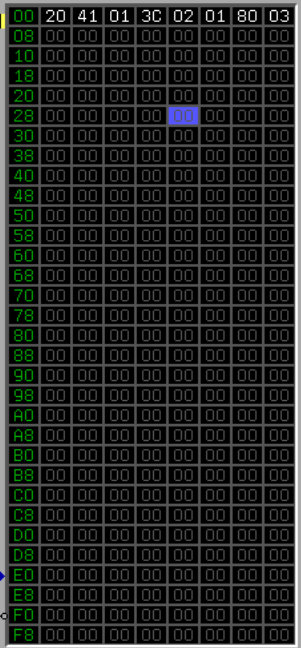
I should be able to edit each cell, to block some cells so that nothing can be written there, read value from cells and move on they. I had idea create many QLineEdit, but 288 elements so much and I don't know how comfortably address to specific cell. So what tools can help to do work more easily? Thanks! -
Hi
Either use QTableWidget or QTableView
https://doc.qt.io/qt-6/qtablewidget.htmlThey provide almost anything you need and will be much easier to handle than a ton of LineEdits.
To get that exact look, you can use a Delegate to handle the drawing so it can be grey when zero and while with values and so on.
https://doc.qt.io/qt-6/qitemdelegate.html#details
https://doc.qt.io/qt-6/qstyleditemdelegate.html#details -
Hi
Either use QTableWidget or QTableView
https://doc.qt.io/qt-6/qtablewidget.htmlThey provide almost anything you need and will be much easier to handle than a ton of LineEdits.
To get that exact look, you can use a Delegate to handle the drawing so it can be grey when zero and while with values and so on.
https://doc.qt.io/qt-6/qitemdelegate.html#details
https://doc.qt.io/qt-6/qstyleditemdelegate.html#details -
@Vlad02
Hi
just as a note.
You might be able to use
https://doc.qt.io/qt-6/qtablewidgetitem.html#setForeground
for the coloring instead of a delegate but it can become a bit clumsy as you then need to loop over all cells
if data changes to reset or change colors.update:
The delegate might seem a bit much the first time so here is a quick example to build on.

class TextColorDelegate : public QStyledItemDelegate
{
    Q_OBJECT
    Q_DISABLE_COPY(TextColorDelegate)
public:
    explicit TextColorDelegate(QObject *parent = Q_NULLPTR)
        : QStyledItemDelegate(parent)
    {}
    void paint(QPainter *painter, const QStyleOptionViewItem &option,
               const QModelIndex &index) const Q_DECL_OVERRIDE
    {
        const QStyle *style = option.widget ? option.widget->style() : QApplication::style();
        QVariant dat = index.data(); // the items text
        if (dat.toInt() == 0)
            painter->setPen(Qt::gray);
        else
            painter->setPen(Qt::white);
        // first col should be green
        if (index.column() == 0 )
            painter->setPen(Qt::green);
        // fill background
        painter->fillRect(option.rect, Qt::black);
        //draw text
        style->drawItemText(painter, option.rect, Qt::AlignCenter, option.palette,
                            option.state & QStyle::State_Enabled, dat.toString() );
    }
};
..
ui->tableWidget->setItemDelegate(new TextColorDelegate); -
@Vlad02
Hi
just as a note.
You might be able to use
https://doc.qt.io/qt-6/qtablewidgetitem.html#setForeground
for the coloring instead of a delegate but it can become a bit clumsy as you then need to loop over all cells
if data changes to reset or change colors.update:
The delegate might seem a bit much the first time so here is a quick example to build on.
class TextColorDelegate : public QStyledItemDelegate
{
    Q_OBJECT
    Q_DISABLE_COPY(TextColorDelegate)
public:
    explicit TextColorDelegate(QObject *parent = Q_NULLPTR)
        : QStyledItemDelegate(parent)
    {}
    void paint(QPainter *painter, const QStyleOptionViewItem &option,
               const QModelIndex &index) const Q_DECL_OVERRIDE
    {
        const QStyle *style = option.widget ? option.widget->style() : QApplication::style();
        QVariant dat = index.data(); // the items text
        if (dat.toInt() == 0)
            painter->setPen(Qt::gray);
        else
            painter->setPen(Qt::white);
        // first col should be green
        if (index.column() == 0 )
            painter->setPen(Qt::green);
        // fill background
        painter->fillRect(option.rect, Qt::black);
        //draw text
        style->drawItemText(painter, option.rect, Qt::AlignCenter, option.palette,
                            option.state & QStyle::State_Enabled, dat.toString() );
    }
};
..
ui->tableWidget->setItemDelegate(new TextColorDelegate); -
@mrjj Hi! Sorry for worry! I don't understand, how I can change style of certain cell in different cases. For example, if I click on cell, it must change background-color. If I click on button, it must change background after a few clicks. Already read documentation, search in Internet at least some ways but without examples can't understand, how this do. And how I can do that cells could change after click on button not double-clicking on them?
