
development package not found
-
You have been told all this at least once before.
- Install libbluetooth-dev with the Ubuntu package manager of your choice. This provides the Bluez libraries and other components, including a configuration file
bluez.pcfor pkg-config, headers, and a library filelibbluetooth.so. - If you are going to use the Qt Creator feature above then you are asking Qt to use
pkg-configto find the headers and libraries to add into your project. The Bluez project provides the packagebluez<<< this is the name to use in the dialog above. Qmake uses pkg-config to determine what should be added to theLIBS,CMAKE_CFLAGS(and related) qmake variables for you. - You can manually make the same changes as the "Add Library" function above to use
pkg-configto find the Bluez components (or any other library that provides configuration for pkg-config).
CONFIG += link_pkgconfig PKGCONFIG += bluez- If you are going to manually configure your project, without pkg-config, to build with the Bluez components then:
LIBS += -lbluetooth - Install libbluetooth-dev with the Ubuntu package manager of your choice. This provides the Bluez libraries and other components, including a configuration file
-
You have been told all this at least once before.
- Install libbluetooth-dev with the Ubuntu package manager of your choice. This provides the Bluez libraries and other components, including a configuration file
bluez.pcfor pkg-config, headers, and a library filelibbluetooth.so. - If you are going to use the Qt Creator feature above then you are asking Qt to use
pkg-configto find the headers and libraries to add into your project. The Bluez project provides the packagebluez<<< this is the name to use in the dialog above. Qmake uses pkg-config to determine what should be added to theLIBS,CMAKE_CFLAGS(and related) qmake variables for you. - You can manually make the same changes as the "Add Library" function above to use
pkg-configto find the Bluez components (or any other library that provides configuration for pkg-config).
CONFIG += link_pkgconfig PKGCONFIG += bluez- If you are going to manually configure your project, without pkg-config, to build with the Bluez components then:
LIBS += -lbluetooth@ChrisW67 are you syaiongthe this
sudo apt install libbluetooth-dev
doles not install the libbluetooth-dev as Linux package ?
nov25-1@nov251-desktop:~$ sudo apt install libbluetooth-dev
[sudo] password for nov25-1:
Reading package lists... Done
Building dependency tree... Done
Reading state information... Done
libbluetooth-dev is already the newest version (5.64-0ubuntu1).
0 upgraded, 0 newly installed, 0 to remove and 0 not upgraded.
nov25-1@nov251-desktop:~$ - Install libbluetooth-dev with the Ubuntu package manager of your choice. This provides the Bluez libraries and other components, including a configuration file
-
No. It plainly does install a Ubuntu package called libbluetooth-dev. The name of the Ubuntu software package is not directly related to the name of any files, libraries, or facilities it provides.
@ChrisW67 Is the the contents of the Linux package Qt compiler/ linker cannot find ?
And I am assuming it is NOT looking for anything in the contents, just for the libbluetooth-dev.
nov25-1@nov251-desktop:~$ dpkg -L libbluetooth-dev
/.
/usr
/usr/include
/usr/include/bluetooth
/usr/include/bluetooth/bluetooth.h
/usr/include/bluetooth/bnep.h
/usr/include/bluetooth/cmtp.h
/usr/include/bluetooth/hci.h
/usr/include/bluetooth/hci_lib.h
/usr/include/bluetooth/hidp.h
/usr/include/bluetooth/l2cap.h
/usr/include/bluetooth/rfcomm.h
/usr/include/bluetooth/sco.h
/usr/include/bluetooth/sdp.h
/usr/include/bluetooth/sdp_lib.h
/usr/lib
/usr/lib/x86_64-linux-gnu
/usr/lib/x86_64-linux-gnu/bluetooth
/usr/lib/x86_64-linux-gnu/bluetooth/plugins
/usr/lib/x86_64-linux-gnu/bluetooth/plugins/sixaxis.a
/usr/lib/x86_64-linux-gnu/libbluetooth.a
/usr/lib/x86_64-linux-gnu/pkgconfig
/usr/lib/x86_64-linux-gnu/pkgconfig/bluez.pc
/usr/share
/usr/share/doc
/usr/share/doc/libbluetooth-dev
/usr/share/doc/libbluetooth-dev/adapter-api.txt.gz
/usr/share/doc/libbluetooth-dev/advertising-api.txt.gz
/usr/share/doc/libbluetooth-dev/agent-api.txt.gz
/usr/share/doc/libbluetooth-dev/assigned-numbers.txt
/usr/share/doc/libbluetooth-dev/btsnoop.txt
/usr/share/doc/libbluetooth-dev/copyright
/usr/share/doc/libbluetooth-dev/device-api.txt.gz
/usr/share/doc/libbluetooth-dev/gatt-api.txt.gz
/usr/share/doc/libbluetooth-dev/health-api.txt
/usr/share/doc/libbluetooth-dev/input-api.txt
/usr/share/doc/libbluetooth-dev/media-api.txt.gz
/usr/share/doc/libbluetooth-dev/mgmt-api.txt.gz
/usr/share/doc/libbluetooth-dev/network-api.txt
/usr/share/doc/libbluetooth-dev/obex-agent-api.txt
/usr/share/doc/libbluetooth-dev/obex-api.txt.gz
/usr/share/doc/libbluetooth-dev/pics-opp.txt.gz
/usr/share/doc/libbluetooth-dev/pixit-opp.txt
/usr/share/doc/libbluetooth-dev/profile-api.txt.gz
/usr/share/doc/libbluetooth-dev/pts-opp.txt
/usr/share/doc/libbluetooth-dev/sap-api.txt
/usr/share/doc/libbluetooth-dev/settings-storage.txt.gz
/usr/share/doc/libbluetooth-dev/supported-features.txt
/usr/share/doc/libbluetooth-dev/test-coverage.txt
/usr/share/doc/libbluetooth-dev/test-runner.txt
/usr/lib/x86_64-linux-gnu/libbluetooth.so
/usr/share/doc/libbluetooth-dev/NEWS.Debian.gz
/usr/share/doc/libbluetooth-dev/changelog.Debian.gz
nov25-1@nov251-deskt -
Adding " LIB " was NOT the question, please read the original post before trying to change the subject .
-
Adding " LIB " was NOT the question, please read the original post before trying to change the subject .
-
@AnneRanch I have provided everything you need to make this work in three different ways. There is nothing further I can do.
@ChrisW67 I appreciate all your help, however, I am still missing an explanation why adding libbluetooth-dev as "system package" did not work "out of the box" ...
It is not my style to fix something by using alternate ways.
If the "add library using package" does not work it needs to be known or better yet fixed.
-
Here is the original I started with
**To compile our program, invoke gcc and link against libbluetooth

# gcc -o simplescan simplescan.c -lbluetooth**


Example 4-1. simplescan.c


#include <stdio.h>
#include <stdlib.h>
#include <unistd.h>
#include <sys/socket.h>
#include <bluetooth/bluetooth.h>
#include <bluetooth/hci.h>
#include <bluetooth/hci_lib.h>

int main(int argc, char **argv)
{
    inquiry_info *ii = NULL;
    int max_rsp, num_rsp;
    int dev_id, sock, len, flags;
    int i;
    char addr[19] = { 0 };
    char name[248] = { 0 };

    dev_id = hci_get_route(NULL);
    sock = hci_open_dev( dev_id );
    if (dev_id < 0 || sock < 0) {
        perror("opening socket");
        exit(1);
    }

    len  = 8;
    max_rsp = 255;
    flags = IREQ_CACHE_FLUSH;
    ii = (inquiry_info*)malloc(max_rsp * sizeof(inquiry_info));

    num_rsp = hci_inquiry(dev_id, len, max_rsp, NULL, &ii, flags);
    if( num_rsp < 0 ) perror("hci_inquiry");

    for (i = 0; i < num_rsp; i++) {
        ba2str(&(ii+i)->bdaddr, addr);
        memset(name, 0, sizeof(name));
        if (hci_read_remote_name(sock, &(ii+i)->bdaddr, sizeof(name),
            name, 0) < 0)
        strcpy(name, "[unknown]");
        printf("%s  %s\n", addr, name);
    }

    free( ii );
    close( sock );
    return 0;
}
Example 4-2. rfcomm-server.c
Kindly explain why I shlud know it is asking for "bluez" package ....
THANKS
-
@AnneRanch said in development package not found:
Kindly explain why I shlud know it is asking for "bluez" package ....
The Bluetooth library, libbluetooth.so , is a product of the Bluez Project. That should also have been fairy obvious from whence you likely lifted the example below.
The original you started with is not a Qt (or even C++) program, provides the simplest possible C code, compile and link commands. It directs the compiler to compile the C code and link it to a library file called
libbluetooth.so, which it does.chrisw@newton:/tmp/simplescan$ ls simplescan.c chrisw@newton:/tmp/simplescan$ gcc -o simplescan simplescan.c -lbluetooth chrisw@newton:/tmp/simplescan$ ldd simplescan linux-vdso.so.1 (0x00007ffe10bea000) libbluetooth.so.3 => /lib/x86_64-linux-gnu/libbluetooth.so.3 (0x00007f2410c5d000) libc.so.6 => /lib/x86_64-linux-gnu/libc.so.6 (0x00007f2410a35000) /lib64/ld-linux-x86-64.so.2 (0x00007f2410cb1000)Now, you have put something like that code in a Qt project with
qmakecontrolling the build.
You can achieve exactly the same simple linking as the example withqmake:chrisw@newton:/tmp/simplescan$ ls simplescan.c simplescan.pro chrisw@newton:/tmp/simplescan$ cat simplescan.pro TEMPLATE = app CONFIG += console CONFIG -= app_bundle CONFIG -= qt SOURCES += simplescan.c LIBS += -lbluetooth chrisw@newton:/tmp/simplescan$ qmake chrisw@newton:/tmp/simplescan$ make gcc -c -pipe -O2 -Wall -Wextra -fPIC -I. -I/usr/lib/x86_64-linux-gnu/qt5/mkspecs/linux-g++ -o simplescan.o simplescan.c g++ -Wl,-O1 -o simplescan simplescan.o -lbluetooth chrisw@newton:/tmp/simplescan$ ldd simplescan linux-vdso.so.1 (0x00007ffeb439c000) libbluetooth.so.3 => /lib/x86_64-linux-gnu/libbluetooth.so.3 (0x00007fa1e5448000) libc.so.6 => /lib/x86_64-linux-gnu/libc.so.6 (0x00007fa1e5220000) /lib64/ld-linux-x86-64.so.2 (0x00007fa1e549c000)This one of the two options I gave you a few weeks ago. You can achieve the same with Qt Creator's Add Library... followed by selecting System Library (or External Library).
That is not what you did. You selected Add Library... inside Qt Creator and then selected System Package
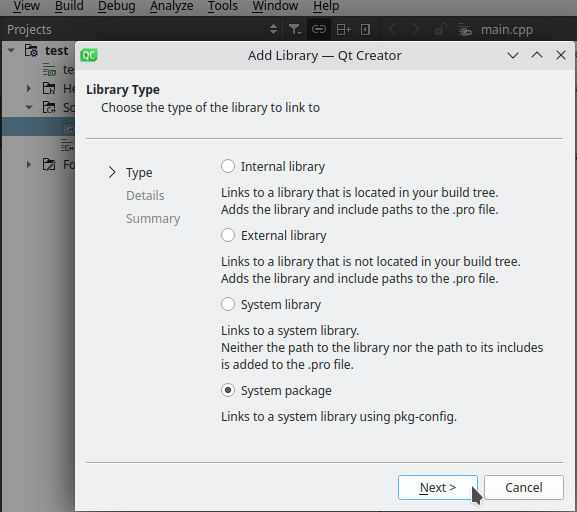
As the dialog clearly states, this uses
pkg-configto locate a system library to include. At this point you have told Qt Creator that you wish to usepkg-configand Qt Creator assumes you know how that works. At the PRO file level the result is the second option I gave you a few weeks ago. It gives you the same ultimate result:chrisw@newton:/tmp/simplescan3$ ls simplescan3.pro simplescan.c chrisw@newton:/tmp/simplescan3$ cat simplescan3.pro TEMPLATE = app CONFIG += console CONFIG -= app_bundle CONFIG -= qt SOURCES += simplescan.c CONFIG += link_pkgconfig PKGCONFIG += bluez chrisw@newton:/tmp/simplescan3$ qmake Info: creating stash file /tmp/simplescan3/.qmake.stash chrisw@newton:/tmp/simplescan3$ make gcc -c -pipe -O2 -Wall -Wextra -fPIC -I. -I/usr/lib/x86_64-linux-gnu/qt5/mkspecs/linux-g++ -o simplescan.o simplescan.c g++ -Wl,-O1 -o simplescan3 simplescan.o -lbluetooth chrisw@newton:/tmp/simplescan3$ ldd ./simplescan3 linux-vdso.so.1 (0x00007ffc07b50000) libbluetooth.so.3 => /lib/x86_64-linux-gnu/libbluetooth.so.3 (0x00007f581db81000) libc.so.6 => /lib/x86_64-linux-gnu/libc.so.6 (0x00007f581d959000) /lib64/ld-linux-x86-64.so.2 (0x00007f581dbd5000)For your education this is a short form version of how
pkg-configfunctions.- A library, or set of libraries, is deployed into a target system through some mechanism. This may be a binary bundle (with an arbitrary name) or it may have been built from source (no name).
- The runtime library will go into a libs folder, headers into an include folder, documentation under share, etc. Importantly, libraries supporting pkg-config will deploy a configuration file (or files) for pkg-config named pkgname.pc into a pkgconfig folder. In your case you can see that bluez.pc was deployed on your system in the Ubuntu libbluetooth-dev bundle. If you were to look at the libcrypt-dev Ubuntu bundle you would see it deploys two different pkg-config configuration files.
- The pkg-config configuratuion files allow you to ask pkg-config :
- What C compiler flags are needed to build a program using this pkgname with e.g.
pkg-config --cflags bluez - What linker flags to use with
pkg-config --libs bluez.
- What C compiler flags are needed to build a program using this pkgname with e.g.
- A library, or set of libraries, is deployed into a target system through some mechanism. This may be a binary bundle (with an arbitrary name) or it may have been built from source (no name).