
Skip to content
  • Categories
  • Recent
  • Tags
  • Popular
  • Users
  • Groups
  • Search
  • Get Qt Extensions
  • Unsolved
Collapse
Brand Logo
  1. Home
  2. Qt Development
  3. Installation and Deployment
  4. No working kit recognised
Qt 6.11 is out! See what's new in the release blog

No working kit recognised

Scheduled Pinned Locked Moved Solved Installation and Deployment
4 Posts 1 Posters 377 Views 1 Watching
  • Oldest to Newest
  • Newest to Oldest
  • Most Votes
Reply
  • Reply as topic
Log in to reply
This topic has been deleted. Only users with topic management privileges can see it.
  • P Offline
    P Offline
    Padlock
    wrote on last edited by
    #1

    I've been working with 5.11.3/MSVC 2017 on Windows 10 for some time and decided to update to 5.15.2 earlier today after switching to MSVC 2019.

    QtCreator won't let me build anything anymore now.
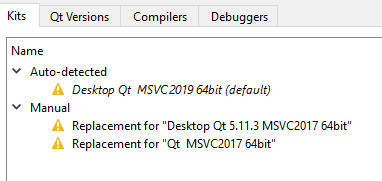
    7827605a-d616-4279-b833-80d14444b545-image.png

    What have I done wrong and/or where can I start fixing something?
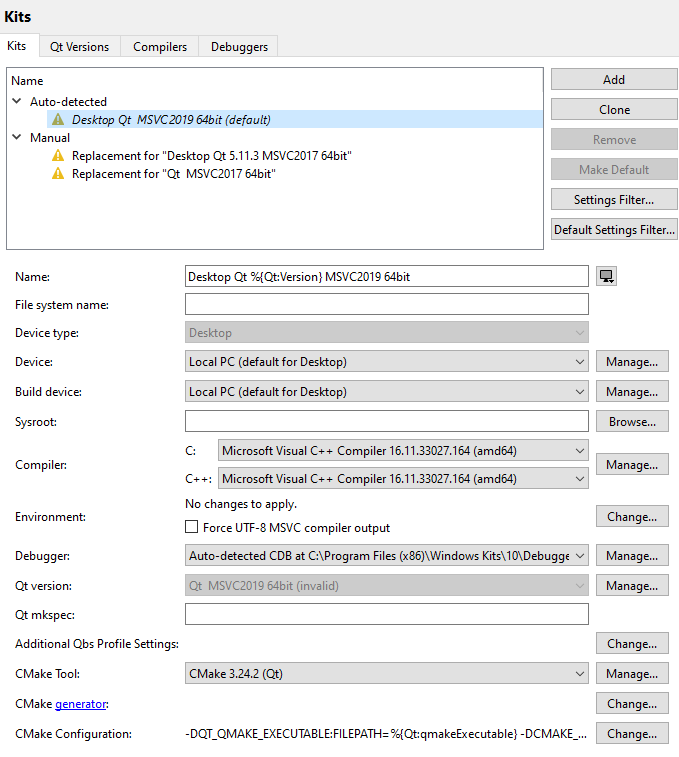
    af305e73-68a9-45db-8436-594d70063a7b-image.png

    1 Reply Last reply
    0
    • P Padlock

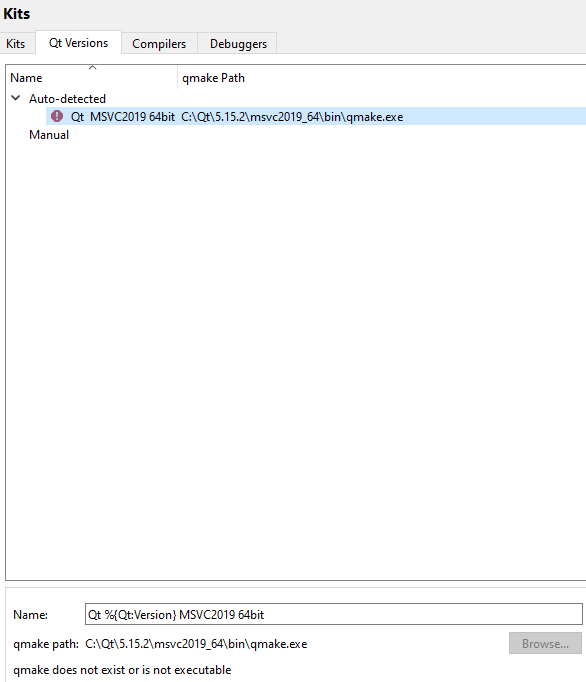
      This is a screenshot of the Qt Versions page:
      5001ca0e-3c49-4ef2-a247-8ce399bcb316-image.png

      That qmake.exe can also be invoked from a command line but QtCreator says it "does not exist or is not executable".

      P Offline
      P Offline
      Padlock
      wrote on last edited by
      #4

      After several unsuccessful attempts, uninstallations and reinstallations I uninstalled Qt entirely, removed the start menu entries manually, and started from scratch twice. This seem to have solved it.

      1 Reply Last reply
      0
      • P Offline
        P Offline
        Padlock
        wrote on last edited by
        #2

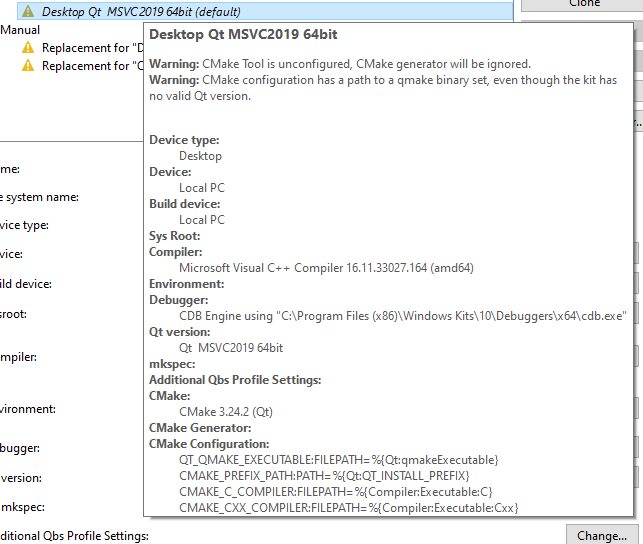
        This might probably be of interest too:
        158c49cb-8bdd-40a9-9619-220fd04f016c-image.png

        I do not understand the two warnings as I ticked installing cmake during the installation of 5.15.2, and the cmake executable does indeed start when I invoke it from the command-line. Apart from this, I'm not even using cmake for anything at the moment, so this shouldn't really make a difference, should it? What am I overlooking?

        1 Reply Last reply
        0
        • P Offline
          P Offline
          Padlock
          wrote on last edited by
          #3

          This is a screenshot of the Qt Versions page:

          5001ca0e-3c49-4ef2-a247-8ce399bcb316-image.png

          That qmake.exe can also be invoked from a command line but QtCreator says it "does not exist or is not executable".

          P 1 Reply Last reply
          0
          • P Padlock

            This is a screenshot of the Qt Versions page:

            5001ca0e-3c49-4ef2-a247-8ce399bcb316-image.png

            That qmake.exe can also be invoked from a command line but QtCreator says it "does not exist or is not executable".

            P Offline
            P Offline
            Padlock
            wrote on last edited by
            #4

            After several unsuccessful attempts, uninstallations and reinstallations I uninstalled Qt entirely, removed the start menu entries manually, and started from scratch twice. This seem to have solved it.

            1 Reply Last reply
            0

            • Login

            • Login or register to search.
            • First post
              Last post
            0
            • Categories
            • Recent
            • Tags
            • Popular
            • Users
            • Groups
            • Search
            • Get Qt Extensions
            • Unsolved