Skip to content
  • Categories
  • Recent
  • Tags
  • Popular
  • Users
  • Groups
  • Search
  • Get Qt Extensions
  • Unsolved
Collapse
Brand Logo
  1. Home
  2. Qt Development
  3. QML and Qt Quick
  4. I've been trying for a long time, can anyone tell me why CustomButtom's control.hovered doesn't work!
Qt 6.11 is out! See what's new in the release blog

I've been trying for a long time, can anyone tell me why CustomButtom's control.hovered doesn't work!

Scheduled Pinned Locked Moved Solved QML and Qt Quick
7 Posts 3 Posters 570 Views 1 Watching
  • Oldest to Newest
  • Newest to Oldest
  • Most Votes
Reply
  • Reply as topic
Log in to reply
This topic has been deleted. Only users with topic management privileges can see it.
  • H Offline
    H Offline
    hilod
    wrote on last edited by
    #1

    2022-12-22 04 55 20.png 2022-12-22 04 56 17.png
    When I mouse over it, it doesn't change the "font color", what's wrong with it?

    1 Reply Last reply
    0
    • fcarneyF Offline
      fcarneyF Offline
      fcarney
      wrote on last edited by
      #7

      States have a priority. The lower in the list (comes first) will have priority over states later in the list. So your "normal" state will have priority over the "hovered" state. Thus it will never show anything on hover as either "normal" and "down" will always be active.

      C++ is a perfectly valid school of magic.

      1 Reply Last reply
      0
      • TomZT Offline
        TomZT Offline
        TomZ
        wrote on last edited by TomZ
        #2

        it helps if you actually share the sourcecode of your MyButton.ui.qml file

        ps. you need to edit the sourcecode to fix things, was that among the things you tried?

        1 Reply Last reply
        0
        • H Offline
          H Offline
          hilod
          wrote on last edited by
          #3

          I just added a State (hovered) and left everything else unchanged.

          Here is the code:


          /*
          This is a UI file (.ui.qml) that is intended to be edited in Qt Design Studio only.
          It is supposed to be strictly declarative and only uses a subset of QML. If you edit
          this file manually, you might introduce QML code that is not supported by Qt Design Studio.
          Check out https://doc.qt.io/qtcreator/creator-quick-ui-forms.html for details on .ui.qml files.
          */
          import QtQuick 2.15
          import QtQuick.Controls 2.15
          
          Button {
              id: control
              width: 100
              height: 60
          
              implicitWidth: Math.max(
                                 buttonBackground ? buttonBackground.implicitWidth : 0,
                                 textItem.implicitWidth + leftPadding + rightPadding)
              implicitHeight: Math.max(
                                  buttonBackground ? buttonBackground.implicitHeight : 0,
                                  textItem.implicitHeight + topPadding + bottomPadding)
              leftPadding: 4
              rightPadding: 4
          
              text: "My Button"
          
              background: buttonBackground
              Rectangle {
                  id: buttonBackground
                  color: "#00000000"
                  implicitWidth: 100
                  implicitHeight: 40
                  opacity: enabled ? 1 : 0.3
                  radius: 2
                  border.color: "#047eff"
              }
          
              contentItem: textItem
              Text {
                  id: textItem
                  text: control.text
          
                  opacity: enabled ? 1.0 : 0.3
                  color: "#047eff"
                  horizontalAlignment: Text.AlignHCenter
                  verticalAlignment: Text.AlignVCenter
              }
          
              states: [
                  State {
                      name: "normal"
                      when: !control.down
          
                      PropertyChanges {
                          target: buttonBackground
                          color: "#00000000"
                          border.color: "#047eff"
                      }
          
                      PropertyChanges {
                          target: textItem
                          color: "#047eff"
                      }
                  },
                  State {
                      name: "down"
                      when: control.down
                      PropertyChanges {
                          target: textItem
                          color: "#ffffff"
                      }
          
                      PropertyChanges {
                          target: buttonBackground
                          color: "#047eff"
                          border.color: "#00000000"
                      }
                  },
                  State {
                      name: "hovered"
                      when: control.hovered
          
                      PropertyChanges {
                          target: textItem
                          color: "#ff04e4"
                          horizontalAlignment: Text.AlignHCenter
                          verticalAlignment: Text.AlignVCenter
                      }
                  }
              ]
          }
          
          
          1 Reply Last reply
          0
          • TomZT Offline
            TomZT Offline
            TomZ
            wrote on last edited by
            #4

            I'm missing a hoverEnabled: true in your file.

            H 1 Reply Last reply
            0
            • TomZT TomZ

              I'm missing a hoverEnabled: true in your file.

              H Offline
              H Offline
              hilod
              wrote on last edited by hilod
              #5

              @TomZ In the properties view, 2 of them are already checked. But it is missing in qml.

              2022-12-22 05 56 55.png
              2022-12-22 05 57 33.png
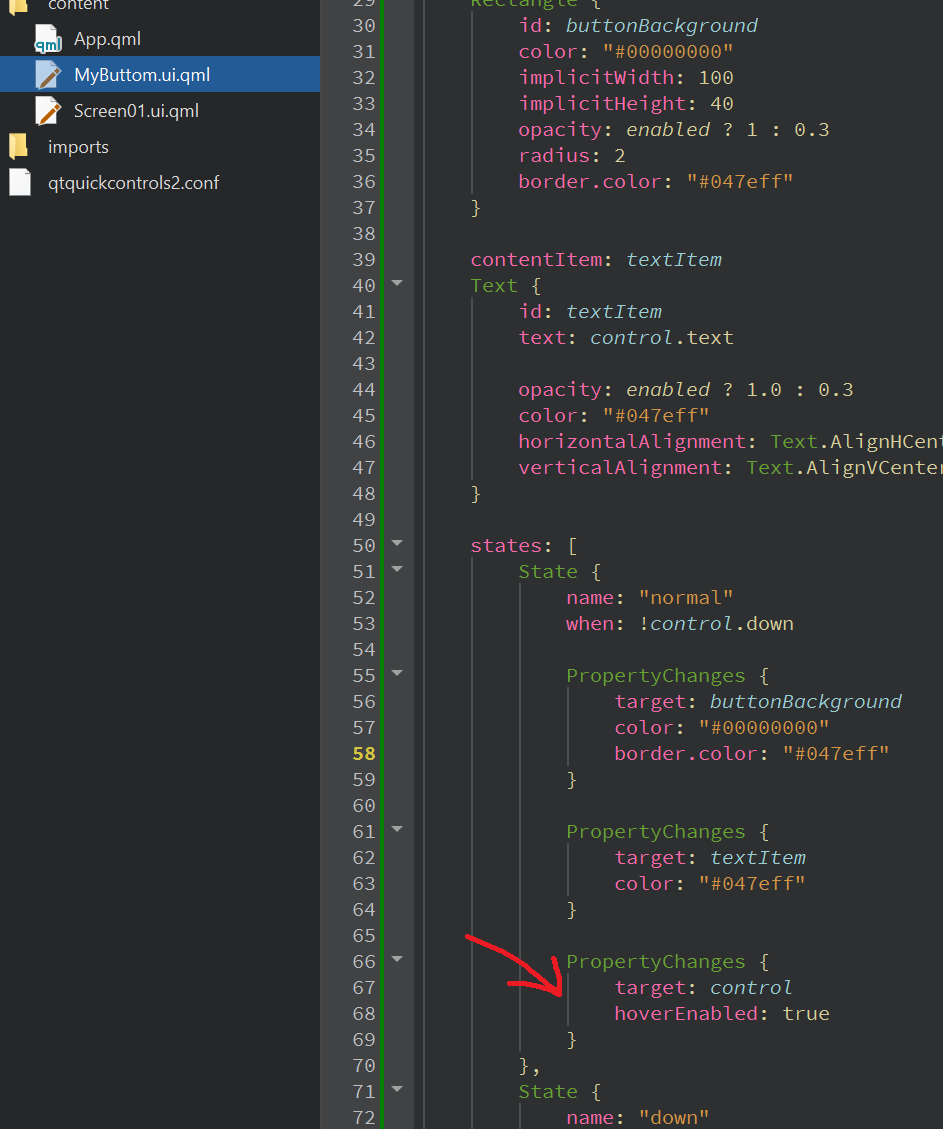
              I unchecked and then re-checked and a line appeared in the qml code within the normal state.
              2022-12-22 06 10 22.png
              But it still doesn't work.

              1 Reply Last reply
              0
              • TomZT Offline
                TomZT Offline
                TomZ
                wrote on last edited by
                #6

                I'm assuming you already figured it out, but making that bool part of the button itself and not of some state will fix this.

                1 Reply Last reply
                0
                • fcarneyF Offline
                  fcarneyF Offline
                  fcarney
                  wrote on last edited by
                  #7

                  States have a priority. The lower in the list (comes first) will have priority over states later in the list. So your "normal" state will have priority over the "hovered" state. Thus it will never show anything on hover as either "normal" and "down" will always be active.

                  C++ is a perfectly valid school of magic.

                  1 Reply Last reply
                  0

                  • Login

                  • Login or register to search.
                  • First post
                    Last post
                  0
                  • Categories
                  • Recent
                  • Tags
                  • Popular
                  • Users
                  • Groups
                  • Search
                  • Get Qt Extensions
                  • Unsolved