
Skip to content
  • Categories
  • Recent
  • Tags
  • Popular
  • Users
  • Groups
  • Search
  • Get Qt Extensions
  • Unsolved
Collapse
Brand Logo
  1. Home
  2. Qt Development
  3. General and Desktop
  4. Align text on center
Qt 6.11 is out! See what's new in the release blog

Align text on center

Scheduled Pinned Locked Moved Unsolved General and Desktop
3 Posts 3 Posters 448 Views 1 Watching
  • Oldest to Newest
  • Newest to Oldest
  • Most Votes
Reply
  • Reply as topic
Log in to reply
This topic has been deleted. Only users with topic management privileges can see it.
  • R Offline
    R Offline
    Roberrt
    wrote on last edited by
    #1

    How i could stop the Loading text from moving to the left, but still continue aligned to the center of the button?
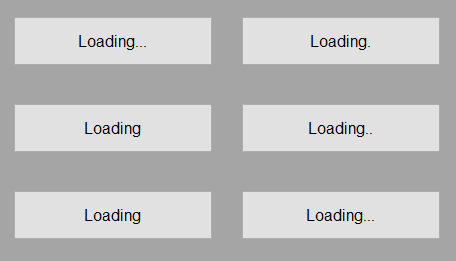
    2022-12-12_18-57-56.gif

    auto timer = new QTimer();
    auto button = new QPushButton(this);
    
    button->setGeometry(50, 50, 200, 50);
    QGridLayout* layout = new QGridLayout();
    button->setLayout(layout);
    
    QLabel* label = new QLabel(button);
    label->setStyleSheet("qproperty-alignment: AlignCenter;");
    
    layout->addWidget(label);
    
    timer->setInterval(500);
    timer->start();
    
    QObject::connect(timer, &QTimer::timeout, [=]
    {
        static int dot = 0;
    
        dot = (dot + 1) % 4;
    
        QString text = "Loading...";
        text.resize(7 + dot);
    
        label->setText(text);
    });
    
    1 Reply Last reply
    0
    • JoeCFDJ Offline
      JoeCFDJ Offline
      JoeCFD
      wrote on last edited by
      #2
      This post is deleted!
      1 Reply Last reply
      0
      • M Offline
        M Offline
        mpergand
        wrote on last edited by mpergand
        #3
        static int dot = 0;
        
           dot = (dot + 1) % 4;
        
           QString text = QString("Loading%1").arg("",dot,'.');
           text=QString("%1%2").arg(text).arg("",10-text.size(),' ');
        
           label->setText(text);
        

        Not the best I guess ;)
        anyway can't work correctly because, space and point have not the same size on not fixed font.

        Would be better to use a fixed left margin for the label.

        1 Reply Last reply
        0

        • Login

        • Login or register to search.
        • First post
          Last post
        0
        • Categories
        • Recent
        • Tags
        • Popular
        • Users
        • Groups
        • Search
        • Get Qt Extensions
        • Unsolved