

Qt 5.15.5 (6) and qsqlmysql plugin compilation with MariaDB
-
I know there's a very old sticky thread but it does not seem to address my problem which appeared with Qt 5.15.4 or 5.15.5
I used to compile Qt and the the mysql plugin using old redistributable source from MySQL (both x86 and x64)Unfortunately my batch script doesn't work any more so I started clean using MariaDB and the tips from:
https://doc.qt.io/qt-5/sql-driver.html#how-to-build-the-qmysql-plugin-on-windows
However the connect.msi file cannot be found when you follow the link aboveInstead I downloaded :
https://archive.mariadb.org//mariadb-10.2.41/win32-packages/mariadb-10.2.41-win32.zip
https://archive.mariadb.org//mariadb-10.2.41/winx64-packages/mariadb-10.2.41-winx64.zip
10.2.41 seems to be the last version supporting 32b buildsI then run configure with this additional flags :
-sql-mysql -I $mysql_include_folder -L $mysql_lib_folder MYSQL_LIBS="-llibmariadb"which returns the following errorERROR: Feature 'sql-mysql' was enabled, but the pre-condition 'libs.mysql' failed.Has anyone experience with the right mariadb installer/zip file?
-
@Christian-Ehrlicher what do you mean? The code I posted is from my powershell script, and
$mysql_**are variables set to the right paths.@JulienMaille said in Qt 5.15.5 (6) and qsqlmysql plugin compilation with MariaDB:
The code I posted is from my powershell script
you did not wrote this
and $mysql_** are variables set to the right paths.
Still you don't follow the documentation on how to pass the MYSQL libs/paths:
The configure script cannot detect the necessary libraries and include files if they are not in the standard paths, so it may be necessary to specify these paths using the *_INCDIR=, *_LIBDIR=, or *_PREFIX= command-line options. For example, if your MySQL files are installed in /usr/local/mysql (or in C:/Program Files/MySQL/MySQL Connector C 6.1 on Windows), then pass the following parameter to configure: MYSQL_PREFIX=/usr/local/mysql (or MYSQL_PREFIX="C:/Program Files/MySQL/MySQL Connector C 6.1" for Windows). The particulars for each driver are explained below. -
I know there's a very old sticky thread but it does not seem to address my problem which appeared with Qt 5.15.4 or 5.15.5
I used to compile Qt and the the mysql plugin using old redistributable source from MySQL (both x86 and x64)Unfortunately my batch script doesn't work any more so I started clean using MariaDB and the tips from:
https://doc.qt.io/qt-5/sql-driver.html#how-to-build-the-qmysql-plugin-on-windows
However the connect.msi file cannot be found when you follow the link aboveInstead I downloaded :
https://archive.mariadb.org//mariadb-10.2.41/win32-packages/mariadb-10.2.41-win32.zip
https://archive.mariadb.org//mariadb-10.2.41/winx64-packages/mariadb-10.2.41-winx64.zip
10.2.41 seems to be the last version supporting 32b buildsI then run configure with this additional flags :
-sql-mysql -I $mysql_include_folder -L $mysql_lib_folder MYSQL_LIBS="-llibmariadb"which returns the following errorERROR: Feature 'sql-mysql' was enabled, but the pre-condition 'libs.mysql' failed.Has anyone experience with the right mariadb installer/zip file?
@JulienMaille said in Qt 5.15.5 (6) and qsqlmysql plugin compilation with MariaDB:
$mysql_include_folder
What should this be? Please follow the documentation and properly pass the needed variables.
-
@JulienMaille said in Qt 5.15.5 (6) and qsqlmysql plugin compilation with MariaDB:
$mysql_include_folder
What should this be? Please follow the documentation and properly pass the needed variables.
@Christian-Ehrlicher what do you mean? The code I posted is from my powershell script, and
$mysql_**are variables set to the right paths. -
@Christian-Ehrlicher what do you mean? The code I posted is from my powershell script, and
$mysql_**are variables set to the right paths.@JulienMaille said in Qt 5.15.5 (6) and qsqlmysql plugin compilation with MariaDB:
The code I posted is from my powershell script
you did not wrote this
and $mysql_** are variables set to the right paths.
Still you don't follow the documentation on how to pass the MYSQL libs/paths:
The configure script cannot detect the necessary libraries and include files if they are not in the standard paths, so it may be necessary to specify these paths using the *_INCDIR=, *_LIBDIR=, or *_PREFIX= command-line options. For example, if your MySQL files are installed in /usr/local/mysql (or in C:/Program Files/MySQL/MySQL Connector C 6.1 on Windows), then pass the following parameter to configure: MYSQL_PREFIX=/usr/local/mysql (or MYSQL_PREFIX="C:/Program Files/MySQL/MySQL Connector C 6.1" for Windows). The particulars for each driver are explained below. -
@Christian-Ehrlicher said in Qt 5.15.5 (6) and qsqlmysql plugin compilation with MariaDB:
MYSQL_PREFIX=
Thank you for your remark. Could you clarify which package has to be downloaded from mariadb website, because 2 of them are mentioned in the doc.
My command is the following one:
"D:\Qt\5-build\qt-everywhere-src-5.15.6\configure.bat" -debug-and-release -mp -shared -strip -opensource -confirm-license -platform win32-msvc -opengl desktop -no-angle -no-iconv -no-dbus -no-icu -no-fontconfig -no-freetype -qt-harfbuzz -qt-doubleconversion -nomake examples -no-compile-examples -nomake tests -skip qt3d -skip qtdoc -skip qtcanvas3d -skip qtconnectivity -skip qtdatavis3d -skip qtgamepad -skip qtgraphicaleffects -skip qtlocation -skip qtlottie -skip qtnetworkauth -skip qtpurchasing -skip qtdeclarative -skip qtquickcontrols -skip qtquickcontrols2 -skip qtquicktimeline -skip qtremoteobjects -skip qtscxml -skip qtsensors -skip qtserialbus -skip qtserialport -skip qtspeech -skip qtvirtualkeyboard -skip qtwebview -skip qtandroidextras -skip qtmacextras -skip qtwayland -skip qtwebchannel -skip qtwebengine -skip qtwebglplugin -skip qtwebsockets -skip qtx11extras -skip qtcharts -optimized-qmake -prefix D:\Qt\5-build\qt-5.15.6.kde-dynamic-msvc2022-x86 -openssl-linked -I D:\Qt\5-build\openssl-1.1\x86\include -L D:\Qt\5-build\openssl-1.1\x86\lib OPENSSL_LIBS="-lUser32 -lAdvapi32 -lGdi32 -llibcrypto -llibssl" -sql-mysql MYSQL_INCDIR="D:\Qt\5-build\mariadb-10.2.41-win32\include" MYSQL_LIBDIR="D:\Qt\5-build\mariadb-10.2.41-win32\lib" MYSQL_PREFIX="D:\Qt\5-build\mariadb-10.2.41-win32" MYSQL_LIBS="-llibmariadb"I still get the same error, when opening the log file I see this:
mysql_config not found.
  => source produced no result.
Trying source 1 (type mysqlConfig) of library mysql ...
mysql_config not found.
  => source produced no result.
Trying source 2 (type mysqlConfig) of library mysql ...
mysql_config not found.
  => source produced no result.
Trying source 3 (type mysqlConfig) of library mysql ...
mysql_config not found.
  => source produced no result.
Trying source 4 (type inline) of library mysql ...
  => source failed condition '!config.win32'.
Trying source 5 (type inline) of library mysql ...
mysql.h not found in [D:\\Qt\\5-build\\mariadb-10.2.41-win32\\include D:\\Qt\\5-build\\mariadb-10.2.41-win32/include] and global paths.
  => source produced no result.
Trying source 6 (type inline) of library mysql ...
mysql.h not found in [D:\\Qt\\5-build\\mariadb-10.2.41-win32\\include D:\\Qt\\5-build\\mariadb-10.2.41-win32/include] and global paths.
  => source produced no result.
Trying source 7 (type inline) of library mysql ...
  => source failed condition '!config.win32'.
Trying source 8 (type inline) of library mysql ...
  => source failed condition '!config.win32'.
test config.qtbase_sqldrivers.libraries.mysql FAILED
I noticed that mariadb places all includes in a subfolder
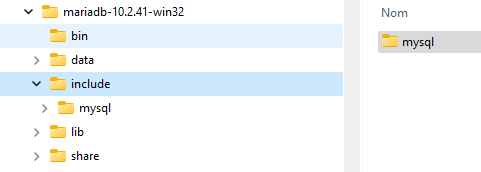
So I changed the include path accordingly and now the error is gone. I'm crossing my fingers while everything compiles
