
Trial project no longer working with Small Business license
-
I was developing a project with the Trial version of QT. I have since purchased a Small Business license, and the project is no longer compiling. Here is the error I'm getting:
D:\qt\EES\Photography\CMakeLists.txt:14: error: Could not find a package configuration file provided by "QT"
with any of the following names:
Qt6Config.cmake
qt6-config.cmake
Qt5Config.cmake
qt5-config.cmakeAdd the installation prefix of "QT" to CMAKE_PREFIX_PATH or set "QT_DIR" to a directory containing one of the above files.
If "QT" provides a separate development package or SDK, be sure it has been installed.I'm not certain where to redirect the QT_DIR prefix. Any ideas?
Thank you,
Bob K. -
@JoeCFD said in Trial project no longer working with Small Business license:
QT_DIR=installed qt path/lib/cmake/Qt5
Still not working. I entered the following:
In QT Creator: Edit | Preferences | System | Environment | Change
Entered: QT_DIR=installed qt path/lib/cmake/Qt5Changed Qt5 to Qt6 and still didn't work.
-
@JoeCFD said in Trial project no longer working with Small Business license:
QT_DIR=installed qt path/lib/cmake/Qt5
Still not working. I entered the following:
In QT Creator: Edit | Preferences | System | Environment | Change
Entered: QT_DIR=installed qt path/lib/cmake/Qt5Changed Qt5 to Qt6 and still didn't work.
@Bob-K in qtcreator this is not needed. Have you selected Qt version on Manage kits? Try to make clean to remove all contents in the project build dir since qt has been changed.
But you do need to set this QT_DIR for cmake on Windows ENV(not in qt creator env) in case cmake is run from command line to build your project.
-
Ugh... this is what I entered:
QT_DIR=C:/Qt/6.3.2/mingw_64/lib/cmake/Qt6/lib/cmake/Qt6
There is no Qt5 in that folder.
Here is my CMakeLists.txt file:
cmake_minimum_required(VERSION 3.5) project(Photography VERSION 0.1 LANGUAGES CXX) set(CMAKE_INCLUDE_CURRENT_DIR ON) set(CMAKE_AUTOUIC ON) set(CMAKE_AUTOMOC ON) set(CMAKE_AUTORCC ON) set(CMAKE_CXX_STANDARD 17) set(CMAKE_CXX_STANDARD_REQUIRED ON) find_package(QT NAMES Qt6 Qt5 REQUIRED COMPONENTS Widgets) find_package(Qt${QT_VERSION_MAJOR} REQUIRED COMPONENTS Widgets) #set(app_icon_resource_windows "${CMAKE_CURRENT_SOURCE_DIR}/eesIcon.qrc") set(PROJECT_SOURCES main.cpp mainwindow.cpp mainwindow.h mainwindow.ui resources.qrc ) if(${QT_VERSION_MAJOR} GREATER_EQUAL 6) qt_add_executable(Photography MANUAL_FINALIZATION ${PROJECT_SOURCES} ) # Define target properties for Android with Qt 6 as: # set_property(TARGET Photography APPEND PROPERTY QT_ANDROID_PACKAGE_SOURCE_DIR # ${CMAKE_CURRENT_SOURCE_DIR}/android) # For more information, see https://doc.qt.io/qt-6/qt-add-executable.html#target-creation else() if(ANDROID) add_library(Photography SHARED ${PROJECT_SOURCES} ) # Define properties for Android with Qt 5 after find_package() calls as: # set(ANDROID_PACKAGE_SOURCE_DIR "${CMAKE_CURRENT_SOURCE_DIR}/android") else() add_executable(Photography ${PROJECT_SOURCES} ) endif() endif() target_link_libraries(Photography PRIVATE Qt${QT_VERSION_MAJOR}::Widgets) set_target_properties(Photography PROPERTIES MACOSX_BUNDLE_GUI_IDENTIFIER my.example.com MACOSX_BUNDLE_BUNDLE_VERSION ${PROJECT_VERSION} MACOSX_BUNDLE_SHORT_VERSION_STRING ${PROJECT_VERSION_MAJOR}.${PROJECT_VERSION_MINOR} MACOSX_BUNDLE TRUE WIN32_EXECUTABLE TRUE ) install(TARGETS Photography BUNDLE DESTINATION . LIBRARY DESTINATION ${CMAKE_INSTALL_LIBDIR}) if(QT_VERSION_MAJOR EQUAL 6) qt_finalize_executable(Photography) endif() -
You select "Auto-detected: Qt 6.3.2 MinGW 64-bit (default)" and then press apply at the bottom of qt creator.
then build.
click projects->Build in qtcreator
under Build Environment
click details of Use system environment and you can see QTDIR is defined as env variable. -
I selected "Auto-detected: Qt 6.3.2 MinGW 64-bit (default)" and then pressed Apply.
And then build, and still have the error.To be honest, I can't find the options:
projects->Build in qtcreator
Build Environment
Use system environmentI'm not sure where those options are located.
-
You don't need to set
QT_DIRto anything.All you have to do, is make sure that you Kit has a Qt Version:
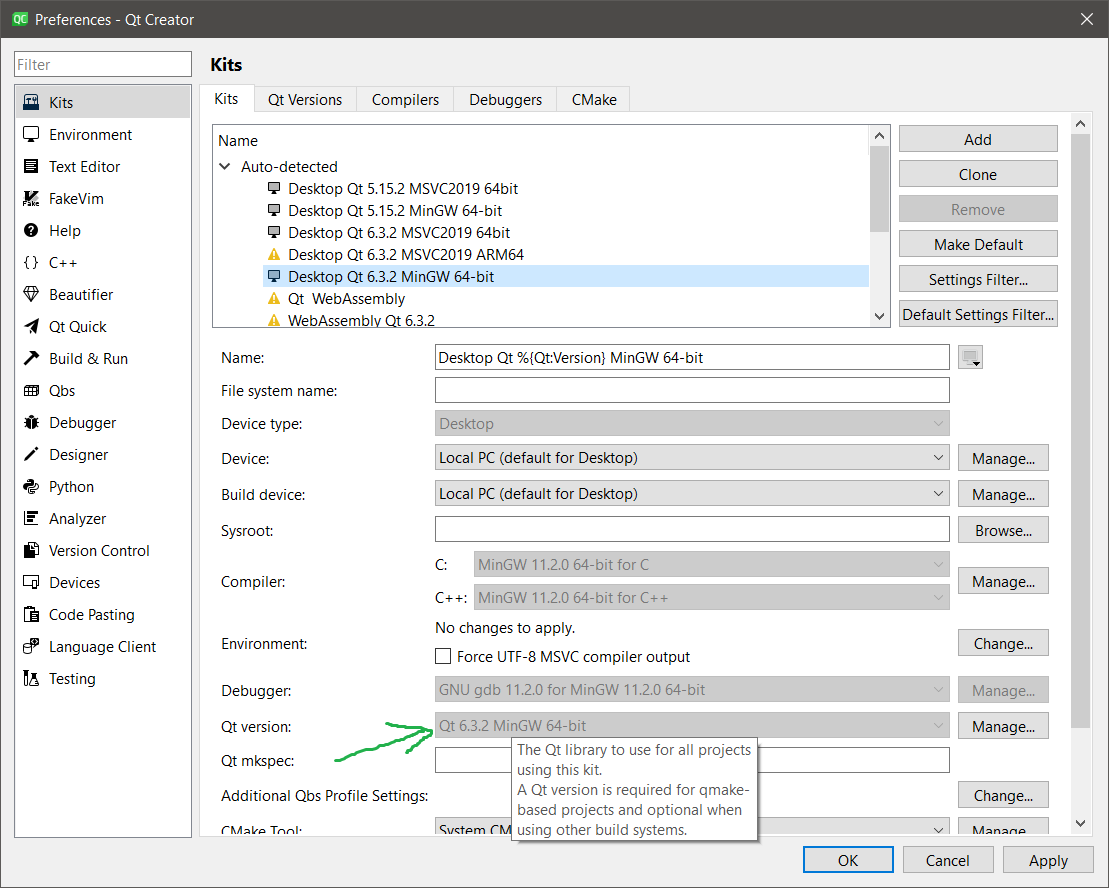
Your CMake project will have in the Initial Configuration
-DCMAKE_PREFIX_PATH:PATH=%{Qt:QT_INSTALL_PREFIX}, which will be expanded in current configuration to something like-DCMAKE_PREFIX_PATH:PATH=C:/Qt/6.3.2/mingw_64Note that there is no
lib/cmake/Qt6or anything like that, justC:/Qt/6.3.2/mingw_64.That's all that CMake needs in order to find the Qt6 package.
You don't need to change any environment variables, set any
QT_DIRCMake variables.When in doubt just click on the Re-configure with Initial Parameters button, which will clear you CMake configuration and configure the project from scratch.
-
Thanks cristian-adam. I was able to verify that Qt version. Found the Initial Configuration. Pressed the Re-configure with Initial Parameters.
Now I'm getting the following error:
:-1: error: CMakeFiles/Photography.dir/Photography_autogen/mocs_compilation.cpp.obj:
in function `MainWindow::qt_static_metacall(QObject*, QMetaObject::Call, int, void**)': -
Your CMake project is configured with
set(CMAKE_AUTOMOC ON), which is not 100% compatible with all Qt software. See more about AUTOMOC in the documentation.You will have to either turn off AUTOMOC generally, or specifically for "bad" source files with:
set_source_files_properties(bad_source_file PROPERTIES SKIP_AUTOMOC ON)But if you are skipping AUTOMOC, you will have to use qt_wrap_cpp for the source files that require moc handling.
-
I've tried the above AUTOMOC settings, and I keep getting the following error:
:-1: error: CMakeFiles/Photography.dir/mainwindow.cpp.obj:mainwindow.cpp:(.rdata$.refptr._ZTV10MainWindow[.refptr._ZTV10MainWindow]+0x0):
undefined reference to `vtable for MainWindow' -
Doing a websearch resulted in a post on this forum: https://forum.qt.io/topic/53850/undefined-reference-to-vtable-for-mainwindow
-
I've tried the above AUTOMOC settings, and I keep getting the following error:
:-1: error: CMakeFiles/Photography.dir/mainwindow.cpp.obj:mainwindow.cpp:(.rdata$.refptr._ZTV10MainWindow[.refptr._ZTV10MainWindow]+0x0):
undefined reference to `vtable for MainWindow'@Bob-K said in Trial project no longer working with Small Business license:
I've tried the above AUTOMOC settings, and I keep getting the following error:
And did you add qt_wrap_cpp() to moc your mainwindow.h as written by @cristian-adam ? Please post your current CMakeLists.txt


