

More xterm in MDI example challenge
-
Reason I used MDI example - it has many useful features - such as "tile the displays"....
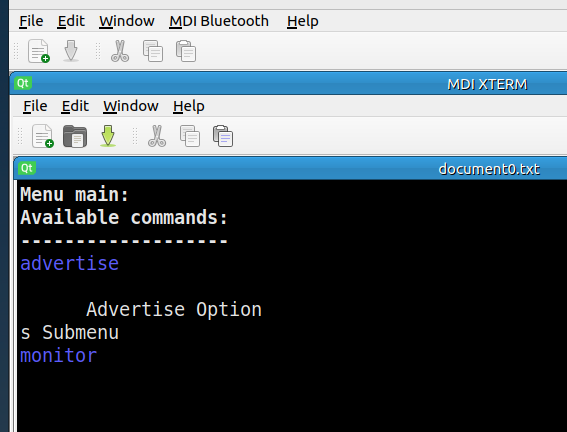
Works as expected, however, need some tuning-up.Here is an example - "stuff" - I do not know what to call it - in MDI example it is a subwindow / child - so far of unknown type.
The xterm filled the original size of this sub-window just fine.
Resizing this sub window to the current size DID NOT resize the original.
So my current desire is to redraw the original to fit into "up sized sub window".I am looking at the params item QString::number(winId()) which tells the xterm "where to write (window) " the command output.
Should I be able to access that window and copy its contents to expanded subwindow ?
How ?
        params << "-T" << "bluetoothctl no options (interactive) case 1 -hold file " << "-fa" <<"Monospace" << "-fs" << "14"<< "-hold" <<
                  "-into" <<QString::number(winId())<<
                  "-e" << "bluetoothctl  | tee /tmp/temp.txt";

        qDebug() <<"params " << params;
Any suggestion will be appreciated.
PARTIALLY SOLVED
MDI example has "Save file" menu option - hence there is a file somewhere waiting to be accessed...
-
Reason I used MDI example - it has many useful features - such as "tile the displays"....
Works as expected, however, need some tuning-up.Here is an example - "stuff" - I do not know what to call it - in MDI example it is a subwindow / child - so far of unknown type.
The xterm filled the original size of this sub-window just fine.
Resizing this sub window to the current size DID NOT resize the original.
So my current desire is to redraw the original to fit into "up sized sub window".I am looking at the params item QString::number(winId()) which tells the xterm "where to write (window) " the command output.
Should I be able to access that window and copy its contents to expanded subwindow ?
How ?
        params << "-T" << "bluetoothctl no options (interactive) case 1 -hold file " << "-fa" <<"Monospace" << "-fs" << "14"<< "-hold" <<
                  "-into" <<QString::number(winId())<<
                  "-e" << "bluetoothctl  | tee /tmp/temp.txt";

        qDebug() <<"params " << params;
Any suggestion will be appreciated.
PARTIALLY SOLVED
MDI example has "Save file" menu option - hence there is a file somewhere waiting to be accessed...
@AnneRanch said in More xterm in MDI example challenge:
Resizing this sub window to the current size DID NOT resize the original.
Correct. I do not know of any way to tell a running
xtermto change its size.I am looking at the params item QString::number(winId()) which tells the xterm "where to write (window) " the command output.
Should I be able to access that window and copy its contents to expanded subwindow ?No. As I advised you previously, so long as you use
xterm -intoyou will not be able to access its output programatically from your code, it will be sent to the widget directly from thexterm. The full story can be read at e.g. https://stackoverflow.com/a/14772227/489865, which explains what would be necessary if you did want to try accessing its output, and as you can see would require pretty hefty coding just to try out. -
@AnneRanch said in More xterm in MDI example challenge:
Resizing this sub window to the current size DID NOT resize the original.
Correct. I do not know of any way to tell a running
xtermto change its size.I am looking at the params item QString::number(winId()) which tells the xterm "where to write (window) " the command output.
Should I be able to access that window and copy its contents to expanded subwindow ?No. As I advised you previously, so long as you use
xterm -intoyou will not be able to access its output programatically from your code, it will be sent to the widget directly from thexterm. The full story can be read at e.g. https://stackoverflow.com/a/14772227/489865, which explains what would be necessary if you did want to try accessing its output, and as you can see would require pretty hefty coding just to try out.@JonB You are addressing tow differtt issues . I think I can get the sizing udder my control using xterm -geometry option.
Secondly - as you said - he command output goes to QTextEdit object , hence it should not be that hard to work on.
I have another post kinda of addressing that... sometime it is hard to keep stuff "under one roof". -
@JonB You are addressing tow differtt issues . I think I can get the sizing udder my control using xterm -geometry option.
Secondly - as you said - he command output goes to QTextEdit object , hence it should not be that hard to work on.
I have another post kinda of addressing that... sometime it is hard to keep stuff "under one roof".@AnneRanch
Indeed. You asked about resizing once the xterm is running ("Resizing this sub window to the current size DID NOT resize the original."), I think you are stuck with that. You can specify to xterm how big the window initially when you invoke it, to use more space if you have it, but I don't think you can "send a message" to the running xterm if the user later resizes the Qt window.As for the output being sent from the xterm directly into the widget via the
"-into" <<QString::number(winId()). If that widget is aQTextEditand you can get to see what it put there viaQTextEdit::text()then that is excellent and that way you can get to see what it output there if you need to!
