
Size of icon display in QTableView
-
The icon display appears very small (about 20 pixels wide and 12 tall)

the Icon file loaded has two versions (one is 32 x 16, the other 64 x 32)
<qresource prefix="/stacking">
        <file alias="LightColour.png">res/LightColour.png</file>
        <file alias="LightColour@2x.png">res/LightColour@2x.png</file>
         : etc
    </qresource>
which are loaded up as follows:
if (0 == ImageListModel::icons.size())
{
     std::lock_guard lock(ImageListModel::mutex);
     if (0 == ImageListModel::icons.size())          // check for race condtion
     {
           ImageListModel::icons.emplace_back(":/stacking/LightColour.png");
            ImageListModel::icons.emplace_back(":/stacking/DarkColour.png");
                  : etc
     }
}
How can I make the displayed Icon larger than the size it currently is?
Thanks
David -
I think I may need a QStyledItemDelegate subclass, a bit like:
class IconSizeDelegate : public QStyledItemDelegate
{
Q_OBJECTpublic: using QStyledItemDelegate::QStyledItemDelegate; protected: void paint(QPainter* painter, const QStyleOptionViewItem& option, const QModelIndex& index) const override; inline QSize sizeHint(const QStyleOptionViewItem& option, const QModelIndex& index) const { QSize result = QStyledItemDelegate::sizeHint(option, index); result.setHeight(result.height() * 1.2); return result; } };The question then is what goes in the paint mf if I want to increase the iconsize for any cells that have a QIcon associated with them (in this case it's all cells in column 0 and that has a selection check box, and Icon and text).
I know it's not as simple as:
void IconSizeDelegate::paint(QPainter* painter, const QStyleOptionViewItem& option, const QModelIndex& index) const
	{
		if (index.data().canConvert<QIcon> ())
		{
			QIcon icon = qvariant_cast<QIcon> (index.model()->data(index, Qt::DecorationRole));
			//scale it . note must be big enough or you get a smaller
			QSize iconSize = option.decorationSize;
			iconSize *= 2;
			QPixmap iconPixmap = icon.pixmap(iconSize);
			//draw icon
			painter->drawPixmap(option.rect.x(), option.rect.center().y() - mysize.height() / 2, iconPixmap);
		}
	}
and then:
IconSizeDelegate* iconSizeDelegate{ new IconSizeDelegate() };
ui->tableView->setItemDelegateForColumn(0, iconSizeDelegate);
Because that didn't work (the column wasn't rendered at all - cells were blank).
So what should it contain?
-
Here's what it looked like before:

I've had another attempt at the IconSizeDelegate which doesn't quite work (no check box, text formatted without ellipsis :( )

Here's the code that produced the above result:
void IconSizeDelegate::paint(QPainter* painter, const QStyleOptionViewItem& option, const QModelIndex& index) const
{
	Q_ASSERT(index.isValid());
	QStyleOptionViewItem opt{ option };
	initStyleOption(&opt, index);

	QStyle* style = opt.widget ? opt.widget->style() : QApplication::style();
	QRect rect = opt.rect;

	constexpr uint neededFeatures
	{ static_cast<uint>(QStyleOptionViewItem::HasCheckIndicator |
		QStyleOptionViewItem::HasDisplay |
		QStyleOptionViewItem::HasDecoration) };

	Q_ASSERT(neededFeatures == (opt.features & neededFeatures));

	Qt::CheckState state = opt.checkState;
	QIcon icon = qvariant_cast<QIcon> (index.model()->data(index, Qt::DecorationRole));
	QString text = index.model()->data(index, Qt::DisplayRole).toString();

	painter->save();

	//
	// Draw the check box normally
	//
	QStyleOptionButton checkBoxStyle;
	checkBoxStyle.state = (Qt::Checked == state) ? QStyle::State_On : QStyle::State_Off;
	style->drawPrimitive(QStyle::PE_IndicatorCheckBox, &checkBoxStyle, painter);
	//
        // Draw the icon twice as large as the default
	//
	QRect nextRect{ rect };
	nextRect.setLeft(nextRect.left() + checkBoxStyle.rect.width());
	QSize iconSize = opt.decorationSize;
	iconSize.scale(2 * iconSize.width(), 2 * iconSize.height(), Qt::KeepAspectRatio);
	QPixmap iconPixmap{ icon.pixmap(iconSize) };
	painter->drawPixmap(nextRect.x(), nextRect.center().y() - iconSize.height() / 2, iconPixmap);

	//
	// Draw the text as normal
	//
	nextRect.setLeft(nextRect.left() + iconSize.width());
	if (option.features & QStyleOptionViewItem::WrapText)
		painter->drawText(nextRect, Qt::AlignLeft | Qt::AlignTop | Qt::TextWordWrap, text);
	else
		painter->drawText(nextRect, Qt::AlignLeft | Qt::AlignVCenter, text);
	painter->restore();
}
What have I missed or got wrong? Should I instead have changed option.decorationSize and invoked the base class paint mf? Can the decoration size be over-ridden using a style sheet? There seems to be a sub-element style for this: QStyle::SE_ItemViewItemDecoration
Thanks
David -
@Perdrix said in Size of icon display in QTableView:
Any clues? Thanks David
No cos your code is over convoluted ...
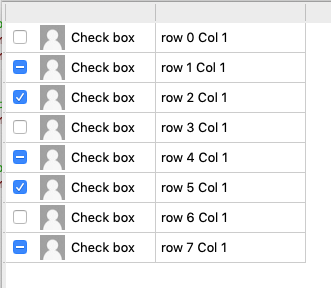
To return to the beginning, drawing an icon with a specific size in a table column, I'm simply doing this:
case Qt::DecorationRole:
    if(index.column()==Check) return Icon->pixmap(Icon->actualSize(QSize(rowHeight-5,rowHeight-5)));
    break;
rowHeight is the value return by table->verticalHeader()->defaultSectionSize();
-
I'm using a sub-classed QStyledItemDelegate because that's what the documentation says I need to do.
Where is your code: in the data() mf??
Here the complete source:
// resizing icon in tableView cell #define Check 0 #define Text 1 int rowHeight; QIcon* Icon; struct Model : public QAbstractTableModel { explicit Model() : QAbstractTableModel(nullptr) {} int rowCount(const QModelIndex &/*parent*/) const { return 8; } int columnCount(const QModelIndex &/*parent*/) const { return 2; } QVariant data(const QModelIndex &index, int role=Qt::DisplayRole) const { if(!index.isValid()) return QVariant(); int row=index.row(); switch (role) { case Qt::DisplayRole: if(index.column()==Text) return QString("row %1 Col %2").arg(index.row()).arg(index.column()); if(index.column()==Check) return QString("Check box"); break; case Qt::CheckStateRole: if(index.column()==Check) return row%3; break; case Qt::DecorationRole: if(index.column()==Check) return Icon->pixmap(Icon->actualSize(QSize(rowHeight-5,rowHeight-5))); break; } return QVariant(); } Qt::ItemFlags flags(const QModelIndex &index) const {Q_UNUSED(index) Qt::ItemFlags f=Qt::ItemIsSelectable|Qt::ItemIsEnabled; if(index.column()==Check) f|=Qt::ItemIsUserCheckable; return f; } }; int main(int argc, char *argv[]) { QApplication app(argc, argv); QString path=QDir::homePath()+"/Desktop/Developpement/Qt5.12/Divers/Essai/img/ic32.jpg"; Icon=new QIcon(path); qDebug()<<QFile::exists(path)<<path; auto table=new QTableView; table->setModel(new Model); rowHeight=table->verticalHeader()->defaultSectionSize(); table->horizontalHeader()->setMinimumSectionSize(150); table->resize(400,400); table->show(); return app.exec(); -
class ItemDelegate : public QStyledItemDelegate
{
        void    paint(QPainter *painter, const QStyleOptionViewItem &option, const QModelIndex &index) const
        {
            QRect rec=option.rect;
            QSize source=Icon->actualSize(rec.size());

             QPixmap pixmap=Icon->pixmap(Icon->actualSize(QSize(rowHeight-5,rowHeight-5)));
             QRect target=QRect(rec.topLeft(),source);
             target.translate(2,2);
             painter->drawPixmap(target, pixmap, QRect(QPoint(0,0),source));
        }
};
Added to a third column:
table->setItemDelegateForColumn(2,new ItemDelegate);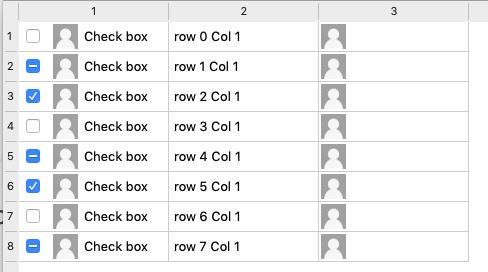
-
Hmmphh... I'm quite sure from the other examples I've seen that what you've shown me isn't the "proper way to do it".
I got the checkbox display working by changing the checkbox display code:
		//
		// Draw the check box normally
		//
		QStyleOptionButton checkBoxStyle;
		constexpr int size = 17;
		constexpr int space = 6;
		checkBoxStyle.rect = QRect(opt.rect.x(),
			opt.rect.center().y() - (size / 2),
			size,
			size);

		checkBoxStyle.state = (Qt::Checked == state) ? QStyle::State_On : QStyle::State_Off;
		style->drawPrimitive(QStyle::PE_IndicatorItemViewItemCheck, &checkBoxStyle, painter);

		//
		// Draw the icon twice as large as the default
		//
		QRect nextRect{ rect };
		nextRect.setLeft(nextRect.left() + checkBoxStyle.rect.width() + space);
Which I admit is not ideal as it uses hard coded values for the size of the checkbox and the spacing. Surely there's a way to find the default size of a Primitive Element such as a PE_IndicatorItemViewItemCheck???
I also still want to know how to get the ellipsis handling for the text done.
-
For elided text see;
QString QFontMetrics::elidedText(const QString &text, Qt::TextElideMode mode, int width, int flags = 0)Quick test to get the size of a checkbox:
QStyle *style = QApplication::style();
              QRect r=style->subElementRect(QStyle::SE_ItemViewItemCheckIndicator, &opt);
              qDebug()<<r.size(); // 19x18 for OSX
see here for more infos:
https://wiki.qt.io/Center_a_QCheckBox_or_Decoration_in_an_Itemview
