
Skip to content
  • Categories
  • Recent
  • Tags
  • Popular
  • Users
  • Groups
  • Search
  • Get Qt
  • Unsolved
Collapse
qtws26_logo

The Qt Event of the Year: Qt World Summit 2026

Save Your Spot >
Brand Logo
  1. Home
  2. Qt Development
  3. General and Desktop
  4. setAutoFillBackgroundRole not working
Qt 6.12 LTS is out! See what's new in the release blog

setAutoFillBackgroundRole not working

Scheduled Pinned Locked Moved Solved General and Desktop
15 Posts 3 Posters 2.8k Views 2 Watching
  • Oldest to Newest
  • Newest to Oldest
  • Most Votes
Reply
  • Reply as topic
Log in to reply
This topic has been deleted. Only users with topic management privileges can see it.
  • O ofmrew

    @ofmrew All of the examples I have seen start with QWidget and not QMainWindow; however, I need the features that QMainWindows provides. Can you point me to and example of a UI based on QMainWindows?

    mrjjM Offline
    mrjjM Offline
    mrjj
    Lifetime Qt Champion
    wrote on last edited by
    #5

    @ofmrew

    Hi
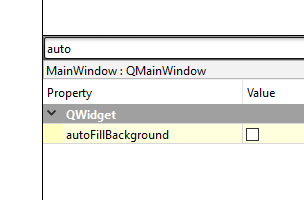
    Its also a property so you should be able to set in designer.
    alt text

    O 1 Reply Last reply
    0
    • mrjjM mrjj

      @ofmrew

      Hi
      Its also a property so you should be able to set in designer.
      alt text

      O Offline
      O Offline
      ofmrew
      wrote on last edited by
      #6

      @mrjj I stated in the first line that that was done.

      mrjjM 1 Reply Last reply
      1
      • O ofmrew

        @mrjj I stated in the first line that that was done.

        mrjjM Offline
        mrjjM Offline
        mrjj
        Lifetime Qt Champion
        wrote on last edited by
        #7

        @ofmrew
        Ah The question is how to set the color for the
        setAutoFillBackground(bool) then ?

        You can change its palette or use a stylesheet.
        (you can change palette in the designer)

        1 Reply Last reply
        0
        • O Offline
          O Offline
          ofmrew
          wrote on last edited by
          #8

          Update. I created a new UI using the same steps as before and I works fine! Sometimes Designer drives me crazy, especially when layouts are involved. However, for now, problem solved. Thanks for your input. However, I would still like that reference to programmatically creating a UI with QMainWindow.

          JonBJ mrjjM 2 Replies Last reply
          0
          • O ofmrew

            Update. I created a new UI using the same steps as before and I works fine! Sometimes Designer drives me crazy, especially when layouts are involved. However, for now, problem solved. Thanks for your input. However, I would still like that reference to programmatically creating a UI with QMainWindow.

            JonBJ Offline
            JonBJ Offline
            JonB
            wrote on last edited by
            #9

            @ofmrew
            A QMainWindow is a QWidget, so anything & everything you can do with the latter you can do too with the former. For QMainWindow concepts and code start at https://doc.qt.io/qt-6/qmainwindow.html#details.

            O 1 Reply Last reply
            1
            • O ofmrew

              Update. I created a new UI using the same steps as before and I works fine! Sometimes Designer drives me crazy, especially when layouts are involved. However, for now, problem solved. Thanks for your input. However, I would still like that reference to programmatically creating a UI with QMainWindow.

              mrjjM Offline
              mrjjM Offline
              mrjj
              Lifetime Qt Champion
              wrote on last edited by mrjj
              #10

              @ofmrew
              Ok super.

              You mean a QMainWindow based one from code ?

              #include <QApplication>
              #include <QMainWindow>
              #include <QMenuBar>
              #include <QStatusBar>
              
              int main(int argc, char *argv[])
              {
                  QApplication a(argc, argv);
              
                  QMainWindow MainWindow;
                  MainWindow.setObjectName(QString::fromUtf8("MainWindow"));
                  MainWindow.resize(800, 600);
               // mainwin has a special area called centralwidget where you put stuff
                  QWidget *centralwidget = new QWidget(&MainWindow);
                  MainWindow.setCentralWidget(centralwidget);
              // and a menu bar
                  QMenuBar *menubar = new QMenuBar(&MainWindow);
                  MainWindow.setMenuBar(menubar);
              // and a status bar
                  QStatusBar *statusbar = new QStatusBar(&MainWindow);
                  MainWindow.setStatusBar(statusbar);
                  MainWindow.show();
                  return a.exec();
              }
              
              O 2 Replies Last reply
              1
              • JonBJ JonB

                @ofmrew
                A QMainWindow is a QWidget, so anything & everything you can do with the latter you can do too with the former. For QMainWindow concepts and code start at https://doc.qt.io/qt-6/qmainwindow.html#details.

                O Offline
                O Offline
                ofmrew
                wrote on last edited by
                #11

                @JonB I had that, I was looking for more. So, I will post what I find out.

                1 Reply Last reply
                0
                • mrjjM mrjj

                  @ofmrew
                  Ok super.

                  You mean a QMainWindow based one from code ?

                  #include <QApplication>
                  #include <QMainWindow>
                  #include <QMenuBar>
                  #include <QStatusBar>
                  
                  int main(int argc, char *argv[])
                  {
                      QApplication a(argc, argv);
                  
                      QMainWindow MainWindow;
                      MainWindow.setObjectName(QString::fromUtf8("MainWindow"));
                      MainWindow.resize(800, 600);
                   // mainwin has a special area called centralwidget where you put stuff
                      QWidget *centralwidget = new QWidget(&MainWindow);
                      MainWindow.setCentralWidget(centralwidget);
                  // and a menu bar
                      QMenuBar *menubar = new QMenuBar(&MainWindow);
                      MainWindow.setMenuBar(menubar);
                  // and a status bar
                      QStatusBar *statusbar = new QStatusBar(&MainWindow);
                      MainWindow.setStatusBar(statusbar);
                      MainWindow.show();
                      return a.exec();
                  }
                  
                  O Offline
                  O Offline
                  ofmrew
                  wrote on last edited by
                  #12

                  @mrjj Thanks. I will use that code as a starting point and post my results.

                  1 Reply Last reply
                  0
                  • mrjjM mrjj

                    @ofmrew
                    Ok super.

                    You mean a QMainWindow based one from code ?

                    #include <QApplication>
                    #include <QMainWindow>
                    #include <QMenuBar>
                    #include <QStatusBar>
                    
                    int main(int argc, char *argv[])
                    {
                        QApplication a(argc, argv);
                    
                        QMainWindow MainWindow;
                        MainWindow.setObjectName(QString::fromUtf8("MainWindow"));
                        MainWindow.resize(800, 600);
                     // mainwin has a special area called centralwidget where you put stuff
                        QWidget *centralwidget = new QWidget(&MainWindow);
                        MainWindow.setCentralWidget(centralwidget);
                    // and a menu bar
                        QMenuBar *menubar = new QMenuBar(&MainWindow);
                        MainWindow.setMenuBar(menubar);
                    // and a status bar
                        QStatusBar *statusbar = new QStatusBar(&MainWindow);
                        MainWindow.setStatusBar(statusbar);
                        MainWindow.show();
                        return a.exec();
                    }
                    
                    O Offline
                    O Offline
                    ofmrew
                    wrote on last edited by
                    #13

                    @mrjj I am using your code in QtCreator Widget Application, not Console Application because when I tried that the includes could not be found. I have searched the documentation and I have this :

                            QWidget *centralwidget = new QWidget(&MainWindow);
                            MainWindow.setCentralWidget(centralwidget);
                            QVBoxLayout * centraLWidgetLayout = new QVBoxLayout(centralwidget);
                            QHBoxLayout * buttonLayout = new QHBoxLayout();
                            QWidget * mainWindow = new QWidget(centralwidget);
                            QPushButton * button1 = new QPushButton("Button 1");
                            QPushButton * button2 = new QPushButton("Button 2");
                            buttonLayout->addWidget(button1);
                            buttonLayout->addWidget(button2);
                    

                    I know that there must be a layout associated with the central widget but how do I get centraLWidgetLayout associated with the central widget and I assume that buttonLayout must be associated with some widget, but what is that widget? I can add my buttons to the buttonLayout and I what that layout and MyCanvas widget In the centraLWidgetLayout.

                    This why I was looking for an example that starts with QMainWindow and not QWidget. The documentation says what happens, but not how to get what you want to happen. Help.

                    1 Reply Last reply
                    0
                    • O Offline
                      O Offline
                      ofmrew
                      wrote on last edited by
                      #14

                      I finally got it:

                      #include "mainwindow.h"
                      #include <QMainWindow>
                      #include <QMenuBar>
                      #include <QStatusBar>
                      #include <QHBoxLayout>
                      #include <QVBoxLayout>
                      #include <QWidget>
                      #include <QPushButton>
                      #include "mycanvas.h"
                      #include <QApplication>
                      
                      int main(int argc, char *argv[])
                      {
                      
                          QApplication a(argc, argv);
                          QMainWindow MainWindow;
                              MainWindow.setObjectName(QString::fromUtf8("MainWindow"));
                              MainWindow.resize(800, 600);
                           // mainwin has a special area called centralwidget where you put stuff
                              QWidget *centralwidget = new QWidget(&MainWindow);
                              MainWindow.setCentralWidget(centralwidget);
                              QVBoxLayout * centraLWidgetLayout = new QVBoxLayout(centralwidget);
                              MyCanvas * canvas = new MyCanvas(centralwidget);
                              canvas->setAutoFillBackground(true);
                              canvas->setBackgroundRole(QPalette::Base);
                              QHBoxLayout * buttonLayout = new QHBoxLayout();
                              QPushButton * button1 = new QPushButton("Button 1");
                              QPushButton * button2 = new QPushButton("Button 2");
                              buttonLayout->addWidget(button1);
                              buttonLayout->addWidget(button2);
                              centraLWidgetLayout->addWidget(canvas);
                              centraLWidgetLayout->addLayout(buttonLayout);
                          // and a menu bar
                              QMenuBar *menubar = new QMenuBar(&MainWindow);
                              MainWindow.setMenuBar(menubar);
                          // and a status bar
                              QStatusBar *statusbar = new QStatusBar(&MainWindow);
                              MainWindow.setStatusBar(statusbar);
                          MainWindow.show();
                          return a.exec();
                      }
                      

                      Thanks mrjj.
                      I need to add horizontal spacers.
                      Easier than I thought it would be.

                      Now I need to find out why the .h and .ccp file were not found when I tried console mode.

                      1 Reply Last reply
                      0
                      • O Offline
                        O Offline
                        ofmrew
                        wrote on last edited by
                        #15

                        The following is a updated version. The last version did not do anything so I add signals and slots so it would be useful.

                        #include "mainwindow.h"
                        #include <QMainWindow>
                        #include <QMenuBar>
                        #include <QStatusBar>
                        #include <QHBoxLayout>
                        #include <QVBoxLayout>
                        #include <QWidget>
                        #include <QPushButton>
                        #include "mycanvas.h"
                        #include <QDebug>
                        #include <QApplication>
                        
                        int main(int argc, char *argv[])
                        {
                        
                            QApplication a(argc, argv);
                        
                            QMainWindow MainWindow;
                            MainWindow.setObjectName(QString::fromUtf8("MainWindow"));
                            MainWindow.setWindowTitle("My Try");
                            MainWindow.resize(800, 600);
                            QWidget *centralwidget = new QWidget(&MainWindow);
                            MainWindow.setCentralWidget(centralwidget);
                            QVBoxLayout * centraLWidgetLayout = new QVBoxLayout(centralwidget);
                            MyCanvas * canvas = new MyCanvas(centralwidget);
                            canvas->setAutoFillBackground(true);
                            canvas->setBackgroundRole(QPalette::Base);
                            QHBoxLayout * buttonLayout = new QHBoxLayout();
                            QPushButton * button1 = new QPushButton("Button 1");
                            QPushButton * button2 = new QPushButton("Button 2");
                            buttonLayout->addWidget(button1);
                            buttonLayout->addWidget(button2);
                            buttonLayout->insertSpacing(1,30);
                            centraLWidgetLayout->addWidget(canvas);
                            centraLWidgetLayout->addLayout(buttonLayout);
                            // and a menu bar
                                QMenuBar *menubar = new QMenuBar(&MainWindow);
                                MainWindow.setMenuBar(menubar);
                            // and a status bar
                                QStatusBar *statusbar = new QStatusBar(&MainWindow);
                                MainWindow.setStatusBar(statusbar);
                            MainWindow.connect(button1, &QPushButton::clicked,[statusbar](){statusbar->showMessage("clicked 1");});
                            MainWindow.show();
                            return a.exec();
                        }
                        

                        However, after adding the spacer to separate the two buttons and looking at the work still to be done, really makes me appreciate Designer, even with all it quirks. Hope this might help someone else.

                        1 Reply Last reply
                        1

                        • Login

                        • Login or register to search.
                        • First post
                          Last post
                        0
                        • Categories
                        • Recent
                        • Tags
                        • Popular
                        • Users
                        • Groups
                        • Search
                        • Get Qt
                        • Unsolved