
Project setting in QTCreator?
-
I am getting use to change "Project setting" with new "load current project .pro file".
My question is - how do you physicality start "Build /Run" ?
Highlighting with mouse then WHAT ??
Also
changing anything in "project setting" give no feedback - so what is a correct way to exit and get back to
"normal " QT editing windows ?
Also - do these icons tasks have a common name ? The "Project" icon itself actually performs similar
tasks as "Tool"- Options. -
I am getting use to change "Project setting" with new "load current project .pro file".
My question is - how do you physicality start "Build /Run" ?
Highlighting with mouse then WHAT ??
Also
changing anything in "project setting" give no feedback - so what is a correct way to exit and get back to
"normal " QT editing windows ?Also - do these icons tasks have a common name ? The "Project" icon itself actually performs similar
tasks as "Tool"- Options.@AnneRanch
In the menu Tools->Options->Kit, you setup, or register, all the Qt kits which should be available from Qt Creator, so the same ones you will can then select in Project menu. You cannot add, or remove kit from the project menu.
In the project settings, in build submenu, you select which kits you want (from the ones configured in tools->options->kits) to use for building your project and setup the build (output folder, compiler arguments, ...)
run submenu is for setup the options for running and deployingOnce you have selected one kit, build you project using menu
Build -> Build Project "...", or shorcutCtrl+B. Or run by using menuBuild -> Runor shortcutCtrl + R.Alternatively you can use the icons 3 and 5 according to this image
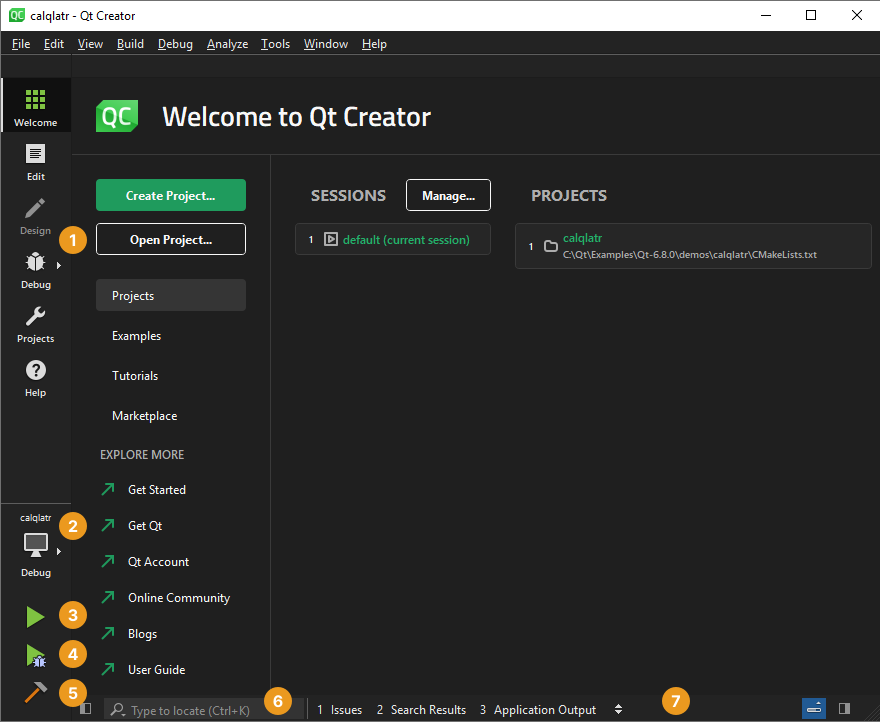
For returning to "edit" mode, click on
Editon the left menu, or useCtrl+2.
Note thatCtrl+5is for project menu. -
Here is a minor issue nobody bother to explain the relations between the icons on the left ( of your post ) and the "window " on the right. Even the color scheme is different and I am using it without any changes (intentionally ) made

I usually run "edit" ....
My question is - how do you physicality start "Build /Run" ?
Highlighting with mouse then WHAT ??as posted originally.
-
Here is a minor issue nobody bother to explain the relations between the icons on the left ( of your post ) and the "window " on the right. Even the color scheme is different and I am using it without any changes (intentionally ) made
I usually run "edit" ....
My question is - how do you physicality start "Build /Run" ?
Highlighting with mouse then WHAT ??as posted originally.
@AnneRanch said in Project setting in QTCreator?:
**My question is - how do you physicality start "Build /Run" ?
The answer is - Follow the steps that @Gojir4 wrote above.

