
Debug mode and release mode give different visual result
-
Hi,
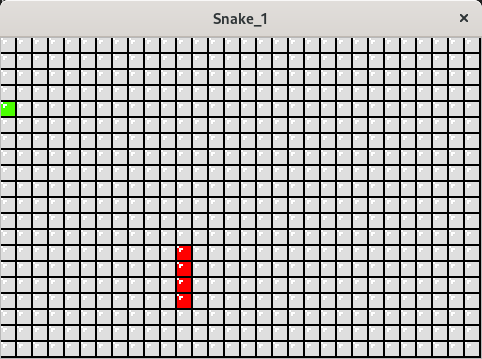
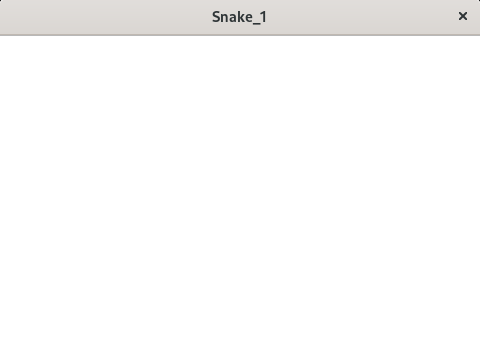
i create game Snake. I have problem because when i start game in debug mode everything is fine but when i switch to release mode nothing works.
Result for debug:
Result for release:
I have no idea what is wrong.
Code:#include "gamescene.h" #include <QKeyEvent> #include <QTimer> #include <QGraphicsPixmapItem> GameScene::GameScene(QObject *parent) : QGraphicsScene{parent}, m_game(), m_timer(new QTimer(this)) { setSceneRect(QRectF(0,0, m_game.RESOLUTION.width(), m_game.RESOLUTION.height())); loadPixmap(); m_game.f.x = 0; m_game.f.y = 64; connect(m_timer, &QTimer::timeout, this, &GameScene::update); m_timer->start(m_game.ITERATION_VALUE); } void GameScene::keyPressEvent(QKeyEvent* event) { if(!event->isAutoRepeat()) { switch(event->key()) { case Qt::Key_Left: { m_game.dir = 1; } break; case Qt::Key_Right: { m_game.dir = 2; } break; case Qt::Key_Up: { m_game.dir = 3; } break; case Qt::Key_Down: { m_game.dir = 0; } break; } } QGraphicsScene::keyPressEvent(event); } void GameScene::loadPixmap() { Q_ASSERT(m_greenPixmap.load(m_game.PATH_TO_GREEN_PIXMAP)); Q_ASSERT(m_redPixmap.load(m_game.PATH_TO_RED_PIXMAP)); Q_ASSERT(m_whitePixmap.load(m_game.PATH_TO_WHITE_PIXMAP)); } void GameScene::update() { clear(); m_game.m_deltaTime += m_game.ITERATION_VALUE; if(m_game.m_deltaTime > m_game.DELAY) { m_game.m_deltaTime = 0.0f; m_game.Tick(); } for (int i = 0; i < m_game.N; i++) { for (int j = 0; j < m_game.M; j++) { QGraphicsPixmapItem *whiteItemPixmap = new QGraphicsPixmapItem(m_whitePixmap); whiteItemPixmap->setPos(i*m_game.size, j*m_game.size); addItem(whiteItemPixmap); } } for (int i= 0; i < m_game.num; i++) { QGraphicsPixmapItem *redItemPixmap = new QGraphicsPixmapItem(m_redPixmap); redItemPixmap->setPos(m_game.s[i].x * m_game.size, m_game.s[i].y * m_game.size); addItem(redItemPixmap); } QGraphicsPixmapItem *greenPixmapItem = new QGraphicsPixmapItem(m_greenPixmap); greenPixmapItem->setPos(m_game.f.x, m_game.f.y); addItem(greenPixmapItem); }Qt version: 6.2.4 GCC 64bit
OS version: Linux fedora 5.17.11-200.fc35.x86_64 #1 SMP PREEMPT Wed May 25 14:56:43 UTC 2022 x86_64 x86_64 x86_64 GNU/Linux -
Hi,
i create game Snake. I have problem because when i start game in debug mode everything is fine but when i switch to release mode nothing works.
Result for debug:
Result for release:
I have no idea what is wrong.
Code:#include "gamescene.h" #include <QKeyEvent> #include <QTimer> #include <QGraphicsPixmapItem> GameScene::GameScene(QObject *parent) : QGraphicsScene{parent}, m_game(), m_timer(new QTimer(this)) { setSceneRect(QRectF(0,0, m_game.RESOLUTION.width(), m_game.RESOLUTION.height())); loadPixmap(); m_game.f.x = 0; m_game.f.y = 64; connect(m_timer, &QTimer::timeout, this, &GameScene::update); m_timer->start(m_game.ITERATION_VALUE); } void GameScene::keyPressEvent(QKeyEvent* event) { if(!event->isAutoRepeat()) { switch(event->key()) { case Qt::Key_Left: { m_game.dir = 1; } break; case Qt::Key_Right: { m_game.dir = 2; } break; case Qt::Key_Up: { m_game.dir = 3; } break; case Qt::Key_Down: { m_game.dir = 0; } break; } } QGraphicsScene::keyPressEvent(event); } void GameScene::loadPixmap() { Q_ASSERT(m_greenPixmap.load(m_game.PATH_TO_GREEN_PIXMAP)); Q_ASSERT(m_redPixmap.load(m_game.PATH_TO_RED_PIXMAP)); Q_ASSERT(m_whitePixmap.load(m_game.PATH_TO_WHITE_PIXMAP)); } void GameScene::update() { clear(); m_game.m_deltaTime += m_game.ITERATION_VALUE; if(m_game.m_deltaTime > m_game.DELAY) { m_game.m_deltaTime = 0.0f; m_game.Tick(); } for (int i = 0; i < m_game.N; i++) { for (int j = 0; j < m_game.M; j++) { QGraphicsPixmapItem *whiteItemPixmap = new QGraphicsPixmapItem(m_whitePixmap); whiteItemPixmap->setPos(i*m_game.size, j*m_game.size); addItem(whiteItemPixmap); } } for (int i= 0; i < m_game.num; i++) { QGraphicsPixmapItem *redItemPixmap = new QGraphicsPixmapItem(m_redPixmap); redItemPixmap->setPos(m_game.s[i].x * m_game.size, m_game.s[i].y * m_game.size); addItem(redItemPixmap); } QGraphicsPixmapItem *greenPixmapItem = new QGraphicsPixmapItem(m_greenPixmap); greenPixmapItem->setPos(m_game.f.x, m_game.f.y); addItem(greenPixmapItem); }Qt version: 6.2.4 GCC 64bit
OS version: Linux fedora 5.17.11-200.fc35.x86_64 #1 SMP PREEMPT Wed May 25 14:56:43 UTC 2022 x86_64 x86_64 x86_64 GNU/Linux@Bondrusiek said in Debug mode and release mode give different visual result:
Q_ASSERT(m_greenPixmap.load(m_game.PATH_TO_GREEN_PIXMAP)); Q_ASSERT(m_redPixmap.load(m_game.PATH_TO_RED_PIXMAP)); Q_ASSERT(m_whitePixmap.load(m_game.PATH_TO_WHITE_PIXMAP));Q_ASSERTmacro is a no-op in Release build, only does the call in Debug build. Usually you should never put a function call inside aQ_ASSERTbecause of this. -
@Bondrusiek said in Debug mode and release mode give different visual result:
Q_ASSERT(m_greenPixmap.load(m_game.PATH_TO_GREEN_PIXMAP)); Q_ASSERT(m_redPixmap.load(m_game.PATH_TO_RED_PIXMAP)); Q_ASSERT(m_whitePixmap.load(m_game.PATH_TO_WHITE_PIXMAP));Q_ASSERTmacro is a no-op in Release build, only does the call in Debug build. Usually you should never put a function call inside aQ_ASSERTbecause of this.@JonB yeah, it is true.
Follow to definition:
Prints a warning message containing the source code file name and line number if test is false.
Q_ASSERT() is useful for testing pre- and post-conditions during development. It does nothing if QT_NO_DEBUG was defined during compilation
Thank you for help.

