
Plugin DLL can't locate its DLL dependencies
-
I have a plugin application (.DLL) that links dynamically to multiple other QT DLLs. When the plugin is loaded in the third party software, it fails to find the dependencies which are located exactly in the same folder as the plugin DLL. The structure looks like this:
myplugin.dll
platforms\
    qwindowsd.dll
QtQml\
    qmlplugind.dll
...
The executable of the software that loads the Plugin is installed under C:/Program Files/MySoftware/Application.exe
Weirdly enough, when I copy the contents of my packaged plugin (dlls and its dependencies) directly into the software's executable directory, next to the executable, it works like a charm, and the plugin is able to find all its DLLs in that directory. So my guess is the DLL lookup isn’t appropriate?
This relates to this: https://stackoverflow.com/questions/29528595/deploying-qt-dll-file-cannot-find-windows-plugin-although-platforms-qwindows-d but his solution was to simply deploy everything with the binaries of the application that loads the Plugin that uses QT, which seems like a bad solution.
Any help on that matter would be appreciated. Thanks
-
I have a plugin application (.DLL) that links dynamically to multiple other QT DLLs. When the plugin is loaded in the third party software, it fails to find the dependencies which are located exactly in the same folder as the plugin DLL. The structure looks like this:
myplugin.dll
platforms\
    qwindowsd.dll
QtQml\
    qmlplugind.dll
...
The executable of the software that loads the Plugin is installed under C:/Program Files/MySoftware/Application.exe
Weirdly enough, when I copy the contents of my packaged plugin (dlls and its dependencies) directly into the software's executable directory, next to the executable, it works like a charm, and the plugin is able to find all its DLLs in that directory. So my guess is the DLL lookup isn’t appropriate?
This relates to this: https://stackoverflow.com/questions/29528595/deploying-qt-dll-file-cannot-find-windows-plugin-although-platforms-qwindows-d but his solution was to simply deploy everything with the binaries of the application that loads the Plugin that uses QT, which seems like a bad solution.
Any help on that matter would be appreciated. Thanks
@yeehaw said in Plugin DLL can't locate its DLL dependencies:
When the plugin is loaded in the third party software, it fails to find the dependencies which are located exactly in the same folder as the plugin DLL.
...
Weirdly enough, when I copy the contents of my packaged plugin (dlls and its dependencies) directly into the software's executable directory, next to the executable, it works like a charm, and the plugin is able to find all its DLLs in that directory. So my guess is the DLL lookup isn’t appropriate?
On Windows, the Exe's folder is a search path but the DLL's folder is not.
To add a non-default search path for Qt plugins, call
QCoreApplication::addLibraryPath()before instantiating your QCoreApplication (or one of its subclasses) -
Thank you so much for your answer @JKSH ! Now my dll is able to find the platform dll which was the initial problem, but my QML imports can't seem to locate the corresponding DLLs, which are located in the same root folder. I get errors of the sort of
module "QtQuick" is not installed. Is there another specific path manipulation that should be done seperately? Thanks -
@yeehaw said in Plugin DLL can't locate its DLL dependencies:
Thank you so much for your answer @JKSH ! Now my dll is able to find the platform dll which was the initial problem
Great!
but my QML imports can't seem to locate the corresponding DLLs, which are located in the same root folder. I get errors of the sort of
module "QtQuick" is not installed. Is there another specific path manipulation that should be done seperately? ThanksRoot folder? You need to preserve the folder structure of the
qmlsubfolders. You also need theqmldirfiles. See https://wiki.qt.io/Deploy_an_Application_on_Windows- <root>\platforms\qwindows.dll
- <root>\QtQuick.2\qmldir
- <root>\QtQuick.2\qtquick2plugin.dll
If that doesn't work still, try calling
QQmlEngine::addImportPath()(note: I haven't done this before so I'm not 100% sure)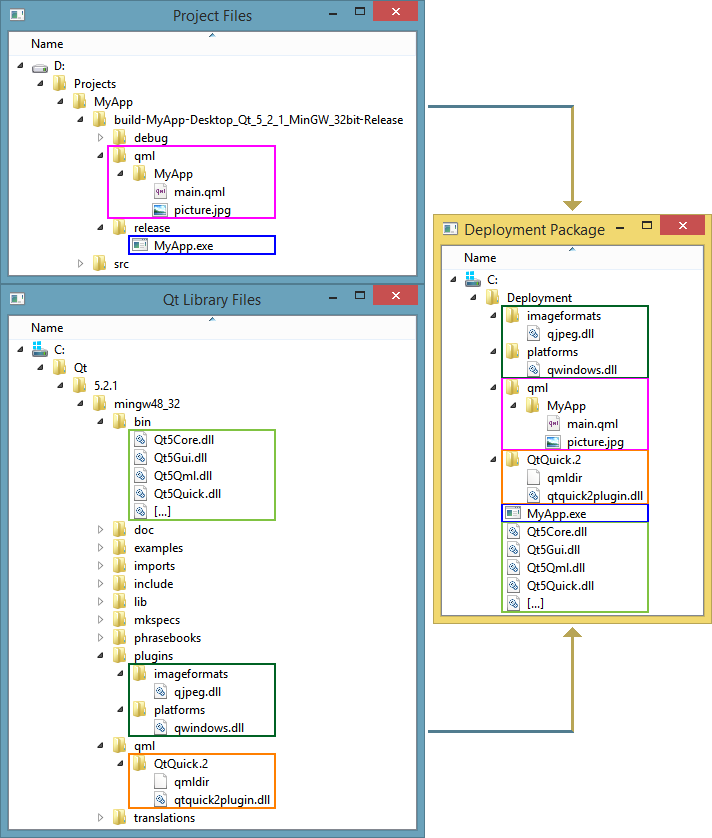
Qt Doc Search for browsers: forum.qt.io/topic/35616/web-browser-extension-for-improved-doc-searches
-
@yeehaw said in Plugin DLL can't locate its DLL dependencies:
Thank you so much for your answer @JKSH ! Now my dll is able to find the platform dll which was the initial problem
Great!
but my QML imports can't seem to locate the corresponding DLLs, which are located in the same root folder. I get errors of the sort of
module "QtQuick" is not installed. Is there another specific path manipulation that should be done seperately? ThanksRoot folder? You need to preserve the folder structure of the
qmlsubfolders. You also need theqmldirfiles. See https://wiki.qt.io/Deploy_an_Application_on_Windows- <root>\platforms\qwindows.dll
- <root>\QtQuick.2\qmldir
- <root>\QtQuick.2\qtquick2plugin.dll
If that doesn't work still, try calling
QQmlEngine::addImportPath()(note: I haven't done this before so I'm not 100% sure)@JKSH
Sorry, Have you tried with windeployqt for deploy?Exemple for window
rem dir where the project is builded
SET OUTDIR=C:\data\project-qt\build64Mingw
SET DIRCOMPILER=C:\Qt\5.15.2\mingw81_64\bin
SET COMPILERVERSION=release
%DIRCOMPILER%\windeployqt --%COMPILERVERSION% --qmldir ..\qml %OUTDIR% -
@JKSH
Sorry, Have you tried with windeployqt for deploy?Exemple for window
rem dir where the project is builded
SET OUTDIR=C:\data\project-qt\build64Mingw
SET DIRCOMPILER=C:\Qt\5.15.2\mingw81_64\bin
SET COMPILERVERSION=release
%DIRCOMPILER%\windeployqt --%COMPILERVERSION% --qmldir ..\qml %OUTDIR%@piervalli said in Plugin DLL can't locate its DLL dependencies:
Have you tried with windeployqt for deploy?
Yes, I have. Why?
Qt Doc Search for browsers: forum.qt.io/topic/35616/web-browser-extension-for-improved-doc-searches
-
@piervalli said in Plugin DLL can't locate its DLL dependencies:
Have you tried with windeployqt for deploy?
Yes, I have. Why?

