
I have added a checkbox to QAbstractItemModel, is there any way to change the appearance of this checkbox?
-
QVariant TreeModel::data(const QModelIndex &index, int role) const
{
    if (!index.isValid())
        return QVariant();

    TreeItem* item = static_cast<TreeItem*>(index.internalPointer());

    if (role == Qt::CheckStateRole && index.column() == 0)
        return static_cast<int>(item->isChecked() ? Qt::Checked : Qt::Unchecked);

    if (role != Qt::DisplayRole)
        return QVariant();

    return item->data(index.column());
}
When I write this code, a checkbox appears in the ui.
I want to change this checkbox type to the checkbox I made.
What should I do? -
When you want to change the appearance of a cell you need to create a custom QStyledItemDelegate - the forum search function is your friend.
-
When you want to change the appearance of a cell you need to create a custom QStyledItemDelegate - the forum search function is your friend.
Of course, I made a class that inherits from QStyledItemDelegate and adjust the row height with sizehint there.
I think I need to redraw it in the paint function, but what should I do to not draw the existing checkbox?void usrItemDelegate::paint(QPainter* painter, const QStyleOptionViewItem& option, const QModelIndex& index) const { Qt::CheckState state = (Qt::CheckState)index.data(Qt::CheckStateRole).toInt(); //drawCheckBox(painter, state); QStyleOptionViewItem opt = option; const QWidget* widget = option.widget; initStyleOption(&opt, index); QStyle* style = opt.widget ? opt.widget->style() : QApplication::style(); opt.rect.setX(opt.rect.x() + 40); //style->drawControl(QStyle::CE_ItemViewItem, &opt, painter, option.widget); //style->drawPrimitive(QStyle::PE_PanelItemViewItem, &opt, painter, widget); if (opt.features & QStyleOptionViewItem::HasCheckIndicator) { switch (opt.checkState) { case Qt::Unchecked: opt.state |= QStyle::State_Off; break; case Qt::PartiallyChecked: opt.state |= QStyle::State_NoChange; break; case Qt::Checked: opt.state |= QStyle::State_On; break; } auto rect = style->subElementRect(QStyle::SE_ItemViewItemCheckIndicator, &opt, widget); rect.setWidth(30); rect.setHeight(30); opt.rect = QStyle::alignedRect(opt.direction, index.data(Qt::TextAlignmentRole).value<Qt::Alignment>(), rect.size(), opt.rect); opt.state = opt.state & ~QStyle::State_HasFocus; //style->drawPrimitive(QStyle::PE_IndicatorItemViewItemCheck, &opt, painter, widget); } } -
Of course, I made a class that inherits from QStyledItemDelegate and adjust the row height with sizehint there.
I think I need to redraw it in the paint function, but what should I do to not draw the existing checkbox?void usrItemDelegate::paint(QPainter* painter, const QStyleOptionViewItem& option, const QModelIndex& index) const { Qt::CheckState state = (Qt::CheckState)index.data(Qt::CheckStateRole).toInt(); //drawCheckBox(painter, state); QStyleOptionViewItem opt = option; const QWidget* widget = option.widget; initStyleOption(&opt, index); QStyle* style = opt.widget ? opt.widget->style() : QApplication::style(); opt.rect.setX(opt.rect.x() + 40); //style->drawControl(QStyle::CE_ItemViewItem, &opt, painter, option.widget); //style->drawPrimitive(QStyle::PE_PanelItemViewItem, &opt, painter, widget); if (opt.features & QStyleOptionViewItem::HasCheckIndicator) { switch (opt.checkState) { case Qt::Unchecked: opt.state |= QStyle::State_Off; break; case Qt::PartiallyChecked: opt.state |= QStyle::State_NoChange; break; case Qt::Checked: opt.state |= QStyle::State_On; break; } auto rect = style->subElementRect(QStyle::SE_ItemViewItemCheckIndicator, &opt, widget); rect.setWidth(30); rect.setHeight(30); opt.rect = QStyle::alignedRect(opt.direction, index.data(Qt::TextAlignmentRole).value<Qt::Alignment>(), rect.size(), opt.rect); opt.state = opt.state & ~QStyle::State_HasFocus; //style->drawPrimitive(QStyle::PE_IndicatorItemViewItemCheck, &opt, painter, widget); } }@IknowQT said in I have added a checkbox to QAbstractItemModel, is there any way to change the appearance of this checkbox?:
but what should I do to not draw the existing checkbox
Presumably: do the drawing yourself in the
QStyleOptionViewItem::HasCheckIndicatorcase, and remove that flag when you call the baseinitStyleOption()? Then that won't attempt to draw it as well as your code. However, I don't know if that option would have caused the base displayer to leave room at the left of the item for the checkbox which now won't be the case....Or, maybe, allow the base
paint()to draw with its checkbox so that "space" is left for it, and then overdraw the checkbox with your one? -
Your paint() method does not do anything. You should post the real working code...
Qt Online Installer direct download: https://download.qt.io/official_releases/online_installers/
Visit the Qt Academy at https://academy.qt.io/catalog -
Your paint() method does not do anything. You should post the real working code...
-
@Christian-Ehrlicher Is my answer above correct or rubbish? :)
@JonB said in I have added a checkbox to QAbstractItemModel, is there any way to change the appearance of this checkbox?:
Is my answer above correct or rubbish? :)
Yes, but I wouldn't call the base class impl at all in this case then.
-
Your paint() method does not do anything. You should post the real working code...
@Christian-Ehrlicher said in I have added a checkbox to QAbstractItemModel, is there any way to change the appearance of this checkbox?:
Your paint() method does not do anything. You should post the real working code...
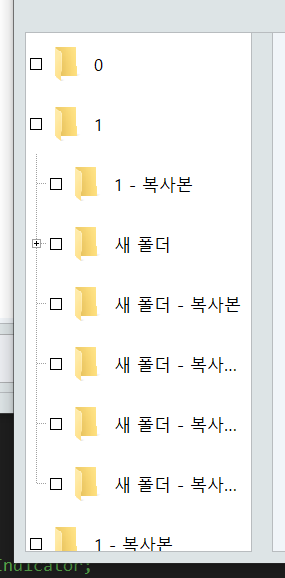
	tyleOptionViewItem opt = option;
	//QStyledItemDelegate::initStyleOption(&opt, index);

	QRect a = opt.rect;

	const int desiredThreshold = 0;
	opt.rect.setX(opt.rect.x() + 40);

	QRect rect = option.widget->style()->subElementRect(QStyle::SE_ItemViewItemCheckIndicator, &opt, option.widget).adjusted(-40,0,-40,0);
	rect = opt.rect;

	option.widget->style()->drawControl(QStyle::CE_ItemViewItem, &opt, painter, option.widget);
	return;
The code I posted is the actual code.
The question I asked is whether it is possible to draw only the checkbox separately in this code. I'd appreciate it if you could give me some code for reference.

