
Skip to content
  • Categories
  • Recent
  • Tags
  • Popular
  • Users
  • Groups
  • Search
  • Get Qt Extensions
  • Unsolved
Collapse
Brand Logo
  1. Home
  2. Qt Development
  3. General and Desktop
  4. Disable API prior to 6.2 - no go
Qt 6.11 is out! See what's new in the release blog

Disable API prior to 6.2 - no go

Scheduled Pinned Locked Moved Unsolved General and Desktop
8 Posts 4 Posters 546 Views 3 Watching
  • Oldest to Newest
  • Newest to Oldest
  • Most Votes
Reply
  • Reply as topic
Log in to reply
This topic has been deleted. Only users with topic management privileges can see it.
  • A Offline
    A Offline
    Anonymous_Banned275
    wrote on last edited by
    #1

    QPromise was added in 6.2 , my kit is set to 6.2.2 and QPromise is not valid.

    Per note in .pro
    I enabled this DEFINES and still cannot use QPromise.

    Is my "number " 0x060200 correct ?
    Am I missing something else ?

    #QPromise
    # You can make your code fail to compile if it uses deprecated APIs.
    # In order to do so, uncomment the following line.
    DEFINES += QT_DISABLE_DEPRECATED_BEFORE=0x060200    # disables all the APIs deprecated before Qt 6.2.0
    
    
    1 Reply Last reply
    0
    • sierdzioS Offline
      sierdzioS Offline
      sierdzio
      Moderators
      wrote on last edited by
      #2

      Is my "number " 0x060200 correct ?

      Yes.

      I enabled this DEFINES and still cannot use QPromise.

      As a new API it is unrelated to "deprecated before" stuff.

      From documentation it seems all you need for it to work is QT+=core which is there by default. Strange, it should work! What error message are you getting?

      (Z(:^

      1 Reply Last reply
      2
      • M Offline
        M Offline
        mchinand
        wrote on last edited by
        #3

        Post the errors you are getting and post your .pro file. Also, if you're using QtCreator, post a screenshot of the 'Projects' page.

        1 Reply Last reply
        0
        • A Offline
          A Offline
          Anonymous_Banned275
          wrote on last edited by
          #4

          What difference does it makes what error I am getting?
          Is the title of post enough "description"?

          Can anybody answer my " is the number " correct question ?

          Now you can see same
          error" I am getting . Hope it helps.
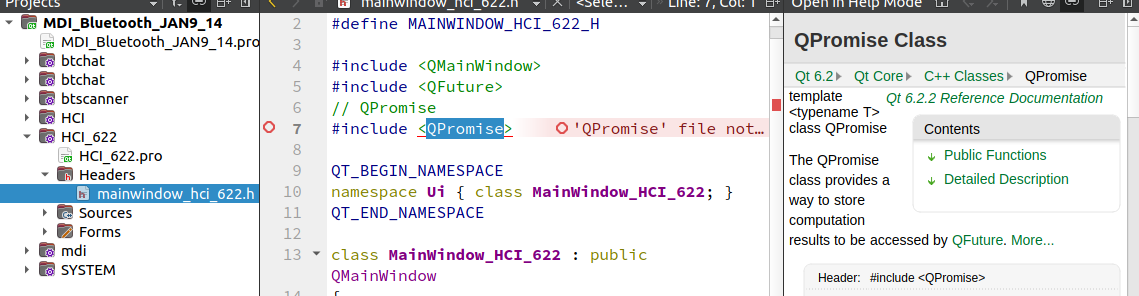
          2a845c4f-f926-43cd-bf3c-5d95ade1fa86-image.png

          1 Reply Last reply
          0
          • A Offline
            A Offline
            Anonymous_Banned275
            wrote on last edited by
            #5

            I have build an independent t, not part of my main project, project and selected kit 6.2.2.
            It still fails to find QPromise.
            I am going to load another 6.2 and see if that is the problem .
            Stand by.

            1 Reply Last reply
            0
            • M Offline
              M Offline
              mchinand
              wrote on last edited by
              #6

              @sierdzio already answered that question and correctly stated that setting that variable is unrelated to your problem since you are not working with a deprecated class or function. You either have an error in your .pro file, you're using the wrong kit, and/or didn't start with a clean (empty) build folder. Share your .pro file and a screenshot of your 'Projects' page from QtCreator. And the full compile output.

              1 Reply Last reply
              0
              • A Offline
                A Offline
                Anonymous_Banned275
                wrote on last edited by
                #7

                I have found that mixing versions in "subproject" is a bad thing.
                But it can be done - so I am back to RTFM
                Until then I cannot honestly say this has been solved.

                PS I wonder if I can add the 6.2.2 version subproject as a complied library - after all that is how it is going to be a part of "subdirs" project anyway - as a library. .

                1 Reply Last reply
                0
                • Christian EhrlicherC Online
                  Christian EhrlicherC Online
                  Christian Ehrlicher
                  Lifetime Qt Champion
                  wrote on last edited by
                  #8

                  You must not mix Qt libraries with different version. Especially you must not mix Qt5 and Qt6.

                  Qt Online Installer direct download: https://download.qt.io/official_releases/online_installers/
                  Visit the Qt Academy at https://academy.qt.io/catalog

                  1 Reply Last reply
                  2

                  • Login

                  • Login or register to search.
                  • First post
                    Last post
                  0
                  • Categories
                  • Recent
                  • Tags
                  • Popular
                  • Users
                  • Groups
                  • Search
                  • Get Qt Extensions
                  • Unsolved