Skip to content
  • Categories
  • Recent
  • Tags
  • Popular
  • Users
  • Groups
  • Search
  • Get Qt Extensions
  • Unsolved
Collapse
Brand Logo
  1. Home
  2. Qt Development
  3. Qt Creator and other tools
  4. How to save updated subdirs project ?
Qt 6.11 is out! See what's new in the release blog

How to save updated subdirs project ?

Scheduled Pinned Locked Moved Unsolved Qt Creator and other tools
6 Posts 4 Posters 598 Views 1 Watching
  • Oldest to Newest
  • Newest to Oldest
  • Most Votes
Reply
  • Reply as topic
Log in to reply
This topic has been deleted. Only users with topic management privileges can see it.
  • A Offline
    A Offline
    Anonymous_Banned275
    wrote on last edited by
    #1

    2d40a4ed-bed7-4a57-809e-6860de015225-image.png

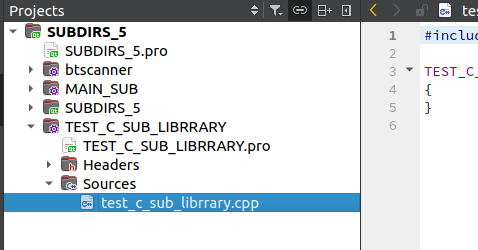
    I cannot see a specific way to save subdirs project after editing / adding subprojects to it.
    If I just exit the next time I reopen QTCreator my changes are gone.

    1 Reply Last reply
    0
    • AxelViennaA Offline
      AxelViennaA Offline
      AxelVienna
      wrote on last edited by
      #2

      Qt creator saves files, not projects. 23aeafc1-952f-4c08-8507-1c68466928db.png
      If you split your view here and chose "open documents", you will see all your edited files and changes marked with "*". If you right click a file, you can save it.

      C++ and Python walk into a bar. C++ reuses the first glass.

      1 Reply Last reply
      0
      • A Offline
        A Offline
        Anonymous_Banned275
        wrote on last edited by
        #3

        Like so ?

        1e770881-0ccb-4310-b260-cadfc5bbd960-image.png

        Do not see any one file marked by X , but I can select it.

        However - was was hoping for something like " save whole subdirs as ..."

        KroMignonK 1 Reply Last reply
        0
        • AxelViennaA Offline
          AxelViennaA Offline
          AxelVienna
          wrote on last edited by
          #4

          Tools->Options->Environment->System->Ask for confirmation before exiting

          C++ and Python walk into a bar. C++ reuses the first glass.

          JonBJ 1 Reply Last reply
          1
          • A Anonymous_Banned275

            Like so ?

            1e770881-0ccb-4310-b260-cadfc5bbd960-image.png

            Do not see any one file marked by X , but I can select it.

            However - was was hoping for something like " save whole subdirs as ..."

            KroMignonK Offline
            KroMignonK Offline
            KroMignon
            wrote on last edited by KroMignon
            #5

            @AnneRanch said in How to save updated subdirs project ?:

            Do not see any one file marked by X , but I can select it.
            However - was was hoping for something like " save whole subdirs as ..."

            I don't really understand what you are trying to do :(
            A subdir project, does not contain any code, it is only used to define which libraries and executables the project contains and define the dependencies to build them in the right order (cf. https://wiki.qt.io/SUBDIRS_-_handling_dependencies)

            So which files do you mean?

            It is an old maxim of mine that when you have excluded the impossible, whatever remains, however improbable, must be the truth. (Sherlock Holmes)

            1 Reply Last reply
            0
            • AxelViennaA AxelVienna

              Tools->Options->Environment->System->Ask for confirmation before exiting

              JonBJ Online
              JonBJ Online
              JonB
              wrote on last edited by
              #6

              @AnneRanch

              Just ensure you have done as @AxelVienna writes:

              @AxelVienna said in How to save updated subdirs project ?:

              Tools->Options->Environment->System->Ask for confirmation before exiting

              You should always have that set. Then you don't have to do anything to explicitly save, like anything else you change in Creator it should save automatically or warn you on exit. You should not be experiencing your:

              If I just exit the next time I reopen QTCreator my changes are gone.

              1 Reply Last reply
              0

              • Login

              • Login or register to search.
              • First post
                Last post
              0
              • Categories
              • Recent
              • Tags
              • Popular
              • Users
              • Groups
              • Search
              • Get Qt Extensions
              • Unsolved