

How do you handle selection of QGraphicsItem?
-
I've these in
hoverandpressevents in the subclass ofQGraphicsItem:void Slice::hoverEnterEvent(QGraphicsSceneHoverEvent*){ qDebug() << "hoverEnterEvent" << isSelected(); if(isSelected()) return; m_color = Qt::gray; moveBy(dx, dy); auto view = static_cast<PieView*>(scene()->parent()); emit view->mouseOver(m_series); } void Slice::hoverLeaveEvent(QGraphicsSceneHoverEvent*){ qDebug() << "hoverLeaveEvent" << isSelected(); if(isSelected()) return; m_color = m_realColor; moveBy(-dx, -dy); auto view = static_cast<PieView*>(scene()->parent()); emit view->mouseLeave(); } void Slice::mousePressEvent(QGraphicsSceneMouseEvent *e){ if(e->button() != Qt::LeftButton) return; if(isSelected()) { setSelected(false); qDebug() << "deselected" << scene()->selectedItems().size(); } else { setSelected(true); qDebug() << "selected" << scene()->selectedItems().size(); } }and here're the things I've done:

first sequence: mouse entered, pressed the button, released the button and left the item. In the output, I got:
hoverEnterEvent false
selected 1
hoverLeaveEvent true
Correct.
second sequence: same as (1) and I got these:
hoverEnterEvent true
deselected 0
hoverLeaveEvent true
Incorrect!
third sequence: mouse entered and left the item, without any press, and got these:
hoverEnterEvent true
hoverLeaveEvent true
Incorrect, again!
-
I've these in
hoverandpressevents in the subclass ofQGraphicsItem:void Slice::hoverEnterEvent(QGraphicsSceneHoverEvent*){ qDebug() << "hoverEnterEvent" << isSelected(); if(isSelected()) return; m_color = Qt::gray; moveBy(dx, dy); auto view = static_cast<PieView*>(scene()->parent()); emit view->mouseOver(m_series); } void Slice::hoverLeaveEvent(QGraphicsSceneHoverEvent*){ qDebug() << "hoverLeaveEvent" << isSelected(); if(isSelected()) return; m_color = m_realColor; moveBy(-dx, -dy); auto view = static_cast<PieView*>(scene()->parent()); emit view->mouseLeave(); } void Slice::mousePressEvent(QGraphicsSceneMouseEvent *e){ if(e->button() != Qt::LeftButton) return; if(isSelected()) { setSelected(false); qDebug() << "deselected" << scene()->selectedItems().size(); } else { setSelected(true); qDebug() << "selected" << scene()->selectedItems().size(); } }and here're the things I've done:
first sequence: mouse entered, pressed the button, released the button and left the item. In the output, I got:
hoverEnterEvent false
selected 1
hoverLeaveEvent true
Correct.
second sequence: same as (1) and I got these:
hoverEnterEvent true
deselected 0
hoverLeaveEvent true
Incorrect!
third sequence: mouse entered and left the item, without any press, and got these:
hoverEnterEvent true
hoverLeaveEvent true
Incorrect, again!
@Emon-Haque
I have not followed your code. But in each of these...Eventoverrides you do not allow the event to proceed through to default handling (by calling base method), is that what is causing whatever your behaviour is? -
I've these in
hoverandpressevents in the subclass ofQGraphicsItem:void Slice::hoverEnterEvent(QGraphicsSceneHoverEvent*){ qDebug() << "hoverEnterEvent" << isSelected(); if(isSelected()) return; m_color = Qt::gray; moveBy(dx, dy); auto view = static_cast<PieView*>(scene()->parent()); emit view->mouseOver(m_series); } void Slice::hoverLeaveEvent(QGraphicsSceneHoverEvent*){ qDebug() << "hoverLeaveEvent" << isSelected(); if(isSelected()) return; m_color = m_realColor; moveBy(-dx, -dy); auto view = static_cast<PieView*>(scene()->parent()); emit view->mouseLeave(); } void Slice::mousePressEvent(QGraphicsSceneMouseEvent *e){ if(e->button() != Qt::LeftButton) return; if(isSelected()) { setSelected(false); qDebug() << "deselected" << scene()->selectedItems().size(); } else { setSelected(true); qDebug() << "selected" << scene()->selectedItems().size(); } }and here're the things I've done:
first sequence: mouse entered, pressed the button, released the button and left the item. In the output, I got:
hoverEnterEvent false
selected 1
hoverLeaveEvent true
Correct.
second sequence: same as (1) and I got these:
hoverEnterEvent true
deselected 0
hoverLeaveEvent true
Incorrect!
third sequence: mouse entered and left the item, without any press, and got these:
hoverEnterEvent true
hoverLeaveEvent true
Incorrect, again!
Do you call the base class' c'tor in
Slice()while creating yourSlice?
Also, like @JonB said: Pass the event to the base class in your overriden functions (call the base event handler).
E.g:void Slice::hoverEnterEvent(QGraphicsSceneHoverEvent* ev){ // .... QGraphicsItem::hoverEnterEvent(ev); }Edit:
Show your
Sliceconstructor -
@Emon-Haque
I have not followed your code. But in each of these...Eventoverrides you do not allow the event to proceed through to default handling (by calling base method), is that what is causing whatever your behaviour is?@JonB, First, added
QGraphicsItem::...Event(e);in the beginning of each function. Second, removed those from beginning and added at the end of each function and third, in addition to those in the end ofhoverEvents, added same beforereturn. Didn't work! -
@JonB, First, added
QGraphicsItem::...Event(e);in the beginning of each function. Second, removed those from beginning and added at the end of each function and third, in addition to those in the end ofhoverEvents, added same beforereturn. Didn't work!The default implementation calls update(); otherwise it does nothing.
The default implementation will update your item. When you dont call it, it could lead to unwanted bahavior.
-
Do you call the base class' c'tor in
Slice()while creating yourSlice?
Also, like @JonB said: Pass the event to the base class in your overriden functions (call the base event handler).
E.g:void Slice::hoverEnterEvent(QGraphicsSceneHoverEvent* ev){ // .... QGraphicsItem::hoverEnterEvent(ev); }Edit:
Show your
Sliceconstructor@Pl45m4, didn't have that in constructor. Tried this:
Slice::Slice(float start, float sweep, QColor color, QRectF rect, PieSeries& series, QGraphicsItem *parent)
    : QGraphicsItem(parent), m_start(start), m_sweep(sweep), m_color(color), m_series(series)
{...}
with and without those base event calls mentioned in reply to @JonB. Didn't work.
EDIT
Here's the whole content:#define whats16 16 Slice::Slice(float start, float sweep, QColor color, QRectF rect, PieSeries& series, QGraphicsItem *parent) : QGraphicsItem(parent), m_start(start), m_sweep(sweep), m_color(color), m_series(series){ m_realColor = color; m_rect = rect; m_path = QPainterPath(QPointF(m_rect.width() / 2, m_rect.height() / 2)); m_path.arcTo(m_rect, -m_start, -m_sweep); m_path.closeSubpath(); dx = 10 * cos((m_start + m_sweep / 2) * M_PI / 180); dy = 10 * sin((m_start + m_sweep / 2) * M_PI / 180); float dimension = m_rect.width() + 2 * 20; m_boundingRect = QRectF(-20, -20, dimension, dimension); setAcceptHoverEvents(true); setFlag(QGraphicsItem::ItemIsSelectable); }EDIT
and for the working example, you can get all code of different classes/struct here
-
The default implementation calls update(); otherwise it does nothing.
The default implementation will update your item. When you dont call it, it could lead to unwanted bahavior.
@Pl45m4, with
QGraphicsItem(parent)in the constructor, addedupdate()at the end of each of those three event handlers with and without calling baseQGraphicsItem::...Event(e). Didn't work -
You can download the project from GitHub to avoid copy/paste and refactoring.
I will try later with a minimal example to test the hover behavior.
Usually it should work, unless you have done something else wrong.Does
mouseOverdo something with you item?
Better useqobject_castto castQObjects.auto view = static_cast<PieView*>(scene()->parent());
emit view->mouseOver(m_series); -
I will try later with a minimal example to test the hover behavior.
Usually it should work, unless you have done something else wrong.Does
mouseOverdo something with you item?
Better useqobject_castto castQObjects.auto view = static_cast<PieView*>(scene()->parent());
emit view->mouseOver(m_series);@Pl45m4, in
mouseOverI add an ellipse (ellipse = new QGraphicsEllipseItem();) in the scene and that ellipse has a text (text = new QGraphicsTextItem(ellipse);):void PieView::onMouseOver(PieSeries &s){ text->document()->clear(); auto cursor = QTextCursor(text->document()); QTextBlockFormat blockFormat; QTextCharFormat charFormat; blockFormat.setAlignment(Qt::AlignHCenter); charFormat.setForeground(Qt::darkGreen); charFormat.setFontPointSize(16); cursor.setBlockFormat(blockFormat); cursor.setBlockCharFormat(charFormat); cursor.insertText(s.name); charFormat.setForeground(Qt::red); charFormat.setFontPointSize(14); cursor.insertBlock(blockFormat, charFormat); cursor.insertText(QString::number(s.value)); charFormat.setForeground(Qt::black); charFormat.setFontPointSize(12); cursor.insertBlock(blockFormat, charFormat); cursor.insertText(QString::number(s.value / m_total * 100) + "%"); text->setY(ellipse->boundingRect().center().y() - text->boundingRect().height()/2); scene()->addItem(ellipse); }and I remove that onMouseLeave:
void PieView::onMouseLeave(){ scene()->removeItem(ellipse); }. PieView is the subclass ofQGraphicsView.EDIT
Will change that static to qobject cast later. Thanks for the reminder. -
@Pl45m4, in
mouseOverI add an ellipse (ellipse = new QGraphicsEllipseItem();) in the scene and that ellipse has a text (text = new QGraphicsTextItem(ellipse);):void PieView::onMouseOver(PieSeries &s){ text->document()->clear(); auto cursor = QTextCursor(text->document()); QTextBlockFormat blockFormat; QTextCharFormat charFormat; blockFormat.setAlignment(Qt::AlignHCenter); charFormat.setForeground(Qt::darkGreen); charFormat.setFontPointSize(16); cursor.setBlockFormat(blockFormat); cursor.setBlockCharFormat(charFormat); cursor.insertText(s.name); charFormat.setForeground(Qt::red); charFormat.setFontPointSize(14); cursor.insertBlock(blockFormat, charFormat); cursor.insertText(QString::number(s.value)); charFormat.setForeground(Qt::black); charFormat.setFontPointSize(12); cursor.insertBlock(blockFormat, charFormat); cursor.insertText(QString::number(s.value / m_total * 100) + "%"); text->setY(ellipse->boundingRect().center().y() - text->boundingRect().height()/2); scene()->addItem(ellipse); }and I remove that onMouseLeave:
void PieView::onMouseLeave(){ scene()->removeItem(ellipse); }. PieView is the subclass ofQGraphicsView.EDIT
Will change that static to qobject cast later. Thanks for the reminder.@Emon-Haque
Just one quickie: that pie chart/view does not use anyQGraphicsItemGroupdoes it? -
@Emon-Haque
Just one quickie: that pie chart/view does not use anyQGraphicsItemGroupdoes it?@JonB, no, it doesn't use any group. In the PieView,
QGriphicsView, constructor I initialize theellipseandtextAND PieView has a functionmakePiewhere I add slice. Here's the constructor:PieView::PieView(QWidget *parent) : QGraphicsView(parent){ auto scene = new QGraphicsScene(this); setScene(scene); setHorizontalScrollBarPolicy(Qt::ScrollBarAlwaysOff); setVerticalScrollBarPolicy(Qt::ScrollBarAlwaysOff); ellipse = new QGraphicsEllipseItem(); ellipse->setBrush(Qt::white); ellipse->setPen(Qt::NoPen); ellipse->setAcceptHoverEvents(false); text = new QGraphicsTextItem(ellipse); text->setAcceptHoverEvents(false); connect(this, &PieView::mouseOver, this, &PieView::onMouseOver); connect(this, &PieView::mouseLeave, this, &PieView::onMouseLeave); }and here's makePie:
void PieView::makePie(QVector<PieSeries>& series){ scene()->clear(); m_total = 0; float startAngle = 0, spanAngle; for (int i = 0; i < series.size(); i++) m_total += series[i].value; QRandomGenerator rand; auto rect = QRectF(0,0, 200,200); for (int i = 0; i < series.size(); i++){ spanAngle = series[i].value / m_total * 360; auto color = QColor::fromRgb(rand.global()->bounded(0,255), rand.global()->bounded(0,255), rand.global()->bounded(0,255)); auto slice = new Slice(startAngle, spanAngle, color, rect, series[i]); scene()->addItem(slice); startAngle += spanAngle; } auto eRect = QRectF(QPoint(sceneRect().center().x() - 75, sceneRect().center().y() - 75), QSize(150,150)); ellipse->setRect(eRect); text->setTextWidth(rect.width()); } -
Problem is the base calls. Probably, there's something in the base
mouseReleaseEventthat created the issue. I've taken it back to the original state, removed base constructor, update and base::...Event calls and added an empty mouseReleaseEvent like this:void Slice::mousePressEvent(QGraphicsSceneMouseEvent *e){ if(e->button() != Qt::LeftButton) return; if(isSelected()) setSelected(false); else setSelected(true); } void Slice::mouseReleaseEvent(QGraphicsSceneMouseEvent*){}Now it behaves normally:
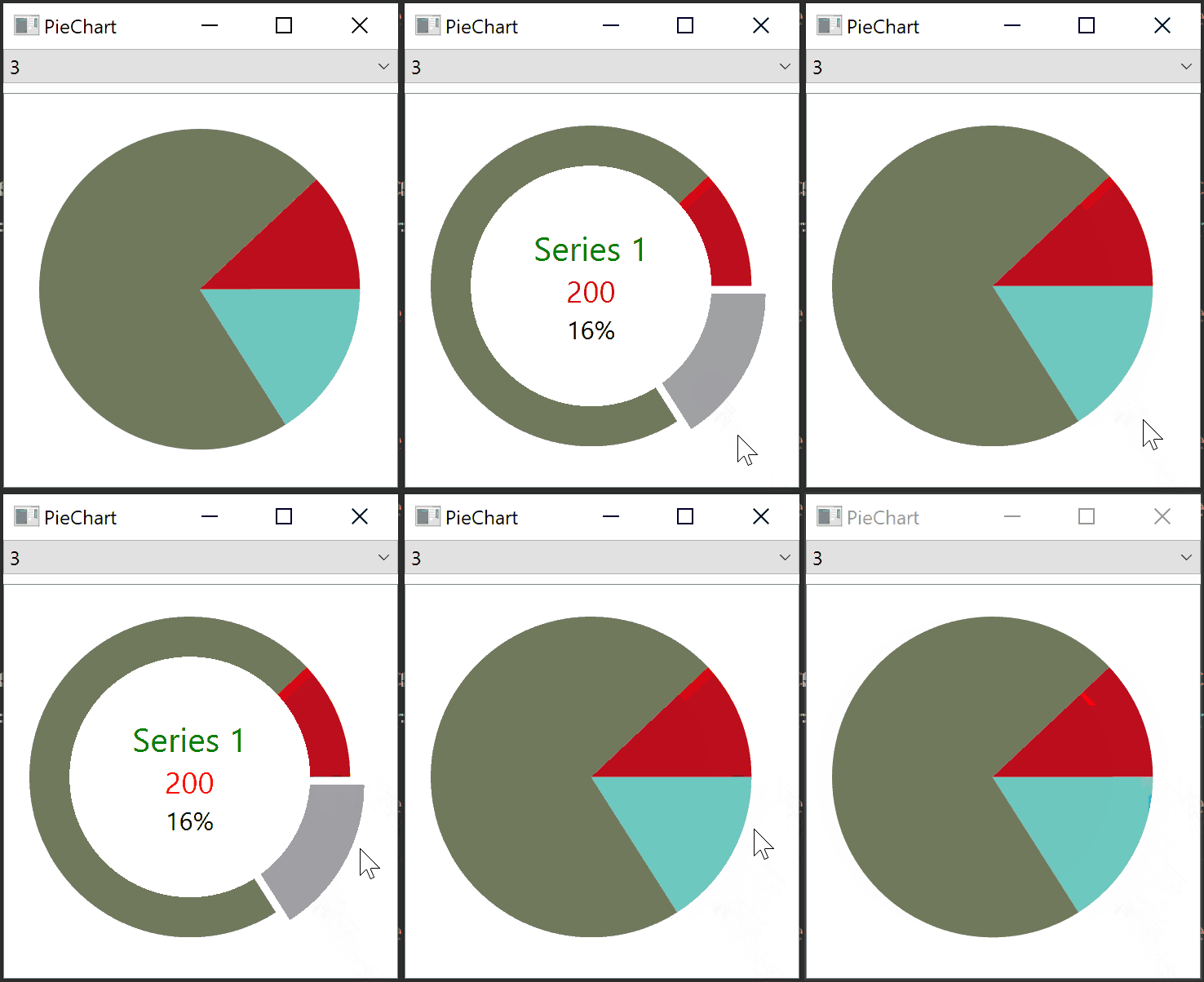
One thing that I couldn't figure out yet is: when I first hover over a slice, rest of the slices are displaced. In the animation see, when mouse entered the bottom right slice for the first time, other two slices moved to the left! This happens only once with 3 slices. Why does it move?
Updated the github repo with these changes.
-
Problem is the base calls. Probably, there's something in the base
mouseReleaseEventthat created the issue. I've taken it back to the original state, removed base constructor, update and base::...Event calls and added an empty mouseReleaseEvent like this:void Slice::mousePressEvent(QGraphicsSceneMouseEvent *e){ if(e->button() != Qt::LeftButton) return; if(isSelected()) setSelected(false); else setSelected(true); } void Slice::mouseReleaseEvent(QGraphicsSceneMouseEvent*){}Now it behaves normally:
One thing that I couldn't figure out yet is: when I first hover over a slice, rest of the slices are displaced. In the animation see, when mouse entered the bottom right slice for the first time, other two slices moved to the left! This happens only once with 3 slices. Why does it move?
Updated the github repo with these changes.
@Emon-Haque said in How do you handle selection of QGraphicsItem?:
when I first hover over a slice, rest of the slices are displaced. In the animation see, when mouse entered the bottom right slice for the first time, other two slices moved to the left! This happens only once with 3 slices. Why does it move?
This seem to be a miscalculation of your slice coordinates.
When you hover the slice, it moves a bit out of the pie chart and the rest seems to follow. So the whole pie moves by X to the right.
Can't tell where exactly but I would check the coordinates where the pie is drawn and how the relation between the "highlighted" (moved out) slice and the rest of the pie slices works.Edit:
Or the whole pie "jumps" to the right in your scene to react on the geometry change... You need to test it. Do you center your pie in your scene?
-
@Emon-Haque said in How do you handle selection of QGraphicsItem?:
when I first hover over a slice, rest of the slices are displaced. In the animation see, when mouse entered the bottom right slice for the first time, other two slices moved to the left! This happens only once with 3 slices. Why does it move?
This seem to be a miscalculation of your slice coordinates.
When you hover the slice, it moves a bit out of the pie chart and the rest seems to follow. So the whole pie moves by X to the right.
Can't tell where exactly but I would check the coordinates where the pie is drawn and how the relation between the "highlighted" (moved out) slice and the rest of the pie slices works.Edit:
Or the whole pie "jumps" to the right in your scene to react on the geometry change... You need to test it. Do you center your pie in your scene?
@Pl45m4, at that time I didn't have the call setSceneRect(....). With that line, now it doesn't move.

