

How do you save and restore the state of QTreeView?
-
It does this by default:

Initially, I'd one table
TestTableand theQTreeViewwas expanded. When I added theNewTable, it collapsed. I expanded it again and executed 3 more statements and it collapsed again. Then I expanded some nodes and executedrollbackand it collapsed! That, probably, is because I remove all rows and add new nodes. When I execute statement(s), this function is called:void ObjectsView::onNoSelect(const QString &query){ bool isDDL = query.toUpper().contains("CREATE") || query.contains("ALTER") || query.contains("DROP"); if(!isDDL) return; this->query->clear(); this->query->prepare("SELECT * FROM sqlite_master"); this->query->exec(); makeTree(); }and the
makeTreeremoves all rows and add new like this:void ObjectsView::makeTree() { QStandardItemModel *model; if(tree->model()){ tree->model()->removeRows(0, tree->model()->rowCount()); model = qobject_cast<QStandardItemModel*>(tree->model()); } else{ model = new QStandardItemModel(tree); model->setColumnCount(2); tree->setModel(model); tree->header()->setSectionResizeMode(0, QHeaderView::Stretch); } QStandardItem *rootNode; while (query->next()) { ... auto child = new QStandardItem(text); rootNode->appendRow(child); ... } // here in another foreach loop I add nodes in child node. }How to save the states of previous tree and apply those states in new tree? Names that are common in both old and new tree, I want those to get the state (expanded/collapsed) from previous tree.
-
It does this by default:
Initially, I'd one table
TestTableand theQTreeViewwas expanded. When I added theNewTable, it collapsed. I expanded it again and executed 3 more statements and it collapsed again. Then I expanded some nodes and executedrollbackand it collapsed! That, probably, is because I remove all rows and add new nodes. When I execute statement(s), this function is called:void ObjectsView::onNoSelect(const QString &query){ bool isDDL = query.toUpper().contains("CREATE") || query.contains("ALTER") || query.contains("DROP"); if(!isDDL) return; this->query->clear(); this->query->prepare("SELECT * FROM sqlite_master"); this->query->exec(); makeTree(); }and the
makeTreeremoves all rows and add new like this:void ObjectsView::makeTree() { QStandardItemModel *model; if(tree->model()){ tree->model()->removeRows(0, tree->model()->rowCount()); model = qobject_cast<QStandardItemModel*>(tree->model()); } else{ model = new QStandardItemModel(tree); model->setColumnCount(2); tree->setModel(model); tree->header()->setSectionResizeMode(0, QHeaderView::Stretch); } QStandardItem *rootNode; while (query->next()) { ... auto child = new QStandardItem(text); rootNode->appendRow(child); ... } // here in another foreach loop I add nodes in child node. }How to save the states of previous tree and apply those states in new tree? Names that are common in both old and new tree, I want those to get the state (expanded/collapsed) from previous tree.
@Emon-Haque
QTreeView, like other widgets, are not amenable to "serializing"/saving. It is normal to save the state of the model it is using, and restore that.Since I think that, say, the expanded/contracted state is a
QTreeView-only thing, not in the model, you would need to traverse the current tree saving whatever for all of those and then re-apply as appropriate to nodes in the new tree.You can get further information by Googling
qtreeview save state. Note e.g. https://forum.qt.io/topic/58592/saving-expanded-state-of-qtreeview/2, where our @Chris-Kawa mentions:One way to approach the problem would be to keep expansion state as part of your model data under a custom role. You would then implement in your model
setData()for that role to store the state anddata()to retrieve it and query/apply whenever you need to.See also https://stackoverflow.com/questions/3253301/howto-restore-qtreeview-last-expanded-state for a more detailed discussion, and perhaps some recursive code which would show you what needs doing/help you.
-
@Emon-Haque
QTreeView, like other widgets, are not amenable to "serializing"/saving. It is normal to save the state of the model it is using, and restore that.Since I think that, say, the expanded/contracted state is a
QTreeView-only thing, not in the model, you would need to traverse the current tree saving whatever for all of those and then re-apply as appropriate to nodes in the new tree.You can get further information by Googling
qtreeview save state. Note e.g. https://forum.qt.io/topic/58592/saving-expanded-state-of-qtreeview/2, where our @Chris-Kawa mentions:One way to approach the problem would be to keep expansion state as part of your model data under a custom role. You would then implement in your model
setData()for that role to store the state anddata()to retrieve it and query/apply whenever you need to.See also https://stackoverflow.com/questions/3253301/howto-restore-qtreeview-last-expanded-state for a more detailed discussion, and perhaps some recursive code which would show you what needs doing/help you.
@JonB, look at that:
void ObjectsView::makeTree()
{
    QStandardItemModel *model;
    QMap<QString, QStringList*> expanded;
    if(tree->model()){
        for (int row = 0; row < tree->model()->rowCount(); row++) {
            auto index = tree->model()->index(row, 0);
            if(!tree->isExpanded(index)) continue;
            auto node = tree->model()->data(index).toString();
            auto trimmed = node.left(node.indexOf(' '));
            auto list = new QStringList;
            expanded.insert(trimmed, list);
            for (int child = 0; child < tree->model()->rowCount(index); child++) {
                auto childIndex = tree->model()->index(child, 0, index);
                if(!tree->isExpanded(childIndex)) continue;
                node = tree->model()->data(childIndex).toString();
                trimmed = node.left(node.indexOf(' '));
                list->append(trimmed);
            }
        }
        tree->model()->removeRows(0, tree->model()->rowCount());
        model = qobject_cast<QStandardItemModel*>(tree->model());
    }
    ....
    // rest of the code
    ....
    for (int row = 0; row < tree->model()->rowCount(); row++) {
        auto index = tree->model()->index(row, 0);
        auto node = tree->model()->data(index).toString();
        auto trimmed = node.left(node.indexOf(' '));
        if(!expanded.keys().contains(trimmed)) continue;
        tree->setExpanded(index, true);
        if(expanded.value(trimmed)->size()){
            auto list = expanded.value(trimmed);
            for (int child = 0; child < tree->model()->rowCount(index); child++) {
                auto childIndex = tree->model()->index(child, 0, index);
                node = tree->model()->data(childIndex).toString();
                trimmed = node.left(node.indexOf(' '));
                if(list->contains(trimmed)) tree->setExpanded(childIndex, true);
            }
        }
    }
    qDeleteAll(expanded.values());
}
and somehow it works:
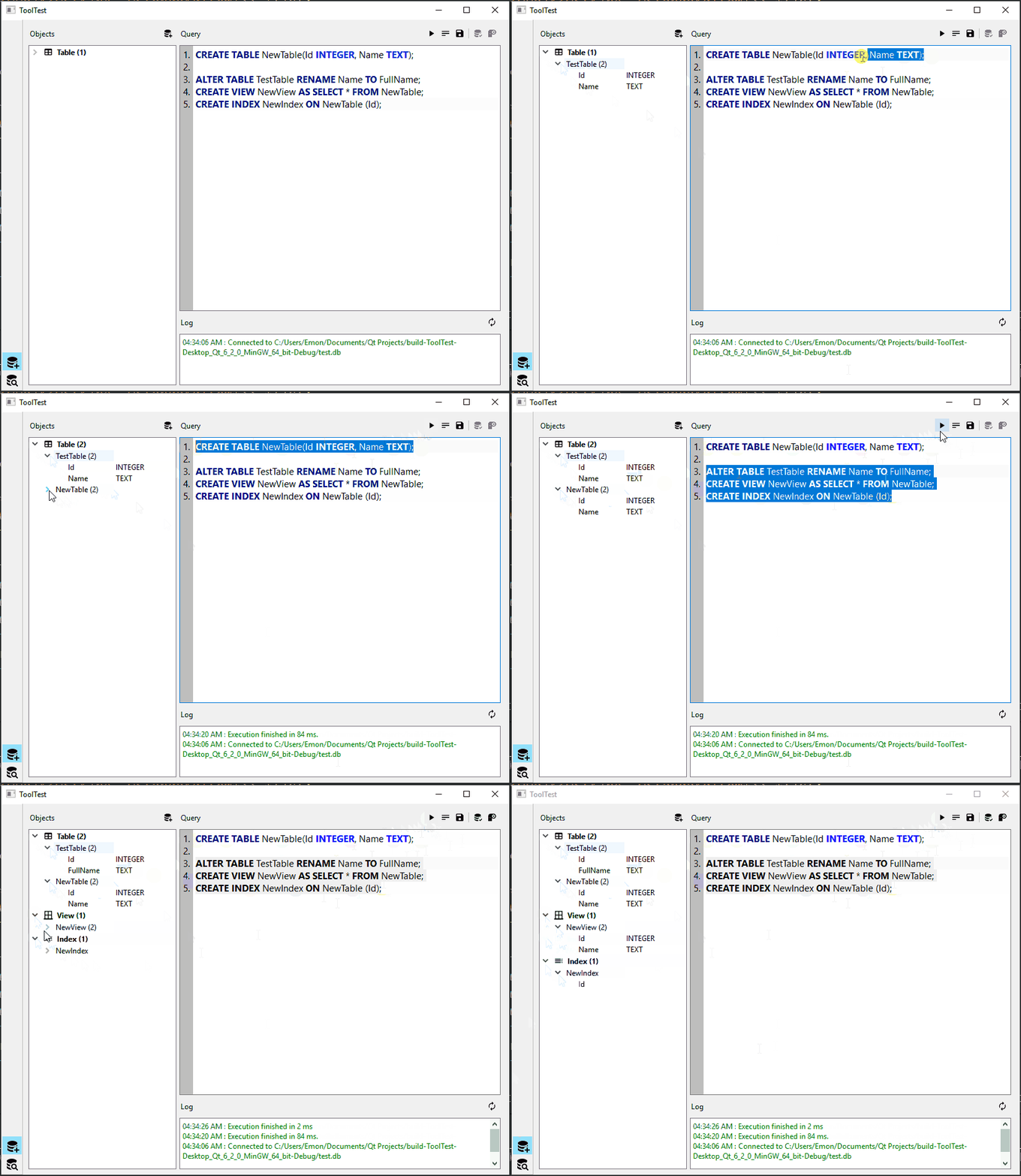
Any suggestion for improvement?
