Skip to content
  • Categories
  • Recent
  • Tags
  • Popular
  • Users
  • Groups
  • Search
  • Get Qt Extensions
  • Unsolved
Collapse
Brand Logo
  1. Home
  2. Qt Development
  3. General and Desktop
  4. Trouble setting up for Android

Trouble setting up for Android

Scheduled Pinned Locked Moved Solved General and Desktop
6 Posts 3 Posters 752 Views 1 Watching
  • Oldest to Newest
  • Newest to Oldest
  • Most Votes
Reply
  • Reply as topic
Log in to reply
This topic has been deleted. Only users with topic management privileges can see it.
  • M Offline
    M Offline
    MScottM
    wrote on last edited by
    #1

    I've been migrating to a new (to me) computer and have reinstalled Qt 5.12.11, which apparently came with Qt Creator 5.0.0

    face7bf6-4034-489b-a9ec-2420d0deaec3-image.png

    and I'm having trouble getting it set up for developing for Android. I've spent several hours trying to clear these errors:

    f0c1772c-a715-47e9-84de-94b5ba01254a-image.png

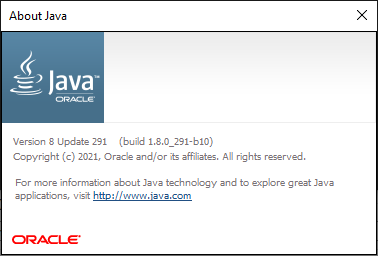
    I'm running Java 1.8 as seen here:

    a8f2653e-87e2-4416-a6ad-ec7ac3022cbb-image.png

    and I have several NDK's loaded which are supposedly compatible with this version of Qt, as listed here.

    Here is my 'Options->Qt Versions' page:

    2ba2519a-cef8-42ee-967a-9e947db9feb2-image.png

    the three marked kits all say 'No compiler can produce code for this Qt version.'

    Here is the 'Options->Compilers' page:
    7a1179a4-8d39-41f3-b505-cdc0648b42ac-image.png

    I'm at a loss as to how to proceed. Does anyone have any insight?

    Best,

    Scott

    KroMignonK Pablo J. RoginaP 2 Replies Last reply
    0
    • M MScottM

      I've been migrating to a new (to me) computer and have reinstalled Qt 5.12.11, which apparently came with Qt Creator 5.0.0

      face7bf6-4034-489b-a9ec-2420d0deaec3-image.png

      and I'm having trouble getting it set up for developing for Android. I've spent several hours trying to clear these errors:

      f0c1772c-a715-47e9-84de-94b5ba01254a-image.png

      I'm running Java 1.8 as seen here:

      a8f2653e-87e2-4416-a6ad-ec7ac3022cbb-image.png

      and I have several NDK's loaded which are supposedly compatible with this version of Qt, as listed here.

      Here is my 'Options->Qt Versions' page:

      2ba2519a-cef8-42ee-967a-9e947db9feb2-image.png

      the three marked kits all say 'No compiler can produce code for this Qt version.'

      Here is the 'Options->Compilers' page:
      7a1179a4-8d39-41f3-b505-cdc0648b42ac-image.png

      I'm at a loss as to how to proceed. Does anyone have any insight?

      Best,

      Scott

      KroMignonK Offline
      KroMignonK Offline
      KroMignon
      wrote on last edited by
      #2

      @MScottM You have to install missed android packages.

      You can do it from Qt Creator / Tools / Devices / Android
      At bottom, select the Android tab and ensure Android SDK Command-line Tools is selected

      1744352c-fdfb-43ef-88da-8a5409122c54-image.png

      It is an old maxim of mine that when you have excluded the impossible, whatever remains, however improbable, must be the truth. (Sherlock Holmes)

      M 1 Reply Last reply
      0
      • KroMignonK KroMignon

        @MScottM You have to install missed android packages.

        You can do it from Qt Creator / Tools / Devices / Android
        At bottom, select the Android tab and ensure Android SDK Command-line Tools is selected

        1744352c-fdfb-43ef-88da-8a5409122c54-image.png

        M Offline
        M Offline
        MScottM
        wrote on last edited by
        #3

        @KroMignon thanks for your reply. Here is my screen from (I believe) the same location:

        ac9750bf-9d26-47c9-9817-ff82b0ce6f9b-image.png

        There are no options available...? I have tried pressing 'Update Installed' and it goes through a couple steps:

        bb62beff-e7e1-4cef-b147-202c9e023111-image.png
        849f2771-3bf3-40ac-9351-0f4e87bd7d22-image.png

        but then ends up blank again.

        KroMignonK 1 Reply Last reply
        0
        • M MScottM

          I've been migrating to a new (to me) computer and have reinstalled Qt 5.12.11, which apparently came with Qt Creator 5.0.0

          face7bf6-4034-489b-a9ec-2420d0deaec3-image.png

          and I'm having trouble getting it set up for developing for Android. I've spent several hours trying to clear these errors:

          f0c1772c-a715-47e9-84de-94b5ba01254a-image.png

          I'm running Java 1.8 as seen here:

          a8f2653e-87e2-4416-a6ad-ec7ac3022cbb-image.png

          and I have several NDK's loaded which are supposedly compatible with this version of Qt, as listed here.

          Here is my 'Options->Qt Versions' page:

          2ba2519a-cef8-42ee-967a-9e947db9feb2-image.png

          the three marked kits all say 'No compiler can produce code for this Qt version.'

          Here is the 'Options->Compilers' page:
          7a1179a4-8d39-41f3-b505-cdc0648b42ac-image.png

          I'm at a loss as to how to proceed. Does anyone have any insight?

          Best,

          Scott

          Pablo J. RoginaP Offline
          Pablo J. RoginaP Offline
          Pablo J. Rogina
          wrote on last edited by
          #4

          @MScottM said in Trouble setting up for Android:

          have reinstalled Qt 5.12.11

          Are you sure you've installed Qt for Android components?
          I'm asking given the errors shown in the screenshot for Auto-detected kits ("'Options->Qt Versions' page:")

          Upvote the answer(s) that helped you solve the issue
          Use "Topic Tools" button to mark your post as Solved
          Add screenshots via postimage.org
          Don't ask support requests via chat/PM. Please use the forum so others can benefit from the solution in the future

          1 Reply Last reply
          0
          • M MScottM

            @KroMignon thanks for your reply. Here is my screen from (I believe) the same location:

            ac9750bf-9d26-47c9-9817-ff82b0ce6f9b-image.png

            There are no options available...? I have tried pressing 'Update Installed' and it goes through a couple steps:

            bb62beff-e7e1-4cef-b147-202c9e023111-image.png
            849f2771-3bf3-40ac-9351-0f4e87bd7d22-image.png

            but then ends up blank again.

            KroMignonK Offline
            KroMignonK Offline
            KroMignon
            wrote on last edited by
            #5

            @MScottM Did you follow Qt Documentation to install base Android components? Cf. https://doc.qt.io/qt-5/android-getting-started.html

            I think you have to do something like this:

            cd <ANDROID_SDK_ROOT>/tools/bin/
            
            REM to install Android SDK Essentials
            sdkmanager.bat --sdk_root=<ANDROID_SDK_ROOT> --install "cmdline-tools;latest"
            sdkmanager.bat --sdk_root=<ANDROID_SDK_ROOT> --install "platform-tools" "platforms;android-29" "build-tools;29.0.2" "ndk;21.3.6528147"
            
            REM to install Android emulator
            sdkmanager.bat --sdk_root=<ANDROID_SDK_ROOT> --install "emulator" "patcher;v4"
            
            REM to install USB driver on Windows to allow debugging via ADB
            sdkmanager.bat --sdk_root=<ANDROID_SDK_ROOT> --install "extras;google;usb_driver"
            

            Note: ANDROID_SDK_ROOT is the path of your android SDK. I guess it is C:\Users\scott\AppData\Local\Android\Sdk\

            It is an old maxim of mine that when you have excluded the impossible, whatever remains, however improbable, must be the truth. (Sherlock Holmes)

            1 Reply Last reply
            0
            • M Offline
              M Offline
              MScottM
              wrote on last edited by
              #6

              I went back to the 'Getting Started with Android' page and downloaded and installed the 'OpenJDK' package - I was using the Java provided JDK 8.

              In Qt, when I pointed the JDK location (Options->Devices->Java Settings) to the new installation folder (was pointing to an Android location), 'C:\Program Files\Eclipse Foundation\jdk-8.0.302.8-hotspot', that triggered Qt to 'Install Missing SDK Packages?' (paraphrasing), which I did.

              When that finished, I went to 'Options->Kits->Qt Versions' and selected the first 'red' Qt for Android item and clicked the button on the right, 'Link with Qt...' It prompted for a restart of Qt - when it came back up, everything had cleared up with green checks!

              I haven't tried uploading to a phone yet, but I think any issues now would be a new problem... Will mark this solved.

              Thank you all!

              1 Reply Last reply
              0

              • Login

              • Login or register to search.
              • First post
                Last post
              0
              • Categories
              • Recent
              • Tags
              • Popular
              • Users
              • Groups
              • Search
              • Get Qt Extensions
              • Unsolved