
Qt Network seems to persistently use memory
-
I have a program that is riddled with calls that pretty much look like this:
// not the actual site I'm pinging, but you get the idea
QNetworkRequest req{QUrl{"https://qt.io"}};
req.setHeader(QNetworkRequest::ContentTypeHeader, "application/json");
req.setRawHeader("X-Api-Key", m_apiKey);

// using head here means that there's not as much content to download, thereby speeding up the app
auto rep = m_manager.head(req);

connect(rep, &QNetworkReply::finished, this, [this, rep]() {
    if (auto status = rep->attribute(QNetworkRequest::HttpStatusCodeAttribute).toInt(); status == 200) [[likely]]
    {
        // well look at that, we are online
    }
    else [[unlikely]]
    {
        // somebody cut a cable or something, so we'd better throw an error message or something
    }

    rep->deleteLater();
});

while (!rep->isFinished())
    qApp->processEvents();
Other than the fact that this has potential to crash (yes, I understand that calling
rep->deleteLater()in this context has the potential to delete rep before the final call torep->isFinished(); my actual code has a workaround), this has a major problem: it eats memory. Granted, it was worse before I realized thatQNetworkReplydoesn't delete itself, but it still eats memory.My code is actually structured so that the network calling stuff in my above code block is mostly separated into functions that look like this:
// there are also head, post, and patch available; I could trivially add any other HTTP verb
void get(const QUrl &url, bool async, int expectedReturnCode,
                const std::function<void (QNetworkReply *)> &successCb,
                const std::function<void (QNetworkReply *)> &failureCb);
so that I can simply call
head(QUrl{"https://qt.io"}, true, 200, [] {
    // internet connected, do something!
}, [] {
    // internet not connected, do something!
});
and have it behave as expected. To access the callbacks, I'm storing them in a
QHash<QNetworkReply *, QPair<std::function<void (QNetworkReply *)>, std::function<void (QNetworkReply *)>>>. I suspected this as possibly being a memory eater but it doesn't seem to actually be the cause; when I tested without using the hash callback method by replacing thehead()call with the actual code fromhead(), memory usage still went up.A typical memory usage scenario looks like this when observed in Heaptrack:
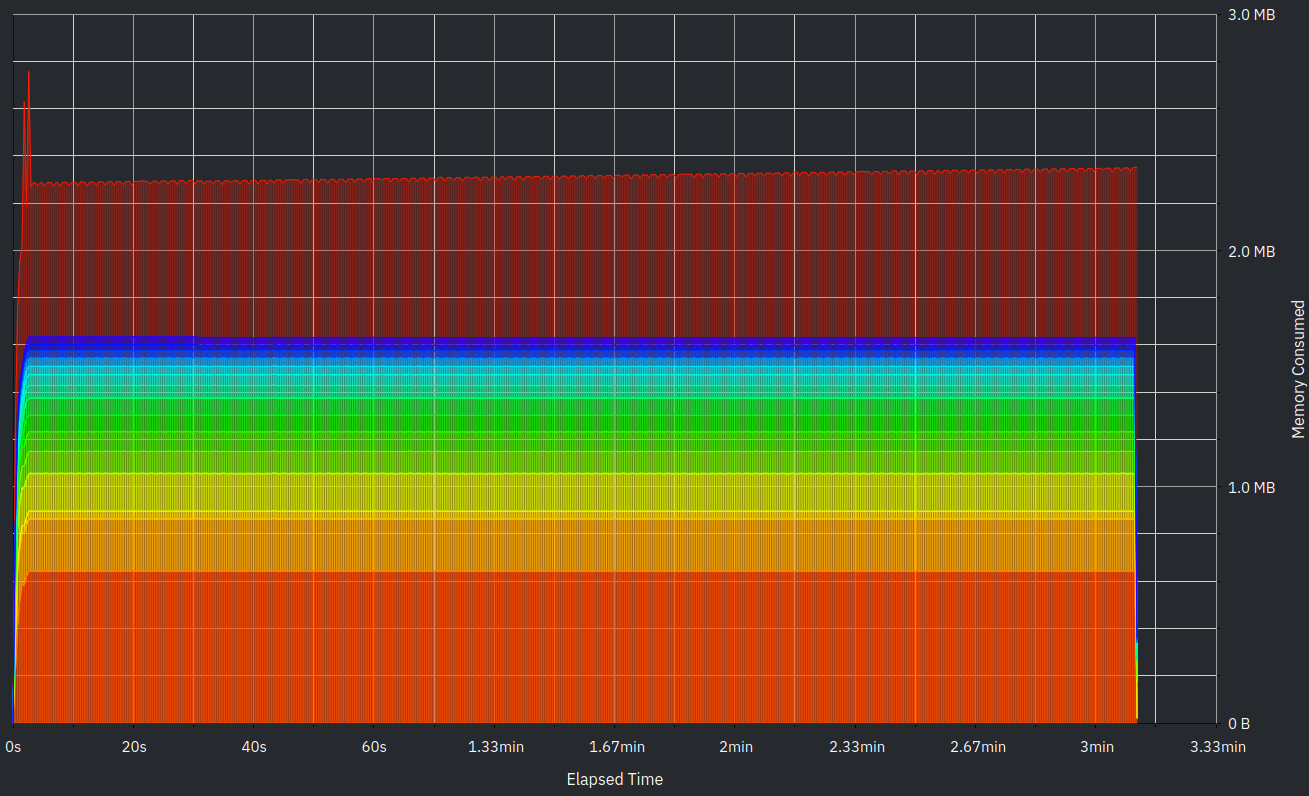
I'm running on openSUSE Tumbleweed using Qt 6.1.2 and/or Qt 5.15.2. I did notice that 5.15.2 had a significantly lower baseline memory usage than 6.1.2; however, both exhibit the same memory-eating behavior.
I understand that (a) this could be an obscure issue and (b) this is a lot of information to parse; however, hopefully I will be able to find a solution. If I left out anything important, please let me know.
Thanks in advance!
@LorenDB said in Qt Network seems to persistently use memory:
I have a program that is riddled with calls that pretty much look like this:
[...]
while (!rep->isFinished())
    qApp->processEvents();
Is there a reason this is avoiding the event loop by busy waiting? DeferredDelete events have some restrictions which this code appears to be tripping over.
#include <QCoreApplication>
#include <QObject>
#include <QDebug>
#include <QTimer>

void tryWithExec()
{
    QObject *obj = new QObject;
    obj->setObjectName("timeout slot");
    QObject::connect(obj, &QObject::destroyed, [](QObject *object) { qDebug() << object << "destroyed"; QCoreApplication::quit(); } );
    obj->deleteLater();
    qDebug() << "QCoreApplication::processEvents()";
    QCoreApplication::instance()->processEvents();
    qDebug() << "returning to event loop";
}

int main(int argc, char *argv[])
{
    QCoreApplication a(argc, argv);
    QObject *obj = new QObject;
    obj->setObjectName("pre-exec");
    QObject::connect(obj, &QObject::destroyed, [](QObject *object) { qDebug() << object<< "destroyed";} );
    QTimer timer;
    timer.setInterval(1000);
    timer.setSingleShot(true);
    QObject::connect(&timer, &QTimer::timeout, &tryWithExec);
    timer.start();
    obj->deleteLater();
    qDebug() << "QCoreApplication::processEvents()";
    a.processEvents();
    qDebug() << "QCoreApplication::exec()";
    return a.exec();
}
Using Qt 5.15.2, the output is:
QCoreApplication::processEvents()
QCoreApplication::exec()
QObject(0x7fd68440b590, name = "pre-exec") destroyed
QCoreApplication::processEvents()
returning to event loop
QObject(0x7fd686006a70, name = "timeout slot") destroyedNote that deferred deletion is not happening in response to QCoreApplication::processEvents().
-
Wow, I have all sorts of advice! Let me sort through this:
@SGaist I already tested with a console application that only does the internet check calls (no other network activity is occurring, at least not anything that I wrote into the test app). The memory creep is still there.
@JoeCFD I'd rather not log into X for various reasons (for example, I'm on KDE Plasma, which for some reason has terrible X support for graphical effects anymore). In fact, I don't think that the fault rests with Wayland, since I've experienced memory creep on Windows as well and since my console test app (see above) also experienced memory creep.
@jeremy_k Hmm, that's a good point. In fact, your suggestion triggered a memory that I had of seeing something similar in Qt Assistant. I looked it up and found that you can call
sendPostedEvents()to do such things as executeDeferredDeleteevents. I will try executing that as well and get back with the results (preliminary testing looks promising). In answer to your question, yes, I have a reason for busy waiting: I specifically want to make sure that network requests execute in a specific order (I'm modifying time records on Clockify, if you want to know, and requesting a stop and then a start can sometimes result in requests finishing in the wrong order which leads to wacky behavior) and decided to add synchronous execution to my network requests that needed it. (I do have the ability to run async requests, however.)Thanks to all involved for the input so far.
-
https://forum.qt.io/topic/128729/real-confusion-about-when-to-delete-qnetworkreply-object/10
Check this one out and you may be able to get some help.
In your code,
if auto rep = m_manager.head(req); finishes immediately, the following connect is useless since finished has been sent out. -
@JoeCFD said in Qt Network seems to persistently use memory:
https://forum.qt.io/topic/128729/real-confusion-about-when-to-delete-qnetworkreply-object/10
Check this one out and you may be able to get some help.
In your code,
if auto rep = m_manager.head(req); finishes immediately, the following connect is useless since finished has been sent out.I tried that without success. I then tried calling
setAutoDeleteReplies(true)on myQNetworkAccessManager, also without success.Another thing that I should point out that I am sure that the problem lies at least partly with Qt Network because when conditions are such that my status requests to Clockify return large(ish) amounts of data, memory creep is larger than when there is little to no data returned. Before anybody asks, no, I am not permanently storing all of this data unless the JSON library I'm using is caching things that I'm parsing behind the scenes.
-
-
Wow, I have all sorts of advice! Let me sort through this:
@SGaist I already tested with a console application that only does the internet check calls (no other network activity is occurring, at least not anything that I wrote into the test app). The memory creep is still there.
@JoeCFD I'd rather not log into X for various reasons (for example, I'm on KDE Plasma, which for some reason has terrible X support for graphical effects anymore). In fact, I don't think that the fault rests with Wayland, since I've experienced memory creep on Windows as well and since my console test app (see above) also experienced memory creep.
@jeremy_k Hmm, that's a good point. In fact, your suggestion triggered a memory that I had of seeing something similar in Qt Assistant. I looked it up and found that you can call
sendPostedEvents()to do such things as executeDeferredDeleteevents. I will try executing that as well and get back with the results (preliminary testing looks promising). In answer to your question, yes, I have a reason for busy waiting: I specifically want to make sure that network requests execute in a specific order (I'm modifying time records on Clockify, if you want to know, and requesting a stop and then a start can sometimes result in requests finishing in the wrong order which leads to wacky behavior) and decided to add synchronous execution to my network requests that needed it. (I do have the ability to run async requests, however.)Thanks to all involved for the input so far.
@LorenDB said in Qt Network seems to persistently use memory:
I specifically want to make sure that network requests execute in a specific order
Chain the sending of the next request to the completion of the current reply. Eg:
void Manager::onReplyFinished(QNetworkReply *reply)
{
    if (!this->m_requestQueue.isEmpty()) {
        this->get(this->m_requestsQueue.takeFirst());
    }
    // process the current reply
}
Asking a question about code? http://eel.is/iso-c++/testcase/
-
@LorenDB said in Qt Network seems to persistently use memory:
I specifically want to make sure that network requests execute in a specific order
Chain the sending of the next request to the completion of the current reply. Eg:
void Manager::onReplyFinished(QNetworkReply *reply) { if (!this->m_requestQueue.isEmpty()) { this->get(this->m_requestsQueue.takeFirst()); } // process the current reply }@jeremy_k the problem is that that approach won't work for my whole application. Some requests return data that needs to be processed by the caller (e.g. the caller is asking if a certain condition is met, and that condition is determined by the state of an online resource).
-
@jeremy_k the problem is that that approach won't work for my whole application. Some requests return data that needs to be processed by the caller (e.g. the caller is asking if a certain condition is met, and that condition is determined by the state of an online resource).
@LorenDB said in Qt Network seems to persistently use memory:
@jeremy_k the problem is that that approach won't work for my whole application. Some requests return data that needs to be processed by the caller (e.g. the caller is asking if a certain condition is met, and that condition is determined by the state of an online resource).
So have the caller connect to QNetworkReply::finished(), or use QNetworkRequest::originatingObject() to indicate which object should be notified.
Asking a question about code? http://eel.is/iso-c++/testcase/
-
@LorenDB said in Qt Network seems to persistently use memory:
@jeremy_k the problem is that that approach won't work for my whole application. Some requests return data that needs to be processed by the caller (e.g. the caller is asking if a certain condition is met, and that condition is determined by the state of an online resource).
So have the caller connect to QNetworkReply::finished(), or use QNetworkRequest::originatingObject() to indicate which object should be notified.
@jeremy_k said in Qt Network seems to persistently use memory:
So have the caller connect to QNetworkReply::finished(), or use QNetworkRequest::originatingObject() to indicate which object should be notified.
That won't really work in my situation. I'm processing data that depends on the value of this reply, and I need to temporarily hang in order to finish. If I try to do a slot-based callback system, my code will quickly turn into an unmanageable jungle (oh wait, it already is... /s).
-
@jeremy_k said in Qt Network seems to persistently use memory:
So have the caller connect to QNetworkReply::finished(), or use QNetworkRequest::originatingObject() to indicate which object should be notified.
That won't really work in my situation. I'm processing data that depends on the value of this reply, and I need to temporarily hang in order to finish. If I try to do a slot-based callback system, my code will quickly turn into an unmanageable jungle (oh wait, it already is... /s).
-
At one point, I was using a
QEventLoop, but I decided that callingprocessEventswould have the same effect. Am I wrong?@LorenDB
Using a localQEventLoop loop, callingloop.exec()and exiting withloop.quit()on your reply finished signal is the standard way of forcing a sync point. I don't know why you'd useprocessEvents()here. Your case is discussed in, say, https://stackoverflow.com/questions/29449561/qeventloop-proper-usage. Note the comments/replies do warn you it is evil :) That's all I know. -
@jeremy_k said in Qt Network seems to persistently use memory:
So have the caller connect to QNetworkReply::finished(), or use QNetworkRequest::originatingObject() to indicate which object should be notified.
That won't really work in my situation. I'm processing data that depends on the value of this reply, and I need to temporarily hang in order to finish. If I try to do a slot-based callback system, my code will quickly turn into an unmanageable jungle (oh wait, it already is... /s).
@LorenDB said in Qt Network seems to persistently use memory:
@jeremy_k said in Qt Network seems to persistently use memory:
So have the caller connect to QNetworkReply::finished(), or use QNetworkRequest::originatingObject() to indicate which object should be notified.
That won't really work in my situation. I'm processing data that depends on the value of this reply, and I need to temporarily hang in order to finish. If I try to do a slot-based callback system, my code will quickly turn into an unmanageable jungle (oh wait, it already is... /s).
It sounds like you are trying to dig your way out of a hole by using a more complicated shovel.
-
All right! As requested, here is a minimal working example that is basically a mashup of various code from my application, plus a bit of demonstration in
main():#include <iostream> #include <QCoreApplication> #include <QNetworkAccessManager> #include <QNetworkReply> #include <QUrlQuery> #include <QTimer> class ClockifyUser : public QObject { public: explicit ClockifyUser(QByteArray apiKey, QString userId, QObject *parent = nullptr) : QObject{parent}, m_apiKey{apiKey}, m_userId{userId} { m_manager.setAutoDeleteReplies(true); } bool hasRunningTimeEntry() { QUrl url{"https://api.clockify.me/api/v1/workspaces/<workspace id goes here; fill it in yourself>/user/" + m_userId + "/time-entries"}; QUrlQuery query; query.addQueryItem("in-progress", "true"); url.setQuery(query); bool status = false; get(url, false, 200, [&status](QNetworkReply *rep) { if (auto text = rep->readAll(); !text.isEmpty() && text != "[]") status = true; }, [](QNetworkReply *) { /* we won't do anything on error */ }); return status; } private: void get(const QUrl &url, bool async, int expectedReturnCode, const std::function<void (QNetworkReply *)> &successCb, const std::function<void (QNetworkReply *)> &failureCb) { QNetworkRequest req{url}; req.setHeader(QNetworkRequest::ContentTypeHeader, "application/json"); req.setRawHeader("X-Api-Key", m_apiKey); auto rep = m_manager.get(req); m_pendingReplies.insert(rep, {successCb, failureCb}); // Please do not question my sanity here; I actually am pretty sure that I know what I am doing here bool *done = async ? nullptr : new bool{false}; connect(rep, &QNetworkReply::finished, this, [this, rep, expectedReturnCode, done]() { if (auto status = rep->attribute(QNetworkRequest::HttpStatusCodeAttribute).toInt(); status == expectedReturnCode) [[likely]] m_pendingReplies[rep].first(rep); else [[unlikely]] m_pendingReplies[rep].second(rep); if (done != nullptr) *done = true; m_pendingReplies.remove(rep); }, Qt::DirectConnection); if (!async) // OK, I know, I haven't made this into a QEventLoop yet while (!(*done)) { qApp->processEvents(); qApp->sendPostedEvents(); } if (done) { delete done; done = nullptr; // in case we are doing async, this is required to make the lamba's done setting logic work } } QHash<QNetworkReply *, QPair<std::function<void (QNetworkReply *)>, std::function<void (QNetworkReply *)>>> m_pendingReplies; QString m_userId; QByteArray m_apiKey; QNetworkAccessManager m_manager; }; int main(int argc, char *argv[]) { QCoreApplication app{argc, argv}; std::cout << "starting...\n"; ClockifyUser user{"your api key goes here", "your user id goes here"}; auto someRandomFunctionThatExecutesInTheEventLoopOrSomewhereLikeThat = [&user] { // Right here, I temporarily halt the code that provides updated statuses to the user interface. While it may // seem odd, it actually prevents stuttering for reasons that I won't go into now if (user.hasRunningTimeEntry()) { // take some action here, like... std::cout << "Good for you, you seem to be working!" << std::endl; // Trivia: std::cout doesn't flush automatically when used in the Qt event loop // ... or something like that } else std::cout << "Why are you not working?" << std::endl; // now we can fire the status update stuff back up }; QTimer timer; timer.setInterval(5000); timer.setSingleShot(false); timer.callOnTimeout(someRandomFunctionThatExecutesInTheEventLoopOrSomewhereLikeThat); std::cout << "timer starting...\n"; timer.start(); // now watch memory usage with your favorite memory usage visualization tool (Visual Studio debugger, Heaptrack, Valgrind, etc. etc.) and see it go up! return app.exec(); }Please take note of several things:
- If you actually want to run this code, you'll have to modify the API key, user ID, and workspace ID that I redacted.
- This is a small sample of what my actual codebase looks like; there are other functions that return values from network requests as well.
Theoretically, this could be refactored into an elaborate callback system, but I'm not sure that it would be a good idea to do so, since it would result in complex callback chains 3 or 4 deep. For example:
connect(this, &SomeClass::someAction, &user, [&user] {
    user.fetchHasRunningTimeEntry();
    connect(&user, &ClockifyUser::hasRunningTimeEntryLoaded, &user, [&user](bool status) {
        if (status)
        {
            // ... execute a stop action, then a start action based on a return value from the stop action ...
            user.stopRunningTimeEntry();
            connect(&user, &ClockifyUser::runningTimeEntryStopped, &user, [&user] {
                user.startRunningTimeEntry(/* whatever params */);
            });
        }
        else
            user.startRunningTimeEntry(/* whatever params */); // ... you get the point ...
    });
});
Hope this helps clear up why I am doing what I am doing.
[Edit: I fixed the example callback-chain code to be a realistic example of what the callback setup would look like, since I realized that my original code wasn't very... correct]
-
All right! As requested, here is a minimal working example that is basically a mashup of various code from my application, plus a bit of demonstration in
main():#include <iostream> #include <QCoreApplication> #include <QNetworkAccessManager> #include <QNetworkReply> #include <QUrlQuery> #include <QTimer> class ClockifyUser : public QObject { public: explicit ClockifyUser(QByteArray apiKey, QString userId, QObject *parent = nullptr) : QObject{parent}, m_apiKey{apiKey}, m_userId{userId} { m_manager.setAutoDeleteReplies(true); } bool hasRunningTimeEntry() { QUrl url{"https://api.clockify.me/api/v1/workspaces/<workspace id goes here; fill it in yourself>/user/" + m_userId + "/time-entries"}; QUrlQuery query; query.addQueryItem("in-progress", "true"); url.setQuery(query); bool status = false; get(url, false, 200, [&status](QNetworkReply *rep) { if (auto text = rep->readAll(); !text.isEmpty() && text != "[]") status = true; }, [](QNetworkReply *) { /* we won't do anything on error */ }); return status; } private: void get(const QUrl &url, bool async, int expectedReturnCode, const std::function<void (QNetworkReply *)> &successCb, const std::function<void (QNetworkReply *)> &failureCb) { QNetworkRequest req{url}; req.setHeader(QNetworkRequest::ContentTypeHeader, "application/json"); req.setRawHeader("X-Api-Key", m_apiKey); auto rep = m_manager.get(req); m_pendingReplies.insert(rep, {successCb, failureCb}); // Please do not question my sanity here; I actually am pretty sure that I know what I am doing here bool *done = async ? nullptr : new bool{false}; connect(rep, &QNetworkReply::finished, this, [this, rep, expectedReturnCode, done]() { if (auto status = rep->attribute(QNetworkRequest::HttpStatusCodeAttribute).toInt(); status == expectedReturnCode) [[likely]] m_pendingReplies[rep].first(rep); else [[unlikely]] m_pendingReplies[rep].second(rep); if (done != nullptr) *done = true; m_pendingReplies.remove(rep); }, Qt::DirectConnection); if (!async) // OK, I know, I haven't made this into a QEventLoop yet while (!(*done)) { qApp->processEvents(); qApp->sendPostedEvents(); } if (done) { delete done; done = nullptr; // in case we are doing async, this is required to make the lamba's done setting logic work } } QHash<QNetworkReply *, QPair<std::function<void (QNetworkReply *)>, std::function<void (QNetworkReply *)>>> m_pendingReplies; QString m_userId; QByteArray m_apiKey; QNetworkAccessManager m_manager; }; int main(int argc, char *argv[]) { QCoreApplication app{argc, argv}; std::cout << "starting...\n"; ClockifyUser user{"your api key goes here", "your user id goes here"}; auto someRandomFunctionThatExecutesInTheEventLoopOrSomewhereLikeThat = [&user] { // Right here, I temporarily halt the code that provides updated statuses to the user interface. While it may // seem odd, it actually prevents stuttering for reasons that I won't go into now if (user.hasRunningTimeEntry()) { // take some action here, like... std::cout << "Good for you, you seem to be working!" << std::endl; // Trivia: std::cout doesn't flush automatically when used in the Qt event loop // ... or something like that } else std::cout << "Why are you not working?" << std::endl; // now we can fire the status update stuff back up }; QTimer timer; timer.setInterval(5000); timer.setSingleShot(false); timer.callOnTimeout(someRandomFunctionThatExecutesInTheEventLoopOrSomewhereLikeThat); std::cout << "timer starting...\n"; timer.start(); // now watch memory usage with your favorite memory usage visualization tool (Visual Studio debugger, Heaptrack, Valgrind, etc. etc.) and see it go up! return app.exec(); }Please take note of several things:
- If you actually want to run this code, you'll have to modify the API key, user ID, and workspace ID that I redacted.
- This is a small sample of what my actual codebase looks like; there are other functions that return values from network requests as well.
Theoretically, this could be refactored into an elaborate callback system, but I'm not sure that it would be a good idea to do so, since it would result in complex callback chains 3 or 4 deep. For example:
connect(this, &SomeClass::someAction, &user, [&user] {
    user.fetchHasRunningTimeEntry();
    connect(&user, &ClockifyUser::hasRunningTimeEntryLoaded, &user, [&user](bool status) {
        if (status)
        {
            // ... execute a stop action, then a start action based on a return value from the stop action ...
            user.stopRunningTimeEntry();
            connect(&user, &ClockifyUser::runningTimeEntryStopped, &user, [&user] {
                user.startRunningTimeEntry(/* whatever params */);
            });
        }
        else
            user.startRunningTimeEntry(/* whatever params */); // ... you get the point ...
    });
});
Hope this helps clear up why I am doing what I am doing.
[Edit: I fixed the example callback-chain code to be a realistic example of what the callback setup would look like, since I realized that my original code wasn't very... correct]
@LorenDB said in Qt Network seems to persistently use memory:
All right! As requested, here is a minimal working example that is basically a mashup of various code from my application, plus a bit of demonstration in
main():Thanks. In particular, thanks for realizing that a separate header file isn't necessary. I would have cut all of the parameters related to this particular service, and used a dummy URL to demonstrate, but that's minor.
	void get(const QUrl &url,
			 bool async,
			 int expectedReturnCode,
			 const std::function<void (QNetworkReply *)> &successCb,
			 const std::function<void (QNetworkReply *)> &failureCb)
	{
		QNetworkRequest req{url};
		req.setHeader(QNetworkRequest::ContentTypeHeader, "application/json");
		req.setRawHeader("X-Api-Key", m_apiKey);

		auto rep = m_manager.get(req);
		m_pendingReplies.insert(rep, {successCb, failureCb});

		// Please do not question my sanity here; I actually am pretty sure that I know what I am doing here
		bool *done = async ? nullptr : new bool{false};
!!!!? There's knowing what it's doing today, and there's you or someone else understanding in a year.
The async variable remains in scope to test later in the function. Using dynamic allocation to create a tristate variable seems like unnecessary complexity, for the sake of reducing performance. If you really like the tristate, create an enum.connect(rep, &QNetworkReply::finished, this, [this, rep, expectedReturnCode, done]() { if (auto status = rep->attribute(QNetworkRequest::HttpStatusCodeAttribute).toInt(); status == expectedReturnCode) [[likely]] m_pendingReplies[rep].first(rep); else [[unlikely]] m_pendingReplies[rep].second(rep); if (done != nullptr) *done = true; m_pendingReplies.remove(rep); }, Qt::DirectConnection);I'm not a fan of lambda functions that do much more than reorder function parameters, or capture one for later use. They seem to be hard to read and hard to test in comparison to a named function. Much like the pointer to a dynamically allocated bool, working should not be the only goal.
  if (!async) // OK, I know, I haven't made this into a QEventLoop yet
  	while (!(*done))
  	{
  		qApp->processEvents();
  		qApp->sendPostedEvents();
  	}
I wouldn't even do that. Return to whatever event loop led to this function call, and remove a little complexity from the program maintainer's life.
  if (done)
  {
  	delete done;
  	done = nullptr; // in case we are doing async, this is required to make the lamba's done setting logic work
Delete on a nullptr is a no-op. There's no need to check first.
The lambda above capturesdoneas a copy. It can't see the nullptr assignment. Also, ifasyncis true, done was already assigned nullptr, and the lambda only touches it if it isn't null.int main(int argc, char *argv[])
{
QCoreApplication app{argc, argv};std::cout << "starting...\n";
ClockifyUser user{"your api key goes here", "your user id goes here"};
auto someRandomFunctionThatExecutesInTheEventLoopOrSomewhereLikeThat = [&user] {
// Right here, I temporarily halt the code that provides updated statuses to the user interface. While it may
// seem odd, it actually prevents stuttering for reasons that I won't go into nowI'm not sure what "the code that provides updated statuses" means. That could be disconnecting a connection that updates a label, which sounds reasonable, or it could be another problem to solve rather than work around.
  if (user.hasRunningTimeEntry())
  {
  	// take some action here, like...
  	std::cout << "Good for you, you seem to be working!" << std::endl; // Trivia: std::cout doesn't flush automatically when used in the Qt event loop
  	// ... or something like that
  }
  else
  	std::cout << "Why are you not working?" << std::endl;

  // now we can fire the status update stuff back up
};
QTimer timer;
timer.setInterval(5000);
timer.setSingleShot(false);
timer.callOnTimeout(someRandomFunctionThatExecutesInTheEventLoopOrSomewhereLikeThat);std::cout << "timer starting...\n";
timer.start();// now watch memory usage with your favorite memory usage visualization tool (Visual Studio debugger, Heaptrack, Valgrind, etc. etc.) and see it go up!
return app.exec();
}- This is a small sample of what my actual codebase looks like; there are other functions that return values from network requests as well.
Theoretically, this could be refactored into an elaborate callback system, but I'm not sure that it would be a good idea to do so, since it would result in complex callback chains 3 or 4 deep.
Signals and slots are an elaborate callback system. Choosing to use Qt and avoid them seems like a strange choice.
For example:
connect(this, &SomeClass::someAction, &user, [&user] {
    user.fetchHasRunningTimeEntry();
    connect(&user, &ClockifyUser::hasRunningTimeEntryLoaded, &user, [&user](bool status) {
        if (status)
        {
            // ... execute a stop action, then a start action based on a return value from the stop action ...
            user.stopRunningTimeEntry();
            connect(&user, &ClockifyUser::runningTimeEntryStopped, &user, [&user] {
                user.startRunningTimeEntry(/* whatever params */);
            });
        }
        else
            user.startRunningTimeEntry(/* whatever params */); // ... you get the point ...
    });
});
Writing small functions that do one thing may lead to needing a few more functions, but it will also likely be easier to understand each function. It also makes using a debugger easier because there's no need to differentiate execution from declaration.
Hope this helps clear up why I am doing what I am doing.
What, yes. Why, ...
The code looks like a difficult read. As pointed out, it already has behavioral issues and some unusual conventions. I don't see anything that couldn't be refactored to use a flatter structure and bear more resemblance to the Qt examples and documentation. Going over heavily trodden ground means it's more likely that the library code will work as intended.[Edit: I fixed the example callback-chain code to be a realistic example of what the callback setup would look like, since I realized that my original code wasn't very... correct]
I hope you were at least half as lost as I am :-)
If refactoring isn't an option, good luck.


