
Skip to content
  • Categories
  • Recent
  • Tags
  • Popular
  • Users
  • Groups
  • Search
  • Get Qt Extensions
  • Unsolved
Collapse
Brand Logo
  1. Home
  2. Qt Development
  3. General and Desktop
  4. drag and drop non-frozen column header to frozen column header
Qt 6.11 is out! See what's new in the release blog

drag and drop non-frozen column header to frozen column header

Scheduled Pinned Locked Moved Unsolved General and Desktop
11 Posts 2 Posters 917 Views 1 Watching
  • Oldest to Newest
  • Newest to Oldest
  • Most Votes
Reply
  • Reply as topic
Log in to reply
This topic has been deleted. Only users with topic management privileges can see it.
  • mrjjM Offline
    mrjjM Offline
    mrjj
    Lifetime Qt Champion
    wrote on last edited by mrjj
    #2

    Hi and welcome to the forums
    so how did you make the frozen ones ?
    like this ?
    https://doc.qt.io/qt-5/qtwidgets-itemviews-frozencolumn-example.html
    So you have a secondary view ?

    1 Reply Last reply
    2
    • S Offline
      S Offline
      Shines
      wrote on last edited by
      #3

      Yes its this way

      1 Reply Last reply
      0
      • mrjjM Offline
        mrjjM Offline
        mrjj
        Lifetime Qt Champion
        wrote on last edited by
        #4

        Hi
        but how did you make the drag and drop considering this example does not implement it.
        I think you might be using default drag and drop which as my make a copy.

        did you try adjusting the default drop action to Move Action ?
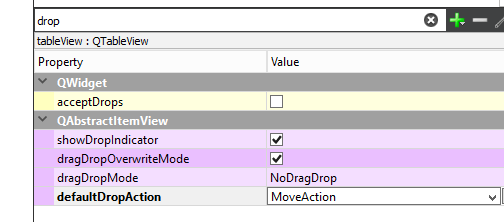
        alt text

        1 Reply Last reply
        0
        • S Offline
          S Offline
          Shines
          wrote on last edited by
          #5

          There are two parts in this. Say for eg first 3 columns are frozen. these are fixed. Remaining columns say for eg 4 columns(num of non frozen columns varies on every run) are non frozen. These 4 columns can be swapped. I also have horizontal scroll bar for non frozen columns. first 3 columns cannot be dragged. But if the header(QHeaderView) of the 4 col is dropped to 3rd(happens with 3rd column only) then 4th col has col3+col4(duplicated).. How to avoid duplicating.
          Col1 Col2 Col3 Col3+col4 Col5

          When col4 is dropped into col3, it should remain as it is. nothing should change.
          I cannot use header->setSectionsMovable(false); as this would make my movable columns fixed.

          mrjjM 1 Reply Last reply
          0
          • S Shines

            There are two parts in this. Say for eg first 3 columns are frozen. these are fixed. Remaining columns say for eg 4 columns(num of non frozen columns varies on every run) are non frozen. These 4 columns can be swapped. I also have horizontal scroll bar for non frozen columns. first 3 columns cannot be dragged. But if the header(QHeaderView) of the 4 col is dropped to 3rd(happens with 3rd column only) then 4th col has col3+col4(duplicated).. How to avoid duplicating.
            Col1 Col2 Col3 Col3+col4 Col5

            When col4 is dropped into col3, it should remain as it is. nothing should change.
            I cannot use header->setSectionsMovable(false); as this would make my movable columns fixed.

            mrjjM Offline
            mrjjM Offline
            mrjj
            Lifetime Qt Champion
            wrote on last edited by
            #6

            Hi

            But what happens when you drop 4 to 3 ?
            It then added all items from one col to the existing col?
            Like a selection ?
            Do you use default drag and drop or did you implement your own ?

            1 Reply Last reply
            0
            • S Offline
              S Offline
              Shines
              wrote on last edited by
              #7

              On dropping 4 to 3 , col 4 changes to col 4 +col3. col 3 and rest of the columns remains unchanged. for drag/drop header is used. its default drag/drop. the problem is only with col 3 and 4. Rest are fine

              1 Reply Last reply
              0
              • S Offline
                S Offline
                Shines
                wrote on last edited by
                #8

                But on dropping 4 to 3 2nd time evrything is becomes fine.
                col1 col2 col3 col4 col5.....
                I have few connect signals for expanding, collapsing, header click etc.

                mrjjM 1 Reply Last reply
                0
                • S Shines

                  But on dropping 4 to 3 2nd time evrything is becomes fine.
                  col1 col2 col3 col4 col5.....
                  I have few connect signals for expanding, collapsing, header click etc.

                  mrjjM Offline
                  mrjjM Offline
                  mrjj
                  Lifetime Qt Champion
                  wrote on last edited by
                  #9

                  @Shines
                  HI
                  Sorry, it's impossible to guess without a minimal example that reproduces this behavior.

                  I tried to change the frozen example to allow header re-arranging but i could not make it
                  do a drag and drop that way where it would copy new items to the existing column.

                  • But on dropping 4 to 3 2nd time evrything is becomes fine

                  so second time you do it, all the duplicated are removed and all is good?

                  I wonder if its just a update bug then.

                  1 Reply Last reply
                  0
                  • S Offline
                    S Offline
                    Shines
                    wrote on last edited by
                    #10

                    yes on first drop col4 is col4 +col3. on 2nd drop duplicates are removed

                    mrjjM 1 Reply Last reply
                    0
                    • S Shines

                      yes on first drop col4 is col4 +col3. on 2nd drop duplicates are removed

                      mrjjM Offline
                      mrjjM Offline
                      mrjj
                      Lifetime Qt Champion
                      wrote on last edited by
                      #11

                      @Shines

                      Ok. that is pretty odd. If the items was indeed added to the column, i doubt anything would just remove them again.

                      You must use the debugger to find out what is going on.

                      1 Reply Last reply
                      0

                      • Login

                      • Login or register to search.
                      • First post
                        Last post
                      0
                      • Categories
                      • Recent
                      • Tags
                      • Popular
                      • Users
                      • Groups
                      • Search
                      • Get Qt Extensions
                      • Unsolved