Skip to content
  • Categories
  • Recent
  • Tags
  • Popular
  • Users
  • Groups
  • Search
  • Get Qt Extensions
  • Unsolved
Collapse
Brand Logo
  1. Home
  2. Qt Development
  3. Installation and Deployment
  4. What is " Installation path :"
Qt 6.11 is out! See what's new in the release blog

What is " Installation path :"

Scheduled Pinned Locked Moved Unsolved Installation and Deployment
3 Posts 2 Posters 1.4k Views 2 Watching
  • Oldest to Newest
  • Newest to Oldest
  • Most Votes
Reply
  • Reply as topic
Log in to reply
This topic has been deleted. Only users with topic management privileges can see it.
  • A Offline
    A Offline
    Anonymous_Banned275
    wrote on last edited by
    #1

    Attempting to "link with Qt " I get this as Installation path default - in red
    /home/qw/Qt

    That is NOT my latest "instillation path " not even close.
    and no matter what I try using "browse" and real installation path - it stays red .
    What Qt wants as "installation path"?
    Obviously the syntax is wrong , so is the default.

    f5afeb23-a0a9-45df-b535-f13656319c0c-image.png

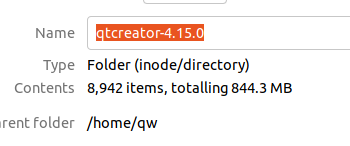
    Here is what file manager see as path

    d546beb8-d1d3-4dc4-8075-93ed2c3e26ea-image.png

    1 Reply Last reply
    0
    • sierdzioS Offline
      sierdzioS Offline
      sierdzio
      Moderators
      wrote on last edited by
      #2

      Qt installation path is where the folder where maintenancetool is located - it is the path you provided when you have installed Qt using the online installer.

      (Z(:^

      A 1 Reply Last reply
      0
      • sierdzioS sierdzio

        Qt installation path is where the folder where maintenancetool is located - it is the path you provided when you have installed Qt using the online installer.

        A Offline
        A Offline
        Anonymous_Banned275
        wrote on last edited by Anonymous_Banned275
        #3

        @sierdzio

        qe@qe-desktop:~$ whereis maintenancetool
        maintenancetool:

        ???

        second
        when I did usual
        sudo apt install qtcreator

        it did not ask for where to install it, but I can find few "qtcreator" files .

        third
        at present, after clean install of ubuntu 21.04 I have NO "maintenance tool"
        working on that one

        fourth
        where is the phony default path ( in red) coming from ?

        ADDENDUM

        Never mind - used real installer

        https://www.qt.io/download-thank-you

        and all is well

        1 Reply Last reply
        1

        • Login

        • Login or register to search.
        • First post
          Last post
        0
        • Categories
        • Recent
        • Tags
        • Popular
        • Users
        • Groups
        • Search
        • Get Qt Extensions
        • Unsolved