
Skip to content
  • Categories
  • Recent
  • Tags
  • Popular
  • Users
  • Groups
  • Search
  • Get Qt Extensions
  • Unsolved
Collapse
Brand Logo
  1. Home
  2. Qt Development
  3. General and Desktop
  4. Icon in QActions
Qt 6.11 is out! See what's new in the release blog

Icon in QActions

Scheduled Pinned Locked Moved Unsolved General and Desktop
2 Posts 2 Posters 185 Views 1 Watching
  • Oldest to Newest
  • Newest to Oldest
  • Most Votes
Reply
  • Reply as topic
Log in to reply
This topic has been deleted. Only users with topic management privileges can see it.
  • O Offline
    O Offline
    Oumayma
    wrote on last edited by
    #1

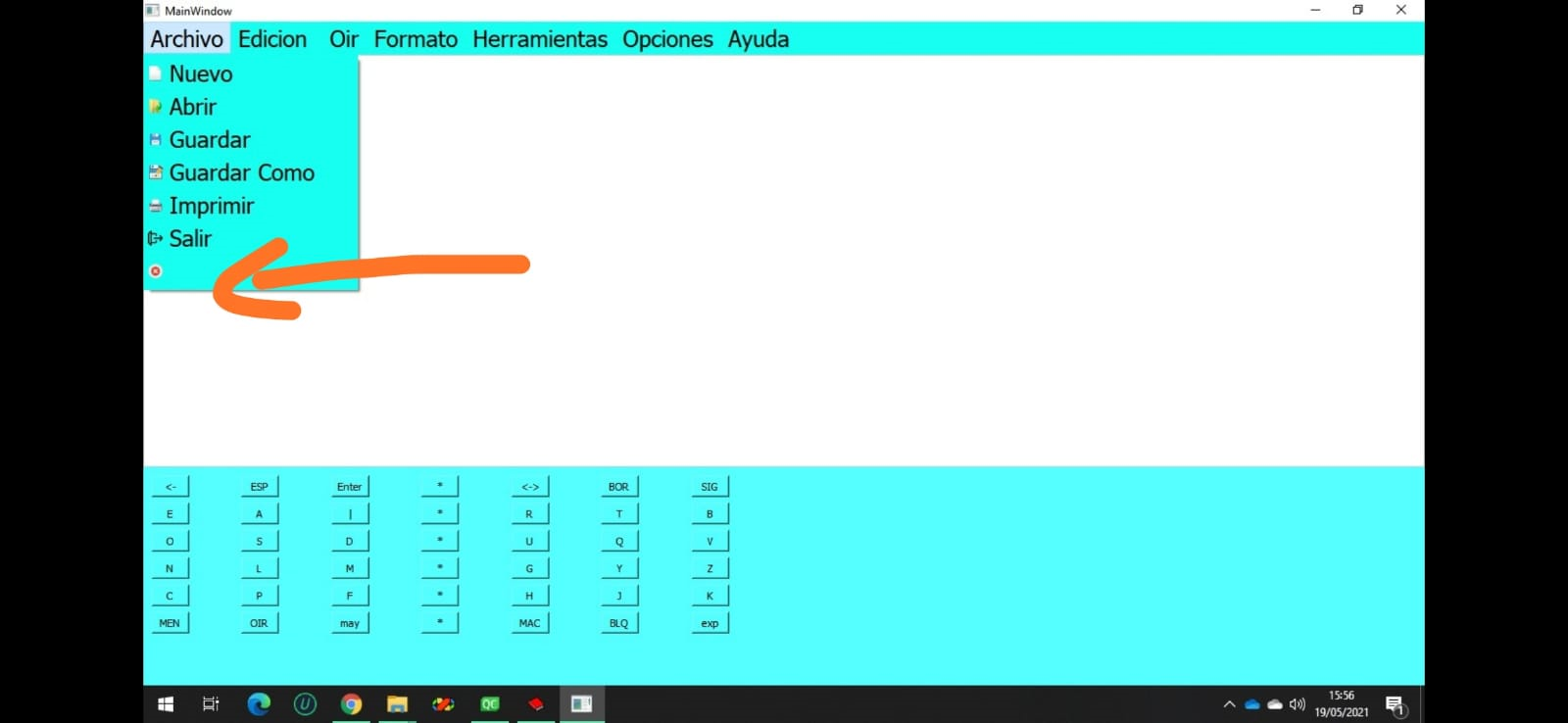
    How do I put my icon in the center?
    As you can see in the image, my last action has no title but it does have an icon and I want to place it in the center.
    bc9d5c86-28c5-456a-99a4-3678d4cf3e9c-image.png

    1 Reply Last reply
    0
    • mrjjM Offline
      mrjjM Offline
      mrjj
      Lifetime Qt Champion
      wrote on last edited by mrjj
      #2

      Hi
      One way is to use a proxy style. Do notice it might not work well with stylesheets.

      alt text

      fast example:

      #include <QProxyStyle>
      #include <QStyleOptionMenuItem>
      class CustomStyle : public QProxyStyle
      {
      public:
          using QProxyStyle::QProxyStyle;
          void drawControl(ControlElement element, const QStyleOption *opt, QPainter *p,
                           const QWidget *w) const override
          {
              if (element == QStyle::CE_MenuItem) {
                  QStyleOptionMenuItem myMenuOption;
                  const QStyleOptionMenuItem *menuOption =
                      qstyleoption_cast<const QStyleOptionMenuItem *>(opt);
                  if (menuOption) {
                      const int width = pixelMetric(PM_SmallIconSize);
                      myMenuOption = *menuOption;
                      QRect r(myMenuOption.rect);
                      r.setLeft( (r.width() / 2) - (width / 2) );
                      myMenuOption.rect = r;
                  }
                  QProxyStyle::drawControl(element, &myMenuOption, p, w);
                  return;
              }
              QProxyStyle::drawControl(element, opt, p, w);
          }
      };
      
      ... (in cpp) 
      ui->menuFile->setStyle(new CustomStyle);
      
      1 Reply Last reply
      3

      • Login

      • Login or register to search.
      • First post
        Last post
      0
      • Categories
      • Recent
      • Tags
      • Popular
      • Users
      • Groups
      • Search
      • Get Qt Extensions
      • Unsolved