
How to use QSpacerItem?
-
Hi,
I have QGridLayout and three QLabels with textes in it.
I would like to use spacer to move labels to down:

Now I have situation on the left and I would like to have situation on the right.
I try something like this:
    grid = new QGridLayout;
    centralWidget()->setLayout(grid);
    l1 = new QLabel("random1");
    l2 = new QLabel("random2");
    l3 = new QLabel("random3");
    grid->addWidget(l1,0,1);
    grid->addWidget(l2,1,1);
    grid->addWidget(l3,2,1);
    QSpacerItem *spacerV1 = new QSpacerItem(1,1,QSizePolicy::Policy::Minimum,QSizePolicy::Policy::Maximum);
    grid->addItem(spacerV1,0,0,3,1);
but with no effects.
-
Hi
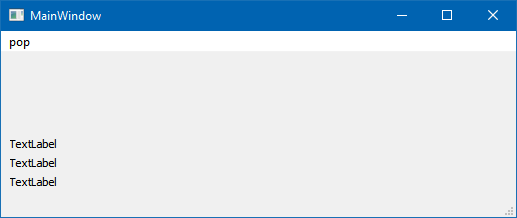
    auto grid = new QGridLayout;
    centralWidget()->setLayout(grid);
    auto l1 = new QLabel("random1");
    auto  l2 = new QLabel("random2");
    auto l3 = new QLabel("random3");
    QSpacerItem *spacerV1 = new QSpacerItem(21, 41, QSizePolicy::Policy::Minimum,  QSizePolicy::Policy::Expanding);
    grid->addItem(spacerV1, 0, 0, 1, 1);
    grid->addWidget(l1, 1, 0);
    grid->addWidget(l2, 2, 0);
    grid->addWidget(l3, 3, 0);
Not sure what was wrong. maybe the cols/rows
-
Hi,
I have QGridLayout and three QLabels with textes in it.
I would like to use spacer to move labels to down:
Now I have situation on the left and I would like to have situation on the right.
I try something like this:
    grid = new QGridLayout;
    centralWidget()->setLayout(grid);
    l1 = new QLabel("random1");
    l2 = new QLabel("random2");
    l3 = new QLabel("random3");
    grid->addWidget(l1,0,1);
    grid->addWidget(l2,1,1);
    grid->addWidget(l3,2,1);
    QSpacerItem *spacerV1 = new QSpacerItem(1,1,QSizePolicy::Policy::Minimum,QSizePolicy::Policy::Maximum);
    grid->addItem(spacerV1,0,0,3,1);
but with no effects.
@qwe3 said in How to use QSpacerItem?:
grid->addItem(spacerV1,0,0,3,1);
Your spacer and your labels dont share the same column.
Your items are in column1, your spacer is in0.void QGridLayout::addItem(QLayoutItem *item, int row, int column, int rowSpan = 1, int columnSpan = 1, Qt::Alignment alignment = Qt::Alignment())

