Skip to content
  • Categories
  • Recent
  • Tags
  • Popular
  • Users
  • Groups
  • Search
  • Get Qt Extensions
  • Unsolved
Collapse
Brand Logo
  1. Home
  2. Qt Development
  3. General and Desktop
  4. Change text color of QRadioButton text with style setStyleSheet without changing the check mark color
Forum Updated to NodeBB v4.3 + New Features

Change text color of QRadioButton text with style setStyleSheet without changing the check mark color

Scheduled Pinned Locked Moved Solved General and Desktop
20 Posts 4 Posters 3.9k Views 3 Watching
  • Oldest to Newest
  • Newest to Oldest
  • Most Votes
Reply
  • Reply as topic
Log in to reply
This topic has been deleted. Only users with topic management privileges can see it.
  • P Palli

    I'm using Windows 10 and Qt 5.15.

    mrjjM Offline
    mrjjM Offline
    mrjj
    Lifetime Qt Champion
    wrote on last edited by
    #6

    @Palli

    Ok. same here :) (5.15.2)
    So yes, i think you have something else in play.

    But fast test should show that clearly.

    1 Reply Last reply
    0
    • P Offline
      P Offline
      Palli
      wrote on last edited by Palli
      #7

      @mrjj

      I created a small test project. https://github.com/Drllap/QRadioButtonTest
      Updated my Qt to 5.15.2

      But I still get the same behavior
      Radio button test 5.15.2.png

      Edit:
      Tried on an old Qt installation I had, 5.7, and get this:
      99c0f714-a08a-4c56-91a4-4f0d64978fce-image.png

      mrjjM 2 Replies Last reply
      0
      • P Palli

        @mrjj

        I created a small test project. https://github.com/Drllap/QRadioButtonTest
        Updated my Qt to 5.15.2

        But I still get the same behavior
        Radio button test 5.15.2.png

        Edit:
        Tried on an old Qt installation I had, 5.7, and get this:
        99c0f714-a08a-4c56-91a4-4f0d64978fce-image.png

        mrjjM Offline
        mrjjM Offline
        mrjj
        Lifetime Qt Champion
        wrote on last edited by
        #8

        @Palli
        Pretty odd, as with 5.15.1, i get
        alt text
        ill try 5.15.2

        1 Reply Last reply
        0
        • P Offline
          P Offline
          Palli
          wrote on last edited by
          #9

          BTW, I'm using Visual Studio 2019 to compile
          Compiling for 32 bit
          Don't know if that matters.

          mrjjM 1 Reply Last reply
          0
          • P Palli

            BTW, I'm using Visual Studio 2019 to compile
            Compiling for 32 bit
            Don't know if that matters.

            mrjjM Offline
            mrjjM Offline
            mrjj
            Lifetime Qt Champion
            wrote on last edited by mrjj
            #10

            @Palli

            well i use same version.
            just 64 bit.

            5.15.2 still showing as black.

            i did notice you are not calling constrcutor for QMaindows

            
            class MainWindow : public QMainWindow
            {
            
            public:
                MainWindow() <<<< not calling base
                {
                    setStyleSheet("QRadioButton { color: red};");
                    setCentralWidget(new ViewField);
                }
            };


            Not that i think it should matter for this issue.

            Also, if you do this in a default GUI project, it still did it ?

            could you run this project ?
            https://www.dropbox.com/s/1ecbob3kwz59l0n/colorme.zip?dl=0

            1 Reply Last reply
            0
            • Christian EhrlicherC Offline
              Christian EhrlicherC Offline
              Christian Ehrlicher
              Lifetime Qt Champion
              wrote on last edited by Christian Ehrlicher
              #11

              @Palli: The first image with the red indicator is the Windows style, the second one is WindowsVista. It's clearly visible because the current style (vista) doesn't draw 3D-effects but is flat.

              Qt Online Installer direct download: https://download.qt.io/official_releases/online_installers/
              Visit the Qt Academy at https://academy.qt.io/catalog

              mrjjM 1 Reply Last reply
              2
              • Christian EhrlicherC Christian Ehrlicher

                @Palli: The first image with the red indicator is the Windows style, the second one is WindowsVista. It's clearly visible because the current style (vista) doesn't draw 3D-effects but is flat.

                mrjjM Offline
                mrjjM Offline
                mrjj
                Lifetime Qt Champion
                wrote on last edited by
                #12

                @Christian-Ehrlicher
                Ahh you're a hawk eye!
                So somehow the WindowsVista gets loaded ?

                Christian EhrlicherC 1 Reply Last reply
                0
                • mrjjM mrjj

                  @Christian-Ehrlicher
                  Ahh you're a hawk eye!
                  So somehow the WindowsVista gets loaded ?

                  Christian EhrlicherC Offline
                  Christian EhrlicherC Offline
                  Christian Ehrlicher
                  Lifetime Qt Champion
                  wrote on last edited by
                  #13

                  @mrjj WindowsVista is the correct (default) one. Don't know if this was (is?) compilable with MinGW though.

                  Qt Online Installer direct download: https://download.qt.io/official_releases/online_installers/
                  Visit the Qt Academy at https://academy.qt.io/catalog

                  mrjjM 1 Reply Last reply
                  1
                  • Christian EhrlicherC Christian Ehrlicher

                    @mrjj WindowsVista is the correct (default) one. Don't know if this was (is?) compilable with MinGW though.

                    mrjjM Offline
                    mrjjM Offline
                    mrjj
                    Lifetime Qt Champion
                    wrote on last edited by
                    #14

                    @Christian-Ehrlicher
                    But we both use the same visual studio 2019 compiler and his sample on my pc,
                    uses the flat version and does not show as red but on his pc with the same Qt version and same compiler uses the
                    "3d" one and get red dot.
                    So not sure how we can differ considering he is on win 10 too.

                    1 Reply Last reply
                    0
                    • Christian EhrlicherC Offline
                      Christian EhrlicherC Offline
                      Christian Ehrlicher
                      Lifetime Qt Champion
                      wrote on last edited by
                      #15

                      Don't know why the windowsvista style is not loaded - it's a plugin.

                      Qt Online Installer direct download: https://download.qt.io/official_releases/online_installers/
                      Visit the Qt Academy at https://academy.qt.io/catalog

                      1 Reply Last reply
                      0
                      • P Palli

                        @mrjj

                        I created a small test project. https://github.com/Drllap/QRadioButtonTest
                        Updated my Qt to 5.15.2

                        But I still get the same behavior
                        Radio button test 5.15.2.png

                        Edit:
                        Tried on an old Qt installation I had, 5.7, and get this:
                        99c0f714-a08a-4c56-91a4-4f0d64978fce-image.png

                        mrjjM Offline
                        mrjjM Offline
                        mrjj
                        Lifetime Qt Champion
                        wrote on last edited by
                        #16

                        @Palli

                        Hi Could you please add

                        #include <QStyleFactory>
                        #include <QDebug>

                        int main(int argc, char *argv[])
                        {   
                            QApplication a(argc, argv);
                             qDebug() << QStyleFactory::keys().join(" ");
                            MainWindow mw;
                            mw.show();
                            return a.exec();
                        }


                        to your 5.15.2 project and see what it lists.
                        for me its
                        "windowsvista Windows Fusion"

                        1 Reply Last reply
                        0
                        • P Offline
                          P Offline
                          Palli
                          wrote on last edited by Palli
                          #17

                          @mrjj When I print out the keys from the style factory I get this:
                          f7ae56a9-2ed1-46ee-9f78-895e662667ab-image.png

                          Ran your Colorme and get this:
                          e5f102c4-74df-41f7-829d-b3913910230d-image.png
                          I use cmake to generate visual studio solution file. Maybe that is the root cause of my issues?

                          @Christian-Ehrlicher
                          I don't know if it is relevant but I manually copy the .dlls I need the run the executables:
                          e8398b11-3b09-45ca-be71-5bc5a8e753ab-image.png
                          Since there windows vista style is not being loaded I wonder if there a .dll I missed?

                          artwawA 1 Reply Last reply
                          0
                          • P Palli

                            @mrjj When I print out the keys from the style factory I get this:
                            f7ae56a9-2ed1-46ee-9f78-895e662667ab-image.png

                            Ran your Colorme and get this:
                            e5f102c4-74df-41f7-829d-b3913910230d-image.png
                            I use cmake to generate visual studio solution file. Maybe that is the root cause of my issues?

                            @Christian-Ehrlicher
                            I don't know if it is relevant but I manually copy the .dlls I need the run the executables:
                            e8398b11-3b09-45ca-be71-5bc5a8e753ab-image.png
                            Since there windows vista style is not being loaded I wonder if there a .dll I missed?

                            artwawA Offline
                            artwawA Offline
                            artwaw
                            wrote on last edited by
                            #18

                            @Palli said in Change text color of QRadioButton text with style setStyleSheet without changing the check mark color:

                            I manually copy the .dlls

                            That might be the issue, yes. windeployqt also copies style dlls which I think are missing here.

                            For more information please re-read.

                            Kind Regards,
                            Artur

                            1 Reply Last reply
                            3
                            • P Offline
                              P Offline
                              Palli
                              wrote on last edited by Palli
                              #19

                              @mrjj @Christian-Ehrlicher

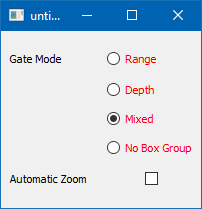
                              Thank you so much for your help, I have solved this but would definitely not been able to without your help.

                              The problem was that the .dll with the windowsvistat styles were not being loaded. Added styles/qwindowsvistastyle.dll to my build folder and it has fixed this issue.

                              mrjjM 1 Reply Last reply
                              2
                              • P Palli

                                @mrjj @Christian-Ehrlicher

                                Thank you so much for your help, I have solved this but would definitely not been able to without your help.

                                The problem was that the .dll with the windowsvistat styles were not being loaded. Added styles/qwindowsvistastyle.dll to my build folder and it has fixed this issue.

                                mrjjM Offline
                                mrjjM Offline
                                mrjj
                                Lifetime Qt Champion
                                wrote on last edited by
                                #20

                                @Palli

                                Well I completely missed it was when running standalone :)
                                Happy you found it :)=

                                1 Reply Last reply
                                0

                                • Login

                                • Login or register to search.
                                • First post
                                  Last post
                                0
                                • Categories
                                • Recent
                                • Tags
                                • Popular
                                • Users
                                • Groups
                                • Search
                                • Get Qt Extensions
                                • Unsolved