
Any Layout dissapear all widgets
-
@Chris-Kawa
Well, not work, the scroll bar not appear enabled, and all the widgets were resized to a size I dont know why system choose that size, the ui is complety useless now.Fortunately save a copy of directory and replace all project before the changes. Yes, Break Layout do the thing but change the position and geometry of widgets, Is too tired set about of 50 widgets again, better replace all project.
Maybe I try to use the scrollbar control, Im almost done with scrollarea, simply dont work, and simply cant use layouts.
Hi
Many of the widgets allow very tiny sizes.
So instead of scrolling, the layout in the ScrollArea makes them smaller and smaller, the more you add.To fix that, you can use setMinimalHeight on the widgets so they don't become too small.
You can, however, also use the scroll area with no layout if you set its scrollContent to some minimum sizes
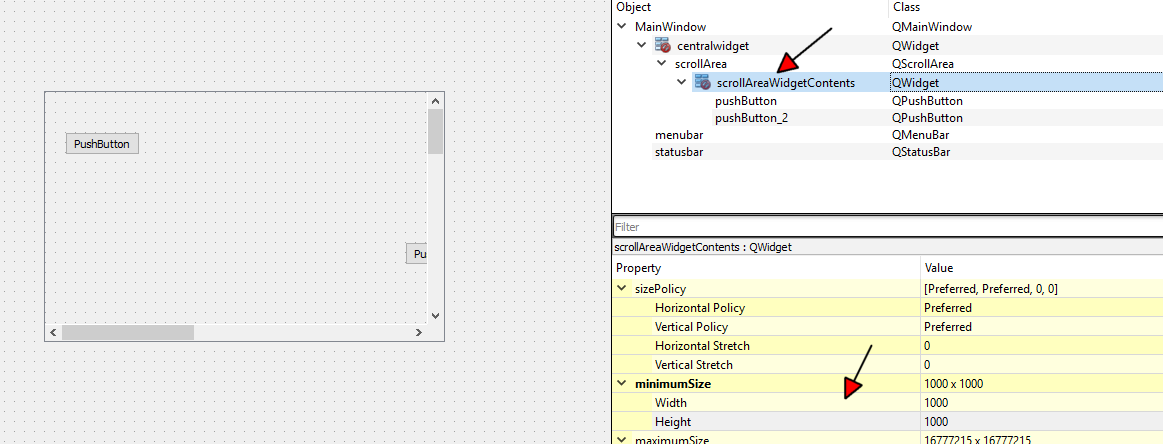
Then you can have a fixed scroll enabled area where you can place the widgets totally free.
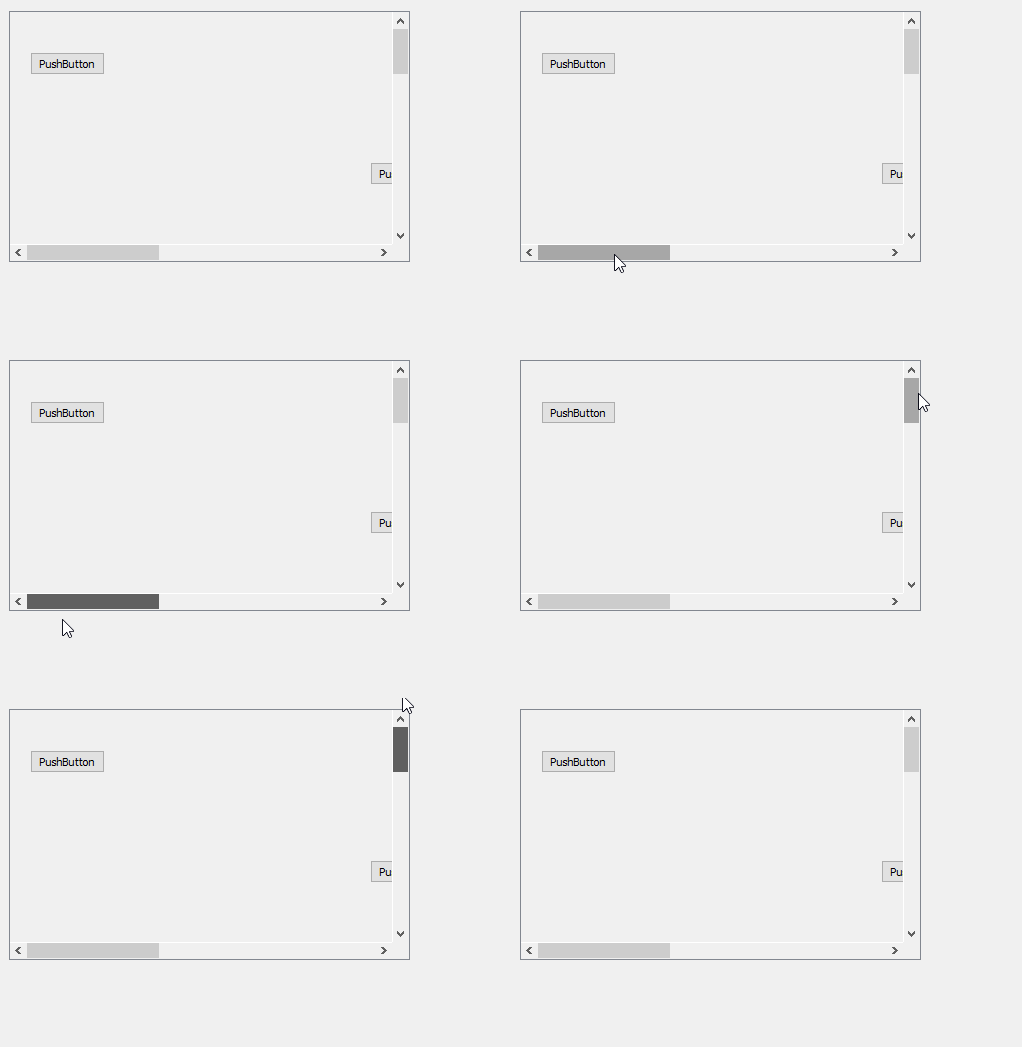
However, do note that this only works well if you not adding more and more during runtime.
-
Hi
Many of the widgets allow very tiny sizes.
So instead of scrolling, the layout in the ScrollArea makes them smaller and smaller, the more you add.To fix that, you can use setMinimalHeight on the widgets so they don't become too small.
You can, however, also use the scroll area with no layout if you set its scrollContent to some minimum sizes
Then you can have a fixed scroll enabled area where you can place the widgets totally free.
However, do note that this only works well if you not adding more and more during runtime.
@mrjj
Ok, sounds good, but, wich minimal size put in widgets???, I dont know wich is the size in pixels of my widgets, I only want that mantains the current geometry. For example now the widgets have 951X51 width and height in geometry.Like a personal comment, I saw some that for me has no sense, geometry manage a relative size to app, and minimumSize manage size in pixels, In general i dont care much the real size, meanwhile the relation of size between all objects in app matains, the minimum size must be too in a relative manner.
-
@mrjj
Ok, sounds good, but, wich minimal size put in widgets???, I dont know wich is the size in pixels of my widgets, I only want that mantains the current geometry. For example now the widgets have 951X51 width and height in geometry.Like a personal comment, I saw some that for me has no sense, geometry manage a relative size to app, and minimumSize manage size in pixels, In general i dont care much the real size, meanwhile the relation of size between all objects in app matains, the minimum size must be too in a relative manner.
-
Hi
You can select all your widgets in the scrollarea. (make sure scroll area is not select or its scroll widget)
Then use ( right click on any of the selected)
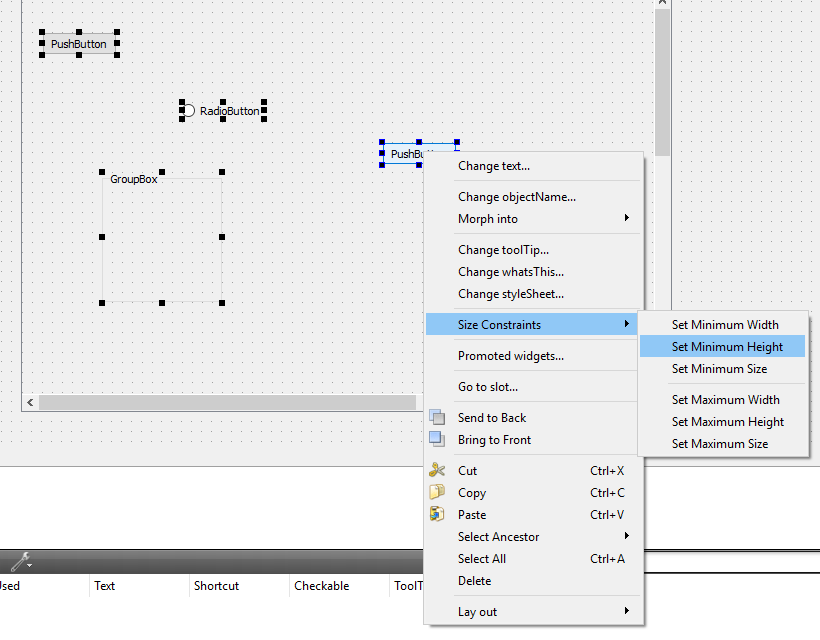
Which set the height to the height it has currently.
@mrjj
Ok, I did. I really apreciate the help thank you. But the scrollbar appear disabled, there is not scrolling.I dont know what im doing wrong, Simply put a scroll area in the form, expand it and put inside all widgets in vertical manner, then again resize the scrollarea and form to a small size, many widgets are not visible now, set the mimimumheight like you show me, but the scrollbar still not working. :'(
-
@mrjj
Ok, I did. I really apreciate the help thank you. But the scrollbar appear disabled, there is not scrolling.I dont know what im doing wrong, Simply put a scroll area in the form, expand it and put inside all widgets in vertical manner, then again resize the scrollarea and form to a small size, many widgets are not visible now, set the mimimumheight like you show me, but the scrollbar still not working. :'(
-
@LCorona
Hmm it sounds right.
Mine can scroll even before i put widget in.But for you , the scrollbars are disabled ?
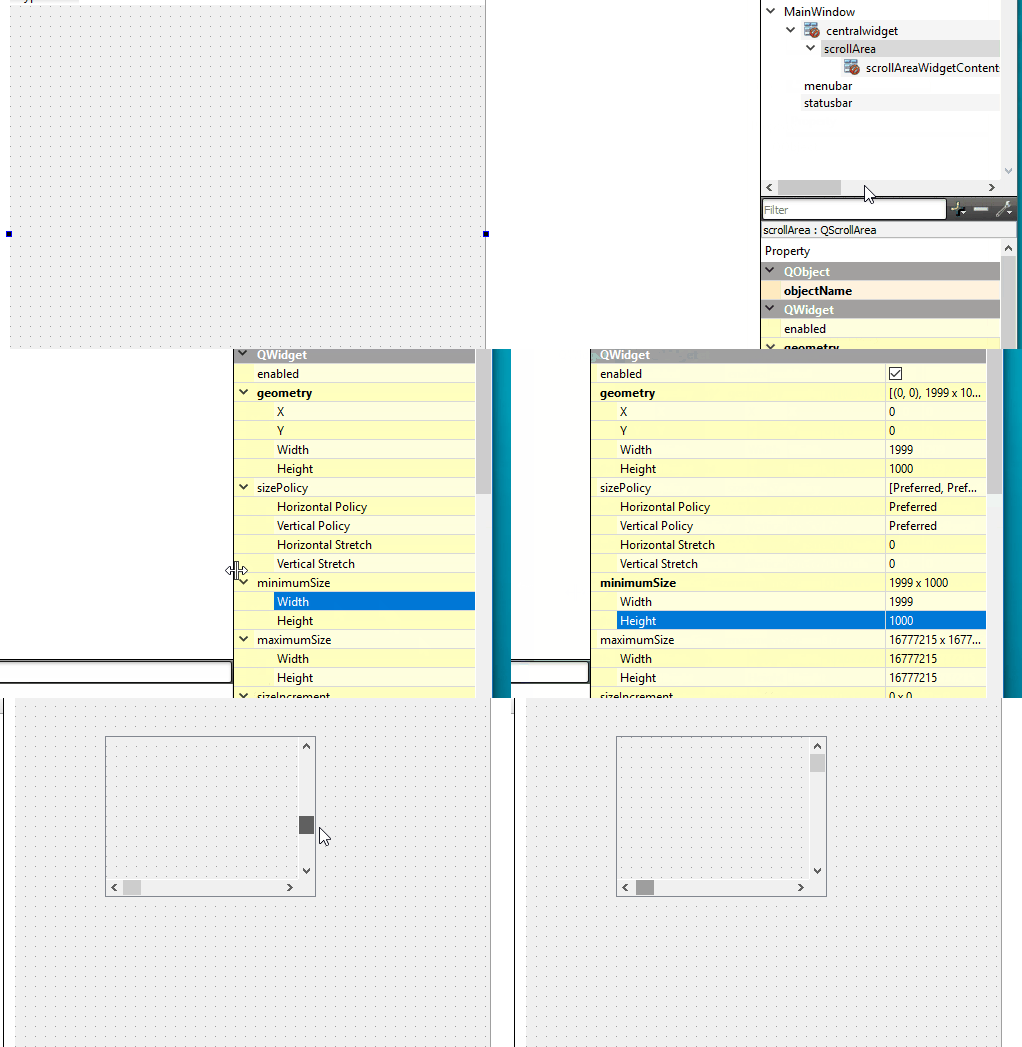
also, the scrollareawidgetcontents has small red symbol to show no layout assigned, right ?

@mrjj
The scrollbars are not disabled, yes, there is a red icon on scrollareawidgetcontents.
Also the ui designer made someting weird, after set the minimumheight of widgets, if again resize the scrollarea to see the hiden widgets, now cant see anything, all widgets are invisible , one is a tablewiget that has a part hidden, this wiget appears cut, the remaining part appears invisible too.
-
@mrjj
The scrollbars are not disabled, yes, there is a red icon on scrollareawidgetcontents.
Also the ui designer made someting weird, after set the minimumheight of widgets, if again resize the scrollarea to see the hiden widgets, now cant see anything, all widgets are invisible , one is a tablewiget that has a part hidden, this wiget appears cut, the remaining part appears invisible too.@LCorona
Hi
When we use ScrollArea without a layout we dont need to set any minimum on the widgets are they should just float
around where we place them and not alter position or size.Did you have them in some layout or anything like that or is it just like 10 custom plots?
Im not sure what happened to it. Sorry it exploded.
Could you maybe paste the ui file to
https://paste.ofcode.org/So i could try have a look ?
I assume its just a normal MainWindow UI with some widgets promoted to customplots ?
-
Maybe I forgot something very important, all the widgets inside scrollarea except the tablewiget are promoted (I dont know is this is consider as a custom widget), maybe this is caused the problems.
@LCorona
Hi
I doubt that as i use promotion all the time and its just a clever trick from Creator.
Like a place holder so in Designer they are just plain Widgets but in the code generated
they are QCustomPlot types. ( well QCustomPlot is a custom widget )Im not sure what could have caused this as it seems there is no layout so the widgets should not jump around at all.
Hence i wanted to see the inside of the UI file (its XML) and open in Designer to see if I can spot anything.
-
@LCorona
Hi
When we use ScrollArea without a layout we dont need to set any minimum on the widgets are they should just float
around where we place them and not alter position or size.Did you have them in some layout or anything like that or is it just like 10 custom plots?
Im not sure what happened to it. Sorry it exploded.
Could you maybe paste the ui file to
https://paste.ofcode.org/So i could try have a look ?
I assume its just a normal MainWindow UI with some widgets promoted to customplots ?
-
@mrjj
Sure, there is my code https://paste.ofcode.org/5HQYLEtKiY5jveeJhuF98bThe form have 48 promoted widgets of customPlot class, and a tablewiget, yes is a normal window
@LCorona
Hi
Working fine.
Your TableWidget has a huge Height. That is on purpose ?But your CustomPlots are just 51 in height ?
What was the plan for each.I think i get design.
Table widget with one col to the side, very high so that it will follow all the customs plot down ?But how big is the plan for each CustomPlot ?
51 pixels is kinda small but did you mean to have them this small ?
Update:
Found it
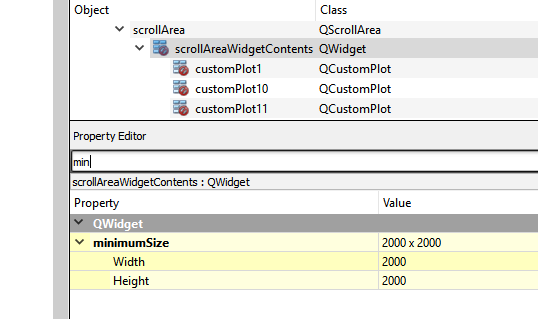
Your scrollAreaWidgetContents did nto have min size set .
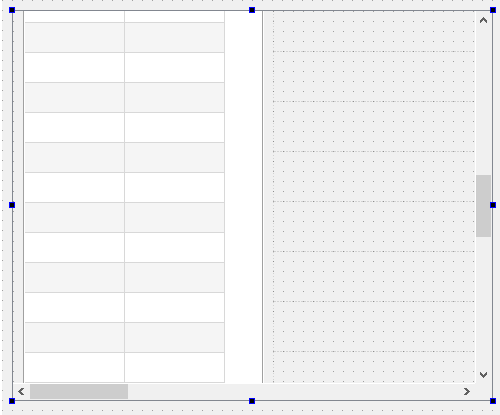
if i set say 2000x 2000 it all works fine
Can i ask why you put them in manually instead of simply adding them using a loop since you want that many ?
(by loop i mean in code)ps. i added col to tablewidget to to see if it was ok. and it was. it just look slightly odd with only one col.
(you can get col to strech whole table width if you want) -
@LCorona
Hi
Working fine.
Your TableWidget has a huge Height. That is on purpose ?But your CustomPlots are just 51 in height ?
What was the plan for each.I think i get design.
Table widget with one col to the side, very high so that it will follow all the customs plot down ?But how big is the plan for each CustomPlot ?
51 pixels is kinda small but did you mean to have them this small ?
Update:
Found it
Your scrollAreaWidgetContents did nto have min size set .
if i set say 2000x 2000 it all works fine
Can i ask why you put them in manually instead of simply adding them using a loop since you want that many ?
(by loop i mean in code)ps. i added col to tablewidget to to see if it was ok. and it was. it just look slightly odd with only one col.
(you can get col to strech whole table width if you want)@mrjj
I build a logic signal analizer, the tablewidget is for manage the channels leyends, put a colorpicker for the plot, and other controls, I choose a tablewidget because want a dragdrop functionality for channels and this widget already implemented.Each customplot is for made a chart of digital signals, these customwidget is the only free thing I found for made a chart, in fact now I already draw successfully many digital signals.
Other customwidget is for made the timeline control.
The thing not work is the scrolling.
I put all the widgets in the form becasuse I read in forums that is not possible create a promote widgets programatically.
Wow, you found it!!!, I will test it.
-
@mrjj
I build a logic signal analizer, the tablewidget is for manage the channels leyends, put a colorpicker for the plot, and other controls, I choose a tablewidget because want a dragdrop functionality for channels and this widget already implemented.Each customplot is for made a chart of digital signals, these customwidget is the only free thing I found for made a chart, in fact now I already draw successfully many digital signals.
Other customwidget is for made the timeline control.
The thing not work is the scrolling.
I put all the widgets in the form becasuse I read in forums that is not possible create a promote widgets programatically.
Wow, you found it!!!, I will test it.
@LCorona
Ok, sounds fine.The only thing to remember that the minimum size you set for
scrollAreaWidgetContents, is the max area where you can place other widgets. So if you hit the bottom, you must extend it.Did you want each CustomPlot to be only 51 height?
-
@LCorona
Ok, sounds fine.The only thing to remember that the minimum size you set for
scrollAreaWidgetContents, is the max area where you can place other widgets. So if you hit the bottom, you must extend it.Did you want each CustomPlot to be only 51 height?
@mrjj
The only thing to remember that the minimum size you set for
scrollAreaWidgetContents, is the max area where you can place other widgets. So if you hit the bottom, you must extend it. OKDid you want each CustomPlot to be only 51 height? Yes, for now is enough, basically, the interest in the signals are the times of the signal enter a flank, in fact, the plot is made only with binary numbers for Y axe, X axe is continuos in time.
Here there is a view of some of generated plots with the actual code.

-
@mrjj
The only thing to remember that the minimum size you set for
scrollAreaWidgetContents, is the max area where you can place other widgets. So if you hit the bottom, you must extend it. OKDid you want each CustomPlot to be only 51 height? Yes, for now is enough, basically, the interest in the signals are the times of the signal enter a flank, in fact, the plot is made only with binary numbers for Y axe, X axe is continuos in time.
Here there is a view of some of generated plots with the actual code.
-
@LCorona
That's looks cool.Ok so all make sense.
Does scrolling work for you now ?
Your scrollabar dont look that big
@mrjj
The scroll bar appears enabled but because I resize the scrollarea to a small size than the one had before set of the minimal size of widgets, but becone disabled again if set the size at original height, also not show the hidden wigets, Im not implemented the solution yet, I have to go for lunch, but I come back. -
@LCorona
That's looks cool.Ok so all make sense.
Does scrolling work for you now ?
Your scrollabar dont look that big

