
QDataWidgetMapper messed column indexes
-
@Oak77
Hi
Im also a bit confused as I dont get why the cols dont match up.
Do you add anything to the QSqlTableModel manually or does it all comes from the connected table ?@mrjj said in QDataWidgetMapper messed column indexes:
@Oak77
Hi
Im also a bit confused as I dont get why the cols dont match up.
Do you add anything to the QSqlTableModel manually or does it all comes from the connected table ?Thanks for looking at it. No, I didn't add anything to the data.
I just noticed that I have sorting applied to this particular data table. It shouldn't cause this situation, because it sorts rows, not columns.. AFAIK there's no way to sort columns in the
QHeaderData.I wonder, if this could be caused by providing a
QSqlTableModel(inheritsQSqlQueryModel, that in turnQAbstractTableModeland thatQAbstractItemModel), while the documentation states aQAbstractItemModelshould be supplied. -
@mrjj said in QDataWidgetMapper messed column indexes:
@Oak77
Hi
Im also a bit confused as I dont get why the cols dont match up.
Do you add anything to the QSqlTableModel manually or does it all comes from the connected table ?Thanks for looking at it. No, I didn't add anything to the data.
I just noticed that I have sorting applied to this particular data table. It shouldn't cause this situation, because it sorts rows, not columns.. AFAIK there's no way to sort columns in the
QHeaderData.I wonder, if this could be caused by providing a
QSqlTableModel(inheritsQSqlQueryModel, that in turnQAbstractTableModeland thatQAbstractItemModel), while the documentation states aQAbstractItemModelshould be supplied. -
@Oak77
No, that should be fine. Try removing whatever sorting you are applying and see where you are. -
@JonB said in QDataWidgetMapper messed column indexes:
@Oak77
No, that should be fine. Try removing whatever sorting you are applying and see where you are.OK, tested, removing
model.setSort(28,Qt.AscendingOrder)didn't change anything. -
@Oak77
If you have aQSqlTableModel, are you relying in the columns coming back in some order which they are not? Do you know whatSELECTstatement is being issued?@JonB said in QDataWidgetMapper messed column indexes:
@Oak77
If you have aQSqlTableModel, are you relying in the columns coming back in some order which they are not? Do you know whatSELECTstatement is being issued?I think the answer is No, I don't rely on any order it would figure out and I supply list of columns. I have a data access class and method which receives a list of columns and assigns them to the model:
        for i, ColName in enumerate(ColumnList):
            model.setHeaderData(i, QtCore.Qt.Horizontal, ColName)
            print("index = " + str(i) + "       Col.name = " + ColName)
Note, that I added the print just now and it shows the same stuff we see in the end, when listing the model from within the
self.mapper, the instance of theQDataWidgetMapper.The main thing is though, that when listing the columns from within the
self.mapper, it should be what should be used to map the columns. Or am I wrong? So it almost looks like theQDataWidgetMapperclass does this to the order of the columns while processing theself.model(). -
OK, one more way to debug that I found: I used
QDataWidgetMapper.mappedWidgetAt(int)to list columns that are mapped, like that:for i in range(mapper.model().columnCount()): w = mapper.mappedWidgetAt(i) if w != None: print(str(i) + " " + w.objectName())And the result is:
1   CName
2   IsGid
3   IsDet
4   IsNew
5   IsPick
9   LL
10   LW               # <<<<<<<< Note the last column is here
11   GidCW
12   DetWidth
13   DetHeight
14   Units
15   IsEtb
16   IsNL
17   FS
18   FV
19   NF
20   DP
21   TT
22   FTab
23   FVC
24   FDC
25   FFC
26   FFV
27   EF
28   GidOrder
29   DetOrder
So the
mapperhas a different order from what is in theself.model(). -
OK, one more way to debug that I found: I used
QDataWidgetMapper.mappedWidgetAt(int)to list columns that are mapped, like that:for i in range(mapper.model().columnCount()): w = mapper.mappedWidgetAt(i) if w != None: print(str(i) + " " + w.objectName())And the result is:
1   CName
2   IsGid
3   IsDet
4   IsNew
5   IsPick
9   LL
10   LW               # <<<<<<<< Note the last column is here
11   GidCW
12   DetWidth
13   DetHeight
14   Units
15   IsEtb
16   IsNL
17   FS
18   FV
19   NF
20   DP
21   TT
22   FTab
23   FVC
24   FDC
25   FFC
26   FFV
27   EF
28   GidOrder
29   DetOrder
So the
mapperhas a different order from what is in theself.model().Hi
Im a bit lost here too as i see no reason
that mapper.model() should have different col order than QSqlTableModel ( self.model() ?)
since we supply the mapper with the model as pointer so it should be same model. -
OK, one more way to debug that I found: I used
QDataWidgetMapper.mappedWidgetAt(int)to list columns that are mapped, like that:for i in range(mapper.model().columnCount()): w = mapper.mappedWidgetAt(i) if w != None: print(str(i) + " " + w.objectName())And the result is:
1   CName
2   IsGid
3   IsDet
4   IsNew
5   IsPick
9   LL
10   LW               # <<<<<<<< Note the last column is here
11   GidCW
12   DetWidth
13   DetHeight
14   Units
15   IsEtb
16   IsNL
17   FS
18   FV
19   NF
20   DP
21   TT
22   FTab
23   FVC
24   FDC
25   FFC
26   FFV
27   EF
28   GidOrder
29   DetOrder
So the
mapperhas a different order from what is in theself.model().@Oak77
It is as @mrjj & I have said. It should all work.QDataWidgetMapperjust works off the model's columns. If you want to resolve this you really need to stop with the fragments of code you have shown so far and rebuild from a small, standalone example, which will work, till you encounter whatever it is you have changed. We will not be able to say anything from the various fragments you have given here. -
Hi
I tried to recreate it so I used your result list here to make the table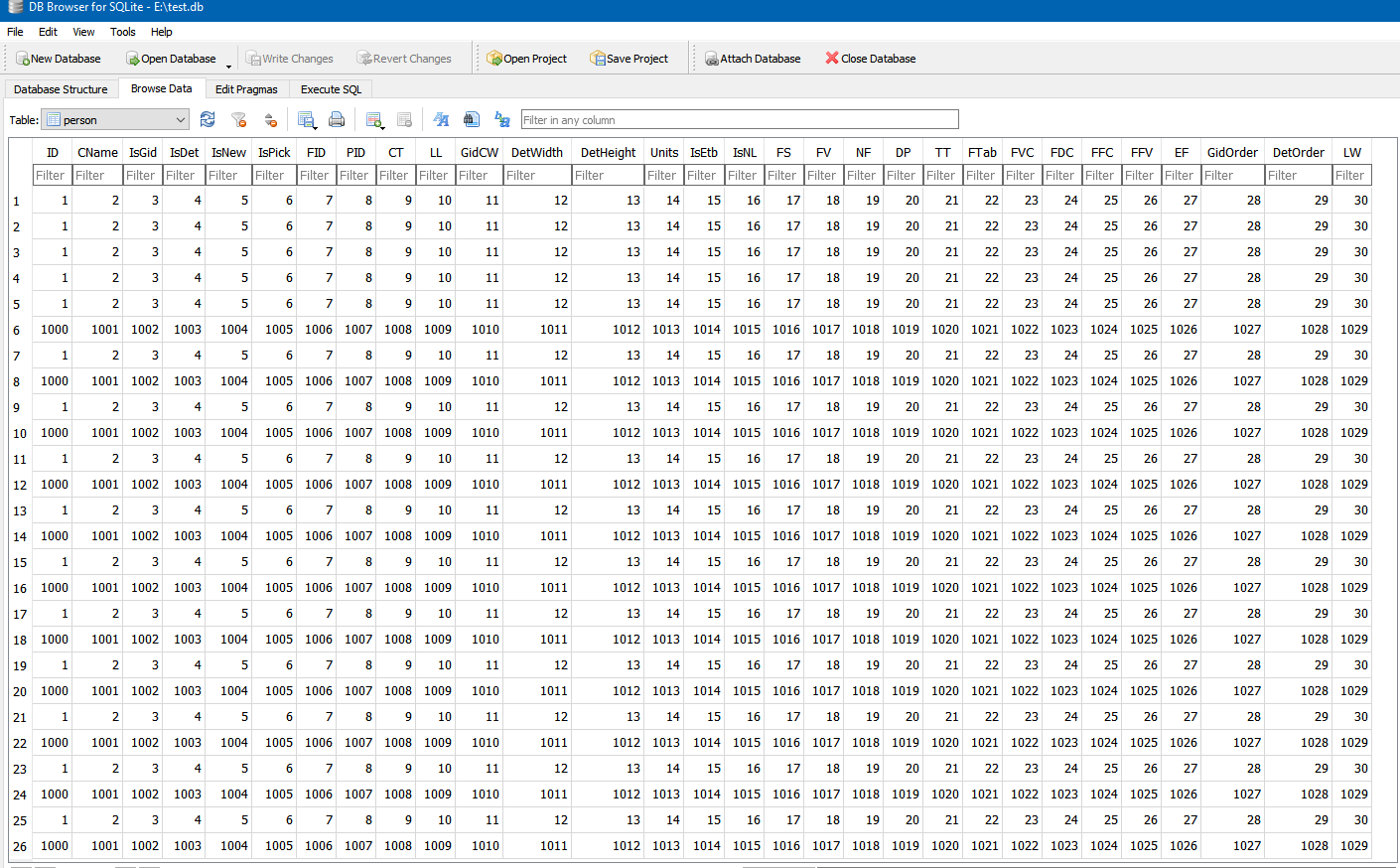
I then mapped it to a bunch a lineEdits, skipping 5,6,7 ( well 4,5,6)
   int range = 0;
    for (auto name : names) {
        QLineEdit *line = new QLineEdit(this);
        ui->vertL->addWidget(line);
        line->setPlaceholderText(name);
        if (range != 5 && range != 6 && range != 7 )
            map->addMapping(line, cc++ );
        else
            cc++;

        range++;
    }
    map->toFirst();
but the values always come as expected

Then i tried to dump the cols like you did
    for (int cc  = 0; cc < map->model()->columnCount(); cc++ ) {
      qDebug().noquote().nospace() << cc << " = " <<  map->model()->headerData(cc, Qt::Horizontal) ;
    }
But they still come in the expected order.
0 = QVariant(QString, ID)
1 = QVariant(QString, CName)
2 = QVariant(QString, IsGid)
3 = QVariant(QString, IsDet)
4 = QVariant(QString, IsNew)
5 = QVariant(QString, IsPick)
6 = QVariant(QString, FID)
7 = QVariant(QString, PID)
8 = QVariant(QString, CT)
9 = QVariant(QString, LL)
10 = QVariant(QString, GidCW)
11 = QVariant(QString, DetWidth)
12 = QVariant(QString, DetHeight)
13 = QVariant(QString, Units)
14 = QVariant(QString, IsEtb)
15 = QVariant(QString, IsNL)
16 = QVariant(QString, FS)
17 = QVariant(QString, FV)
18 = QVariant(QString, NF)
19 = QVariant(QString, DP)
20 = QVariant(QString, TT)
21 = QVariant(QString, FTab)
22 = QVariant(QString, FVC)
23 = QVariant(QString, FDC)
24 = QVariant(QString, FFC)
25 = QVariant(QString, FFV)
26 = QVariant(QString, EF)
27 = QVariant(QString, GidOrder)
28 = QVariant(QString, DetOrder)
29 = QVariant(QString, LW)So I really cant find a way to see what you see. Sadly.
-
Hi
I tried to recreate it so I used your result list here to make the tableI then mapped it to a bunch a lineEdits, skipping 5,6,7 ( well 4,5,6)
   int range = 0;
    for (auto name : names) {
        QLineEdit *line = new QLineEdit(this);
        ui->vertL->addWidget(line);
        line->setPlaceholderText(name);
        if (range != 5 && range != 6 && range != 7 )
            map->addMapping(line, cc++ );
        else
            cc++;

        range++;
    }
    map->toFirst();
but the values always come as expected
Then i tried to dump the cols like you did
    for (int cc  = 0; cc < map->model()->columnCount(); cc++ ) {
      qDebug().noquote().nospace() << cc << " = " <<  map->model()->headerData(cc, Qt::Horizontal) ;
    }
But they still come in the expected order.
0 = QVariant(QString, ID)
1 = QVariant(QString, CName)
2 = QVariant(QString, IsGid)
3 = QVariant(QString, IsDet)
4 = QVariant(QString, IsNew)
5 = QVariant(QString, IsPick)
6 = QVariant(QString, FID)
7 = QVariant(QString, PID)
8 = QVariant(QString, CT)
9 = QVariant(QString, LL)
10 = QVariant(QString, GidCW)
11 = QVariant(QString, DetWidth)
12 = QVariant(QString, DetHeight)
13 = QVariant(QString, Units)
14 = QVariant(QString, IsEtb)
15 = QVariant(QString, IsNL)
16 = QVariant(QString, FS)
17 = QVariant(QString, FV)
18 = QVariant(QString, NF)
19 = QVariant(QString, DP)
20 = QVariant(QString, TT)
21 = QVariant(QString, FTab)
22 = QVariant(QString, FVC)
23 = QVariant(QString, FDC)
24 = QVariant(QString, FFC)
25 = QVariant(QString, FFV)
26 = QVariant(QString, EF)
27 = QVariant(QString, GidOrder)
28 = QVariant(QString, DetOrder)
29 = QVariant(QString, LW)So I really cant find a way to see what you see. Sadly.
@mrjj said in QDataWidgetMapper messed column indexes:
Hi
I tried to recreate it so I used your result list here to make the table
....
So I really cant find a way to see what you see. Sadly.Thank you very much! I'll study your example and I'll try to find a difference. In the meanwhile I set to make a simplified example width a Chinook database table, but I didn't finished it yet. It will take me probably few days to study everything.
-
@mrjj said in QDataWidgetMapper messed column indexes:
Hi
I tried to recreate it so I used your result list here to make the table
....
So I really cant find a way to see what you see. Sadly.Thank you very much! I'll study your example and I'll try to find a difference. In the meanwhile I set to make a simplified example width a Chinook database table, but I didn't finished it yet. It will take me probably few days to study everything.
-
@Oak77
Hi
You are welcome to have my test project to play around with but
it's c++ so didn't include it as you seem to use python so I guess you don't have a c++ compiler
just like i don't have python installed.@mrjj said in QDataWidgetMapper messed column indexes:
@Oak77
it's c++ so didn't include it as you seem to use python so I guess you don't have a c++ compiler
just like i don't have python installed.That's perfectly fine, I have zero C++ skills but I can read it a bit. This proved that I have to look for a source of the problem within my code.
I found I was wrong in one particular point: Setting
HeaderDatadoes not define the columns of the query. I found that coincidentally with a different example, where it clearly shown way more columns than what was set. This also means that the query itself might be already having a different order of columns. I'll have a look at it once behind the incident PC to confirm it.However, it raises another question and that is how a user is supposed to define the columns without using
setQuery, because the documentation clearly states using it should be avoided. I'll open another thread for this particular interesting question.EDIT: Well, thinking about that, itwon't change the fact, that model shows different order from mapping, because the query is defined before the model is created and consequently used in the mapper.
-
@mrjj said in QDataWidgetMapper messed column indexes:
@Oak77
it's c++ so didn't include it as you seem to use python so I guess you don't have a c++ compiler
just like i don't have python installed.That's perfectly fine, I have zero C++ skills but I can read it a bit. This proved that I have to look for a source of the problem within my code.
I found I was wrong in one particular point: Setting
HeaderDatadoes not define the columns of the query. I found that coincidentally with a different example, where it clearly shown way more columns than what was set. This also means that the query itself might be already having a different order of columns. I'll have a look at it once behind the incident PC to confirm it.However, it raises another question and that is how a user is supposed to define the columns without using
setQuery, because the documentation clearly states using it should be avoided. I'll open another thread for this particular interesting question.EDIT: Well, thinking about that, itwon't change the fact, that model shows different order from mapping, because the query is defined before the model is created and consequently used in the mapper.
@Oak77 said in QDataWidgetMapper messed column indexes:
Setting HeaderData does not define the columns of the query
Indeed, header data is just header data. It has no effect on any query. I did wonder if you were doing something like this, but we couldn't tell from the code you gave.... I'll go and look at your new question...


