
Opening .tiff geoimages consumes enormous memory
-
Ok, I understand the:
p = QProcess()
p.start("python", ["dummy_script.py"])
but not
p.start("ffprobe", ['-show_format', '-show_streams', 'a.mp4.py'])I assume that I put "python" on "ffprobe" but what I put on '-show_format', '-show_streams' ??
Thanx
-
Ok, I understand the:
p = QProcess()
p.start("python", ["dummy_script.py"])
but not
p.start("ffprobe", ['-show_format', '-show_streams', 'a.mp4.py'])I assume that I put "python" on "ffprobe" but what I put on '-show_format', '-show_streams' ??
Thanx
@john_hobbyist
Hi
The first one, starts the python app with the parameter of a script nameThis one
p.start("ffprobe", ['-show_format', '-show_streams', 'a.mp4.py'])calls the app ffprobe with 4 parameters.
So you would do
p.start("gdalinfo ", ['UAV_image.tif'])
you might need a full path to the UAV_image.tif instead of just the name.
-
I have been stuck around two weeks on this. Maybe I should ask what I am trying to do, in order to help me, if somebody can, on this specific question.
So is there any sample code in QT so that I can open .tif files, show me the corner coordinates (I am trying to make it work with gdal)
and when zoom (by establishing 4 points on the .tif) in to show me the updated new corner coordinates?I am trying this github code:
https://github.com/kklmn/OrthoView/blob/master/OrthoView.py
but I do not know how feasible it is -
I have been stuck around two weeks on this. Maybe I should ask what I am trying to do, in order to help me, if somebody can, on this specific question.
So is there any sample code in QT so that I can open .tif files, show me the corner coordinates (I am trying to make it work with gdal)
and when zoom (by establishing 4 points on the .tif) in to show me the updated new corner coordinates?I am trying this github code:
https://github.com/kklmn/OrthoView/blob/master/OrthoView.py
but I do not know how feasible it is@john_hobbyist
Hi
Well its not a trivial thing you want to do.
If you mean some meta data from the geotiff with "corner coordinates" then no.
Qt does not know the geotiff format and cannot read any META data from the file. (beside the actual tiff image)if you can get that info from gdalinfo commandline, its not a bad idea.
Im not sure OrthoView.py will work for you as it seems to want to load all of the image and that seems to use
an excessive amount of ram.Did you try something like
http://tuiview.org/
and see if that can even load the image ? -
@john_hobbyist
Hi
Well its not a trivial thing you want to do.
If you mean some meta data from the geotiff with "corner coordinates" then no.
Qt does not know the geotiff format and cannot read any META data from the file. (beside the actual tiff image)if you can get that info from gdalinfo commandline, its not a bad idea.
Im not sure OrthoView.py will work for you as it seems to want to load all of the image and that seems to use
an excessive amount of ram.Did you try something like
http://tuiview.org/
and see if that can even load the image ?@mrjj said in Opening .tiff geoimages consumes enormous memory:
@john_hobbyist
Hi
Well its not a trivial thing you want to do.
If you mean some meta data from the geotiff with "corner coordinates" then no.
Qt does not know the geotiff format and cannot read any data from the file.if you can get that info from gdalinfo commandline, its not a bad idea.
Im not sure OrthoView.py will work for you as it seems to want to load all of the image and that seems to use
an excessive amount of ram.Did you try something like
http://tuiview.org/
and see if that can even load the image ?Ok, I will take a look thank you! Can I add python code to the http://tuiview.org/ ?
-
@mrjj said in Opening .tiff geoimages consumes enormous memory:
cannot read any data from the file.
It can read the image, but only completely which is obvious no meaningful way for big images. Therefore you have to use special libraries like e.g. gdal. So either you want to use geotiffs and have to learn what a georeferenced image is and how a geotiff is internally structured or don't use them.
-
@mrjj said in Opening .tiff geoimages consumes enormous memory:
@john_hobbyist
Hi
Well its not a trivial thing you want to do.
If you mean some meta data from the geotiff with "corner coordinates" then no.
Qt does not know the geotiff format and cannot read any data from the file.if you can get that info from gdalinfo commandline, its not a bad idea.
Im not sure OrthoView.py will work for you as it seems to want to load all of the image and that seems to use
an excessive amount of ram.Did you try something like
http://tuiview.org/
and see if that can even load the image ?Ok, I will take a look thank you! Can I add python code to the http://tuiview.org/ ?
Ok, I will take a look thank you! Can I add python code to the http://tuiview.org/ ?
well its written in python witha bit of c code for the raster.
But it was more to see if that could load such a huge image. -
I am reading the examples you have sent me, thank you! Also, I found this easy example (only one file): https://github.com/marcel-goldschen-ohm/MultiPageTIFFViewerPyQt/tree/master
but when running this:
https://github.com/marcel-goldschen-ohm/MultiPageTIFFViewerPyQt/blob/master/MultiPageTIFFViewerQt.py
I get this error, which I am trying to address:Traceback (most recent call last): File "MultiPageTIFFViewerQt.py", line 15, in <module> from ImageViewerQt import ImageViewerQt ModuleNotFoundError: No module named 'ImageViewerQt'Any idea what this is? (I copied from the github and is wrong! What is this!)
-
I am reading the examples you have sent me, thank you! Also, I found this easy example (only one file): https://github.com/marcel-goldschen-ohm/MultiPageTIFFViewerPyQt/tree/master
but when running this:
https://github.com/marcel-goldschen-ohm/MultiPageTIFFViewerPyQt/blob/master/MultiPageTIFFViewerQt.py
I get this error, which I am trying to address:Traceback (most recent call last): File "MultiPageTIFFViewerQt.py", line 15, in <module> from ImageViewerQt import ImageViewerQt ModuleNotFoundError: No module named 'ImageViewerQt'Any idea what this is? (I copied from the github and is wrong! What is this!)
@john_hobbyist
Hi
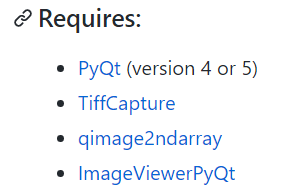
It seems it uses https://github.com/marcel-goldschen-ohm/PyQtImageViewer
so you also download and install thatmake sure you have all it lists
-
@john_hobbyist
Hi
It seems it uses https://github.com/marcel-goldschen-ohm/PyQtImageViewer
so you also download and install thatmake sure you have all it lists
@mrjj said in Opening .tiff geoimages consumes enormous memory:
@john_hobbyist
Hi
It seems it uses https://github.com/marcel-goldschen-ohm/PyQtImageViewer
so you also download and install thatmake sure you have all it lists
Ok, I have installed everything, but how I ask from https://github.com/marcel-goldschen-ohm/MultiPageTIFFViewerPyQt/blob/master/MultiPageTIFFViewerQt.py to "see" this: https://github.com/marcel-goldschen-ohm/PyQtImageViewer ??
I tried this kind:
import importlib
moduleName = input('Enter module name:')
importlib.import_module(moduleName)
from here: https://stackoverflow.com/questions/2349991/how-to-import-other-python-files
but it imports the python.py file, I am sure what it needs to import PyQtImageViewer anyway...! Any help would be appreciated. Thanks -
@mrjj said in Opening .tiff geoimages consumes enormous memory:
@john_hobbyist
Hi
It seems it uses https://github.com/marcel-goldschen-ohm/PyQtImageViewer
so you also download and install thatmake sure you have all it lists
Ok, I have installed everything, but how I ask from https://github.com/marcel-goldschen-ohm/MultiPageTIFFViewerPyQt/blob/master/MultiPageTIFFViewerQt.py to "see" this: https://github.com/marcel-goldschen-ohm/PyQtImageViewer ??
I tried this kind:
import importlib
moduleName = input('Enter module name:')
importlib.import_module(moduleName)
from here: https://stackoverflow.com/questions/2349991/how-to-import-other-python-files
but it imports the python.py file, I am sure what it needs to import PyQtImageViewer anyway...! Any help would be appreciated. Thanks@john_hobbyist
Hi
Sadly i don't really know Python that well
I just thought you would have to save QtImageViewer.py to the project folder together with the other files
and it would be able to find it.
I am not sure how Python modules works / should be located.But im pretty sure others will know :)
-
This post is deleted!

