
Memory is not released after QWebEngineView was deleted
-
I was writing a thin client for Google Tasks with using QWebEngine instead of authorizing with browser when I noticed that my app uses the same amount of memory when QWebEngineView was deleted.
How does QWebEngine manage memory? Running this short example (created on "Qt app with widgets template") shows that 15 megabytes were completely lost (Ubuntu 20.04 LTS, Wayland session, Qt 5.12 from apt)#include "mainwindow.h" #include <QApplication> #include <QDebug> #include <QtWebEngineWidgets/QtWebEngineWidgets> int main(int argc, char *argv[]) { QApplication a(argc, argv); MainWindow w; auto view = new QWebEngineView{}; view->setUrl(QUrl{"www.google.com"}); qDebug() << view; w.setCentralWidget(view); w.connect(view, &QWebEngineView::loadFinished, [&w](){ w.show(); delete w.takeCentralWidget(); }); w.connect(view, &QObject::destroyed, [](void * ptr){ qDebug() << ptr; }); return a.exec(); }You can see on screenshots below that this short example uses 20 Mb on launch and 35 Mb when memory considered release. The app I try to implement uses the same 20 Mb before view was allocated and 45 Mb after it was deleted.

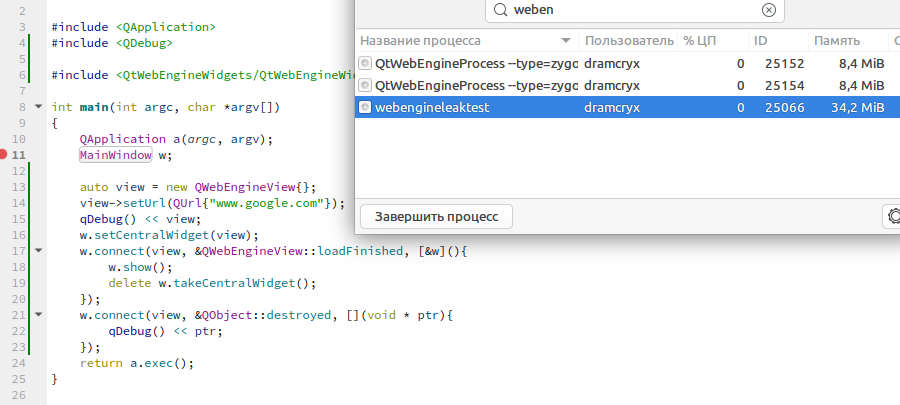
I know that malloc might not release the memory just because I wrotedelete somethingbut we are talking 15 Mb at least which should definitely be released.
How can I reduce memory usage after deletion of last (and the only) QWebEngineView? -
I was writing a thin client for Google Tasks with using QWebEngine instead of authorizing with browser when I noticed that my app uses the same amount of memory when QWebEngineView was deleted.
How does QWebEngine manage memory? Running this short example (created on "Qt app with widgets template") shows that 15 megabytes were completely lost (Ubuntu 20.04 LTS, Wayland session, Qt 5.12 from apt)#include "mainwindow.h" #include <QApplication> #include <QDebug> #include <QtWebEngineWidgets/QtWebEngineWidgets> int main(int argc, char *argv[]) { QApplication a(argc, argv); MainWindow w; auto view = new QWebEngineView{}; view->setUrl(QUrl{"www.google.com"}); qDebug() << view; w.setCentralWidget(view); w.connect(view, &QWebEngineView::loadFinished, [&w](){ w.show(); delete w.takeCentralWidget(); }); w.connect(view, &QObject::destroyed, [](void * ptr){ qDebug() << ptr; }); return a.exec(); }You can see on screenshots below that this short example uses 20 Mb on launch and 35 Mb when memory considered release. The app I try to implement uses the same 20 Mb before view was allocated and 45 Mb after it was deleted.
I know that malloc might not release the memory just because I wrotedelete somethingbut we are talking 15 Mb at least which should definitely be released.
How can I reduce memory usage after deletion of last (and the only) QWebEngineView?
