Skip to content
  • Categories
  • Recent
  • Tags
  • Popular
  • Users
  • Groups
  • Search
  • Get Qt Extensions
  • Unsolved
Collapse
Brand Logo
  1. Home
  2. Qt Development
  3. General and Desktop
  4. Add widget from custom class to MainWindow
Qt 6.11 is out! See what's new in the release blog

Add widget from custom class to MainWindow

Scheduled Pinned Locked Moved Solved General and Desktop
19 Posts 2 Posters 2.7k Views 2 Watching
  • Oldest to Newest
  • Newest to Oldest
  • Most Votes
Reply
  • Reply as topic
Log in to reply
This topic has been deleted. Only users with topic management privileges can see it.
  • T Tamfub

    @mrjj No: documentation says

    void QFormLayout::addRow(QWidget *label, QWidget *field)
    Adds a new row to the bottom of this form layout, with the given label and field.
    

    so it takes a QWidget as a second parameter, and I need a way to retrieve it from ip_field.

    mrjjM Offline
    mrjjM Offline
    mrjj
    Lifetime Qt Champion
    wrote on last edited by
    #6

    @Tamfub
    But is IPCtrl not based on QWidget ???
    like
    class IPCtrl : QWidget

    ?

    mrjjM 1 Reply Last reply
    0
    • mrjjM mrjj

      @Tamfub
      But is IPCtrl not based on QWidget ???
      like
      class IPCtrl : QWidget

      ?

      mrjjM Offline
      mrjjM Offline
      mrjj
      Lifetime Qt Champion
      wrote on last edited by
      #7

      @mrjj

      Ah saw link :)
      well its
      class IPCtrl : public QFrame

      so yes you can use that directly.

      T 1 Reply Last reply
      0
      • mrjjM mrjj

        @mrjj

        Ah saw link :)
        well its
        class IPCtrl : public QFrame

        so yes you can use that directly.

        T Offline
        T Offline
        Tamfub
        wrote on last edited by Tamfub
        #8

        @mrjj I know, but it complains:
        Screenshot_4.png

        mrjjM 1 Reply Last reply
        0
        • T Tamfub

          @mrjj I know, but it complains:
          Screenshot_4.png

          mrjjM Offline
          mrjjM Offline
          mrjj
          Lifetime Qt Champion
          wrote on last edited by
          #9

          @Tamfub
          Hi
          the first parameter needs to be a QLabel and u give it a char *
          also it seems that ip_field is not pointer ?

          T 1 Reply Last reply
          0
          • mrjjM mrjj

            @Tamfub
            Hi
            the first parameter needs to be a QLabel and u give it a char *
            also it seems that ip_field is not pointer ?

            T Offline
            T Offline
            Tamfub
            wrote on last edited by Tamfub
            #10

            @mrjj Actually it is ok with the Char* in place of the QLabel, so I would put that apart for now.
            I tried to:

            • declare IPCtrl *ip_field (a pointer, as you suggested) in mainwindow.h

            • write ui->formLayout->addRow("IP Address", ip_field->window()); ip_field->show(); (then with the arrows in place of the dots) in mainwindow.cpp

            the application starts but the UI won't just appear...

            mrjjM 1 Reply Last reply
            0
            • T Tamfub

              @mrjj Actually it is ok with the Char* in place of the QLabel, so I would put that apart for now.
              I tried to:

              • declare IPCtrl *ip_field (a pointer, as you suggested) in mainwindow.h

              • write ui->formLayout->addRow("IP Address", ip_field->window()); ip_field->show(); (then with the arrows in place of the dots) in mainwindow.cpp

              the application starts but the UI won't just appear...

              mrjjM Offline
              mrjjM Offline
              mrjj
              Lifetime Qt Champion
              wrote on last edited by
              #11

              @Tamfub

              Ok the window() part makes no sense to me.

              Looking at the code, it just seems like a normal custom widget.
              Did you change the code shown on SO or used it as is ?

              T 1 Reply Last reply
              0
              • mrjjM mrjj

                @Tamfub

                Ok the window() part makes no sense to me.

                Looking at the code, it just seems like a normal custom widget.
                Did you change the code shown on SO or used it as is ?

                T Offline
                T Offline
                Tamfub
                wrote on last edited by
                #12

                @mrjj I used it as is, no changes.

                mrjjM 1 Reply Last reply
                0
                • T Tamfub

                  @mrjj I used it as is, no changes.

                  mrjjM Offline
                  mrjjM Offline
                  mrjj
                  Lifetime Qt Champion
                  wrote on last edited by
                  #13

                  @Tamfub
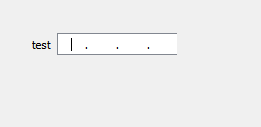
                  Ok i did fast test.
                  It just compiles so not sure why you get so much grief from it :)

                  ui->formLayout->addRow("test", field);

                  alt text

                  test project.
                  https://www.dropbox.com/s/v0a5rdlkzi3igvb/IPCtrlTEst.zip?dl=0

                  1 Reply Last reply
                  2
                  • T Offline
                    T Offline
                    Tamfub
                    wrote on last edited by
                    #14

                    @mrjj Ok, it worked also for me now, the error in addRow disappeares when ip_field is declared as a pointer. I did not try this XD

                    Thank you very much!

                    mrjjM 1 Reply Last reply
                    1
                    • T Tamfub

                      @mrjj Ok, it worked also for me now, the error in addRow disappeares when ip_field is declared as a pointer. I did not try this XD

                      Thank you very much!

                      mrjjM Offline
                      mrjjM Offline
                      mrjj
                      Lifetime Qt Champion
                      wrote on last edited by
                      #15

                      @Tamfub
                      Np :)
                      yes it must be pointer OR you must use the & to take address but
                      due to how deletion works, it's best to use pointer :)

                      T 1 Reply Last reply
                      0
                      • mrjjM mrjj

                        @Tamfub
                        Np :)
                        yes it must be pointer OR you must use the & to take address but
                        due to how deletion works, it's best to use pointer :)

                        T Offline
                        T Offline
                        Tamfub
                        wrote on last edited by
                        #16

                        @mrjj Got it! Do you know why the right border of the textEdit is not visible?

                        mrjjM 1 Reply Last reply
                        0
                        • T Tamfub

                          @mrjj Got it! Do you know why the right border of the textEdit is not visible?

                          mrjjM Offline
                          mrjjM Offline
                          mrjj
                          Lifetime Qt Champion
                          wrote on last edited by mrjj
                          #17

                          @Tamfub
                          It seems the last Edit touches the QFrames border.
                          but even if i make it HUGE, it still happens so its
                          its seems to be due to
                          pLayout->setContentsMargins( 0, 0, 0, 0 );
                          so you can fix it with
                          pLayout->setContentsMargins( 0, 0, 1, 0 );
                          Seems not to give ill side effects.

                          ps. in
                          IPCtrl::IPCtrl(QWidget *parent) : QFrame(parent)

                          T 1 Reply Last reply
                          1
                          • mrjjM mrjj

                            @Tamfub
                            It seems the last Edit touches the QFrames border.
                            but even if i make it HUGE, it still happens so its
                            its seems to be due to
                            pLayout->setContentsMargins( 0, 0, 0, 0 );
                            so you can fix it with
                            pLayout->setContentsMargins( 0, 0, 1, 0 );
                            Seems not to give ill side effects.

                            ps. in
                            IPCtrl::IPCtrl(QWidget *parent) : QFrame(parent)

                            T Offline
                            T Offline
                            Tamfub
                            wrote on last edited by
                            #18

                            @mrjj Fine, thank you again :)

                            mrjjM 1 Reply Last reply
                            0
                            • T Tamfub

                              @mrjj Fine, thank you again :)

                              mrjjM Offline
                              mrjjM Offline
                              mrjj
                              Lifetime Qt Champion
                              wrote on last edited by
                              #19

                              @Tamfub
                              Np.
                              please mark as solved if you got it working :)

                              1 Reply Last reply
                              1

                              • Login

                              • Login or register to search.
                              • First post
                                Last post
                              0
                              • Categories
                              • Recent
                              • Tags
                              • Popular
                              • Users
                              • Groups
                              • Search
                              • Get Qt Extensions
                              • Unsolved