
Skip to content
  • Categories
  • Recent
  • Tags
  • Popular
  • Users
  • Groups
  • Search
  • Get Qt Extensions
  • Unsolved
Collapse
Brand Logo
  1. Home
  2. Qt Development
  3. General and Desktop
  4. Make an element look active when it loses focus
Qt 6.11 is out! See what's new in the release blog

Make an element look active when it loses focus

Scheduled Pinned Locked Moved Solved General and Desktop
10 Posts 2 Posters 1.6k Views 1 Watching
  • Oldest to Newest
  • Newest to Oldest
  • Most Votes
Reply
  • Reply as topic
Log in to reply
This topic has been deleted. Only users with topic management privileges can see it.
  • F Offline
    F Offline
    Flanagan
    wrote on last edited by
    #1

    Hi, do you know how can I make an element look active when it loses focus?

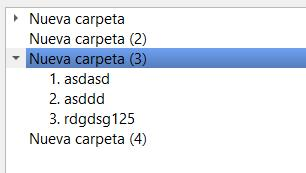
    I have a QTreeWidget and I need the selection to look blue even though I have gone to another application. My app has fusion style.

    a74a3ebe-7609-488f-889a-079336e2e359-image.png

    9d73813d-912d-43dd-9fdc-0616c569f8dd-image.png

    I tried to change stylesheet but the left triangle and the color... :
    e6cd5b28-a780-4007-a595-5e3b04132465-image.png
    I'd rather do it differently.
    Maybe it could somehow make the widget not lose focus, or at least make it appear not to lose focus?

    1 Reply Last reply
    0
    • mrjjM Offline
      mrjjM Offline
      mrjj
      Lifetime Qt Champion
      wrote on last edited by
      #2

      Hi
      Its not possible to make it not lose focus when switching to another app.

      Can i ask why its so important to you that your app does not follow the normal visual guidelines?
      Its by design the selection color is grey when not having focus.

      F 1 Reply Last reply
      3
      • mrjjM mrjj

        Hi
        Its not possible to make it not lose focus when switching to another app.

        Can i ask why its so important to you that your app does not follow the normal visual guidelines?
        Its by design the selection color is grey when not having focus.

        F Offline
        F Offline
        Flanagan
        wrote on last edited by
        #3

        @mrjj

        It is a program that I am going to use on a second screen while I have the focus on another app.

        I am going to make the selection in the Qt app with global hotkeys while I am using another application and I wanted to see the selection in blue like when I use the app normally but of course, the app does not have the focus and it looks gray.

        1 Reply Last reply
        0
        • mrjjM Offline
          mrjjM Offline
          mrjj
          Lifetime Qt Champion
          wrote on last edited by mrjj
          #4

          Hi
          Ok that way.
          Well on Windows the fusion style seems not to use palette so the old trick

          QPalette p = palette();
          p.setColor(QPalette::Inactive, QPalette::Highlight, p.color(QPalette::Active, QPalette::Highlight));
          setPalette(p);
          

          Seems to have no effect.

          I also tried with a QStyledItemDelegate but i cant tell where it get that blue
          selection color from with Fusion as it it seems to ignore all palette.
          https://code.woboq.org/qt5/qtbase/src/widgets/styles/qfusionstyle.cpp.html

          So I think your best bet is the stylesheet even if not perfect.

          F 1 Reply Last reply
          3
          • mrjjM mrjj

            Hi
            Ok that way.
            Well on Windows the fusion style seems not to use palette so the old trick

            QPalette p = palette();
            p.setColor(QPalette::Inactive, QPalette::Highlight, p.color(QPalette::Active, QPalette::Highlight));
            setPalette(p);
            

            Seems to have no effect.

            I also tried with a QStyledItemDelegate but i cant tell where it get that blue
            selection color from with Fusion as it it seems to ignore all palette.
            https://code.woboq.org/qt5/qtbase/src/widgets/styles/qfusionstyle.cpp.html

            So I think your best bet is the stylesheet even if not perfect.

            F Offline
            F Offline
            Flanagan
            wrote on last edited by
            #5

            @mrjj it worked!

            I'm using PySide2

            palette = self.palette()
            palette.setColor(QtGui.QPalette.Inactive, QtGui.QPalette.Highlight, palette.color(QtGui.QPalette.Active, QtGui.QPalette.Highlight))
            palette.setColor(QtGui.QPalette.Inactive, QtGui.QPalette.HighlightedText, palette.color(QtGui.QPalette.Active, tGui.QPalette.HighlightedText))
            self.setPalette(palette)
            

            Thanks!

            mrjjM 1 Reply Last reply
            2
            • F Flanagan

              @mrjj it worked!

              I'm using PySide2

              palette = self.palette()
              palette.setColor(QtGui.QPalette.Inactive, QtGui.QPalette.Highlight, palette.color(QtGui.QPalette.Active, QtGui.QPalette.Highlight))
              palette.setColor(QtGui.QPalette.Inactive, QtGui.QPalette.HighlightedText, palette.color(QtGui.QPalette.Active, tGui.QPalette.HighlightedText))
              self.setPalette(palette)
              

              Thanks!

              mrjjM Offline
              mrjjM Offline
              mrjj
              Lifetime Qt Champion
              wrote on last edited by
              #6

              @Flanagan
              Oh so on your platform, it did allow to color the inactive as active?
              Cool. Thank for reporting back.

              Ps. What platform ? linux or also windows ?

              F 1 Reply Last reply
              1
              • mrjjM mrjj

                @Flanagan
                Oh so on your platform, it did allow to color the inactive as active?
                Cool. Thank for reporting back.

                Ps. What platform ? linux or also windows ?

                F Offline
                F Offline
                Flanagan
                wrote on last edited by
                #7

                @mrjj Yep, I'm using Windows, it works even the other way, Active to Inactive

                Video proof:
                https://mega.nz/file/OlwCjKCZ#fcPYipywn2_XcOfV4Ai3zytRMz1f8InCiMNs4H5UcX8

                mrjjM 1 Reply Last reply
                0
                • F Flanagan

                  @mrjj Yep, I'm using Windows, it works even the other way, Active to Inactive

                  Video proof:
                  https://mega.nz/file/OlwCjKCZ#fcPYipywn2_XcOfV4Ai3zytRMz1f8InCiMNs4H5UcX8

                  mrjjM Offline
                  mrjjM Offline
                  mrjj
                  Lifetime Qt Champion
                  wrote on last edited by mrjj
                  #8

                  @Flanagan
                  Ok thats odd i could not get it to do it on win 10 . :)
                  Im using Qt 15.0
                  What version does this work in ?
                  In any case, im happy it still worked.

                  F 1 Reply Last reply
                  1
                  • mrjjM mrjj

                    @Flanagan
                    Ok thats odd i could not get it to do it on win 10 . :)
                    Im using Qt 15.0
                    What version does this work in ?
                    In any case, im happy it still worked.

                    F Offline
                    F Offline
                    Flanagan
                    wrote on last edited by
                    #9

                    @mrjj I use Windows 10 and PySide2 5.15.
                    https://www.qt.io/blog/qt-for-python-5.15.0-is-out

                    xD it's odd that it doesn't work for you.

                    mrjjM 1 Reply Last reply
                    0
                    • F Flanagan

                      @mrjj I use Windows 10 and PySide2 5.15.
                      https://www.qt.io/blog/qt-for-python-5.15.0-is-out

                      xD it's odd that it doesn't work for you.

                      mrjjM Offline
                      mrjjM Offline
                      mrjj
                      Lifetime Qt Champion
                      wrote on last edited by mrjj
                      #10

                      @Flanagan
                      Yep, I assume i did something wrong then since you have same Qt version so should also work with c++ :)

                      Tried again and now it worked :)
                      Seems i was messing up something with a stylesheet.

                      1 Reply Last reply
                      3

                      • Login

                      • Login or register to search.
                      • First post
                        Last post
                      0
                      • Categories
                      • Recent
                      • Tags
                      • Popular
                      • Users
                      • Groups
                      • Search
                      • Get Qt Extensions
                      • Unsolved