Skip to content
  • Categories
  • Recent
  • Tags
  • Popular
  • Users
  • Groups
  • Search
  • Get Qt Extensions
  • Unsolved
Collapse
Brand Logo
  1. Home
  2. Qt Development
  3. General and Desktop
  4. Too much height around QLabels
Qt 6.11 is out! See what's new in the release blog

Too much height around QLabels

Scheduled Pinned Locked Moved Solved General and Desktop
12 Posts 2 Posters 3.9k Views 1 Watching
  • Oldest to Newest
  • Newest to Oldest
  • Most Votes
Reply
  • Reply as topic
Log in to reply
This topic has been deleted. Only users with topic management privileges can see it.
  • B Offline
    B Offline
    Bushstar
    wrote on last edited by
    #3

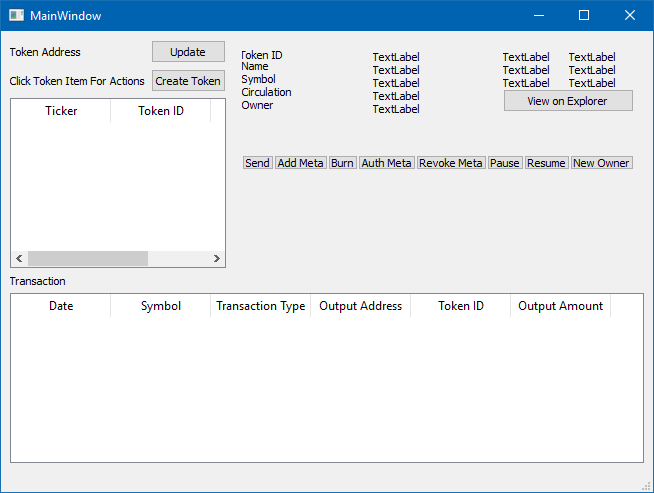
    Tried that but the result seems to be no better, or not significantly so. Included a screen from the Designer.

    The row of buttons at the bottom which were just below the text labels now have a large gap. Need to reduce the height around the QLabel and get that button row to move up.

    Everything resides in a QFrame, I'm posting the structure here. I'm new to designing Qt forms, I may be doing something very wrong!

    1 Reply Last reply
    0
    • mrjjM Offline
      mrjjM Offline
      mrjj
      Lifetime Qt Champion
      wrote on last edited by
      #4

      Hi
      It looks right from looking at it but should compress.

      Can you post your UI file here so i can have a look at it ?

      You can also use
      https://paste.ofcode.org/

      if huge.

      1 Reply Last reply
      0
      • B Offline
        B Offline
        Bushstar
        wrote on last edited by
        #5

        Here's the UI code. There's a QVBoxLayout under the buttons called token_form, this is where I'll dynamically add forms based on which button is pushed, I added a space under that as well to try and push things up. The UI should end up with two halves, the bottom half beginning at the QLabel Tranaction on the left hand side.

        https://paste.ofcode.org/36UbTmLeUDB3f4BFD47pCWk

        1 Reply Last reply
        0
        • mrjjM Offline
          mrjjM Offline
          mrjj
          Lifetime Qt Champion
          wrote on last edited by
          #6

          Hi
          When i run it i get this
          alt text

          So it does seem to keep the label compressed so i wonder if you insert something at runtime that confuses it
          or what is going on.

          Could you run test just to be sure you get same results?
          https://www.dropbox.com/s/rfmhywvc4qlc844/testcompress.zip?dl=0

          1 Reply Last reply
          0
          • B Offline
            B Offline
            Bushstar
            wrote on last edited by
            #7

            It must be inheriting something from the program. I'm adding an extra tab into an existing open source application. I will take a look and see if I can find something that is adding the spacing.

            I did define margin and padding 0 in the QLabel styleSheet in the Qt Designer for the page, do you need to specify that the settings in the QLabel override the global style sheet?

            mrjjM 1 Reply Last reply
            0
            • B Bushstar

              It must be inheriting something from the program. I'm adding an extra tab into an existing open source application. I will take a look and see if I can find something that is adding the spacing.

              I did define margin and padding 0 in the QLabel styleSheet in the Qt Designer for the page, do you need to specify that the settings in the QLabel override the global style sheet?

              mrjjM Offline
              mrjjM Offline
              mrjj
              Lifetime Qt Champion
              wrote on last edited by
              #8

              @Bushstar
              Hi
              I also wondered if something from stylesheet even im not sure what it could be.

              • i did define margin and padding 0 in the QLabel styleSheet in the Qt Designer for the page, do you need to specify that the settings in the QLabel override the global style sheet?

              Im not 100% sure what you ask. 😋
              If the page (widget) has a stylesheet then it should win over any global style sheet you set on QApplication.

              1 Reply Last reply
              0
              • B Offline
                B Offline
                Bushstar
                wrote on last edited by
                #9

                I was thinking of the CSS !important property, could not remember it's name. Will find and check the global style sheet.

                mrjjM 1 Reply Last reply
                0
                • B Bushstar

                  I was thinking of the CSS !important property, could not remember it's name. Will find and check the global style sheet.

                  mrjjM Offline
                  mrjjM Offline
                  mrjj
                  Lifetime Qt Champion
                  wrote on last edited by
                  #10

                  @Bushstar
                  If possible, you could try disable style sheet and see if it then shows at expected.

                  1 Reply Last reply
                  1
                  • B Offline
                    B Offline
                    Bushstar
                    wrote on last edited by
                    #11

                    @mrjj It was the style sheet for the application that was interfering. Giving all elements their own specific name was enough to stop those styles applying to the new widget I was adding.

                    Thanks for taking the time to help me out with this, it's appreciated.

                    mrjjM 1 Reply Last reply
                    1
                    • B Bushstar

                      @mrjj It was the style sheet for the application that was interfering. Giving all elements their own specific name was enough to stop those styles applying to the new widget I was adding.

                      Thanks for taking the time to help me out with this, it's appreciated.

                      mrjjM Offline
                      mrjjM Offline
                      mrjj
                      Lifetime Qt Champion
                      wrote on last edited by
                      #12

                      @Bushstar
                      Good to hear. :)
                      Thank you for reporting back. It useful to know what was the actual cause.

                      1 Reply Last reply
                      0

                      • Login

                      • Login or register to search.
                      • First post
                        Last post
                      0
                      • Categories
                      • Recent
                      • Tags
                      • Popular
                      • Users
                      • Groups
                      • Search
                      • Get Qt Extensions
                      • Unsolved