
Skip to content
  • Categories
  • Recent
  • Tags
  • Popular
  • Users
  • Groups
  • Search
  • Get Qt Extensions
  • Unsolved
Collapse
Brand Logo
  1. Home
  2. Qt Development
  3. QML and Qt Quick
  4. PathView elements displacement is not equal
Qt 6.11 is out! See what's new in the release blog

PathView elements displacement is not equal

Scheduled Pinned Locked Moved Unsolved QML and Qt Quick
3 Posts 1 Posters 423 Views
  • Oldest to Newest
  • Newest to Oldest
  • Most Votes
Reply
  • Reply as topic
Log in to reply
This topic has been deleted. Only users with topic management privileges can see it.
  • D Offline
    D Offline
    dsba
    wrote on last edited by
    #1

    I am trying to draw a button with certain width and height on PathView. As CurrentItem starts from center, center button is highlighted s4.png .
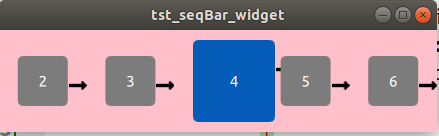
    Problem I am facing is, to fix spacing between each element to size of that arrow so that output look like after a chain of numbers in incremental order.

    Thanks in advance.

    1 Reply Last reply
    0
    • D Offline
      D Offline
      dsba
      wrote on last edited by
      #2

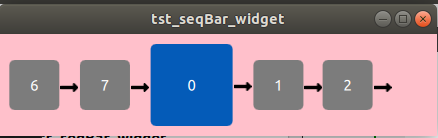
      using PathPercent I am able to achieve it like this but looping appearance does not present i.e after 2, 3 should appear and 6 should be followed by an arrow.

      I also notice that on pathItemCount increase or decrease, this again vary with displacement of elements.
      s6.png

      1 Reply Last reply
      0
      • D Offline
        D Offline
        dsba
        wrote on last edited by
        #3

        Or is there any other way, I can achieve this using widget/qml component?

        1 Reply Last reply
        0

        • Login

        • Login or register to search.
        • First post
          Last post
        0
        • Categories
        • Recent
        • Tags
        • Popular
        • Users
        • Groups
        • Search
        • Get Qt Extensions
        • Unsolved