
QGraphicsView doesn't close when MainWindow is closed.
-
@Cobra91151
If that's all you do, where (on the main window) will thisQGraphicsView viewactually show up? [I know it will be at (0, 0), but that's not what I'm getting at.] -
@Peter_Dev
I know it does! I am asking if that is your intention? EDIT You have just deleted your post saying it shows up in a separate window :(If it is, do you put other stuff on your main window? And is your intention that this separate graphics view window should be a modeless, separate window, but you would like it to close when the main window closes?
-
@Cobra91151
If that's all you do, where (on the main window) will thisQGraphicsView viewactually show up? [I know it will be at (0, 0), but that's not what I'm getting at.]Hello!
You are right. To addQGraphicsViewto the main window:Code:
MainWindow::MainWindow(QWidget *parent)
  : QMainWindow(parent)
  , ui(new Ui::MainWindow)
{
      QWidget *mainWidget = new QWidget(this);
      setCentralWidget(mainWidget);
      QGraphicsScene *scene = new QGraphicsScene(mainWidget);
      scene->addLine(10, 10, 100, 100);

      QGraphicsView *view = new QGraphicsView(scene);
      view->setFixedSize(500, 300);

      QHBoxLayout *testLayout = new QHBoxLayout();
      testLayout->addWidget(view);
      mainWidget->setLayout(testLayout);
}
The example code will draw the simple line and display it on the main window.
-
@Peter_Dev
I know it does! I am asking if that is your intention? EDIT You have just deleted your post saying it shows up in a separate window :(If it is, do you put other stuff on your main window? And is your intention that this separate graphics view window should be a modeless, separate window, but you would like it to close when the main window closes?
@JonB Sorry, i deleted that post because i thougth you were asking me, when you were asking Cobra91151. Qraphics view shows up in it's own window. Is there a way to connect graphics view to mainwindow, but keep it in separate window and keep it accessible to any function in Mainwindow?
-
Hello!
You are right. To addQGraphicsViewto the main window:Code:
MainWindow::MainWindow(QWidget *parent)
  : QMainWindow(parent)
  , ui(new Ui::MainWindow)
{
      QWidget *mainWidget = new QWidget(this);
      setCentralWidget(mainWidget);
      QGraphicsScene *scene = new QGraphicsScene(mainWidget);
      scene->addLine(10, 10, 100, 100);

      QGraphicsView *view = new QGraphicsView(scene);
      view->setFixedSize(500, 300);

      QHBoxLayout *testLayout = new QHBoxLayout();
      testLayout->addWidget(view);
      mainWidget->setLayout(testLayout);
}
The example code will draw the simple line and display it on the main window.
@Cobra91151
Yes; or the OP could justthis->setCentralWidget(view)if he wanted that widget alone in the main window. However, we now know that he actually does want it as a separate window, just he wants to control its closure, which I'm answering now.... -
@JonB Sorry, i deleted that post because i thougth you were asking me, when you were asking Cobra91151. Qraphics view shows up in it's own window. Is there a way to connect graphics view to mainwindow, but keep it in separate window and keep it accessible to any function in Mainwindow?
@Peter_Dev
If you keep it separate, you really just have two distinct, top-level windows, with no link between them. The main window cannot have a "parent-child" relationship to the gfx view window.You could fiddle around with the gfx view as a modeless dialog, but I don't; think that is right/would help.
So far as I know, you cannot have a relationship between these two independent, top-level windows. No automatic closing of the gfx view when you close the main window (or vice versa!).
That means you must write code overriding main window's close event which explicitly closes the gfx view, e.g.:
void MainWindow::closeEvent(QCloseEvent *event)
{
    view.close();
    QMainWindow::closeEvent(event);
}
Having your separate gfx window has consequences for the native windowing system. You will see both windows showing up in your windowing manager's "open program windows taskbar". Which may or may not what you intend.
but keep it in separate window and keep it accessible to any function in Mainwindow?
Kind of depends what you mean by "accessible to any function". You can still access it via your
viewmember variable. But it's not a part of the main window. -
@Peter_Dev
If you keep it separate, you really just have two distinct, top-level windows, with no link between them. The main window cannot have a "parent-child" relationship to the gfx view window.You could fiddle around with the gfx view as a modeless dialog, but I don't; think that is right/would help.
So far as I know, you cannot have a relationship between these two independent, top-level windows. No automatic closing of the gfx view when you close the main window (or vice versa!).
That means you must write code overriding main window's close event which explicitly closes the gfx view, e.g.:
void MainWindow::closeEvent(QCloseEvent *event)
{
    view.close();
    QMainWindow::closeEvent(event);
}
Having your separate gfx window has consequences for the native windowing system. You will see both windows showing up in your windowing manager's "open program windows taskbar". Which may or may not what you intend.
but keep it in separate window and keep it accessible to any function in Mainwindow?
Kind of depends what you mean by "accessible to any function". You can still access it via your
viewmember variable. But it's not a part of the main window. -
@JonB Sorry, i deleted that post because i thougth you were asking me, when you were asking Cobra91151. Qraphics view shows up in it's own window. Is there a way to connect graphics view to mainwindow, but keep it in separate window and keep it accessible to any function in Mainwindow?
Also, you can try to create the additional dialog, which will contain the
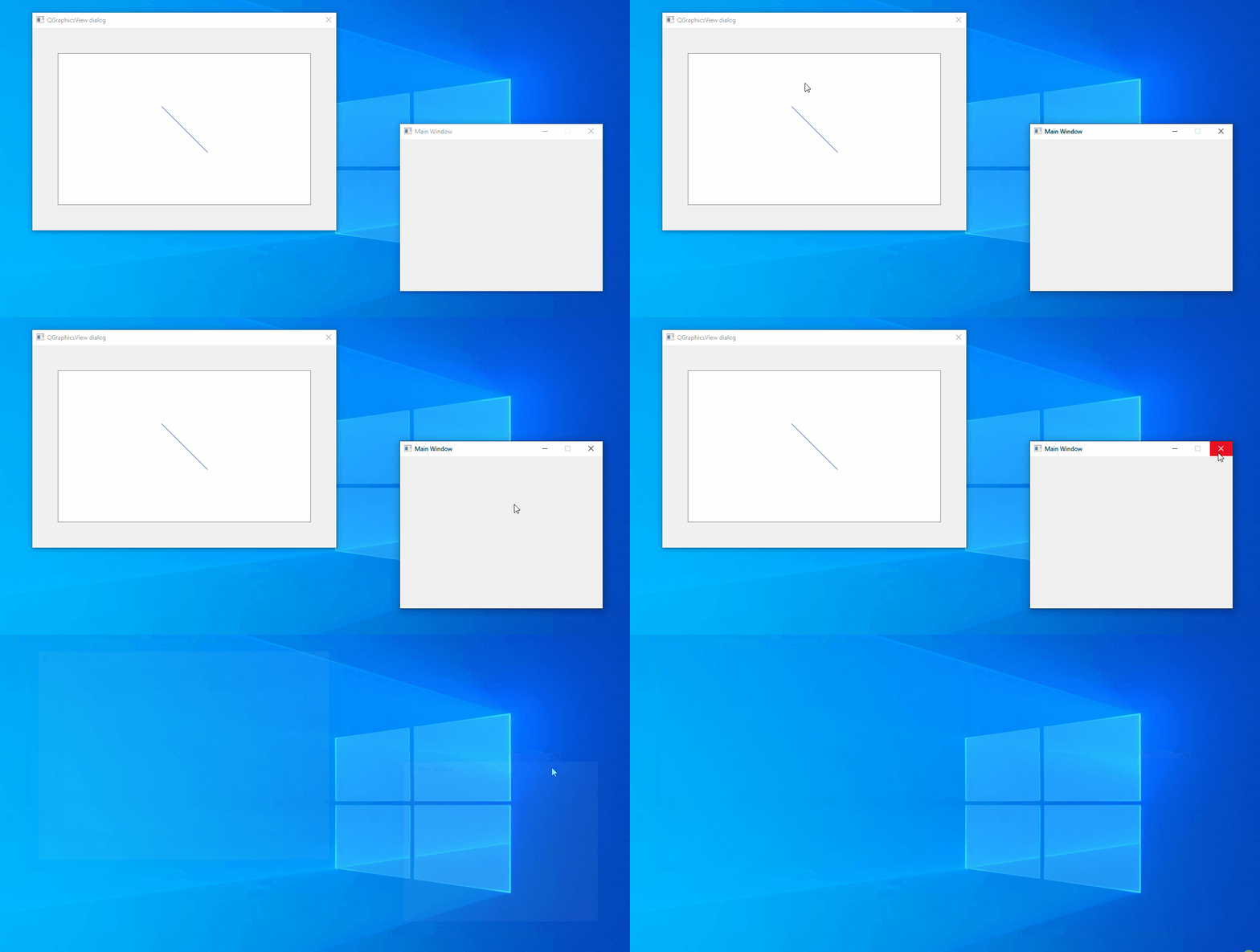
QGraphicsViewand display dialog when main window launches. To connect between them, you can use signal and slots: https://doc.qt.io/qt-5/signalsandslots.html. When the main window closes, then it will close the second dialog automatically.Code:
graphicstest.h
#ifndef GRAPHICSTEST_H
#define GRAPHICSTEST_H

#include <QMainWindow>
#include "seconddlg.h"

class GraphicsTest : public QMainWindow
{
    Q_OBJECT

public:
    GraphicsTest(QWidget *parent = nullptr);
    ~GraphicsTest();
};
#endif // GRAPHICSTEST_H
graphicstest.cpp
#include "graphicstest.h"

GraphicsTest::GraphicsTest(QWidget *parent)
    : QMainWindow(parent)
{
    setWindowTitle("Main Window");
    setFixedSize(400, 300);
    SecondDlg *sDlg = new SecondDlg(this);
    sDlg->show();
}

GraphicsTest::~GraphicsTest()
{
}
seconddlg.h
#ifndef SECONDDLG_H
#define SECONDDLG_H

#include <QDialog>
#include <QGraphicsScene>
#include <QGraphicsView>
#include <QHBoxLayout>

namespace Ui {
class SecondDlg;
}

class SecondDlg : public QDialog
{
    Q_OBJECT

public:
    explicit SecondDlg(QWidget *parent = nullptr);
    ~SecondDlg();

private:
    Ui::SecondDlg *ui;
};

#endif // SECONDDLG_H
seconddlg.cpp
#include "seconddlg.h"
#include "ui_seconddlg.h"

SecondDlg::SecondDlg(QWidget *parent) :
    QDialog(parent),
    ui(new Ui::SecondDlg)
{
    ui->setupUi(this);
    setWindowTitle("QGraphicsView dialog");
    setMinimumSize(600, 400);
    setWindowFlags(Qt::Dialog | Qt::MSWindowsFixedSizeDialogHint | Qt::WindowCloseButtonHint);
    QGraphicsScene *scene = new QGraphicsScene(this);
    scene->addLine(10, 10, 100, 100);

    QGraphicsView *view = new QGraphicsView(scene);
    view->setFixedSize(500, 300);

    QHBoxLayout *testLayout = new QHBoxLayout();
    testLayout->addWidget(view);
    setLayout(testLayout);
}

SecondDlg::~SecondDlg()
{
    delete ui;
}
Screenshot:
-
Also, you can try to create the additional dialog, which will contain the
QGraphicsViewand display dialog when main window launches. To connect between them, you can use signal and slots: https://doc.qt.io/qt-5/signalsandslots.html. When the main window closes, then it will close the second dialog automatically.Code:
graphicstest.h
#ifndef GRAPHICSTEST_H
#define GRAPHICSTEST_H

#include <QMainWindow>
#include "seconddlg.h"

class GraphicsTest : public QMainWindow
{
    Q_OBJECT

public:
    GraphicsTest(QWidget *parent = nullptr);
    ~GraphicsTest();
};
#endif // GRAPHICSTEST_H
graphicstest.cpp
#include "graphicstest.h"

GraphicsTest::GraphicsTest(QWidget *parent)
    : QMainWindow(parent)
{
    setWindowTitle("Main Window");
    setFixedSize(400, 300);
    SecondDlg *sDlg = new SecondDlg(this);
    sDlg->show();
}

GraphicsTest::~GraphicsTest()
{
}
seconddlg.h
#ifndef SECONDDLG_H
#define SECONDDLG_H

#include <QDialog>
#include <QGraphicsScene>
#include <QGraphicsView>
#include <QHBoxLayout>

namespace Ui {
class SecondDlg;
}

class SecondDlg : public QDialog
{
    Q_OBJECT

public:
    explicit SecondDlg(QWidget *parent = nullptr);
    ~SecondDlg();

private:
    Ui::SecondDlg *ui;
};

#endif // SECONDDLG_H
seconddlg.cpp
#include "seconddlg.h"
#include "ui_seconddlg.h"

SecondDlg::SecondDlg(QWidget *parent) :
    QDialog(parent),
    ui(new Ui::SecondDlg)
{
    ui->setupUi(this);
    setWindowTitle("QGraphicsView dialog");
    setMinimumSize(600, 400);
    setWindowFlags(Qt::Dialog | Qt::MSWindowsFixedSizeDialogHint | Qt::WindowCloseButtonHint);
    QGraphicsScene *scene = new QGraphicsScene(this);
    scene->addLine(10, 10, 100, 100);

    QGraphicsView *view = new QGraphicsView(scene);
    view->setFixedSize(500, 300);

    QHBoxLayout *testLayout = new QHBoxLayout();
    testLayout->addWidget(view);
    setLayout(testLayout);
}

SecondDlg::~SecondDlg()
{
    delete ui;
}
Screenshot:
@Cobra91151 Thank you for support! That's also a very good solution!)
-
Also, you can try to create the additional dialog, which will contain the
QGraphicsViewand display dialog when main window launches. To connect between them, you can use signal and slots: https://doc.qt.io/qt-5/signalsandslots.html. When the main window closes, then it will close the second dialog automatically.Code:
graphicstest.h
#ifndef GRAPHICSTEST_H
#define GRAPHICSTEST_H

#include <QMainWindow>
#include "seconddlg.h"

class GraphicsTest : public QMainWindow
{
    Q_OBJECT

public:
    GraphicsTest(QWidget *parent = nullptr);
    ~GraphicsTest();
};
#endif // GRAPHICSTEST_H
graphicstest.cpp
#include "graphicstest.h"

GraphicsTest::GraphicsTest(QWidget *parent)
    : QMainWindow(parent)
{
    setWindowTitle("Main Window");
    setFixedSize(400, 300);
    SecondDlg *sDlg = new SecondDlg(this);
    sDlg->show();
}

GraphicsTest::~GraphicsTest()
{
}
seconddlg.h
#ifndef SECONDDLG_H
#define SECONDDLG_H

#include <QDialog>
#include <QGraphicsScene>
#include <QGraphicsView>
#include <QHBoxLayout>

namespace Ui {
class SecondDlg;
}

class SecondDlg : public QDialog
{
    Q_OBJECT

public:
    explicit SecondDlg(QWidget *parent = nullptr);
    ~SecondDlg();

private:
    Ui::SecondDlg *ui;
};

#endif // SECONDDLG_H
seconddlg.cpp
#include "seconddlg.h"
#include "ui_seconddlg.h"

SecondDlg::SecondDlg(QWidget *parent) :
    QDialog(parent),
    ui(new Ui::SecondDlg)
{
    ui->setupUi(this);
    setWindowTitle("QGraphicsView dialog");
    setMinimumSize(600, 400);
    setWindowFlags(Qt::Dialog | Qt::MSWindowsFixedSizeDialogHint | Qt::WindowCloseButtonHint);
    QGraphicsScene *scene = new QGraphicsScene(this);
    scene->addLine(10, 10, 100, 100);

    QGraphicsView *view = new QGraphicsView(scene);
    view->setFixedSize(500, 300);

    QHBoxLayout *testLayout = new QHBoxLayout();
    testLayout->addWidget(view);
    setLayout(testLayout);
}

SecondDlg::~SecondDlg()
{
    delete ui;
}
Screenshot:
@Cobra91151
That's what I meant by "doing it with modeless dialog". If it works it's simpler because you don't have to explicitly close. But I thought when I tried it there were problems.In your example, if you drag the windows so they overlap can user still click either one up-front? And if the main window has content widgets you can interact with them freely? I recall problems, but I may (well) be getting confused!
-
@Cobra91151
That's what I meant by "doing it with modeless dialog". If it works it's simpler because you don't have to explicitly close. But I thought when I tried it there were problems.In your example, if you drag the windows so they overlap can user still click either one up-front? And if the main window has content widgets you can interact with them freely? I recall problems, but I may (well) be getting confused!
-
Yes, you can interact with them, but second dialog overlaps the main window:
 .
.@Cobra91151
Ah ha! I thought I had some recollection of issues like this, So they are not truly independent, the graphics view would always be atop the main window. Which may not be the behaviour desired by @Peter_Dev , I don't know.

