Skip to content
  • Categories
  • Recent
  • Tags
  • Popular
  • Users
  • Groups
  • Search
  • Get Qt
  • Unsolved
Collapse
Brand Logo
  1. Home
  2. Qt Development
  3. General and Desktop
  4. QJSEngine, error #2 (Problem after Qt update)
Qt 6.12 LTS is out! See what's new in the release blog

QJSEngine, error #2 (Problem after Qt update)

Scheduled Pinned Locked Moved Unsolved General and Desktop
16 Posts 2 Posters 2.8k Views 2 Watching
  • Oldest to Newest
  • Newest to Oldest
  • Most Votes
Reply
  • Reply as topic
Log in to reply
This topic has been deleted. Only users with topic management privileges can see it.
  • SPlattenS SPlatten

    @mrjj said in QJSEngine, error #2 (Problem after Qt update):

    https://bugreports.qt.io/secure/Dashboard.jspa

    Thank you, I will create a post now. Although I was hoping someone else would try it and see if its just me or its repeatable?

    mrjjM Offline
    mrjjM Offline
    mrjj
    Lifetime Qt Champion
    wrote on last edited by
    #6

    @SPlatten
    hi
    Is that code enough to see the issue ?
    I have only Windows Os. Have you also seen it there ?

    1 Reply Last reply
    0
    • SPlattenS Offline
      SPlattenS Offline
      SPlatten
      wrote on last edited by SPlatten
      #7

      @mrjj, I don't have a machine running Windows anymore. That source should be enough for any reasonable coder to use the same and reproduce.

      https://bugreports.qt.io/browse/QTBUG-83432

      Kind Regards,
      Sy

      mrjjM 1 Reply Last reply
      0
      • SPlattenS SPlatten

        @mrjj, I don't have a machine running Windows anymore. That source should be enough for any reasonable coder to use the same and reproduce.

        https://bugreports.qt.io/browse/QTBUG-83432

        mrjjM Offline
        mrjjM Offline
        mrjj
        Lifetime Qt Champion
        wrote on last edited by
        #8

        @SPlatten
        Ok super.

        Sure but it lowers the number of people testing it as
        one must make a project, alter the code a lot to make it compile
        since its a member function.
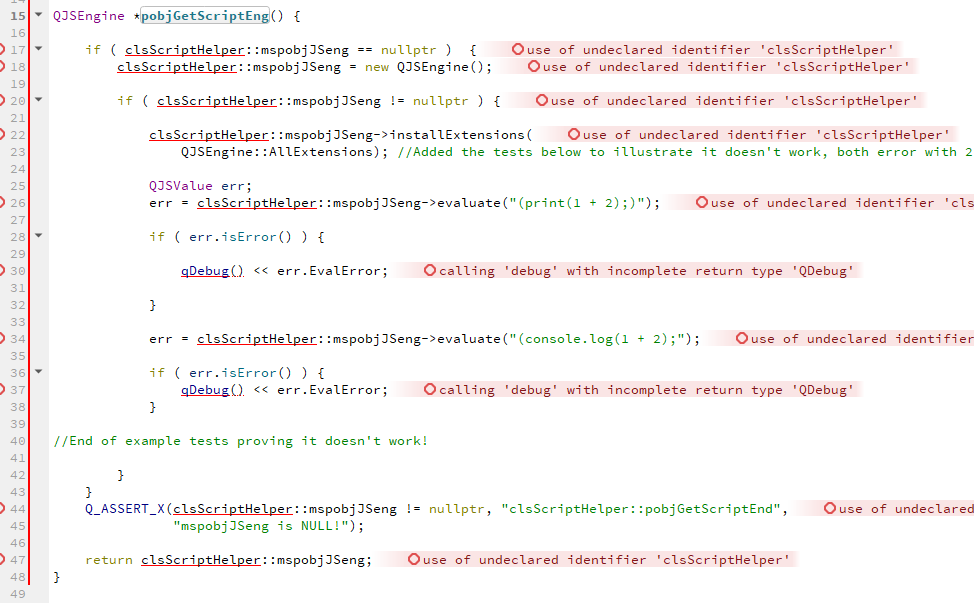
        alt text

        when we have to change the code a lot to make it run , there is a chance we introduce other errors
        or simply not test the same.

        anyway, would you say this test it ?

        void Test()
        {
            QJSEngine *mspobjJSeng = new class QJSEngine();
        
            mspobjJSeng->installExtensions(
                QJSEngine::AllExtensions); //Added the tests below to illustrate it doesn't work, both error with 2
        
            QJSValue err;
            err = mspobjJSeng->evaluate("(print(1 + 2);)");
        
            if ( err.isError() ) {
                qDebug() << err.EvalError;
            }
        
            err = mspobjJSeng->evaluate("(console.log(1 + 2);");
        
            if ( err.isError() ) {
                qDebug() << err.EvalError;
            }
        }


        1 Reply Last reply
        0
        • SPlattenS Offline
          SPlattenS Offline
          SPlatten
          wrote on last edited by
          #9

          Sorry, I should have uploaded the example application I created when I posted the bug on the official site...

              #include <QGuiApplication>
              #include <QQmlApplicationEngine>
              #include <QDebug>
          
              int main(int argc, char *argv[]) {
                  QCoreApplication::setAttribute(Qt::AA_EnableHighDpiScaling);
                  QGuiApplication app(argc, argv);
                  QJSEngine test;
                  test.installExtensions(QJSEngine::AllExtensions);
                  QJSValue result = test.evaluate("(console.info(\"Hello World\");)");
                  qDebug() << result.EvalError;
                  return 0;
              }
          

          Kind Regards,
          Sy

          mrjjM 1 Reply Last reply
          0
          • SPlattenS SPlatten

            Sorry, I should have uploaded the example application I created when I posted the bug on the official site...

                #include <QGuiApplication>
                #include <QQmlApplicationEngine>
                #include <QDebug>
            
                int main(int argc, char *argv[]) {
                    QCoreApplication::setAttribute(Qt::AA_EnableHighDpiScaling);
                    QGuiApplication app(argc, argv);
                    QJSEngine test;
                    test.installExtensions(QJSEngine::AllExtensions);
                    QJSValue result = test.evaluate("(console.info(\"Hello World\");)");
                    qDebug() << result.EvalError;
                    return 0;
                }
            
            mrjjM Offline
            mrjjM Offline
            mrjj
            Lifetime Qt Champion
            wrote on last edited by
            #10

            Hi
            Ah, yes that was easier to test with.
            Anyway, i also got error 2 for both examples on windows using
            Qt 5.14.1

            So this did use to work in other version or ?

            1 Reply Last reply
            0
            • mrjjM Offline
              mrjjM Offline
              mrjj
              Lifetime Qt Champion
              wrote on last edited by
              #11

              Hi
              Tested some more.
              i dont get the
              " Indicates that console functions (console.log(), for example) should be installed."
              error.

              so the error 2 comes from not being a value i guess.

               auto text = R"(
                                  function f(a, b) {
                                    console.log("a is ", a, "b is ", b);
                                  }
                                  f(10,10);
                                  )";
                      QJSValue result = test.evaluate(text);


              console seems to work.

              js: a is  10 b is  10
              2
              

              so it does work for me on Win. No error about console.

              1 Reply Last reply
              0
              • SPlattenS Offline
                SPlattenS Offline
                SPlatten
                wrote on last edited by SPlatten
                #12

                My usage is similar I use console.info in a function and its not working, yes it was working in previous versions of Qt.

                In my example even Hello World just a string doesn't work.

                Kind Regards,
                Sy

                mrjjM 1 Reply Last reply
                0
                • SPlattenS SPlatten

                  My usage is similar I use console.info in a function and its not working, yes it was working in previous versions of Qt.

                  In my example even Hello World just a string doesn't work.

                  mrjjM Offline
                  mrjjM Offline
                  mrjj
                  Lifetime Qt Champion
                  wrote on last edited by
                  #13

                  @SPlatten

                  so it broke going from 5-14-1 to 5-14-2 ?
                  or what was your old version ?
                  Seems to work in 5.14.1 here on win.

                  1 Reply Last reply
                  0
                  • SPlattenS Offline
                    SPlattenS Offline
                    SPlatten
                    wrote on last edited by SPlatten
                    #14

                    Sorry I really can't answer that, here is an update, just tried this:

                        #include <QGuiApplication>
                        #include <QQmlApplicationEngine>
                        #include <QDebug>
                    
                        int main(int argc, char *argv[]) {
                            QCoreApplication::setAttribute(Qt::AA_EnableHighDpiScaling);
                            QGuiApplication app(argc, argv);
                            QJSEngine test;
                            test.installExtensions(QJSEngine::AllExtensions);
                            QJSValue result;
                            result = test.evaluate("console.log(123);");
                            qDebug() << result.EvalError;
                            result = test.evaluate("(console.log(456);)");
                            qDebug() << result.EvalError;
                            result = test.evaluate("(console.log(\"Hello World\");)");
                            qDebug() << result.EvalError;
                            return 0;
                        }
                    

                    The output from this was:

                        QML debugging is enabled. Only use this in a safe environment.
                        2020-04-10 13:15:53.563312+0100 scriptExample[1089:16542] QML Debugger: Waiting for connection on port 49396...
                        2020-04-10 13:15:54.515935+0100 scriptExample[1089:16432] [js] 123
                        2020-04-10 13:15:54.515978+0100 scriptExample[1089:16432] 2
                        2020-04-10 13:15:54.516023+0100 scriptExample[1089:16432] 2
                        2020-04-10 13:15:54.516132+0100 scriptExample[1089:16432] 2
                        2020-04-10 13:15:54.671516+0100 scriptExample[1089:16432] QObject::connect: No such signal QCoreApplication::focusObjectChanged(QObject*)
                    

                    Interestingly, removing the brackets surrounding the console.log call and it worked. The addition / requirement of brackets around the JavaScript is a fairly new addition.

                    Another edit, I changed the last console.log to:

                        result = test.evaluate("function abc(t) { console.log(\"Hello World:\" + t);}abc(999);");
                        qDebug() << result.EvalError;
                    

                    Output:

                        2020-04-10 13:23:59.005721+0100 scriptExample[1207:20216] [js] Hello World:999
                        2020-04-10 13:23:59.005735+0100 scriptExample[1207:20216] 2
                    

                    Notice that result.EvalError is still 2 even though the script was executed perfectly and the output was as desired.

                    My conclusion is that the issue seems to be related to the introduction of wrapping content in brackets.
                    if I remove the brackets from the console.log that displays Hello World, that also works.

                    Kind Regards,
                    Sy

                    1 Reply Last reply
                    1
                    • SPlattenS Offline
                      SPlattenS Offline
                      SPlatten
                      wrote on last edited by
                      #15

                      There would seem to be multiple problems with QJSEngine, if I try to register a global then it must be wrapped in () or it fails:

                          "({\"db\":\"test\",\"host\":\"localhost\",\"usr\":\"root\",\"pass\":\"123456\"})"
                      

                      If it is left as:

                          "{\"db\":\"test\",\"host\":\"localhost\",\"usr\":\"root\",\"pass\":\"123456\"}"
                      

                      It fails with, EvalError: 2

                      It's not consistent, some things need to be wrapped in () or they fail others cannot be wrapped in () or they will fail, what is the reasoning for it and surely it would be better all round if the wrapping and handling of when or if to wrap in () was handled by the engine itself?

                      Kind Regards,
                      Sy

                      1 Reply Last reply
                      0
                      • SPlattenS Offline
                        SPlattenS Offline
                        SPlatten
                        wrote on last edited by SPlatten
                        #16

                        Trying alternate versions until I can find one that doesn't have this problem, so far I've tried:

                        5.14.2
                        5.13.2
                        5.12.8
                        5.12.2

                        Then there is quite a jump to versions available on the MaintenanceTool to 5.9.9, which I'm downloading now.

                        Qt 5.9.9 works, I'm getting different syntax errors now, but at least the fundamental stuff is now working. Hope this gives the Qt developers something to go on.

                        Yep, 5.9.9 definitely works.

                        Kind Regards,
                        Sy

                        1 Reply Last reply
                        0

                        • Login

                        • Login or register to search.
                        • First post
                          Last post
                        0
                        • Categories
                        • Recent
                        • Tags
                        • Popular
                        • Users
                        • Groups
                        • Search
                        • Get Qt
                        • Unsolved