
QTableWidget replace dotted selected row with border
-
For a QTableWidget, I'm trying to replace the default dotted border around a selected row so that it extends to the entire row and is a black border instead. I've searched the forums and google but I can't find any examples of what I want to achieve which is this:

I tried setting the outline property in the stylesheets but it didn't do anything.
Does anyone know how to do this?Thanks
-
Hi
The dotted is actually a focus rect not selection. Different concept.
Anyway,
you can use a delegate to do custom drawing to get that effectclass DrawBorderDelegate : public QStyledItemDelegate { QTableView *table; public: DrawBorderDelegate( QObject *parent, QTableView *theTable ) : QStyledItemDelegate( parent ), table(theTable) {} void paint( QPainter *painter, const QStyleOptionViewItem &option, const QModelIndex &index ) const { // kill the focus rect QStyleOptionViewItem option2 = option; // its const.. option2.state = option.state & (~QStyle::State_HasFocus); QStyledItemDelegate::paint( painter, option2, index ); // if selected row paint borders if ( table->currentIndex().row() == index.row() ) { const QRect rect( option.rect ); painter->setPen(QPen(Qt::red, 2)); painter->drawLine( rect.topLeft(), rect.topRight() ); painter->drawLine( rect.bottomLeft(), rect.bottomRight() ); // Draw left edge of left-most cell if ( index.column() == 0 ) painter->drawLine( rect.topLeft(), rect.bottomLeft() ); // Draw right edge of right-most cell if ( index.column() == index.model()->columnCount() - 1 ) painter->drawLine( rect.topRight(), rect.bottomRight() ); } } }; // DrawBorderDelegate .. in cpp ui->tableWidget->setItemDelegate( new DrawBorderDelegate( this, ui->tableWidget ) );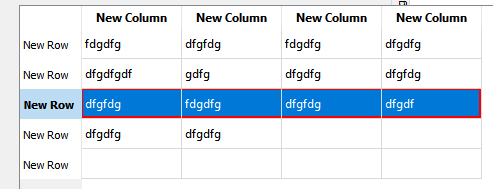
Design note. this was fast made so i just gave the QTableWidget as a parameter to know the current row.
That couples it to that type of view which is not optimal. -
Hi
The dotted is actually a focus rect not selection. Different concept.
Anyway,
you can use a delegate to do custom drawing to get that effectclass DrawBorderDelegate : public QStyledItemDelegate { QTableView *table; public: DrawBorderDelegate( QObject *parent, QTableView *theTable ) : QStyledItemDelegate( parent ), table(theTable) {} void paint( QPainter *painter, const QStyleOptionViewItem &option, const QModelIndex &index ) const { // kill the focus rect QStyleOptionViewItem option2 = option; // its const.. option2.state = option.state & (~QStyle::State_HasFocus); QStyledItemDelegate::paint( painter, option2, index ); // if selected row paint borders if ( table->currentIndex().row() == index.row() ) { const QRect rect( option.rect ); painter->setPen(QPen(Qt::red, 2)); painter->drawLine( rect.topLeft(), rect.topRight() ); painter->drawLine( rect.bottomLeft(), rect.bottomRight() ); // Draw left edge of left-most cell if ( index.column() == 0 ) painter->drawLine( rect.topLeft(), rect.bottomLeft() ); // Draw right edge of right-most cell if ( index.column() == index.model()->columnCount() - 1 ) painter->drawLine( rect.topRight(), rect.bottomRight() ); } } }; // DrawBorderDelegate .. in cpp ui->tableWidget->setItemDelegate( new DrawBorderDelegate( this, ui->tableWidget ) );Design note. this was fast made so i just gave the QTableWidget as a parameter to know the current row.
That couples it to that type of view which is not optimal. -
Hi
The dotted is actually a focus rect not selection. Different concept.
Anyway,
you can use a delegate to do custom drawing to get that effectclass DrawBorderDelegate : public QStyledItemDelegate { QTableView *table; public: DrawBorderDelegate( QObject *parent, QTableView *theTable ) : QStyledItemDelegate( parent ), table(theTable) {} void paint( QPainter *painter, const QStyleOptionViewItem &option, const QModelIndex &index ) const { // kill the focus rect QStyleOptionViewItem option2 = option; // its const.. option2.state = option.state & (~QStyle::State_HasFocus); QStyledItemDelegate::paint( painter, option2, index ); // if selected row paint borders if ( table->currentIndex().row() == index.row() ) { const QRect rect( option.rect ); painter->setPen(QPen(Qt::red, 2)); painter->drawLine( rect.topLeft(), rect.topRight() ); painter->drawLine( rect.bottomLeft(), rect.bottomRight() ); // Draw left edge of left-most cell if ( index.column() == 0 ) painter->drawLine( rect.topLeft(), rect.bottomLeft() ); // Draw right edge of right-most cell if ( index.column() == index.model()->columnCount() - 1 ) painter->drawLine( rect.topRight(), rect.bottomRight() ); } } }; // DrawBorderDelegate .. in cpp ui->tableWidget->setItemDelegate( new DrawBorderDelegate( this, ui->tableWidget ) );Design note. this was fast made so i just gave the QTableWidget as a parameter to know the current row.
That couples it to that type of view which is not optimal.@mrjj said in QTableWidget replace dotted selected row with border:
ui->tableWidget->setItemDelegate( new DrawBorderDelegate( this, ui->tableWidget ) );
I've noticed that border looks thicker on the bottom than the top. Also it looks like the painter doesn't draw over the table grid lines. Why does this happen?
