
How to highlight empty Area in QGraphicsScene?
-
@Akhendra
you can use QGraphicsView::drawBackground()@raven-worx
As per Qt document:
Draws the background of the scene using painter, before any items and the foreground are drawn. Reimplement this function to provide a custom background for this view.So here i am adding a QPixmap to a scene after view is created and also custom items are also added.
I cant see any thing. -
@raven-worx
As per Qt document:
Draws the background of the scene using painter, before any items and the foreground are drawn. Reimplement this function to provide a custom background for this view.So here i am adding a QPixmap to a scene after view is created and also custom items are also added.
I cant see any thing. -
Hi
So the pixmap is covering all of the background?And you place some Items in some locations and you want to show remaining space (on the pixmap) that
is not covered with an item ?Is the pixmap just blank or is there some area where Items are allowed and some not?
Could you show how it looks ?
(use postimage.org (or similar) as image upload is still broken here) -
Hi
So the pixmap is covering all of the background?And you place some Items in some locations and you want to show remaining space (on the pixmap) that
is not covered with an item ?Is the pixmap just blank or is there some area where Items are allowed and some not?
Could you show how it looks ?
(use postimage.org (or similar) as image upload is still broken here)@mrjj
The pixmap is not blank, actually it is Image of data contains lets say photo clicked from camera and added this as a pixmap to scene.
The pixmap is covering all of the background and on top of that i am just adding items(PixmapItem,RectItem, etc).
Find the sampled image with items drawn on top.
https://i.postimg.cc/d3BFrTMZ/Capture.jpg
https://postimg.cc/D48RK0w7 -
So your PixMap Item is your background and on that background you put other
QGraphicItems?You could check each point covered by your PixMap item whether there is one of your
QGraphicsItemsor not. Then repaint this point/area. -
@Pl45m4
Thank you. This one kind of solution.
But it take more time to find out due to image resolution.
I am just exploring other alternative approaches.@Akhendra
So when user press Add item, he is given one of some size. Lets say 200x200You then want app to draw/highlight in some way all areas that could hold this item without this overlapping?
like this ?
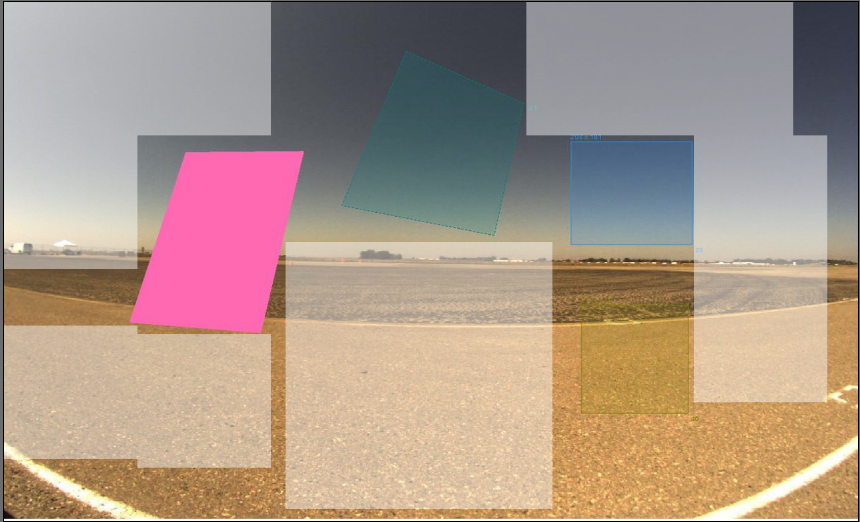
Since you also have no rectangular areas, the placement method needs to be more clever than
simply dividing the pixmap into a grid.
Do you need to go tight on the polygons ? Or would its bouncing area be good enough ?Is the Item, you insert always the same size to begin with?
or do different items come in different start sizes? -
@Akhendra
So when user press Add item, he is given one of some size. Lets say 200x200You then want app to draw/highlight in some way all areas that could hold this item without this overlapping?
like this ?
Since you also have no rectangular areas, the placement method needs to be more clever than
simply dividing the pixmap into a grid.
Do you need to go tight on the polygons ? Or would its bouncing area be good enough ?Is the Item, you insert always the same size to begin with?
or do different items come in different start sizes?@mrjj
The items are not same size and items come in different start sizes also.
As you mentioned, when ever i added a item then if i ask for empty area then it should highlight/draw(area which is not hold by item).Mainly i need this empty area to fill(bucket fill) lets say if i want fill the empty area with pink color which is one of the item's color,so that the whole empty area become part of another item's area.
I hope you understood.
Thanks for reply. -
@mrjj
The items are not same size and items come in different start sizes also.
As you mentioned, when ever i added a item then if i ask for empty area then it should highlight/draw(area which is not hold by item).Mainly i need this empty area to fill(bucket fill) lets say if i want fill the empty area with pink color which is one of the item's color,so that the whole empty area become part of another item's area.
I hope you understood.
Thanks for reply.@Akhendra
Ok, so it's very dynamic.
Does this "filling" come after user placed all floating areas ?
Or is that a way to sort of extend an existing items area ?- if i ask for empty area then it should highlight/draw(area which is not hold by item).
So it should show one possible location and not all possible locations?
- if i ask for empty area then it should highlight/draw(area which is not hold by item).
-
@Akhendra
Ok, so it's very dynamic.
Does this "filling" come after user placed all floating areas ?
Or is that a way to sort of extend an existing items area ?- if i ask for empty area then it should highlight/draw(area which is not hold by item).
So it should show one possible location and not all possible locations?
@mrjj
is that a way to sort of extend an existing items area ? Yes.- if i ask for empty area then it should highlight/draw(area which is not hold by item).
So it should show one possible location and not all possible locations?==> It should show all possible locations which is not hold by items.
- if i ask for empty area then it should highlight/draw(area which is not hold by item).
-
@mrjj
is that a way to sort of extend an existing items area ? Yes.- if i ask for empty area then it should highlight/draw(area which is not hold by item).
So it should show one possible location and not all possible locations?==> It should show all possible locations which is not hold by items.
Hi
Ok so these highlighted areas are shown as postions for the new item you are about to put in so rect for a rect
and polyshape for other forms ?And not like non regular area of free space ?
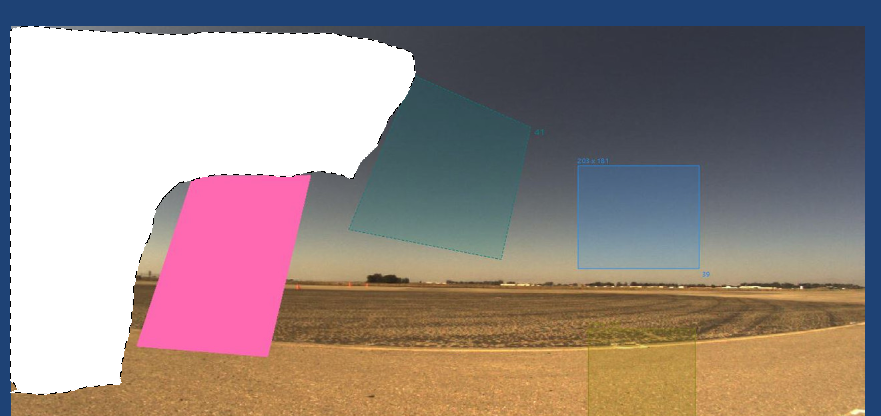
Ugly, but the point is that the highlight area be the same shape the to be inserted item and
not like a blob ish ? ( as in picture) - if i ask for empty area then it should highlight/draw(area which is not hold by item).
-
Hi
Ok so these highlighted areas are shown as postions for the new item you are about to put in so rect for a rect
and polyshape for other forms ?And not like non regular area of free space ?
Ugly, but the point is that the highlight area be the same shape the to be inserted item and
not like a blob ish ? ( as in picture)@mrjj
so these highlighted areas are shown as postions for the new item you are about to put in so rect for a rect
and polyshape for other forms ?==> It is polyshape so that i can add to another ployshape(polygon) or mask.but the point is that the highlight area be the same shape the to be inserted item ==> No. It would be polyshape(like polygon or mask).
My main aim is to add empty area to either existing polyshape(polygon) item or mask(pixel mask) item.
I hope you understood the context.
Thank you for extended support. -
@mrjj
so these highlighted areas are shown as postions for the new item you are about to put in so rect for a rect
and polyshape for other forms ?==> It is polyshape so that i can add to another ployshape(polygon) or mask.but the point is that the highlight area be the same shape the to be inserted item ==> No. It would be polyshape(like polygon or mask).
My main aim is to add empty area to either existing polyshape(polygon) item or mask(pixel mask) item.
I hope you understood the context.
Thank you for extended support.@Akhendra
Hi
Ok so that is far more complex than i thought at first.
It sounds more like a selection tool in a paint application than simply placement of polygons with anti overlapping detection.If you want to select/highlight the pixels in the free area(s), im not sure how we can
do that in any fast way as we would have to have a pixel buffer and subtract the pixel area where there are items. Since its polygons, this would be heavy for a big image.Well now that is clear what you are after,
let's see if we can get lucky and someone knows a fast way to
do this with Qt. Sadly I'm not expert in graphical algorithms but other here might be :) -
@Akhendra
Hi
Ok so that is far more complex than i thought at first.
It sounds more like a selection tool in a paint application than simply placement of polygons with anti overlapping detection.If you want to select/highlight the pixels in the free area(s), im not sure how we can
do that in any fast way as we would have to have a pixel buffer and subtract the pixel area where there are items. Since its polygons, this would be heavy for a big image.Well now that is clear what you are after,
let's see if we can get lucky and someone knows a fast way to
do this with Qt. Sadly I'm not expert in graphical algorithms but other here might be :)


