
Qt 6.11 is out! See what's new in the release
blog
How to custom cells position in QML GridView?
-
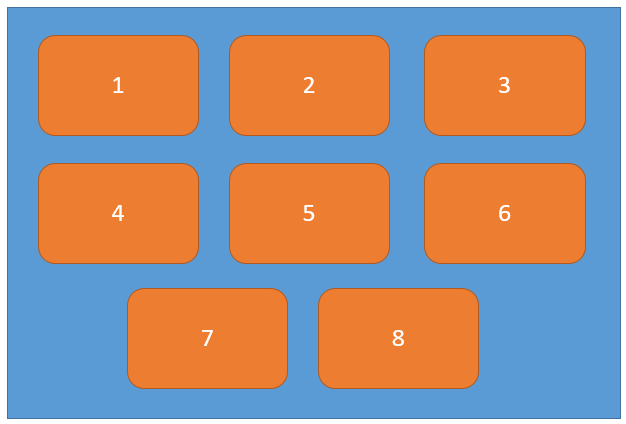
I have already create a GridView in my project and set the model/delegate for GridView. I wanna set the cells in center of last row. But I just found a property can set the GridView layout from left to right, how can I custom cells in center of the last row? Like this image. Thanks.
-
Hi Dylan,
I'm still learning QML, so my answer here may not be the best solution but it works, this is how I'd do it;
import QtQuick 2.12
import QtQuick.Window 2.12

Window {
    visible: true
    width: 400
    height: 300
    color: "#5b9bd5"
    title: qsTr("Hello World")

    Column {
        y: 30
        id: column
        spacing: 20
        width: parent.width


        Row { spacing: 20; anchors.horizontalCenter: parent.horizontalCenter
            Rectangle { color: "#ed7d31"; width: 100; height: 60; radius: 10
                Text { text: "1"; color: "white"; anchors.centerIn: parent }
            }
            Rectangle { color: "#ed7d31"; width: 100; height: 60; radius: 10
                Text { text: "2"; color: "white";anchors.centerIn: parent }
            }
            Rectangle { color: "#ed7d31"; width: 100; height: 60; radius: 10
                Text { text: "3"; color: "white";anchors.centerIn: parent }
            }
        }
        Row { spacing: 20; anchors.horizontalCenter: parent.horizontalCenter
            Rectangle { color: "#ed7d31"; width: 100; height: 60; radius: 10
                Text { text: "4"; color: "white"; anchors.centerIn: parent }
            }
            Rectangle { color: "#ed7d31"; width: 100; height: 60; radius: 10
                Text { text: "5"; color: "white"; anchors.centerIn: parent }
            }
            Rectangle { color: "#ed7d31"; width: 100; height: 60; radius: 10
                Text { text: "6"; color: "white"; anchors.centerIn: parent }
            }
        }
        Row { spacing: 20; anchors.horizontalCenter: parent.horizontalCenter
            Rectangle { color: "#ed7d31"; width: 100; height: 60; radius: 10
                Text { text: "7"; color: "white"; anchors.centerIn: parent }
            }
            Rectangle { color: "#ed7d31"; width: 100; height: 60; radius: 10
                Text { text: "8"; color: "white"; anchors.centerIn: parent }
            }
        }
    }
}
