
Skip to content
  • Categories
  • Recent
  • Tags
  • Popular
  • Users
  • Groups
  • Search
  • Get Qt Extensions
  • Unsolved
Collapse
Brand Logo
  1. Home
  2. Qt Development
  3. General and Desktop
  4. Change color of QLCD??
Qt 6.11 is out! See what's new in the release blog

Change color of QLCD??

Scheduled Pinned Locked Moved Solved General and Desktop
6 Posts 4 Posters 4.4k Views 2 Watching
  • Oldest to Newest
  • Newest to Oldest
  • Most Votes
Reply
  • Reply as topic
Log in to reply
This topic has been deleted. Only users with topic management privileges can see it.
  • Q Offline
    Q Offline
    QFelix
    wrote on last edited by aha_1980
    #1

    Hello,
    I want to change the color of the digits from QLCDNumber. How do I write this in Qt Creator?

    1 Reply Last reply
    0
    • Christian EhrlicherC Online
      Christian EhrlicherC Online
      Christian Ehrlicher
      Lifetime Qt Champion
      wrote on last edited by
      #2

      Set a QPalette with the colors you want. QLcdNumber is using the Light, Dark color role and the one set with QWidget::foregroundRole()

      Qt Online Installer direct download: https://download.qt.io/official_releases/online_installers/
      Visit the Qt Academy at https://academy.qt.io/catalog

      1 Reply Last reply
      5
      • mrjjM Offline
        mrjjM Offline
        mrjj
        Lifetime Qt Champion
        wrote on last edited by
        #3

        Hi
        Welcome to the forums
        As @Christian-Ehrlicher says, you can do that with QPalette like

        // get the palette
        auto palette = ui->lcdNumber->palette();
        // foreground color
        palette.setColor(palette.WindowText, Qt::blue);
        // "light" border
        palette.setColor(palette.Light, QColor(255, 0, 0));
        // "dark" border
        palette.setColor(palette.Dark, QColor(0, 255, 0));
        // set the palette back
        ui->lcdNumber->setPalette(palette);
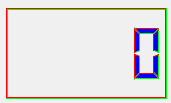
        

        alt text

        However, it looks best if you change to flat look
        ui->lcdNumber->setSegmentStyle(QLCDNumber::Flat );

        alt text

        Or matches the dark/light with the base color so the 'raised' look still works.

        Q 1 Reply Last reply
        3
        • mrjjM mrjj

          Hi
          Welcome to the forums
          As @Christian-Ehrlicher says, you can do that with QPalette like

          // get the palette
          auto palette = ui->lcdNumber->palette();
          // foreground color
          palette.setColor(palette.WindowText, Qt::blue);
          // "light" border
          palette.setColor(palette.Light, QColor(255, 0, 0));
          // "dark" border
          palette.setColor(palette.Dark, QColor(0, 255, 0));
          // set the palette back
          ui->lcdNumber->setPalette(palette);
          

          alt text

          However, it looks best if you change to flat look
          ui->lcdNumber->setSegmentStyle(QLCDNumber::Flat );
          alt text

          Or matches the dark/light with the base color so the 'raised' look still works.

          Q Offline
          Q Offline
          QFelix
          wrote on last edited by QFelix
          #4

          @mrjj What's the "ui" you're using? Can't find it in my code...

          And another question: I wrote a program with some pictures and so on, it's a racing game. I wahr to include QLCDNumber in this program to Show the score, but it doesn't works...

          aha_1980A 1 Reply Last reply
          0
          • Q QFelix

            @mrjj What's the "ui" you're using? Can't find it in my code...

            And another question: I wrote a program with some pictures and so on, it's a racing game. I wahr to include QLCDNumber in this program to Show the score, but it doesn't works...

            aha_1980A Offline
            aha_1980A Offline
            aha_1980
            Lifetime Qt Champion
            wrote on last edited by
            #5

            @QFelix said in [SOLVED] Change color of QLCD??:

            @mrjj What's the "ui" you're using? Can't find it in my code...

            If you create your code with Qt designer, you typically have a member ui in your class where you reference all your UI widgets. If you add them programmatically, then just ignore this ;)

            Regards

            Qt has to stay free or it will die.

            1 Reply Last reply
            3
            • mrjjM Offline
              mrjjM Offline
              mrjj
              Lifetime Qt Champion
              wrote on last edited by
              #6

              @QFelix said in Change color of QLCD??:

              I wahr to include QLCDNumber in this program to Show the score, but it doesn't works...

              Hi
              How did yo use it ?
              It should just work like any other widget you used.
              But without some code , its hard to guess at what went wrong.

              1 Reply Last reply
              0

              • Login

              • Login or register to search.
              • First post
                Last post
              0
              • Categories
              • Recent
              • Tags
              • Popular
              • Users
              • Groups
              • Search
              • Get Qt Extensions
              • Unsolved