
Event mark on QCalendarWidget
-
Hi,
I'd like to place an event mark on a specific QCalendarWidget's cell. This mark could be an image on the top left like in the example:
https://doc.qt.io/qt-5/qtquickcontrols1-calendar-example.html
The problem with this example is that I'm find it difficult to adapt Quick Controls / QML to my project. Is there any way to programatically do this?
-
Hi
Do you mean in QML or QWidget?
If QWidgts, then like this
https://wiki.qt.io/How_to_create_a_custom_calender_widgetYou should be able to just call base
QCalendarWidget::paintCell(painter, rect, date);
first and then draw an image on top of the default drawing. -
Hi
Thanks for the answer.
I tried this just as a test and it's working fine:void paintCell(QPainter *painter, const QRect &rect, const QDate &date) const { if (date.day() == 20) { // test condition // When the conditions are matched, passed QDate is drawn as we like. painter->save(); painter->drawRect(rect.x(), rect.y(), 15, 15); painter->fillRect(rect.x(), rect.y(), 15, 15, Qt::red); painter->drawText(rect, Qt::TextSingleLine | Qt::AlignCenter, QString::number(date.day())); painter->restore(); } else { // if our conditions are not matching, show the default way. QCalendarWidget::paintCell(painter, rect, date); } }The problem now is that I can't select the days that match the above condition (day = 20). The cell doesn't get the 'selection' behavior (blue background). Clicked signal is being emitted normally. Did I do something wrong?
-
Hi
Thanks for the answer.
I tried this just as a test and it's working fine:void paintCell(QPainter *painter, const QRect &rect, const QDate &date) const { if (date.day() == 20) { // test condition // When the conditions are matched, passed QDate is drawn as we like. painter->save(); painter->drawRect(rect.x(), rect.y(), 15, 15); painter->fillRect(rect.x(), rect.y(), 15, 15, Qt::red); painter->drawText(rect, Qt::TextSingleLine | Qt::AlignCenter, QString::number(date.day())); painter->restore(); } else { // if our conditions are not matching, show the default way. QCalendarWidget::paintCell(painter, rect, date); } }The problem now is that I can't select the days that match the above condition (day = 20). The cell doesn't get the 'selection' behavior (blue background). Clicked signal is being emitted normally. Did I do something wrong?
@rudag
Hi
Nope you didn't do anything wrong
however the logic in that code
is that if
if (date.day() == 20) then we do
custom drawing
and else
we draw normally. (calling base)The custom drawing does not handle drawing the selection part as its just a demo.
However, i was kinda expecting you just to do
void paintCell(QPainter *painter, const QRect &rect, const QDate &date) const
    {
	    QCalendarWidget::paintCell(painter, rect, date); // draw it normal

		if ( it has event ) {
			painter->drawPixmap( .... )
		}

    }
so you let it draw as normal and then put image on top when it applies.
-
@rudag
Hi
Nope you didn't do anything wrong
however the logic in that code
is that if
if (date.day() == 20) then we do
custom drawing
and else
we draw normally. (calling base)The custom drawing does not handle drawing the selection part as its just a demo.
However, i was kinda expecting you just to do
void paintCell(QPainter *painter, const QRect &rect, const QDate &date) const
    {
	    QCalendarWidget::paintCell(painter, rect, date); // draw it normal

		if ( it has event ) {
			painter->drawPixmap( .... )
		}

    }
so you let it draw as normal and then put image on top when it applies.
@mrjj
Thanks! Its working fine now!Just a "bonus" question:
I'm using
painter->drawImage(rect.x(), rect.y(), QImage(":/eventindicator.png"));and it shows the image fine but I get the following every time I click on a date with event:
libpng warning: iCCP: known incorrect sRGB profile
Do I have to worry about it? -
@mrjj
Thanks! Its working fine now!Just a "bonus" question:
I'm using
painter->drawImage(rect.x(), rect.y(), QImage(":/eventindicator.png"));and it shows the image fine but I get the following every time I click on a date with event:
libpng warning: iCCP: known incorrect sRGB profile
Do I have to worry about it?Hi
Super.- libpng warning: iCCP: known incorrect sRGB profile
Do I have to worry about it?
Nope, its just libpng that at some point was changed so it do not like certain
profiles, mostly from older photoshop.https://stackoverflow.com/questions/22745076/libpng-warning-iccp-known-incorrect-srgb-profile
If you wish, you can strip your image so warning goes away but
its not harmful in any way as far as i know it. -
Hi
Super.- libpng warning: iCCP: known incorrect sRGB profile
Do I have to worry about it?
Nope, its just libpng that at some point was changed so it do not like certain
profiles, mostly from older photoshop.https://stackoverflow.com/questions/22745076/libpng-warning-iccp-known-incorrect-srgb-profile
If you wish, you can strip your image so warning goes away but
its not harmful in any way as far as i know it.@mrjj
Hello again! I have another question regarding QCalendarWidget. If I should open another thread for this then let me know.I need to decrease the week number shown by 1 so it matches my commercial calendar. I didn't find any method like the paintCell() that paints the week number cell. I guess it has something to do with the VerticalHeaderFormat property but I don't know how to use it to achieve what I need. Can you help me?
Thanks in advance.
-
@mrjj
Hello again! I have another question regarding QCalendarWidget. If I should open another thread for this then let me know.I need to decrease the week number shown by 1 so it matches my commercial calendar. I didn't find any method like the paintCell() that paints the week number cell. I guess it has something to do with the VerticalHeaderFormat property but I don't know how to use it to achieve what I need. Can you help me?
Thanks in advance.
-
Hi
Did you try the example and change the format used ?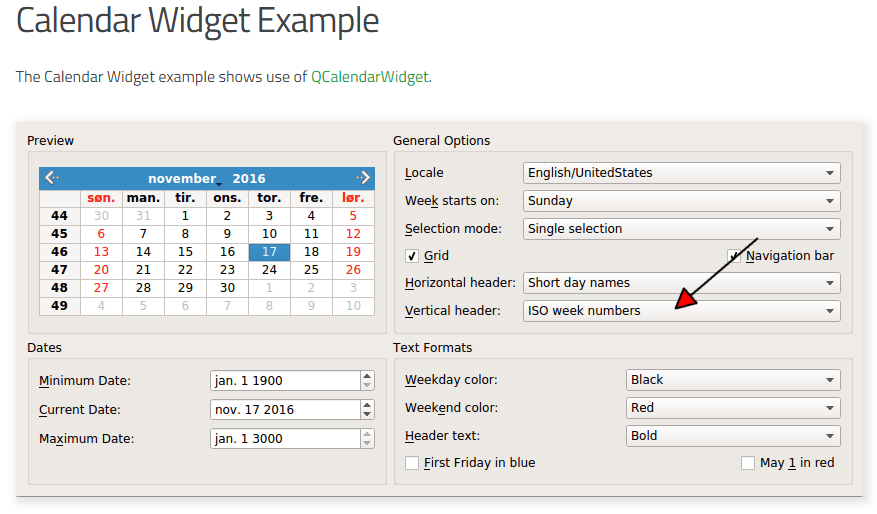
I dont knwo if that will do it but its a good first try :)
@mrjj
Hi
Unfortunately it doesn't help. The example you mentioned shows only the standard options:verticalHeaderCombo->addItem(tr("ISO week numbers"), QCalendarWidget::ISOWeekNumbers); verticalHeaderCombo->addItem(tr("None"), QCalendarWidget::NoVerticalHeader);I need to decrease the ISOWeekNumbers by 1. Do you know what method draws the week number?
-
@mrjj
Hi
Unfortunately it doesn't help. The example you mentioned shows only the standard options:verticalHeaderCombo->addItem(tr("ISO week numbers"), QCalendarWidget::ISOWeekNumbers); verticalHeaderCombo->addItem(tr("None"), QCalendarWidget::NoVerticalHeader);I need to decrease the ISOWeekNumbers by 1. Do you know what method draws the week number?
Hi
Ah. sorry. should have checked the docs. I hoped it would have more options. my bad.As far as I know, there is no draw week number function
as its drawn by the QTableView and data coms from the model.so I think you will have to subclass the model and overwrite data function to
return the wanted value.QVariant QCalendarModel::data(const QModelIndex &index, int role) const { if (role == Qt::TextAlignmentRole) return (int) Qt::AlignCenter; int row = index.row(); int column = index.column(); if(role == Qt::DisplayRole) { if (m_weekNumbersShown && column == HeaderColumn && row >= m_firstRow && row < m_firstRow + RowCount) { QDate date = dateForCell(row, columnForDayOfWeek(Qt::Monday)); if (date.isValid()) return date.weekNumber(); <<<<<<<<<----------------------- }you can live brose the code here
https://code.woboq.org/qt5/qtbase/src/widgets/widgets/qcalendarwidget.cpp.html -
Hi
Ah. sorry. should have checked the docs. I hoped it would have more options. my bad.As far as I know, there is no draw week number function
as its drawn by the QTableView and data coms from the model.so I think you will have to subclass the model and overwrite data function to
return the wanted value.QVariant QCalendarModel::data(const QModelIndex &index, int role) const { if (role == Qt::TextAlignmentRole) return (int) Qt::AlignCenter; int row = index.row(); int column = index.column(); if(role == Qt::DisplayRole) { if (m_weekNumbersShown && column == HeaderColumn && row >= m_firstRow && row < m_firstRow + RowCount) { QDate date = dateForCell(row, columnForDayOfWeek(Qt::Monday)); if (date.isValid()) return date.weekNumber(); <<<<<<<<<----------------------- }you can live brose the code here
https://code.woboq.org/qt5/qtbase/src/widgets/widgets/qcalendarwidget.cpp.html@mrjj
Now manipulating the data shown is the easiest part :P
Seems like QCalendarModel isn't accessible for subclassing since it doesn't have a header file. Even if I could subclass it I'd have to make my CustomCalendarWidget use it instead of QCalendarModel. I guess there's no way to make it, is there?

