
QTableView sort indicator not shows
-
@jronald
Don't know then. https://stackoverflow.com/questions/43535789/how-to-set-sort-indicator-for-qtableview-programatically reports the same as you, but was never answered if the indicators truly do not show for that user. It shows the principle of what you're supposed to write. There seem to be plenty of others for whom indicators are working fine. You're not using any special "skin"/"theme" on your platform (which is what?)? Or some table style or something which might not show the indicators?P.S.
Last thing: try asetSectionsClickable(true), just in case that influences...?@JonB said in QTableView sort indicator not shows:
@jronald
Don't know then. https://stackoverflow.com/questions/43535789/how-to-set-sort-indicator-for-qtableview-programatically reports the same as you, but was never answered if the indicators truly do not show for that user. It shows the principle of what you're supposed to write. There seem to be plenty of others for whom indicators are working fine. You're not using any special "skin"/"theme" on your platform (which is what?)? Or some table style or something which might not show the indicators?No, a demo simply for testing.
P.S.
Last thing: try asetSectionsClickable(true), just in case that influences...?Tried, failed.
-
@JonB said in QTableView sort indicator not shows:
@jronald
Don't know then. https://stackoverflow.com/questions/43535789/how-to-set-sort-indicator-for-qtableview-programatically reports the same as you, but was never answered if the indicators truly do not show for that user. It shows the principle of what you're supposed to write. There seem to be plenty of others for whom indicators are working fine. You're not using any special "skin"/"theme" on your platform (which is what?)? Or some table style or something which might not show the indicators?No, a demo simply for testing.
P.S.
Last thing: try asetSectionsClickable(true), just in case that influences...?Tried, failed.
@jronald
OK. At this point: I can't help because I'm not C++, but:- Can you produce a 20-liner minimal (2 data rows) complete which compiles? So someone can just paste and try.
- Tell us what version of Qt and what platform.
- Request someone kind who fancies compiling. @mrjj is known to be very helpful at trying other people's UI stuff. :) :)
- Compare their result to yours.
- If it truly turns out to be inexplicable, make post on Qt bug forum.
-
@jronald
OK. At this point: I can't help because I'm not C++, but:- Can you produce a 20-liner minimal (2 data rows) complete which compiles? So someone can just paste and try.
- Tell us what version of Qt and what platform.
- Request someone kind who fancies compiling. @mrjj is known to be very helpful at trying other people's UI stuff. :) :)
- Compare their result to yours.
- If it truly turns out to be inexplicable, make post on Qt bug forum.
@JonB said in QTableView sort indicator not shows:
- Can you produce a 20-liner minimal (2 data rows) complete which compiles? So someone can just paste and try.

PS: rename toTestQt.tar.bz2
PS: cheating failed, the project can't be downloaded- Tell us what version of Qt and what platform.
- Qt 5.13.1 AMD64
- OS: Manjaro xfce AMD64
- Request someone kind who fancies compiling. @mrjj is known to be very helpful at trying other people's UI stuff. :) :)
- Compare their result to yours.
I'll try it on Winows later.
-
No need to upload something (it doesn't work) - 10 lines of code are enough:
#include <QtWidgets>
int main(int argc, char **argv)
{
    QApplication app(argc, argv);

    QStringListModel model({"A", "B", "C", "D", "E", "F"});
    QTableView tv;
    tv.setModel(&model);
    tv.setSortingEnabled(true);
    tv.horizontalHeader()->setSortIndicatorShown(true);
    tv.show();
    return app.exec();
}
This is working fine for me.
Qt Online Installer direct download: https://download.qt.io/official_releases/online_installers/
Visit the Qt Academy at https://academy.qt.io/catalog -
No need to upload something (it doesn't work) - 10 lines of code are enough:
#include <QtWidgets>
int main(int argc, char **argv)
{
    QApplication app(argc, argv);

    QStringListModel model({"A", "B", "C", "D", "E", "F"});
    QTableView tv;
    tv.setModel(&model);
    tv.setSortingEnabled(true);
    tv.horizontalHeader()->setSortIndicatorShown(true);
    tv.show();
    return app.exec();
}
This is working fine for me.
@Christian-Ehrlicher
Thank you
It doesn't work for me.


-
What style is this? Did you compile Qt by yourself? Please try with fusion style ("-style fusion")
Qt Online Installer direct download: https://download.qt.io/official_releases/online_installers/
Visit the Qt Academy at https://academy.qt.io/catalog -
Hi
Just as a note.
works on Win 10.
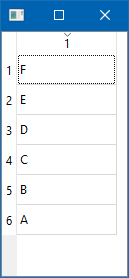
Linux Mint
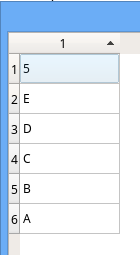
so it seems related to Arch linux.
-
What style is this? Did you compile Qt by yourself? Please try with fusion style ("-style fusion")
@Christian-Ehrlicher said in QTableView sort indicator not shows:
What style is this?
default style of Manjaro xfce
Did you compile Qt by yourself?
No, installed by
pacmanPlease try with fusion style ("-style fusion")
Do you mean compile Qt with
-style fusion? -
@jronald said in QTableView sort indicator not shows:
Compile Qt with -style fusion?
No, start the app with this parameter.
Qt Online Installer direct download: https://download.qt.io/official_releases/online_installers/
Visit the Qt Academy at https://academy.qt.io/catalog -
@jronald said in QTableView sort indicator not shows:
Compile Qt with -style fusion?
No, start the app with this parameter.
@Christian-Ehrlicher said in QTableView sort indicator not shows:
@jronald said in QTableView sort indicator not shows:
Compile Qt with -style fusion?
No, start the app with this parameter.

Nice, any way to built in the style?
BTW, "Qt5 Settings (Qt5 Configuration Tool)" can change the style used by the demo.Thanks


